

編輯:關於 Android 開發
用 RecyclerView 顯示縱向清單並加上預設分割線後,會發現最後一項下方也多了一條線,視覺上很突兀。試了一堆繞路的方法都沒頭緒,最後決定直接去看 DividerItemDecoration 的原始碼。
public class DividerItemDecoration extends ItemDecoration {
    private static final int[] ATTRS = new int[]{16843284};
    public static final int HORIZONTAL_LIST = 0;
    public static final int VERTICAL_LIST = 1;
    private Drawable mDivider;
    private int mOrientation;

    public DividerItemDecoration(Context context, int orientation) {
        TypedArray a = context.obtainStyledAttributes(ATTRS);
        this.mDivider = a.getDrawable(0);
        a.recycle();
        this.setOrientation(orientation);
    }

    public void setOrientation(int orientation) {
        if (orientation != 0 && orientation != 1) {
            throw new IllegalArgumentException("invalid orientation");
        } else {
            this.mOrientation = orientation;
        }
    }

    public void onDraw(Canvas c, RecyclerView parent) {
        if (this.mOrientation == 1) {
            this.drawVertical(c, parent);
        } else {
            this.drawHorizontal(c, parent);
        }
    }

    public void drawVertical(Canvas c, RecyclerView parent) {
        int left = parent.getPaddingLeft();
        int right = parent.getWidth() - parent.getPaddingRight();
        int childCount = parent.getChildCount();

        for (int i = 0; i < childCount; ++i) {
            View child = parent.getChildAt(i);
            LayoutParams params = (LayoutParams) child.getLayoutParams();
            int top = child.getBottom() + params.bottomMargin;
            int bottom = top + this.mDivider.getIntrinsicHeight();
            this.mDivider.setBounds(left, top, right, bottom);
            this.mDivider.draw(c);
        }
    }

    public void drawHorizontal(Canvas c, RecyclerView parent) {
        int top = parent.getPaddingTop();
        int bottom = parent.getHeight() - parent.getPaddingBottom();
        int childCount = parent.getChildCount();

        for (int i = 0; i < childCount; ++i) {
            View child = parent.getChildAt(i);
            LayoutParams params = (LayoutParams) child.getLayoutParams();
            int left = child.getRight() + params.rightMargin;
            int right = left + this.mDivider.getIntrinsicHeight();
            this.mDivider.setBounds(left, top, right, bottom);
            this.mDivider.draw(c);
        }
    }

    public void getItemOffsets(Rect outRect, int itemPosition, RecyclerView parent) {
        if (this.mOrientation == 1) {
            outRect.set(0, 0, 0, this.mDivider.getIntrinsicHeight());
        } else {
            outRect.set(0, 0, this.mDivider.getIntrinsicWidth(), 0);
        }
    }
}
我用的是縱向清單,關鍵就在 drawVertical()。迴圈從 0 跑到 childCount - 1,等於每一項都畫一次,最後一項自然也會被畫上分割線。
public void drawVertical(Canvas c, RecyclerView parent) {
    int left = parent.getPaddingLeft();
    int right = parent.getWidth() - parent.getPaddingRight();
    int childCount = parent.getChildCount();

    // 關鍵就在這裡:childCount - 1
    for (int i = 0; i < childCount - 1; ++i) {
        View child = parent.getChildAt(i);
        LayoutParams params = (LayoutParams) child.getLayoutParams();
        int top = child.getBottom() + params.bottomMargin;
        int bottom = top + this.mDivider.getIntrinsicHeight();
        this.mDivider.setBounds(left, top, right, bottom);
        this.mDivider.draw(c);
    }
}
由於這個類我們無法直接改動,做法是自訂一個類(例如 RecycleViewDividerGridLayout 或自己命名),把 drawVertical() 換成上面這段,然後在 addItemDecoration() 時改用自訂類別即可。
如果不堅持用系統的 Drawable 分割線,還有兩個常見做法:一是完全不加 ItemDecoration,改在 item 版面底部自己放一條高度 1dp 的 View,並在 onBindViewHolder 中對最後一項設為 GONE;二是自訂 ItemDecoration 時在 getItemOffsets() 判斷 position 是否為最後一項,不給出間距。前者控制力最強、也最容易做出「首項無上邊距、末項無下邊距」這種細節。
大功告成。
 Android實用技術(4)——Service的綁定與解綁(Ⅱ)
上一篇我們掌握了Service最基本的知識,這次繼續深入這個元件。先複習一下生命週期:相比Activity,Service的生命週期相當單純——onCreate() →
 Google Play 上架卡關:「版本 1 未提供給任何設備配置使用」怎麼解
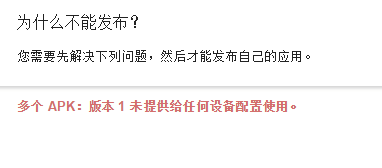
在 Google Play Console 上傳 APK、填好說明文字、截圖與圖示之後,卻發現「發布應用」按鈕始終是灰色無法點擊,而錯誤訊息寫著: 多個 APK:版本
 新版 MySQL 5.7 搭建多線程主從復制實戰
環境準備與安裝 本文以 MySQL 5.7.11 為例,記錄從零搭建多線程主從復制的完整過程。 首先獲取安裝包 mysql-5.7.11-1.el6.x86_64.rpm
 在 Android Studio 中進行單元測試與 UI 測試完整指南
 本篇翻譯自 Google I/O 2015 中關於測試的 codelab(Unit and UI