

編輯:關於 Android 開發
在 Android 中,輸入框右下角的按鈕樣式是可以自訂的,搭配監聽器就能實作搜尋、下一步、送出等互動。本文整理常見的 imeOptions 取值與監聽方式。
關鍵是 android:imeOptions,通常還要搭配 android:singleLine="true" 才能正常生效:
<EditText
    android:layout_width="match_parent"
    android:layout_height="wrap_content"
    android:singleline="true"
    android:imeoptions="actionSearch" />
為 EditText 設定 setOnEditorActionListener(),即可攔截軟鍵盤的動作按鈕:
@Override
public boolean onEditorAction(TextView v, int actionId, KeyEvent event) {
    boolean isOK = true;
    switch (actionId) {
        case EditorInfo.IME_ACTION_NONE:
            Toast.makeText(mContext, "點擊-->NONE", Toast.LENGTH_SHORT).show();
            break;
        case EditorInfo.IME_ACTION_GO:
            Toast.makeText(mContext, "點擊-->GO", Toast.LENGTH_SHORT).show();
            break;
        case EditorInfo.IME_ACTION_SEARCH:
            Toast.makeText(mContext, "點擊-->SEARCH", Toast.LENGTH_SHORT).show();
            break;
        case EditorInfo.IME_ACTION_SEND:
            Toast.makeText(mContext, "點擊-->SEND", Toast.LENGTH_SHORT).show();
            break;
        case EditorInfo.IME_ACTION_NEXT:
            Toast.makeText(mContext, "點擊-->NEXT", Toast.LENGTH_SHORT).show();
            break;
        default:
            isOK = false;
            break;
    }
    return isOK;
}
回傳 true 表示事件已消費完畢,系統不會再執行預設行為(例如再多換一行);回傳 false 則交給系統處理。
若需要取得完整的按鍵事件(含 KeyEvent),可改用:
et.setOnKeyListener(new View.OnKeyListener() {
    @Override
    public boolean onKey(View v, int keyCode, KeyEvent event) {
        // 建議同時判斷 KEYCODE_ENTER 與 KEYCODE_NUMPAD_ENTER
        if (event.getKeyCode() == KeyEvent.KEYCODE_ENTER
                && event.getAction() == KeyEvent.ACTION_DOWN) {
            // 在這裡處理邏輯
            return true;
        }
        return false;
    }
});
有些輸入法在單行模式下並不會觸發上述監聽器,這時可以退而求其次,用 TextWatcher 監聽內容變化,偵測到換行符號時自行攔截:
et.addTextChangedListener(new TextWatcher() {
    @Override
    public void afterTextChanged(Editable s) {
        if (s.toString().contains("\n")) {
            // 移除換行並執行自訂邏輯
        }
    }
    // beforeTextChanged、onTextChanged 可留空
});
<?xml version="1.0" encoding="utf-8"?>
<LinearLayout xmlns:android="https://schemas.android.com/apk/res/android"
    xmlns:tools="https://schemas.android.com/tools"
    android:layout_width="match_parent"
    android:layout_height="match_parent"
    android:orientation="vertical"
    android:paddingBottom="@dimen/activity_vertical_margin"
    android:paddingLeft="@dimen/activity_horizontal_margin"
    android:paddingRight="@dimen/activity_horizontal_margin"
    android:paddingTop="@dimen/activity_vertical_margin"
    tools:context="com.edwin.demokeyboard.MainActivity">

    <TextView
        android:layout_width="match_parent"
        android:layout_height="50dp"
        android:gravity="center"
        android:text="改變軟鍵盤右下角確定鍵樣式"
        android:textSize="20sp" />

    <EditText
        android:id="@+id/et_main_one"
        android:layout_width="match_parent"
        android:layout_height="wrap_content"
        android:hint="actionGo"
        android:imeOptions="actionGo"
        android:singleLine="true" />

    <EditText
        android:id="@+id/et_main_two"
        android:layout_width="match_parent"
        android:layout_height="wrap_content"
        android:hint="actionSearch"
        android:imeOptions="actionSearch"
        android:singleLine="true" />

    <EditText
        android:id="@+id/et_main_three"
        android:layout_width="match_parent"
        android:layout_height="wrap_content"
        android:hint="actionSend"
        android:imeOptions="actionSend"
        android:singleLine="true" />

    <EditText
        android:id="@+id/et_main_four"
        android:layout_width="match_parent"
        android:layout_height="wrap_content"
        android:hint="actionNext"
        android:imeOptions="actionNext"
        android:singleLine="true" />

</LinearLayout>
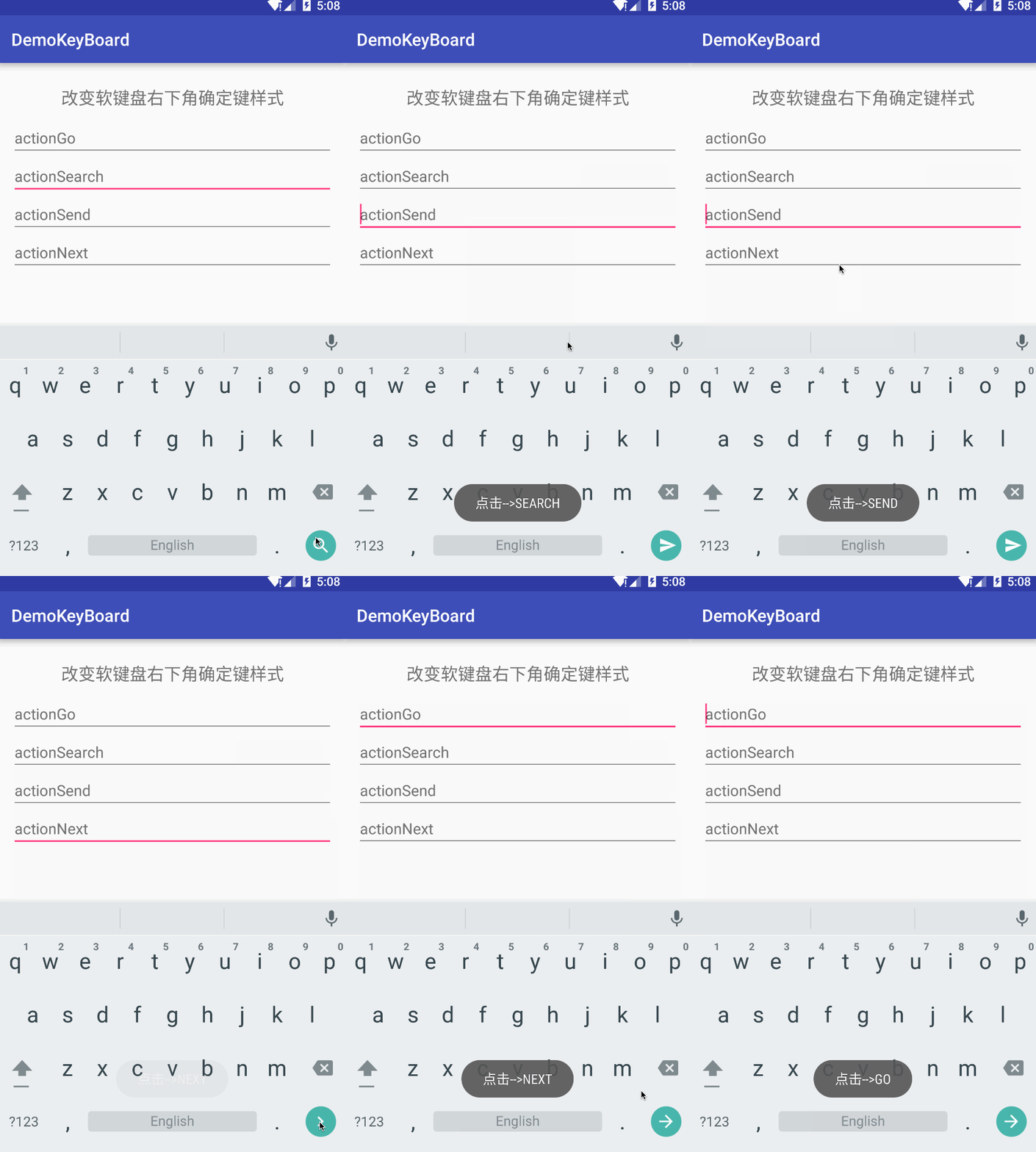
實際效果會因機型與輸入法而異,建議至少同時實作 OnEditorActionListener 與 OnKeyListener,以覆蓋絕大多數情境。
 Android 為空白包簽名:jarsigner 指令完整教學
 前言:先前公司在騰訊開放平台認領應用時,遇到一個問題——需要為空白包簽名,再上傳審核。 騰訊開放平台的官方
 谷歌電子市場(五):推薦頁面與飛入飛出控件 StellarMap
 1. RecommendFragment public class RecommendFragment
 ToggleButton 自定義開關按鈕的完整實現指南
動手打造屬於自己的 ToggleButton 開關效果 在 Android 開發中,ToggleButton 是一種常見的兩態開關控件,特別適合密碼保護、自動更新這類需要
 Android Studio 下 NDK 开发(一):从配置环境到 JNI 调用
 捣鼓了一天的 NDK,总结一下。在 Eclipse 下开发 NDK 似乎挺麻烦,书上的做