

編輯:關於 Android 開發
一個簡單的 Android 撥號功能,通常由產品、UI、架構、開發、測試與營運等角色共同完成。就開發端而言,核心包含介面布局、事件綁定、Intent 啟動撥號動作,以及權限宣告。
Intent intent = new Intent();
intent.setAction(Intent.ACTION_CALL);
intent.setData(Uri.parse("tel:" + number));
startActivity(intent);
若僅想開啟撥號介面而不直接撥打,可改用 ACTION_DIAL,通常不需要直接撥號權限。
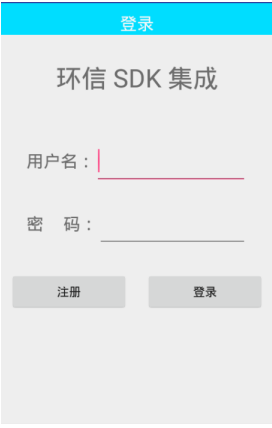 硅谷社交 3:登錄頁面的布局實現與 EaseTitleBar 復用
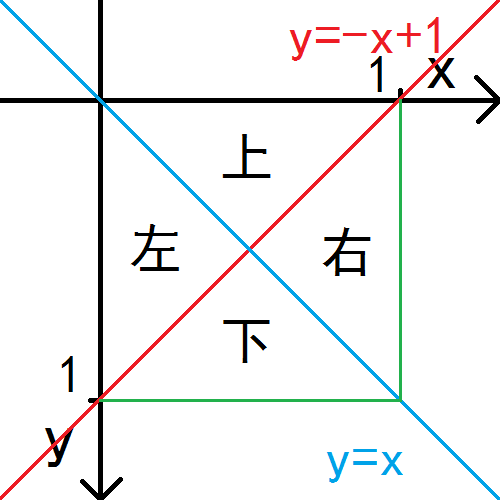 Android 貪吃蛇開發:四方向虛擬按鍵與觸控判定
如何判斷按下哪個方向鍵 在自訂 DirectionKeys 中,四個三角形按鈕其實可以用一個矩形畫布來表示。只要把觸控座標換算成 0 到 1 的相對座標,就能用對角線條件
 ListView 自適應表格實作:讓每個單元格都能自訂尺寸
用 ListView 拼出一張會自適應的表格,是不少 Android 新手會卡住的地方。老實說,如果只講「自適應表格」,GridView 其實更好寫;但 GridView
 Binder 中的 asInterface 到底做了什麼?源碼與實踐解析
 使用 AIDL 進行跨進程通信時,工具會在 Stub 類中生成一個 asInterface 方法