

編輯:關於 Android 開發
使用 AIDL 進行跨進程通信時,工具會在 Stub 類中生成一個 asInterface 方法。以《Android 開發藝術探索》中的例子為例,生成的源碼如下:
/**
 * Cast an IBinder object into an com.willhua.demoaidl.aidl.IBookManager
 * interface, generating a proxy if needed.
 */
public static com.willhua.demoaidl.aidl.IBookManager asInterface(android.os.IBinder obj) {
    if ((obj == null)) {
        return null;
    }
    android.os.IInterface iin = obj.queryLocalInterface(DESCRIPTOR);
    if (((iin != null) && (iin instanceof com.willhua.demoaidl.aidl.IBookManager))) {
        return ((com.willhua.demoaidl.aidl.IBookManager) iin);
    }
    return new com.willhua.demoaidl.aidl.IBookManager.Stub.Proxy(obj);
}
我們都知道,asInterface 的作用是根據調用方是否與服務端處於同一進程,返回不同的實現對象。但具體是怎麼判斷的、返回的究竟是什麼,很多人並不清楚。顯然,決定返回哪種對象的關鍵在於 obj.queryLocalInterface(DESCRIPTOR) 的結果。
下面用一個可運行的 DEMO 把這個過程走一遍,代碼沿用《Android 開發藝術探索》中的例子。
DEMO 主要包含兩部分:MainActivity 與 BookService。MainActivity 會 bindService 綁定 BookService,而 BookService 通過在 Manifest 中配置 android:process,可以分別與 MainActivity 處於同進程或不同進程。
核心代碼:
public class BookService extends Service {
    private Binder mBinder = new IBookManager.Stub() {
        // 具體業務方法省略
    };

    @Override
    public IBinder onBind(Intent intent) {
        LOG("BookService onBind mBinder:" + mBinder.getClass().getName()
                + " Process:" + Process.myPid());
        return mBinder;
    }
}
public class MainActivity extends Activity {
    private IBookManager mService;
    private Button mQuery;
    private TextView mOutInfo;

    @Override
    protected void onCreate(Bundle savedInstanceState) {
        super.onCreate(savedInstanceState);
        setContentView(R.layout.activity_main);
        connectService();
    }

    private void connectService() {
        Intent intent = new Intent(getApplicationContext(), BookService.class);
        bindService(intent, new ServiceConnection() {
            @Override
            public void onServiceDisconnected(ComponentName name) { }

            @Override
            public void onServiceConnected(ComponentName name, IBinder service) {
                LOG("onServiceConnected " + service);
                mService = IBookManager.Stub.asInterface(service);
            }
        }, BIND_AUTO_CREATE);
    }
}
public static abstract class Stub extends android.os.Binder
        implements com.willhua.demoaidl.aidl.IBookManager {
    private static final java.lang.String DESCRIPTOR = "com.willhua.demoaidl.aidl.IBookManager";

    /** 構造時把自身關聯到該接口 */
    public Stub() {
        this.attachInterface(this, DESCRIPTOR);
    }

    /**
     * Cast an IBinder object into an com.willhua.demoaidl.aidl.IBookManager
     * interface, generating a proxy if needed.
     */
    public static com.willhua.demoaidl.aidl.IBookManager asInterface(android.os.IBinder obj) {
        if ((obj == null)) {
            return null;
        }
        android.os.IInterface iin = obj.queryLocalInterface(DESCRIPTOR);
        if (((iin != null) && (iin instanceof com.willhua.demoaidl.aidl.IBookManager))) {
            return ((com.willhua.demoaidl.aidl.IBookManager) iin);
        }
        return new com.willhua.demoaidl.aidl.IBookManager.Stub.Proxy(obj);
    }
}
android.os.Binder 的相關源碼:
public class Binder implements IBinder {
    /**
     * 把特定接口與當前 Binder 關聯起來,之後 queryLocalInterface()
     * 在 descriptor 匹配時會返回指定的 owner IInterface。
     */
    public void attachInterface(IInterface owner, String descriptor) {
        mOwner = owner;
        mDescriptor = descriptor;
    }

    /**
     * 利用 attachInterface() 中提供的信息,在 descriptor 匹配時返回關聯的 IInterface
     */
    public IInterface queryLocalInterface(String descriptor) {
        if (mDescriptor.equals(descriptor)) {
            return mOwner;
        }
        return null;
    }

    final class BinderProxy implements IBinder {
        public IInterface queryLocalInterface(String descriptor) {
            return null;
        }
    }
}
通過日誌可以看到,在 onServiceConnected 中:當 MainActivity 與 BookService 同進程時,打印結果如下:

當兩者處於不同進程時:

先看同進程的情形
同進程時,onServiceConnected 收到的 service 對象類型是 BookService$1,$ 表示內部類。而 BookService 中只在 mBinder 的初始化處定義了一個 IBookManager.Stub() 的匿名子類,可見此時拿到的正是 Stub 的實例。
IBookManager.Stub 繼承 android.os.Binder 並實現 IBookManager,其 queryLocalInterface 方法來自父類 Binder。傳入的 descriptor 就是 Stub 中定義的 DESCRIPTOR 常量;而 Binder 中的 mDescriptor 是在 attachInterface 裡賦值的,attachInterface 又在 Stub 的構造函數中被調用:
this.attachInterface(this, DESCRIPTOR);
onServiceConnected 中的調用為:
mService = IBookManager.Stub.asInterface(service);
注意此時 service 本身就是 IBookManager.Stub 的實例,因此:
if (mDescriptor.equals(descriptor))
這個判斷必然成立——mDescriptor 與 descriptor 都是 Stub 中定義的同一個 DESCRIPTOR,於是 queryLocalInterface 返回 mOwner。而 mOwner 是什麼?在構造函數調用 attachInterface 時已經被賦值為 this,也就是這個 Stub 對象本身。
回頭對照 asInterface 的邏輯,結論就清楚了:同進程時,asInterface 返回的就是 Stub 對象,也正是 onBind 中返回的那個 mBinder。
再看跨進程的情形
由日誌可知,跨進程時 onServiceConnected 收到的 service 類型是 android.os.BinderProxy。前面源碼已經給出,BinderProxy 的 queryLocalInterface 直接返回 null,因此 asInterface 中的 if 判斷不成立,最終返回 IBookManager.Stub.Proxy 對象。
於是又引出一個更有意思的問題:為什麼跨進程時收到的是 BinderProxy,而同進程時收到的卻是 IBookManager.Stub?這牽涉到 Binder 驅動在跨進程傳遞 IBinder 時的代理化機制,且聽下回分解。
 Navigation Drawer 實作全解:從 DrawerLayout 到 ActionBarDrawerToggle
抽屜式導航欄(Navigation Drawer)是顯示在螢幕左緣的主導航面板。大部分時間隱藏,當使用者從左緣往右滑動時才會出現;在應用程式頂層,點擊 ActionBar
 RecyclerView 多類型 Item 實戰:一個 Adapter 搞定混合列表
用 ListView 時代,實現「圖片項與文字項交替出現」這種混合列表,往往要靠多套 Adapter 加 MergeAdapter 之類的第三方方案拼湊。換成 Recy
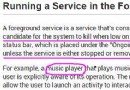 Android實用技術(5)——Service進階技巧:前台服務與IntentService
前面我們已經把Service的基礎用法摸清楚了,這一篇來看兩個實務上很常踩到的問題,以及對應的標準解法。 一、前台服務(Foreground Service) 問題:Se
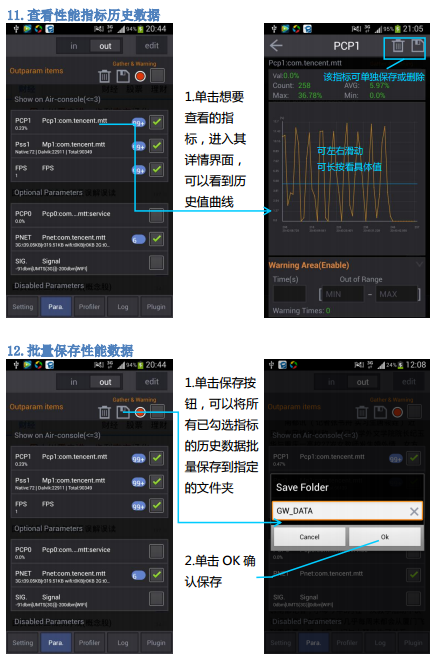 騰訊 GT 隨身調:Android 效能測試工具介紹
騰訊 GT 隨身調:手機端 App 效能測試工具 在進行 App 測試時,除了功能驗證,也需要關注 CPU、記憶體、流量、電量與流暢度等效能指標。騰訊開源的 GT(隨身調