

編輯:關於 Android 開發
Android 可透過 Intent 的 ACTION_VIEW 搭配 setDataAndType 開啟不同檔案。關鍵在於取得檔案 URI,並提供正確的 MIME 類型,讓系統找到能處理該檔案的應用程式。

建立 Intent,設定 ACTION_VIEW,取得檔案的 MIME 類型,再呼叫 setDataAndType。若裝置沒有可處理的應用程式,startActivity 可能會拋出 ActivityNotFoundException,因此建議加上例外處理。
private void openFile(File file) {
    Intent intent = new Intent();
    intent.addFlags(Intent.FLAG_ACTIVITY_NEW_TASK);
    intent.setAction(Intent.ACTION_VIEW);
    String type = getMIMEType(file);
    intent.setDataAndType(Uri.fromFile(file), type);
    startActivity(intent);
}
可根據副檔名查詢對應的 MIME 類型。常見包含 image、video、audio、application、text 等。若無法判斷,可退回使用通用類型,讓系統嘗試開啟。
常見對應:jpg 為 image/jpeg,png 為 image/png,mp4 為 video/mp4,mp3 為 audio/mpeg,pdf 為 application/pdf,doc 為 application/msword,xls 為 application/vnd.ms-excel,ppt 為 application/vnd.ms-powerpoint,txt 為 text/plain,zip 為 application/zip。
除了開啟檔案,也可使用 Intent 開啟網頁、地圖、電話、簡訊、電子郵件、Market 搜尋或分享文字。不同 Action 與 URI 組合可對應不同系統功能。
使用 setDataAndType 時,URI 與 MIME 類型必須一致。若 URI 是 content URI,需確認內容提供者可讀;若是檔案 URI,需注意 Android 版本對 FileUriExposedException 的限制,必要時改用 FileProvider。
 仿 360 手機衛士的簡易實作:設計思路與原始碼拆解
 這段時間一直在廣州四處跑,實習工作著實不好找,部落格也荒廢了一段。做這個仿 360 手機衛士的專案,主要目的是把常用
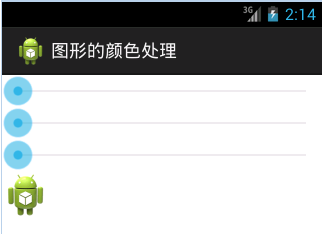 Android 圖片顏色處理:用 ColorMatrix 做即時調色
本文仿照美圖秀秀那類修圖 App 的交互方式,用三個 SeekBar 分別控制圖片的紅、綠、藍通道,拖動時即時改變圖片色調。 版面配置 三條滑桿加上一個 ImageVie
 手把手教你打造質感滿分的圓形水波紋 LoadingView(Android)
 大家好,這裡是番外篇。拜讀了前輩的部落格,又學到不少新東西。前輩曾說過:要站在巨人的肩膀上。
 探索 Android View 的事件分發機制
Android View 事件分發機制探索 概述 事件傳遞機制是 Android 系統中相當重要的一塊。事件類型繁多,本文聚焦於 TouchEvent 在 framewo