

編輯:關於 Android 開發
行動端上傳圖片、附件到伺服器是很常見的需求。本文記錄一組完整可運行的實作:Android 端以 multipart/form-data 提交表單(支援同時攜帶多個檔案與一般欄位),服務端則採用 .NET 的 WebApi 介面接收。
以下 HttpClientUtil 負責封裝整個表單提交流程:把一般欄位與檔案欄位分別塞進 MultipartEntityBuilder,送出後取回响应字串。
package com.example.my.androidupload;

import android.util.Log;

import java.io.File;
import java.io.Serializable;
import java.util.Iterator;
import java.util.LinkedHashMap;
import java.util.Map;
import java.util.Map.Entry;

import org.apache.http.Consts;
import org.apache.http.HttpEntity;
import org.apache.http.HttpResponse;
import org.apache.http.client.HttpClient;
import org.apache.http.client.methods.HttpPost;
import org.apache.http.entity.ContentType;
import org.apache.http.entity.mime.MultipartEntityBuilder;
import org.apache.http.entity.mime.content.FileBody;
import org.apache.http.entity.mime.content.StringBody;
import org.apache.http.impl.client.DefaultHttpClient;
import org.apache.http.util.EntityUtils;

/**
 * Created by wz on 2016/04/19.
 */
public class HttpClientUtil {
    public final static String Method_POST = "POST";
    public final static String Method_GET = "GET";

    /**
     * multipart/form-data 類型的表單提交
     *
     * @param form 表單數據
     */
    public static String submitForm(MultipartForm form) {
        String responseStr = "";

        HttpClient httpClient = new DefaultHttpClient();
        try {
            HttpPost httpPost = new HttpPost(form.getAction());

            MultipartEntityBuilder entityBuilder = MultipartEntityBuilder.create();

            Log.e("HttpClientUtil", "111");
            // 追加普通表單字段
            Map<String, String> normalFieldMap = form.getNormalField();
            for (Iterator<Entry<String, String>> iterator = normalFieldMap.entrySet().iterator(); iterator.hasNext(); ) {
                Entry<String, String> entity = iterator.next();
                entityBuilder.addPart(entity.getKey(), new StringBody(entity.getValue(), ContentType.create("text/plain", Consts.UTF_8)));
            }
            Log.e("HttpClientUtil", "222");
            // 追加文件字段
            Map<String, File> fileFieldMap = form.getFileField();
            for (Iterator<Entry<String, File>> iterator = fileFieldMap.entrySet().iterator(); iterator.hasNext(); ) {
                Entry<String, File> entity = iterator.next();
                entityBuilder.addPart(entity.getKey(), new FileBody(entity.getValue()));
            }
            Log.e("HttpClientUtil", "333");

            httpPost.setEntity(entityBuilder.build());
            Log.e("HttpClientUtil", "444");

            HttpResponse response = httpClient.execute(httpPost);
            int statusCode = response.getStatusLine().getStatusCode();
            HttpEntity resEntity = response.getEntity();
            Log.e("HttpClientUtil", "結果:" + Integer.toString(statusCode));
            if (200 == statusCode) {
                if (resEntity != null) {
                    responseStr = EntityUtils.toString(resEntity);
                }
            }
        } catch (Exception e) {
            System.out.println("提交表單失敗,原因:" + e.getMessage());
        } finally {
            try {
                httpClient.getConnectionManager().shutdown();
            } catch (Exception ex) {
            }
        }
        return responseStr;
    }

    /**
     * 表單字段 Bean
     */
    public class MultipartForm implements Serializable {
        private static final long serialVersionUID = -2138044819190537198L;

        /** 提交 URL **/
        private String action = "";

        /** 提交方式:POST/GET **/
        private String method = "POST";

        /** 普通表單字段 **/
        private Map<String, String> normalField = new LinkedHashMap<String, String>();

        /** 文件字段 **/
        private Map<String, File> fileField = new LinkedHashMap<String, File>();

        public String getAction() {
            return action;
        }

        public void setAction(String action) {
            this.action = action;
        }

        public String getMethod() {
            return method;
        }

        public void setMethod(String method) {
            this.method = method;
        }

        public Map<String, String> getNormalField() {
            return normalField;
        }

        public void setNormalField(Map<String, String> normalField) {
            this.normalField = normalField;
        }

        public Map<String, File> getFileField() {
            return fileField;
        }

        public void setFileField(Map<String, File> fileField) {
            this.fileField = fileField;
        }

        public void addFileField(String key, File value) {
            fileField.put(key, value);
        }

        public void addNormalField(String key, String value) {
            normalField.put(key, value);
        }
    }
}
網路請求必須放在子執行緒中,因此這裡用 Thread 包一層:
public class MainActivity extends AppCompatActivity implements View.OnClickListener {
    private Button mBtnUpload;

    @Override
    public void onClick(View v) {
        switch (v.getId()) {
            case R.id.btn_upload: {
                new Thread(new Runnable() {
                    @Override
                    public void run() {
                        HttpClientUtil httpClient = new HttpClientUtil();
                        HttpClientUtil.MultipartForm form = httpClient.new MultipartForm();
                        // 設置 form 屬性、參數
                        form.setAction("https://192.168.1.5:9001/api/Mobile/FileUpload/UploadFile");
                        String path = Environment.getExternalStorageDirectory().getPath() + "/DCIM" + "/20151120_051052.jpg";
                        Log.e("11", path);
                        File file = new File(path);
                        form.addFileField("file", file);
                        form.addNormalField("ID", "301201604");
                        String resultcode = httpClient.submitForm(form);
                        Log.e("上傳結果:", resultcode);
                    }
                }).start();
                break;
            }
        }
    }

    @Override
    protected void onCreate(Bundle savedInstanceState) {
        super.onCreate(savedInstanceState);
        setContentView(R.layout.activity_main);
        mBtnUpload = (Button) findViewById(R.id.btn_upload);
        mBtnUpload.setOnClickListener(this);
    }
}
實務上還需要記得在 AndroidManifest.xml 中加上 INTERNET 權限,Android 6.0 以上若要讀取外部儲存空間的圖片,也必須動態申請 READ_EXTERNAL_STORAGE。
服務端提供兩個版本。第一個版本只接收檔案、不寫入資料庫;第二個版本會把檔案資訊一併存進資料庫。
/// <summary>
/// 附件上傳
/// </summary>
[RoutePrefix("api/Mobile/FileUpload")]
public class FileUploadController : ApiController
{
    static readonly string UploadFolder = "/UpLoad/ApiUpload";
    static readonly string ServerUploadFolder = HttpContext.Current.Server.MapPath(UploadFolder);

    #region 上傳文件-文件信息不保存到數據庫
    /// <summary>
    /// 上傳文件-文件信息不保存到數據庫
    /// </summary>
    /// <returns>返回文件信息</returns>
    [HttpPost]
    [Route("UploadFile")]
    public async Task<List<FileResultDTO>> UploadFile()
    {
        Log.Info("UploadFile", "進入");

        // 驗證這是一個 HTML 表單文件上傳請求
        if (!Request.Content.IsMimeMultipartContent("form-data"))
        {
            Log.Info("UploadFile", "error01");
            throw new HttpResponseException(Request.CreateResponse(HttpStatusCode.UnsupportedMediaType));
        }

        MultipartFormDataStreamProvider streamProvider = new RenamingMultipartFormDataStreamProvider(ServerUploadFolder);
        await Request.Content.ReadAsMultipartAsync(streamProvider);
        Log.Info("UploadFile", "進入01");

        List<FileResultDTO> itemList = new List<FileResultDTO>();
        foreach (MultipartFileData file in streamProvider.FileData)
        {
            Log.Info("UploadFile", "進入02");

            FileInfo fileInfo = new FileInfo(file.LocalFileName);

            FileResultDTO item = new FileResultDTO();
            var sLocalFileName = file.LocalFileName;
            string fileName = sLocalFileName.Substring(sLocalFileName.LastIndexOf("\\") + 1, sLocalFileName.Length - sLocalFileName.LastIndexOf("\\") - 1);

            item.ID = Guid.NewGuid();
            item.FileName = file.Headers.ContentDisposition.FileName;
            item.ServerFileName = fileInfo.Name;
            item.FileSize = fileInfo.Length;
            item.FilePath = UploadFolder;
            item.FullFilePath = ServerUploadFolder;
            item.ContentType = file.Headers.ContentType.MediaType.ToString();
            item.UploadTime = DateTime.Now;

            itemList.Add(item);
        }
        Log.Info("UploadFile", "進入03");
        return itemList;
    }
    #endregion

    #region 上傳文件-文件信息會保存到數據庫
    /// <summary>
    /// 上傳文件-文件信息會保存到數據庫
    /// </summary>
    /// <returns></returns>
    [HttpPost]
    [Route("UploadFileToServer")]
    public IHttpActionResult UploadFileToServer()
    {
        // 驗證是否是 multipart/form-data
        if (!Request.Content.IsMimeMultipartContent("form-data"))
        {
            throw new HttpResponseException(Request.CreateResponse(HttpStatusCode.UnsupportedMediaType));
        }

        List<AttachmentDTO> list = new List<AttachmentDTO>();
        string devId = "";
        for (int i = 0; i < HttpContext.Current.Request.Files.Count; i++)
        {
            HttpPostedFile file = HttpContext.Current.Request.Files[i];

            string sFileName = "ST_M_" + Guid.NewGuid() + System.IO.Path.GetExtension(file.FileName);
            string path = AppDomain.CurrentDomain.BaseDirectory + ServerUploadFolder + "/";

            file.SaveAs(Path.Combine(path, sFileName));

            AttachmentDTO entity = new AttachmentDTO();
            devId = HttpContext.Current.Request["DevId"].ToString();
            string ForeignID = HttpContext.Current.Request["ForeignID"].ToString();

            entity.ForeignID = ForeignID;
            entity.FileName = sFileName;
            entity.FilePath = ServerUploadFolder;
            entity.UploadTime = DateTime.Now;
            entity.ContentType = file.ContentType;
            entity.FileSize = file.ContentLength;
            entity.CreatedTime = DateTime.Now;

            list.Add(entity);
        }

        MobileBL.GetInstance().InsertAttachment(devId, list);
        return Ok(true);
    }
    #endregion
}

public class RenamingMultipartFormDataStreamProvider : MultipartFormDataStreamProvider
{
    public string Root { get; set; }

    public RenamingMultipartFormDataStreamProvider(string root)
        : base(root)
    {
        Root = root;
    }

    public override string GetLocalFileName(HttpContentHeaders headers)
    {
        string filePath = headers.ContentDisposition.FileName;

        // Multipart requests with the file name seem to always include quotes.
        if (filePath.StartsWith(@"\""") && filePath.EndsWith(@""""))
            filePath = filePath.Substring(1, filePath.Length - 2);

        var filename = Path.GetFileName(filePath);
        var extension = Path.GetExtension(filePath);
        var contentType = headers.ContentType.MediaType;

        return "ST_M_" + Guid.NewGuid() + extension;
    }
}
第一,檔名一定要重新產生。範例中繼承 MultipartFormDataStreamProvider 並覆寫 GetLocalFileName,用 GUID 加原始副檔名作為存檔名稱,可以避免中文檔名、特殊字元與同名覆蓋等一連串問題。
第二,務必先驗證 Request.Content.IsMimeMultipartContent("form-data"),否則面對非表單請求時容易拋出難以理解的例外。
第三,Android 端別忘了把網路操作移出主執行緒,並在 finally 中確實關閉連線,否則會累積出連線洩漏。
參考資料:https://www.cnblogs.com/fly100/articles/3492525.html
 交叉編譯可在 Android 上運行的 qemu user mode 完整踩坑記錄
 前言 本文記錄在 Ubuntu 64 位元系統上對 qemu 專案進行交叉編譯,且只編
 UI 元件之 ImageView(一):顯示圖片與 ScaleType 完整解析
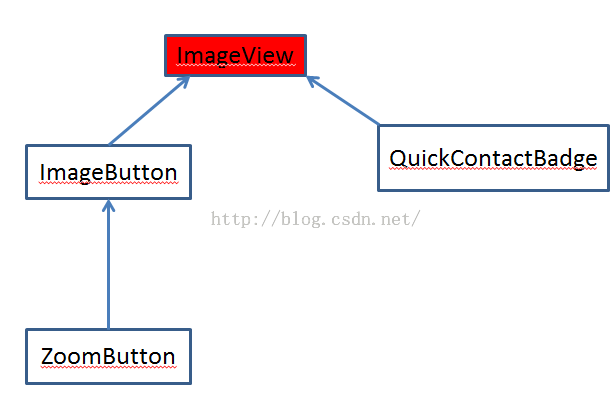
ImageView 是 Android 中最基礎的圖片顯示元件。理解它的繼承關係與縮放模型,能省下大量「圖片怎麼就是怪怪的」的摸索時間。 一、家族繼承關係 Image
 ListView 效能優化的三次進化:從 ViewHolder 到 ViewHolderHelper
 ListView 在滾動時之所以容易卡頓,根源往往不在資料量,而在「
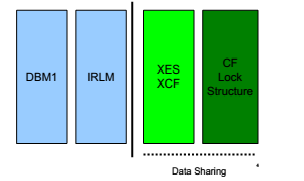 DB2 效能調優路線圖:深入 LOCK 鎖機制
在整理了 DB2 LOG 相關主題之後,本文接著深入探討 LOCK(鎖)的運作。相較於 LOG,鎖的內容與應用場景關係更為密切,涉及的面向也更為複雜。這篇文章試著從基本概