

編輯:關於 Android 開發
本文以通俗方式解析 Android 與藍牙 BLE(低功耗藍牙)之間的通信原理,並附上完整程式碼。(注意:藍牙 4.0 需 Android 4.3 及以上版本才支援。)
BLE(Bluetooth Low Energy)是藍牙 4.0 核心 profile,主要特點是快速搜索、快速連接、超低功耗保持連接與數據傳輸,缺點是傳輸速率較低,因此常用於可穿戴設備。
BLE 數據傳輸涉及幾個關鍵概念:
通俗來講,app 搜索到 BLE 設備後,會收到設備反饋的信息(如電量),這些信息存在於約定好的 characteristic 對象中;反之,app 也能透過寫入信息到 characteristic 發送給設備,讓設備執行相應動作。這和平常的對象賦值類似,只是方法從 set 變成了 write。
打個比方:characteristic 好比球隊的球員,service 好比球隊名稱,profile 則像國家。要找到某個球員並了解他的信息,需先知道國家、再知道球隊、最後才能找到球員。
<uses-feature android:name="android.hardware.bluetooth_le" android:required="true"/>
<uses-permission android:name="android.permission.BLUETOOTH"/>
<uses-permission android:name="android.permission.BLUETOOTH_ADMIN"/>
建議寫在啟動 Activity 中,避免用戶需手動開啟藍牙影響體驗:
private void initBluetooth() {
    BluetoothManager mBluetoothManager = (BluetoothManager) this.getSystemService(Context.BLUETOOTH_SERVICE);
    if (mBluetoothManager != null) {
        BluetoothAdapter mBluetoothAdapter = mBluetoothManager.getAdapter();
        if (mBluetoothAdapter != null) {
            if (!mBluetoothAdapter.isEnabled()) {
                mBluetoothAdapter.enable(); // 打開藍牙
            }
        }
    }
}
把 BLE 通信相關程式碼集中到一個工具類 BleManager 中,便於維護與調用。透過 BluetoothAdapter.startLeScan() 搜索設備,並以回調 LeScanCallback 處理搜索結果:
private BluetoothAdapter mBluetoothAdapter;
private BluetoothDevice mBluetoothDevice;
private BluetoothGatt mBluetoothGatt;
private boolean isScanning = false;

private BleManager(Context context) {
    this.mContext = context;
    BluetoothManager bluetoothManager = (BluetoothManager) context.getSystemService(Context.BLUETOOTH_SERVICE);
    if (bluetoothManager == null) {
        return;
    }
    mBluetoothAdapter = bluetoothManager.getAdapter();
}

public void startLeScan() {
    if (mBluetoothAdapter == null) return;
    if (isScanning) return;
    isScanning = true;
    mBluetoothAdapter.startLeScan(mLeScanCallback); // 回調函數
    mHandler.sendEmptyMessageDelayed(STOP_LESCAN, 10000); // 10 秒後停止搜索
}

private LeScanCallback mLeScanCallback = new LeScanCallback() {
    @Override
    public void onLeScan(BluetoothDevice device, int arg1, byte[] arg2) {
        if (device.getName() == null) return;
        if (device.getName().contains("Ble_Name")) { // 判斷是否為目標設備
            mBluetoothDevice = device; // 獲取周邊設備
            stopLeScan(); // 找到後立即停止掃描,避免耗電
            connect();    // 連接
        }
    }
};
搜索到設備後透過 connectGatt() 建立 GATT 連接(Android 作為 client 端),並以 BluetoothGattCallback 處理連接狀態與服務發現:
public boolean connect() {
    if (mBluetoothDevice == null) return false;
    // Android 作為 client 端,連接 GATT Server
    mBluetoothGatt = mBluetoothDevice.connectGatt(mContext, false, mGattCallback);
    return mBluetoothGatt != null && mBluetoothGatt.connect();
}

private final BluetoothGattCallback mGattCallback = new BluetoothGattCallback() {
    @Override
    public void onConnectionStateChange(BluetoothGatt gatt, int status, int newState) {
        if (newState == BluetoothProfile.STATE_CONNECTED) {
            gatt.discoverServices(); // 連接成功後發現服務
        } else if (newState == BluetoothProfile.STATE_DISCONNECTED) {
            // 處理斷開連接
        }
    }

    @Override
    public void onServicesDiscovered(BluetoothGatt gatt, int status) {
        if (status == BluetoothGatt.GATT_SUCCESS) {
            getBatteryLevel(); // 獲取電量
        }
    }
    // onCharacteristicRead / onCharacteristicChanged / onCharacteristicWrite 等回調省略
};
// 獲取服務
public BluetoothGattService getService(UUID uuid) {
    if (mBluetoothAdapter == null || mBluetoothGatt == null) return null;
    return mBluetoothGatt.getService(uuid);
}

// 獲取特征
private BluetoothGattCharacteristic getCharcteristic(String serviceUUID, String characteristicUUID) {
    BluetoothGattService service = getService(UUID.fromString(serviceUUID));
    if (service == null) return null;
    return service.getCharacteristic(UUID.fromString(characteristicUUID));
}

// 讀取數據
public void readCharacteristic(BluetoothGattCharacteristic characteristic) {
    if (mBluetoothAdapter == null || mBluetoothGatt == null) return;
    mBluetoothGatt.readCharacteristic(characteristic);
}

// 設置通知
public boolean setCharacteristicNotification(BluetoothGattCharacteristic characteristic, boolean enabled) {
    if (mBluetoothAdapter == null || mBluetoothGatt == null) return false;
    return mBluetoothGatt.setCharacteristicNotification(characteristic, enabled);
}
取得可寫入的 characteristic 後,透過 setValue() 賦值,再呼叫 writeCharacteristic() 發送:
public void write(byte[] data) {
    BluetoothGattCharacteristic writeCharacteristic =
            getCharcteristic(Values.UUID_KEY_SERVICE, Values.UUID_KEY_WRITE);
    if (writeCharacteristic == null) return;
    writeCharacteristic.setValue(data); // 為 characteristic 賦值
    writeCharacteristicWrite(writeCharacteristic);
}

public void writeCharacteristicWrite(BluetoothGattCharacteristic characteristic) {
    if (mBluetoothAdapter == null || mBluetoothGatt == null) return;
    boolean isBoolean = mBluetoothGatt.writeCharacteristic(characteristic);
    // isBoolean 返回 true 表示寫入成功
}
在需要搜索藍牙的 Activity 中直接呼叫 startLeScan() 即可,找到目標設備後會自動連接,並透過回調通知結果。搜索成功後,可在按鈕事件中呼叫 write(byte[]) 發送數據,寫入是否成功取決於 writeCharacteristicWrite() 的返回值。
以上便是 Android 與藍牙 BLE 通信的完整流程,從搜索、連接、服務發現到讀寫數據,構成了一套完整的低功耗藍牙交互機制。
 騰訊 Bugly 乾貨:RxJava 結合 MVP 的實戰分層與線程調度
本文整理自騰訊 Bugly 開發者社群的技術分享,主講者為騰訊 IEG Android 開發工程師戴俊,主題是《基於 RxJava 的一種 MVP 實現》。 RxJava
 SwipeRefreshLayout 下拉刷新實作與 AsyncTask 優化
 SwipeRefreshLayout 是 Android 官方提供的下拉刷新控制項,常以它
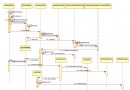 Android 6.0 Camera2 拍照流程分析:從 CaptureSession 到圖片儲存
拍照流程總覽 在 Camera2 中,按下快門後會先建立 CaptureSession,接著以 TEMPLATE_STILL_CAPTURE 建立 JPEG 拍攝請求,並
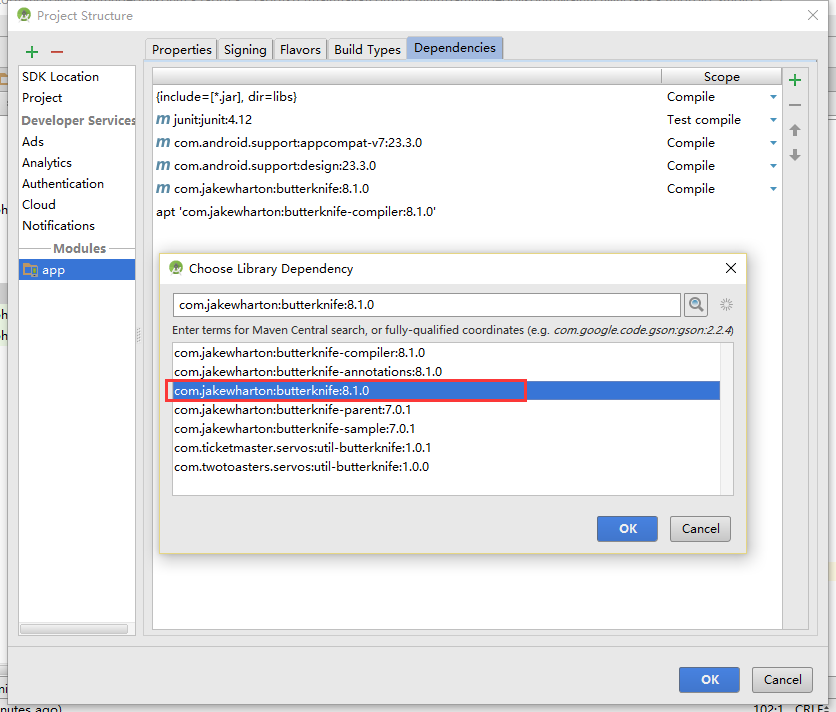 ButterKnife 8.1.0 的配置與使用,解決空指針問題
ButterKnife 是這兩年比較流行的開源庫,是一個 View 注入框架,主要功能是代替 findVi