

編輯:關於 Android 開發
PullToRefresh 是 Chrisbanes 開發的知名開源下拉刷新元件,支援下拉、上拉與雙向刷新,使用簡單、擴展性佳。本文示範如何整合並使用它。
效果預覽圖:
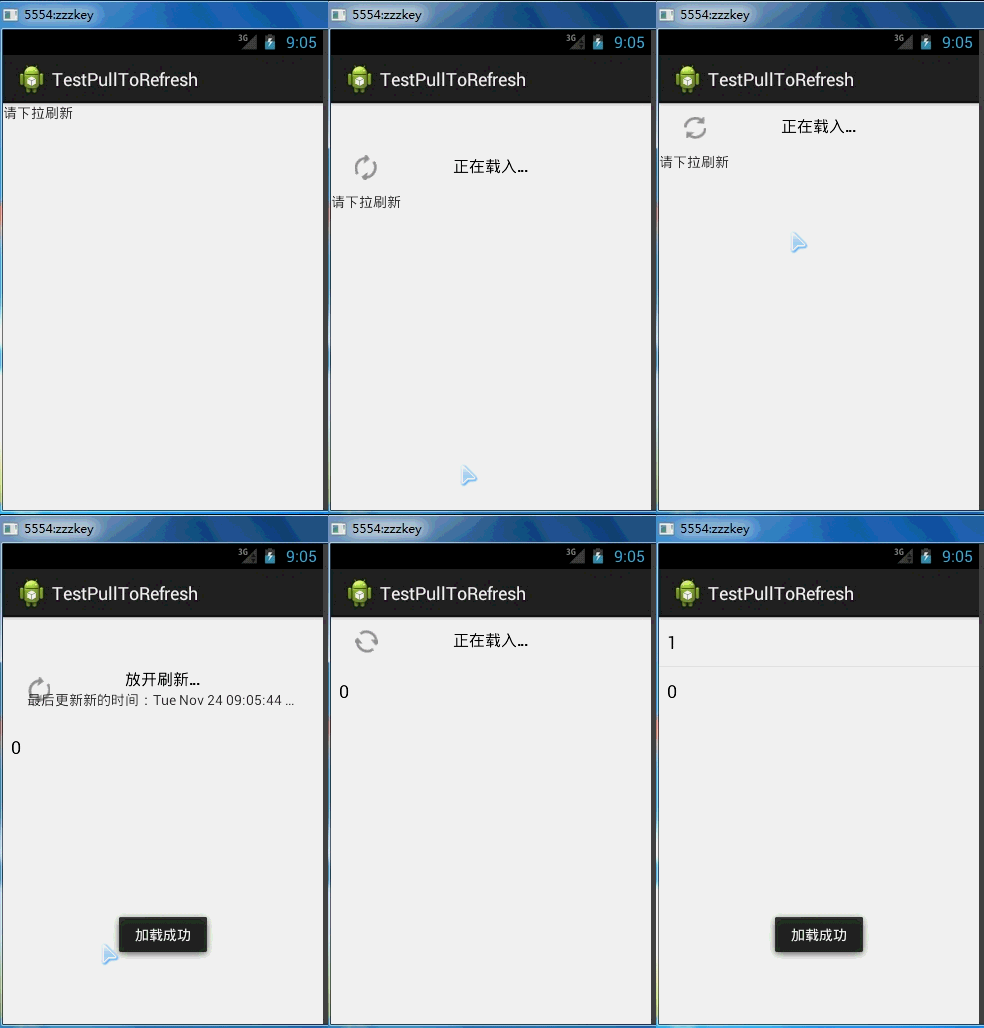
專案下載地址:https://github.com/chrisbanes/Android-PullToRefresh
將原本的 ListView 替換為 PullToRefreshListView 即可。
1 <RelativeLayout xmlns:android="https://schemas.android.com/apk/res/android" 2 xmlns:tools="https://schemas.android.com/tools" 3 android:layout_width="match_parent" 4 android:layout_height="match_parent" 5 tools:context="com.zzw.testpulltorefresh.MainActivity" > 6 7 <com.handmark.pulltorefresh.library.PullToRefreshListView 8 android:id="@+id/listView" 9 android:layout_width="match_parent" 10 android:layout_height="match_parent" 11 /> 12 </RelativeLayout>
透過 setMode() 設定刷新模式(可選擇單向下拉 Mode.PULL_FROM_START 或雙向 Mode.BOTH),並以 OnRefreshListener 監聽手勢。刷新時以 AsyncTask 模擬耗時操作,完成後更新資料並呼叫 onRefreshComplete()。
1 package com.zzw.testpulltorefresh; 2 3 import java.util.ArrayList; 4 import java.util.Date; 5 6 import com.handmark.pulltorefresh.library.PullToRefreshBase; 7 import com.handmark.pulltorefresh.library.PullToRefreshBase.Mode; 8 import com.handmark.pulltorefresh.library.PullToRefreshBase.OnRefreshListener; 9 import com.handmark.pulltorefresh.library.PullToRefreshListView; 10 11 import android.app.Activity; 12 import android.os.AsyncTask; 13 import android.os.Bundle; 14 import android.os.SystemClock; 15 import android.widget.Adapter; 16 import android.widget.ArrayAdapter; 17 import android.widget.ListView; 18 import android.widget.TextView; 19 import android.widget.Toast; 20 21 public class MainActivity extends Activity { 22 23 private PullToRefreshListView listView; 24 private ArrayList<String> data; 25 private ArrayAdapter adapter; 26 private int count = 0; 27 28 @Override 29 protected void onCreate(Bundle savedInstanceState) { 30 super.onCreate(savedInstanceState); 31 setContentView(R.layout.activity_main); 32 33 data = new ArrayList<String>(); 34 35 listView = (PullToRefreshListView) findViewById(R.id.listView); 36 // 設置向下滑動時刷新 37 listView.setMode(Mode.PULL_FROM_START); 38 // 支持下拉和上拉 listView.setMode(Mode.BOTH); 39 // 設置監聽 40 listView.setOnRefreshListener(new OnRefreshListener<ListView>() { 41 @Override 42 public void onRefresh(PullToRefreshBase<ListView> refreshView) { 43 // 在這完成業務邏輯 44 new MyAsyncTask().execute(); 45 } 46 }); 47 48 adapter = new ArrayAdapter(this, android.R.layout.simple_list_item_1, data); 49 listView.setAdapter(adapter); 50 51 // 設置如果數據為空的時候顯示什麼 52 TextView textView = new TextView(this); 53 textView.setText("請下拉刷新"); 54 listView.setEmptyView(textView); 55 } 56 57 private class MyAsyncTask extends AsyncTask { 58 59 @Override 60 protected void onPreExecute() { 61 // 開始刷新 62 listView.setRefreshing(); 63 } 64 65 @Override 66 protected Object doInBackground(Object... params) { 67 // 假設耗時時間為3秒 68 SystemClock.sleep(3000); 69 return count++; 70 } 71 72 @Override 73 protected void onPostExecute(Object result) { 74 75 data.add(0, result + ""); 76 adapter.notifyDataSetChanged(); 77 78 // 設置標簽 79 listView.setLastUpdatedLabel("最後更新新的時間:" + new Date()); 80 81 // 刷新完成 82 listView.onRefreshComplete(); 83 Toast.makeText(getApplicationContext(), "加載成功", 0).show(); 84 } 85 } 86 87 }
 Cordova 自定義插件開發完整流程:從環境建置到 plugin.xml 配置
 因為工作需要在專案裡加一個自訂插件,折騰了好一陣子終於做出最簡單的版本,平台是 Andr
 我的 Android 第二課:專案結構、清單檔、DDMS 與打電話案例
 各位好,小編又來分享知識了。上一篇筆記講解了 Android 工具與 SDK 的設定,今天則要帶大
 Android 使用 XmlPullParser 解析 XML
XmlPullParser 是 Android 中常見的 XML 解析方式之一,特色是以事件驅動的方式逐步讀
 Android 選擇器比較:原生 Picker、iOS 風格與 GridPicker
Android 選擇器比較 地址、日期與時間選擇是常見需求。原生 Picker 與仿 iOS 樣式多採滑動選取,選項顯示有限且操作精度受影響;GridPicker 則以多