

編輯:關於 Android 開發
「把一個圖片 URL 變成 Bitmap」是每個 Android 開發者都寫過的需求。最小可用的版本只需要 URL、串流與解碼三個步驟:
package cn.com.hh.http;

import java.io.IOException;
import java.io.InputStream;
import java.net.MalformedURLException;
import java.net.URL;
import java.net.URLConnection;

import android.graphics.Bitmap;
import android.graphics.BitmapFactory;

public class Download {

    /**
     * 從網路下載圖片資源
     *
     * @param imgPath 圖片網址
     * @return 解碼後的 Bitmap,失敗時為 null
     */
    public Bitmap DownloadImg(String imgPath) {
        Bitmap bmp = null;
        try {
            URL imgUrl = new URL(imgPath);
            URLConnection con = imgUrl.openConnection();
            InputStream in = con.getInputStream();
            bmp = BitmapFactory.decodeStream(in);
        } catch (MalformedURLException e) {
            e.printStackTrace();
        } catch (IOException e) {
            e.printStackTrace();
        }
        return bmp;
    }
}
程式邏輯很直白:開連線、拿輸入串流、交給 BitmapFactory 解碼。但這段程式碼若直接搬進 App,馬上會遇到三個問題,值得逐一補上。
從 Android 3.0(Honeycomb)開始,NetworkOnMainThreadException 會直接讓這種寫法崩潰。下載必須離開 UI 執行緒,再把結果丟回主執行緒更新畫面。現代專案通常交給協程或 ExecutorService 處理:
public void loadImageAsync(Context context, String url, ImageView target) {
    ExecutorService pool = Executors.newSingleThreadExecutor();
    Handler main = new Handler(Looper.getMainLooper());
    pool.execute(() -> {
        final Bitmap bmp = downloadImg(url);
        main.post(() -> {
            if (bmp != null) {
                target.setImageBitmap(bmp);
            }
        });
    });
}網路存取屬於受限資源,Manifest 中必須先聲明:
<uses-permission android:name="android.permission.INTERNET" />另外,InputStream 與 HttpURLConnection 都持有系統資源,應以 try-with-resources 確保釋放,並明確設定逾時,避免連線卡死:
public Bitmap downloadImg(String imgPath) {
    HttpURLConnection conn = null;
    try (InputStream in = new URL(imgPath).openStream()) {
        return BitmapFactory.decodeStream(in);
    } catch (IOException e) {
        Log.e("Download", "下載失敗:" + imgPath, e);
        return null;
    } finally {
        if (conn != null) {
            conn.disconnect();
        }
    }
}decodeStream 會把整張圖完整載入記憶體,一張幾 MB 的照片就足以讓低階裝置當機。實務上應改用 BitmapFactory.Options 的 inJustDecodeBounds 先讀尺寸,再依目標檢視大小決定 inSampleSize 做降採樣:
BitmapFactory.Options opts = new BitmapFactory.Options();
opts.inJustDecodeBounds = true;
BitmapFactory.decodeStream(in, null, opts);

int sample = 1;
while (opts.outWidth / (sample * 2) >= targetWidth) {
    sample *= 2;
}
opts.inSampleSize = sample;
opts.inJustDecodeBounds = false;
return BitmapFactory.decodeStream(new URL(imgPath).openStream(), null, opts);如果只是想顯示網路圖片,其實不必自己造輪子——Glide、Coil 這類函式庫已經把執行緒調度、記憶體與磁碟快取、生命週期綁定、降採樣都做完了,還能自動取消不再需要的請求。上面這段程式碼的價值,在於理解「一個圖片請求背後到底發生了什麼」,這樣在函式庫行為不如預期時,你才知道該往哪裡查。
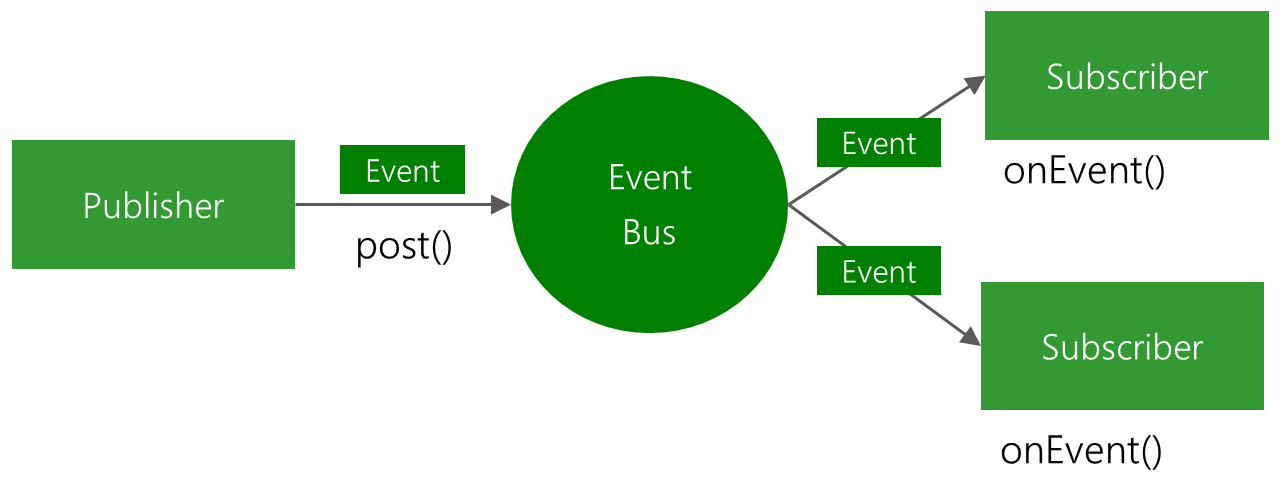 EventBus 3.0 使用指南:從替代 Handler 到組件通訊與線程模型
EventBus 是什麼 EventBus 是一個基於發布/訂閱模式實現組件間消息傳遞的框架。它存在的意義是簡化通信過程——傳統做法要麼用廣播,要麼靠接口回調,寫起來繁瑣
 Android 多執行緒下載全解析:分段下載與進度更新的實作原理
多執行緒下載的核心思想,是把一個大檔案切成若干段,交由多個執行緒同時下載,再各自寫入本地檔案的對應位置,藉此充分利用頻寬、加快下載速度。整個過程可以拆解為以下幾個步驟。
 MaterialRefreshLayout 下拉刷新與上拉載入實作
MaterialRefreshLayout 簡介 MaterialRefreshLayout 是一個比 SwipeRefreshLayout 更具視覺效果的下拉刷新元件。
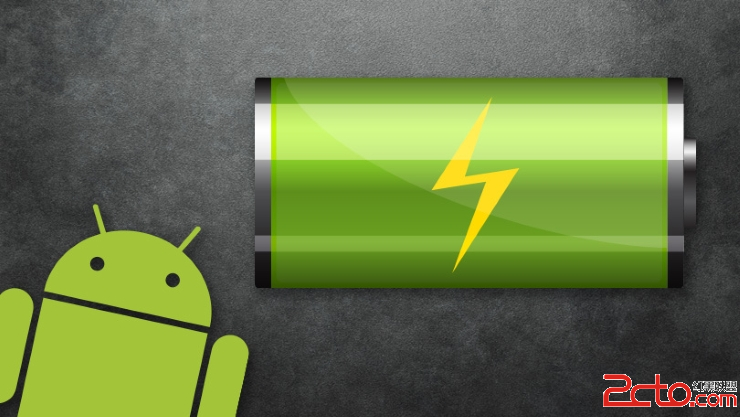 分析與優化應用電量:Battery Historian 實戰
為什麼要花力氣管電量 在 Android 專案中,電量消耗是相對難以監控的一環,但使用者卻非常在意手機的待機時間。過度耗電的應用,往往會被使用者毫不留情地卸載,僥倖心態只