

編輯:關於 Android 開發
這篇記錄一個最基礎的登陸界面:用 EditText、TextView、Button 在 XML 中搭出界面,再用 findViewById 與 OnClickListener 在代碼裡綁定事件,順帶示範 RadioGroup 與 RadioButton 的單選用法。
<?xml version="1.0" encoding="utf-8"?>
<LinearLayout xmlns:android="https://schemas.android.com/apk/res/android"
    android:layout_width="match_parent"
    android:layout_height="match_parent"
    android:orientation="vertical">

    <!-- 賬號輸入 -->
    <TextView
        android:id="@+id/text01"
        android:layout_width="fill_parent"
        android:layout_height="wrap_content"
        android:text="@string/user" />

    <EditText
        android:id="@+id/edt01"
        android:layout_width="fill_parent"
        android:layout_height="wrap_content"
        android:hint="@string/input"
        android:textSize="15sp"
        android:layout_marginTop="20dp" />

    <!-- 密碼輸入 -->
    <TextView
        android:id="@+id/text02"
        android:layout_width="fill_parent"
        android:layout_height="wrap_content"
        android:text="@string/password" />

    <EditText
        android:id="@+id/edt02"
        android:layout_width="fill_parent"
        android:layout_height="wrap_content"
        android:hint="@string/passw"
        android:textSize="15sp"
        android:layout_marginTop="20dp"
        android:inputType="numberPassword" />

    <!-- 單選框應用 -->
    <RadioGroup
        android:id="@+id/group"
        android:orientation="horizontal"
        android:layout_width="wrap_content"
        android:layout_height="wrap_content">

        <RadioButton
            android:id="@+id/rb1"
            android:layout_width="wrap_content"
            android:layout_height="wrap_content"
            android:text="@string/man" />

        <RadioButton
            android:id="@+id/rb2"
            android:layout_width="wrap_content"
            android:layout_height="wrap_content"
            android:text="@string/woman"
            android:checked="true" />
    </RadioGroup>

    <!-- 登陸按鈕 -->
    <Button
        android:id="@+id/submit_btn"
        android:layout_width="wrap_content"
        android:layout_height="wrap_content"
        android:text="@string/submit"
        android:layout_gravity="center"
        android:background="@drawable/anydo" />

</LinearLayout>幾個細節值得注意:RadioButton 必須放在 RadioGroup 內才能形成互斥單選,這裡通過給其中一個設置 android:checked="true" 指定默認選項;android:hint 提供輸入提示,比 text 更合適,因為一旦用戶開始輸入提示就會自動消失。
package com.example.login;

import android.os.Bundle;
import android.app.Activity;
import android.view.View;
import android.view.View.OnClickListener;
import android.widget.Button;
import android.widget.EditText;
import android.widget.Toast;

public class MainActivity extends Activity {

    private EditText ed01;
    private EditText ed02;
    private Button submit;
    private String results1;
    private String results2;

    @Override
    protected void onCreate(Bundle savedInstanceState) {
        super.onCreate(savedInstanceState);
        setContentView(R.layout.main);

        // 獲取布局文件中的輸入框與按鈕控件
        ed01 = (EditText) this.findViewById(R.id.edt01);
        ed02 = (EditText) this.findViewById(R.id.edt02);
        submit = (Button) this.findViewById(R.id.submit_btn);

        // 為按鈕添加點擊事件
        submit.setOnClickListener(new OnClickListener() {
            public void onClick(View v) {
                // 獲取輸入框中的內容
                results1 = ed01.getText().toString();
                results2 = ed02.getText().toString();

                // 賬號密碼判等
                if (results1.equals("android") && results2.equals("2016")) {
                    Toast.makeText(MainActivity.this, R.string.login,
                            Toast.LENGTH_LONG).show();
                } else {
                    Toast.makeText(MainActivity.this, R.string.failed,
                            Toast.LENGTH_LONG).show();
                }
            }
        });
    }
}密碼不要寫死在代碼裡。示例把正確的賬號密碼硬編碼在 onClick 中,僅適合教學演示。真實項目必須把校驗放到服務端,客戶端只負責收集與上傳。
動畫與空值判斷不能省。用戶可能直接點擊登陸而不做任何輸入,此時 results1 是空字符串而非 null,equals 不會崩潰,但應提前用 TextUtils.isEmpty() 給出明確提示,體驗更好。
登陸按鈕要防連點。點擊後應立即禁用按鈕或加時間戳節流,避免用戶連點觸發多次請求。
密碼輸入建議改用 textPassword。示例用的 numberPassword 只允許數字,若密碼包含字母就會無法輸入。
單選組記得讀取結果。示例中 RadioGroup 只完成了界面展示,若要獲取性別選項,可以在點擊時調用 group.getCheckedRadioButtonId() 拿到被選中的 RadioButton ID,再取其文本。
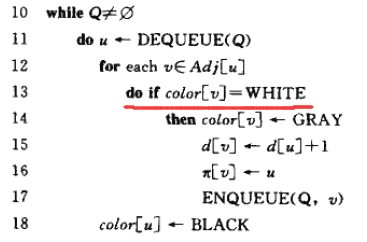 演算法導論筆記:廣度優先搜尋與深度優先搜尋的原理與複雜度分析
廣度優先搜尋(BFS) 給定圖 G = (V, E) 與特定源頂點 s,廣度優先搜尋會系統化地探索 G 中的邊,目的是「發現」所有能從 s 到達的頂點,並計算 s 到這些
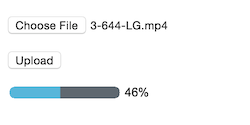 以 HT for Web 向量繪製 HTML5 檔案上傳進度條
 在 HTML5 檔案上傳過程中,若沒有進度提示,使用者往往無法判斷上傳狀態。本文以 HT for Web
 註冊介面設計與實作(二):註冊業務邏輯的實作
 承接上一篇的註冊介面設計,本篇聚焦於註冊業務邏輯的實作。核心在於一個 checkform 方法,用來驗證表單:帳號不可為空、
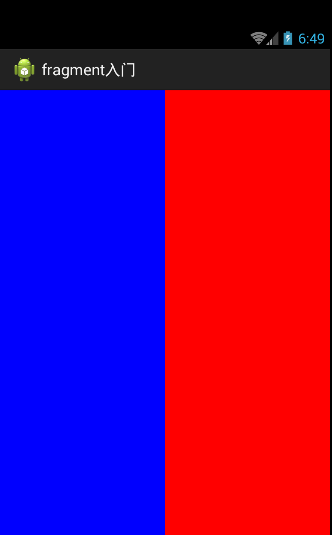 Android Fragment 入門:靜態宣告與動態建立一次學會
Fragment 是 Activity 介面中的一部分或一種行為。可以把多個 Fragment 組合到一個 Activity 中,構成多畫面介面,也能在不同 Activi