

編輯:關於 Android 開發
開發過程中最惱人的莫過於應用突然閃退回到桌面,而且往往不知道它什麼時候會再犯。除錯階段還好,起碼能靠 logcat 追到出錯位置;但使用者日常使用中突然崩潰,那就真的欲哭無淚了。
今天要談的就是如何攔住系統拋出的 Unchecked 異常。所謂 Unchecked,指的就是非受檢異常,它沒辦法用 try-catch 在編譯期強制捕捉。
先從 Exception 的分類說起。Java 中 Exception 分成 CheckedException 與 UncheckedException:前者必須用 try...catch... 顯式捕捉,後者不需要。UncheckedException 通常也叫 RuntimeException。《Effective Java》的觀點是——可恢復的情況用受檢異常,程式錯誤(無法恢復、大錯已經釀成)則用執行時異常。常見的 RuntimeException 有 IllegalArgumentException、IllegalStateException、NullPointerException、IndexOutOfBoundsException 等;而 IOException 及其子類則屬於受檢異常。
UncaughtException 處理類的作用,是在程式發生未捕捉異常時接管流程,記錄下錯誤資訊並上報。直接看程式碼:

public class CrashHandler implements UncaughtExceptionHandler {

    public static final String TAG = "TEST";

    private static CrashHandler INSTANCE = new CrashHandler();
    private Context mContext;
    /** 系統預設的處理器,保留它是為了不影響其他未攔下的異常 */
    private Thread.UncaughtExceptionHandler mDefaultHandler;
    /** 用來存放裝置資訊 */
    private Map<String, String> infos = new HashMap<String, String>();
    private static String error = "程式錯誤,額,不對,我應該說,伺服器正在維護中,請稍後再試";
    private static final Map<String, String> regexMap = new HashMap<String, String>();
    private DateFormat formatter = new SimpleDateFormat("yyyy-MM-dd-HH-mm-ss", Locale.CHINA);

    private CrashHandler() {}

    /** 單例 */
    public static CrashHandler getInstance() {
        initMap();
        return INSTANCE;
    }

    public void init(Context context) {
        mContext = context;
        mDefaultHandler = Thread.getDefaultUncaughtExceptionHandler();
        Thread.setDefaultUncaughtExceptionHandler(this);
    }

    @Override
    public void uncaughtException(Thread thread, Throwable ex) {
        if (!handleException(ex) && mDefaultHandler != null) {
            // 自己沒處理,交回系統預設處理器
            mDefaultHandler.uncaughtException(thread, ex);
        } else {
            try {
                Thread.sleep(3000);   // 留一點時間讓提示顯示出來
            } catch (InterruptedException e) {
                Log.e(TAG, "error : ", e);
            }
            android.os.Process.killProcess(android.os.Process.myPid());
            System.exit(1);
        }
    }

    /** 自訂錯誤處理:收集資訊、寫檔、提示 */
    private boolean handleException(Throwable ex) {
        if (ex == null) return false;
        saveCrashInfo2File(ex);
        new Thread() {
            @Override
            public void run() {
                Looper.prepare();
                Toast.makeText(mContext, error, Toast.LENGTH_LONG).show();
                Looper.loop();
            }
        }.start();
        return true;
    }

    /** 收集裝置與版本資訊 */
    public void collectDeviceInfo(Context ctx) {
        try {
            PackageManager pm = ctx.getPackageManager();
            PackageInfo pi = pm.getPackageInfo(ctx.getPackageName(), PackageManager.GET_ACTIVITIES);
            if (pi != null) {
                infos.put("versionName", pi.versionName == null ? "null" : pi.versionName);
                infos.put("versionCode", pi.versionCode + "");
            }
        } catch (NameNotFoundException e) {
            Log.e(TAG, "an error occured when collect package info", e);
        }
        Field[] fields = Build.class.getDeclaredFields();
        for (Field field : fields) {
            try {
                field.setAccessible(true);
                infos.put(field.getName(), field.get(null).toString());
            } catch (Exception e) {
                Log.e(TAG, "an error occured when collect crash info", e);
            }
        }
    }

    /** 把堆疊寫成檔案,檔名即為回傳值,方便後續上傳 */
    private String saveCrashInfo2File(Throwable ex) {
        StringBuffer sb = getTraceInfo(ex);
        Writer writer = new StringWriter();
        PrintWriter printWriter = new PrintWriter(writer);
        ex.printStackTrace(printWriter);
        Throwable cause = ex.getCause();
        while (cause != null) {
            cause.printStackTrace(printWriter);
            cause = cause.getCause();
        }
        printWriter.close();
        sb.append(writer.toString());
        try {
            long timestamp = System.currentTimeMillis();
            String time = formatter.format(new Date());
            String fileName = "crash-" + time + "-" + timestamp + ".log";
            if (Environment.getExternalStorageState().equals(Environment.MEDIA_MOUNTED)) {
                String path = Environment.getExternalStorageDirectory() + "/crash/";
                File dir = new File(path);
                if (!dir.exists()) dir.mkdirs();
                FileOutputStream fos = new FileOutputStream(path + fileName);
                fos.write(sb.toString().getBytes());
                fos.close();
            }
            return fileName;
        } catch (Exception e) {
            Log.e(TAG, "an error occured while writing file...", e);
        }
        return null;
    }

    /** 整理堆疊資訊 */
    public static StringBuffer getTraceInfo(Throwable e) {
        StringBuffer sb = new StringBuffer();
        Throwable ex = e.getCause() == null ? e : e.getCause();
        StackTraceElement[] stacks = ex.getStackTrace();
        for (int i = 0; i < stacks.length; i++) {
            if (i == 0) setError(ex.toString());
            sb.append("class: ").append(stacks[i].getClassName())
              .append("; method: ").append(stacks[i].getMethodName())
              .append("; line: ").append(stacks[i].getLineNumber())
              .append("; Exception: ").append(ex.toString()).append("\n");
        }
        return sb;
    }

    /** 依異常類型挑一句提示語 */
    public static void setError(String e) {
        Pattern pattern;
        Matcher matcher;
        for (Entry<String, String> m : regexMap.entrySet()) {
            pattern = Pattern.compile(m.getKey());
            matcher = pattern.matcher(e);
            if (matcher.matches()) {
                error = m.getValue();
                break;
            }
        }
    }

    private static void initMap() {
        regexMap.put(".*NullPointerException.*", "嘿,無中生有~Boom!");
        regexMap.put(".*ClassNotFoundException.*", "你確定你找得到它?");
        regexMap.put(".*ArithmeticException.*", "我猜你的數學是體育老師教的,對吧?");
        regexMap.put(".*ArrayIndexOutOfBoundsException.*", "恩,無下限=無節操,請不要跟我搭話");
        regexMap.put(".*IllegalArgumentException.*", "你的出生就是一場錯誤。");
        regexMap.put(".*IllegalAccessException.*", "很遺憾,你的信用卡帳號已被凍結");
        regexMap.put(".*NumberFormatException.*", "想要改變一下自己形象?");
        regexMap.put(".*OutOfMemoryError.*", "或許你該減減肥了");
        regexMap.put(".*StackOverflowError.*", "啊,啊,憋不住了!");
        regexMap.put(".*RuntimeException.*", "你的人生走錯了方向,重來吧");
    }
}
自訂一個 Application,在 onCreate 中就完成註冊,這樣整個 App 生命週期都在監控範圍內:
import android.app.Application;

public class CrashApplication extends Application {
    @Override
    public void onCreate() {
        super.onCreate();
        CrashHandler crashHandler = CrashHandler.getInstance();
        crashHandler.init(getApplicationContext());
    }
}
接著在 AndroidManifest 中掛上這個 Application:
<application android:name=".CrashApplication" ... />
以及寫檔需要的權限:
<uses-permission android:name="android.permission.WRITE_EXTERNAL_STORAGE" />
目前尚未加入「把錯誤日誌上傳到伺服器」的環節。補上這塊之後,就能即時收到使用者端的崩潰日誌,依機型、系統版本、時間維度交叉分析,對後期維護的幫助非常大。實作時記得做幾件事:只在 WiFi 或可 flex 的網路策略下上傳、對日誌做去重與節流、並在正式環境移除本篇這種玩笑式的提示文案,改成簡潔的「已回報問題」引導。
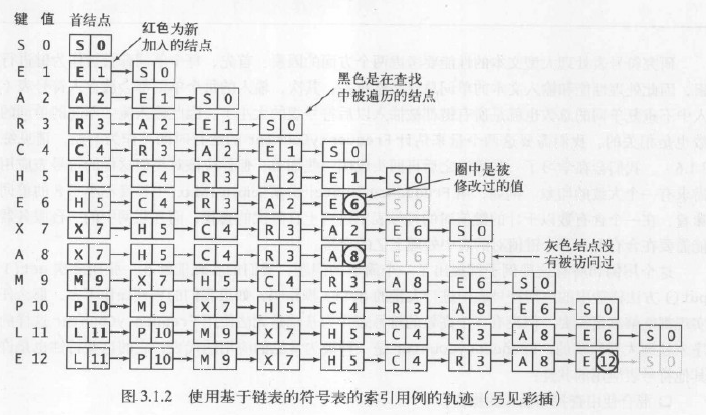 無序鏈表上的順序查找:符號表最直觀的實作與效能真相
一、基本思想 實作符號表最簡單的資料結構選擇莫過於鏈表:每個節點存放一組鍵值對,並用 next 指標串成鏈。 get() 的做法是走訪鏈表,用 equals() 逐一比對
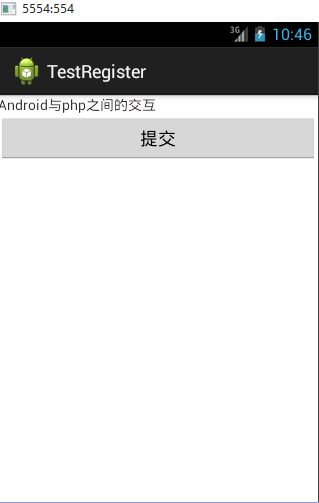 Android 與 PHP 的 HTTP 連線實作(三):取得伺服器 JSON 資料
Android 與 PHP 的資料交換概念 Android 與 PHP 的互動,通常透過 HTTP 網路連線完成。PHP 負責連接資料庫、查詢資料,並將結果整理成 JSO
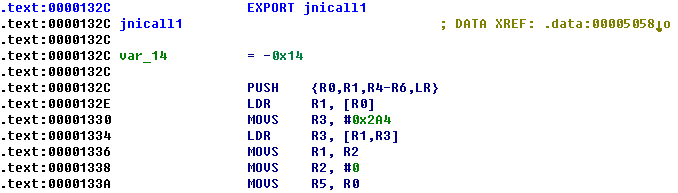 Android 逆向動態調試入門:從 SO 斷點到 Dex Dump
在 SO 關鍵函數下斷點動態調試常見起點,是在 SO 檔案中的關鍵函數設置斷點。通常先用靜態分析工具找到函數偏移,再讓 android_server 運行並轉發埠,之後以
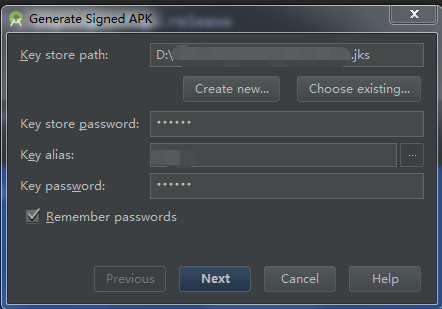 Android Studio 多渠道打包實戰:基於友盟統計的 productFlavors 方案
 一款 App 上架時往往需要針對不同應用市場產出多個渠道包,以便統計各渠