

編輯:關於 Android 開發
Android 的人機介面由各種 View 與 ViewGroup 組成。掌握常見控件的使用方式,是建立良好使用者體驗的基礎。
TextView 是最基本的文字顯示元件。常用屬性包含 id、layout_width、layout_height、text、textSize 與 textColor。寬高常見值有 match_parent、fill_parent 與 wrap_content。
EditText 可讓使用者輸入文字,除了繼承 TextView 的屬性外,也常用 hint 屬性顯示提示文字。當使用者尚未輸入內容時,hint 會顯示提示,輸入後會自動消失。
ImageView 用於顯示圖片。常用屬性包含 src 與 background。src 通常用來指定要顯示的圖片資源,background 則可設定背景圖片或背景顏色。
Button 常用來顯示可點擊的文字按鈕,可透過 text 設定文字,也可透過背景色或背景圖自訂外觀。ImageButton 則更偏向以圖片呈現按鈕。
使用 Button 時,通常會透過 setOnClickListener 設定點擊事件。常見寫法包含匿名內部類、外部類別或 Activity 直接實作 OnClickListener。
這兩個控件都能提供輸入時自動匹配的功能。AutoCompleteTextView 適合單一輸入欄位;MultiAutoCompleteTextView 則可輸入多筆內容,並在每筆後加上分隔符。
使用時通常需要設定 completionThreshold,並搭配 ArrayAdapter 等適配器提供候選資料。
ToggleButton 具有開與關兩種狀態,可透過 textOn 與 textOff 設定不同狀態下顯示的文字。
CheckBox 則提供勾選與取消勾選的功能,常搭配 OnCheckedChangeListener 使用。
RadioButton 通常會與 RadioGroup 一起使用,形成單選群組,確保同一時間只能選擇一個選項。
 用樹莓派打造一個能與你對話的機器人
 最近我用樹莓派做了一個能與人對話的機器人,這裡簡單分享一下整個實現過程。 樹莓派(Raspberry Pi)是目前全球最流行的微型電腦
 標題欄透明度隨 ScrollView 滑動漸變實作
效果說明 這個範例展示如何讓標題欄背景在 ScrollView 滑動時逐漸變得不透明。當畫面向下滾動,標題背景會從全透明慢慢過渡到指定顏色,常用於個人頁面或內容頁的視覺效
 WebView 載入網頁並加入進度條
 在 Android 中內嵌網頁時,常希望像微信一樣,在頂部顯示載入進度。這可以透過 WebView 搭配 ProgressBar 與
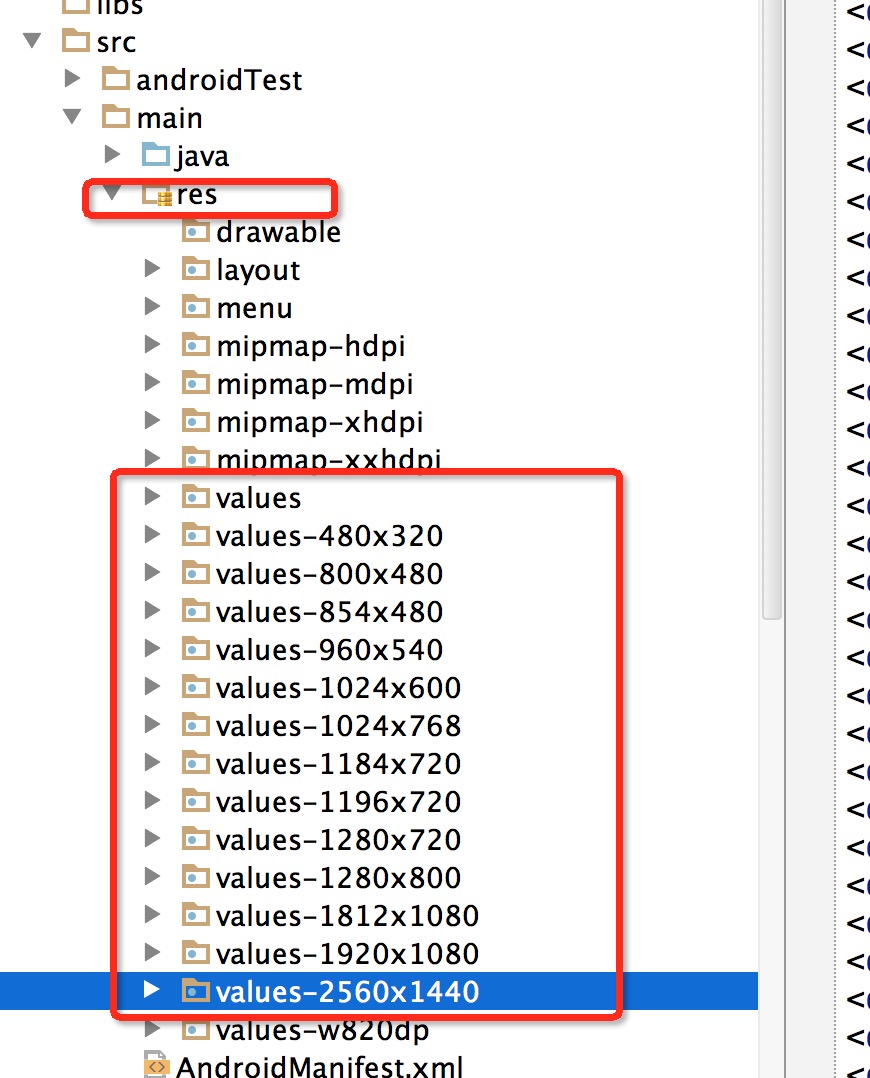 Android 屏幕適配終極方案:用百分比思路告別適配噩夢
一、概述 做 Android 開發時,屏幕適配往往是讓人頭疼的事,各種屏幕尺寸適配起來實在痛苦。但如果換個角度思考,看看 Web 前端開發——電腦螢幕與手機解析度的種類遠