

編輯:關於 Android 開發
本文轉載自:https://bijian1013.iteye.com/blog/2166855
在 Java 中發送 HTTP 請求,最基礎的方式便是透過 HttpURLConnection。以下程式碼完整示範了 GET 與 POST 兩種方法的實作:
package com.bijian.study; import java.io.BufferedReader; import java.io.DataOutputStream; import java.io.IOException; import java.io.InputStreamReader; import java.net.HttpURLConnection; import java.net.URL; import java.net.URLEncoder; public class PostRequest { public static final String GET_URL = "https://localhost:8080/SpringMVC/greeting"; public static final String POST_URL = "https://localhost:8080/SpringMVC/greeting"; public static void readContentFromGet() throws IOException { // 拼湊get請求的URL字串,使用URLEncoder.encode對特殊和不可見字符進行編碼 String getURL = GET_URL + "?name=" + URLEncoder.encode("zhangshan", "utf-8"); URL getUrl = new URL(getURL); // 根據拼湊的URL,打開連接,URL.openConnection函數會根據URL的類型, // 返回不同的URLConnection子類的對象,這裡URL是一個http,因此實際返回的是HttpURLConnection HttpURLConnection connection = (HttpURLConnection) getUrl.openConnection(); // 進行連接,但是實際上get request要在下一句的connection.getInputStream()函數中才會真正發到服務器 connection.connect(); // 取得輸入流,並使用Reader讀取 BufferedReader reader = new BufferedReader(new InputStreamReader(connection.getInputStream(), "utf-8"));// 設置編碼,否則中文亂碼 System.out.println("============================="); System.out.println("Contents of get request"); System.out.println("============================="); String lines; while ((lines = reader.readLine()) != null) { // lines = new String(lines.getBytes(), "utf-8"); System.out.println(lines); } reader.close(); // 斷開連接 connection.disconnect(); System.out.println("============================="); System.out.println("Contents of get request ends"); System.out.println("============================="); } public static void readContentFromPost() throws IOException { // Post請求的url,與get不同的是不需要帶參數 URL postUrl = new URL(POST_URL); // 打開連接 HttpURLConnection connection = (HttpURLConnection) postUrl.openConnection(); // Output to the connection. Default is false, set to true because post method must write something to the connection // 設置是否向connection輸出,因為這個是post請求,參數要放在http正文內,因此需要設為true connection.setDoOutput(true); // Read from the connection. Default is true. connection.setDoInput(true); // Set the post method. Default is GET connection.setRequestMethod("POST"); // Post cannot use caches // Post 請求不能使用緩存 connection.setUseCaches(false); // This method takes effects to every instances of this class.URLConnection.setFollowRedirects是static函數,作用於所有的URLConnection對象。 // connection.setFollowRedirects(true); // This methods only takes effacts to this instance.URLConnection.setInstanceFollowRedirects是成員函數,僅作用於當前函數 connection.setInstanceFollowRedirects(true); // Set the content type to urlencoded,because we will write some URL-encoded content to the connection. Settings above must be set before connect! // 配置本次連接的Content-type,配置為application/x-www-form-urlencoded的意思是正文是urlencoded編碼過的form參數,下面我們可以看到我們對正文內容使用URLEncoder.encode進行編碼 connection.setRequestProperty("Content-Type", "application/x-www-form-urlencoded"); // 連接,從postUrl.openConnection()至此的配置必須要在connect之前完成, // 要注意的是connection.getOutputStream會隱含的進行connect。 connection.connect(); DataOutputStream out = new DataOutputStream(connection.getOutputStream()); // The URL-encoded contend // 正文,正文內容其實跟get的URL中'?'後的參數字符串一致 String content = "name=" + URLEncoder.encode("張三", "utf-8"); // DataOutputStream.writeBytes將字符串中的16位的unicode字符以8位的字符形式寫道流裡面 out.writeBytes(content); out.flush(); out.close();// flush and close BufferedReader reader = new BufferedReader(new InputStreamReader(connection.getInputStream(), "utf-8"));// 設置編碼,否則中文亂碼 String line = ""; System.out.println("============================="); System.out.println("Contents of post request"); System.out.println("============================="); while ((line = reader.readLine()) != null) { // line = new String(line.getBytes(), "utf-8"); System.out.println(line); } System.out.println("============================="); System.out.println("Contents of post request ends"); System.out.println("============================="); reader.close(); connection.disconnect(); } public static void main(String[] args) { try { readContentFromGet(); readContentFromPost(); } catch (IOException e) { e.printStackTrace(); } } }
執行結果:
============================= Contents of get request ============================= <!DOCTYPE html> <html> <head> <meta http-equiv="Content-Type" content="text/html; charset=UTF-8"> <title>Hello</title> </head> <body> 你好,zhangshan </body> </html> ============================= Contents of get request ends ============================= ============================= Contents of post request ============================= <!DOCTYPE html> <html> <head> <meta http-equiv="Content-Type" content="text/html; charset=UTF-8"> <title>Hello</title> </head> <body> 你好,張三 </body> </html> ============================= Contents of post request ends =============================
重點提醒:透過 BufferedReader 讀取遠端回傳的資料時,務必設定讀取編碼,否則中文會出現亂碼。
這裡有幾個關鍵觀念值得深入:
其一,HttpURLConnection.connect 函式實際上只是建立了與伺服器的 TCP 連線,並未真正發送 HTTP 請求。無論 POST 還是 GET,HTTP 請求都是直到 getInputStream() 才被正式發送出去。
其二,在 POST 請求中,順序至關重要。對 connection 物件的一切設定(那一堆 set 函式)都必須在 connect() 之前完成;而對 outputStream 的寫入,又必須在 inputStream 的讀取之前。這些順序實際上是由 HTTP 請求的格式所決定的。
其三,HTTP 請求由兩部分組成:一是 HTTP 標頭,所有關於此次請求的設定都在標頭中定義;二是正文 content。在 connect() 中,會依據 HttpURLConnection 物件的設定值生成 HTTP 標頭,因此必須在呼叫 connect 之前把所有設定準備好。
其四,緊接 HTTP 標頭之後的是請求正文,正文透過 outputStream 寫入。實際上 outputStream 並非網路串流,充其量是個字串串流,寫入的內容不會立即發送到網路,而是在串流關閉後,依據輸入內容生成 HTTP 正文。
最後,在 getInputStream() 被呼叫時,準備好的 HTTP 請求便正式發送到伺服器,並回傳一個輸入流以讀取伺服器回應。由於請求此時已發送完畢(含標頭與正文),因此在 getInputStream() 之後再對 connection 進行設定或寫入 outputStream 都將失去意義,甚至導致異常發生。
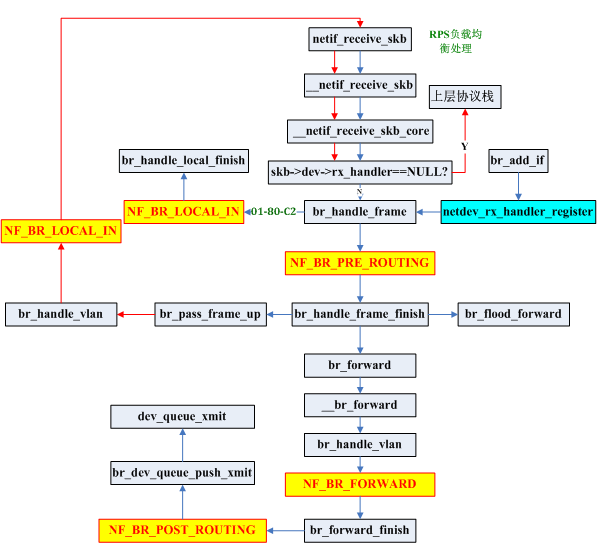 Linux 3.10 內核網橋轉發邏輯剖析
作者:lvyilong316 此前分析過 Linux 2.6.32 的網橋轉發邏輯,這次換成 3.10。這兩個版本恰好對應 CentOS 5 與 CentOS 7 的系統
 Android 動態調試七種武器之 IDA Pro
IDA Pro 是 Android 原生層除錯與逆向分析中常見的工具。本文整理使用 IDA Pro 進行 Android
 使用 getDrawable 時遇到 NoSuchMethodError 的解法
 在為 TextView 設定圖示或背景時,若直接呼叫某些 Resources 或 Con
 告別 0 寬高:onCreate 中獲取 View 尺寸的四種可靠方案
「在 onCreate 裡拿到的 View 寬高是 0」這個問題,幾乎每個 Android 開發者都遇到過。它其實不難解決,但我們追求的往往不是「怎麼解決」,而是「有幾種