

編輯:關於 Android 開發
在開發中,我們常常需要在 Button、TextView 等控件裡顯示一些特殊符號,如下圖所示:
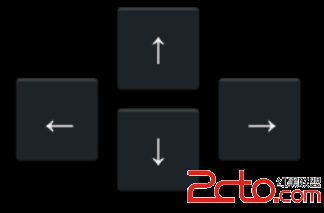
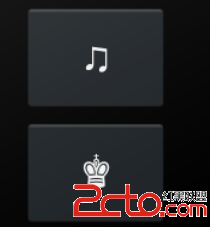
這些符號固然可以用圖片來顯示,但其實直接使用 Unicode 碼就能呈現,既省事又清晰。
四個箭頭圖示的程式碼如下:
<RelativeLayout android:layout_width="0dp" android:layout_height="match_parent" android:layout_weight="1" android:gravity="center_horizontal"> <Button android:id="@+id/scroll_left" android:layout_width="40dip" android:layout_height="40dip" android:layout_alignParentLeft="true" android:layout_centerVertical="true" android:text="@string/left_arrow"/> <Button android:id="@+id/scroll_up" android:layout_width="40dip" android:layout_height="40dip" android:layout_alignParentTop="true" android:layout_toRightOf="@id/scroll_left" android:text="@string/up_arrow"/> <Button android:id="@+id/scroll_down" android:layout_width="40dip" android:layout_height="40dip" android:layout_below="@id/scroll_up" android:layout_toRightOf="@id/scroll_left" android:text="@string/down_arrow"/> <Button android:id="@+id/scroll_right" android:layout_width="40dip" android:layout_height="40dip" android:layout_centerVertical="true" android:layout_toRightOf="@id/scroll_down" android:text="@string/right_arrow"/> </RelativeLayout>
皇冠與音符圖示的程式碼如下:
<LinearLayout android:layout_width="wrap_content" android:layout_height="wrap_content" android:orientation="vertical"> <Button android:layout_width="wrap_content" android:layout_height="wrap_content" android:text="@string/music"/> <Button android:layout_width="wrap_content" android:layout_height="wrap_content" android:text="@string/crown"/> </LinearLayout>
上面用到的字符串值分別為:
<string name="music">\u265A</string> <string name="crown">\u266B</string> <string name="left_arrow">\u2190</string> <string name="up_arrow">\u2191</string> <string name="down_arrow">\u2193</string> <string name="right_arrow">\u2192</string>
下面再整理一份常見特殊符號的 Unicode 碼值,方便日後查閱。在 Android 的 string.xml 中使用 Unicode 表示符號時,直接採用對應的 JS 形式的 Unicode 值即可。
← \u2190 → \u2192 ↑ \u2191 ↓ \u2193 ↔ \u2194 ↕ \u2195 ▲ \u25B2 ▼ \u25BC
★ \u2605 ◆ \u25C6 ● \u25CF ■ \u25A0 ▲ \u25B2 ▼ \u25BC ♥ \u2764 ☺ \u263A ☻ \u263B ✈ \u2708 ☎ \u260E ☀ \u2600 ☁ \u2601 ☂ \u2602 ❄ \u2744 ☃ \u2603
$ \u0024 ¢ \u00A2 £ \u00A3 ¤ \u00A4
 ViewDragHelper 完全解析(三十三):告別手作手勢,自訂 ViewGroup 拖拽從此輕鬆
(一) 前言 近來在錄製實戰專案,整體框架仿照 QQ 5.X 的側滑效果。要做這種效果,一般路徑有幾條:自行自訂 ViewGroup、採用 MenuDrawer 這類開源
 Android 事件分發機制實例驗證:十種情境逐一剖析
Android 事件分發機制實例驗證 本文的程式結構是:MainActivity 中有一個自定義的 MyLayout 佈局,MyLayout 下又有一個自定義的 MyBu
 OuNews 簡單的新聞客戶端應用源碼分享
 一直想練習用 MVP 模式開發應用,於是結合了 RxJava、Retrofit 等熱門開源庫,寫出了這麼一款新聞閱讀軟體。它包
 Android 自定義標題欄背景圖(平鋪、樣式與 Activity 引用完整流程)
Android 自訂標題欄背景:從平鋪圖片到樣式套用 想讓標題欄不只是單調的純色,用一張背景圖往往比填色更有質感——圖片本身的明暗變化會帶來視覺上的凹凸層次。以下示範如何