

編輯:系統備份
資料的備份與還原是許多應用必備的功能。由於讀寫檔案屬於耗時操作,若放在主線程會造成卡頓,因此適合以 AsyncTask 在背景執行。以下示範如何實作資料庫的備份與還原。
首先建立一個繼承自 AsyncTask 的類別,透過 FileChannel 進行檔案複製:
public class BackupTask extends AsyncTask<String, Void, Integer> { private static final String COMMAND_BACKUP = "backupDatabase"; public static final String COMMAND_RESTORE = "restroeDatabase"; private Context mContext; public BackupTask(Context context) { this.mContext = context; } @Override protected Integer doInBackground(String... params) { // 取得正在使用的資料庫路徑 // 預設路徑為 /data/data/(包名)/databases/*.db File dbFile = mContext.getDatabasePath(Environment .getExternalStorageDirectory().getAbsolutePath() + "/dlion/db_dlion.db"); File exportDir = new File(Environment.getExternalStorageDirectory(), "dlionBackup"); if (!exportDir.exists()) { exportDir.mkdirs(); } File backup = new File(exportDir, dbFile.getName()); String command = params[0]; if (command.equals(COMMAND_BACKUP)) { try { backup.createNewFile(); fileCopy(dbFile, backup); return 1; } catch (Exception e) { e.printStackTrace(); return 0; } } else if (command.equals(COMMAND_RESTORE)) { try { fileCopy(backup, dbFile); return 1; } catch (Exception e) { e.printStackTrace(); return 0; } } else { return null; } } private void fileCopy(File dbFile, File backup) throws IOException { FileChannel inChannel = new FileInputStream(dbFile).getChannel(); FileChannel outChannel = new FileOutputStream(backup).getChannel(); try { inChannel.transferTo(0, inChannel.size(), outChannel); } catch (IOException e) { e.printStackTrace(); } finally { if (inChannel != null) { inChannel.close(); } if (outChannel != null) { outChannel.close(); } } } }
接著在 MainActivity 中以非同步方式觸發備份與還原:
// 數據恢復 private void dataRecover() { new BackupTask(this).execute("restroeDatabase"); } // 數據備份 private void dataBackup() { new BackupTask(this).execute("backupDatabase"); }
核心技巧在於用 FileChannel.transferTo() 高效地複製整個資料庫檔,並以命令字串區分「備份」與「還原」兩種行為。透過 AsyncTask 包裝後,檔案操作在背景執行,不影響 UI 流暢度。
 安卓系統備份與還原教學 Recovery與刷機精靈兩種做法
刷機這件事,動機五花八門:預裝軟件太多看著煩、想嚐鮮別家的系統、機器越用越卡想換個乾淨環境……但不管出於哪種原因,有一點必須提前想清楚:一旦刷過機,商家很可能就不再履行三
 Recovery 備份與還原系統詳細教學 從此刷機無憂
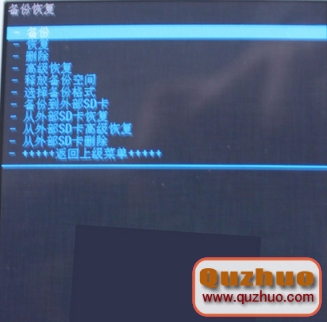
看大家對刷機這麼有熱情,難免會遇到刷完後不如意的情況,想刷回原本的系統。雖然方法很多,但我一直習慣用 Recovery 內建的備份與還原功能來管理系統,方法其實很簡單。做
 手機QQ聊天記錄怎麼備份導出 圖文步驟教學
手機QQ是我們日常常用的溝通工具,聊天記錄裡難免沉澱著重要資訊。那該如何備份與導出?下面小編就把流程走一遍。 手機QQ聊天記錄導出步驟 在QQ主介面,單擊需要導出記錄的好
 EFS 是什麼?為什麼刷機前一定要備份它
不少玩家照著官方教學刷完機,手機卻變成沒有訊號、IMEI 顯示為零、基帶未知——這幾乎都是同一個原因:EFS 資料遺失了。這也是為什麼老手總強調刷機前必須先備份 EFS。