

編輯:中階開發
在 Android 平台上,該如何在 OpenGL 環境下截圖呢?如果是一款 FPS 類型的遊戲,用常規方式截圖時,由於 Android 系統底層讀取 framebuffer 的效率不高,截出來的画面往往會因刷新問題而產生上下兩半部不匹配的情況。在 GL 中,我們可以用下面這段程式碼來解決。
public static Bitmap SavePixels(int x, int y, int w, int h, GL10 gl)
{
int b[]=new int[w*h];
int bt[]=new int[w*h];
IntBuffer ib=IntBuffer.wrap(b);
ib.position(0);
gl.glReadPixels(x, y, w, h, GL10.GL_RGBA, GL10.GL_UNSIGNED_BYTE, ib);
for(int i=0; i<h; i++)
{
for(int j=0; j<w; j++)
{
int pix=b[i*w+j];
int pb=(pix>>16)&0xff;
int pr=(pix<<16)&0x00ff0000;
int pix1=(pix&0xff00ff00) | pr | pb;
bt[(h-i-1)*w+j]=pix1;
}
}
Bitmap sb=Bitmap.createBitmap(bt, w, h, true);
return sb;
}
上面是一個簡單的 GL 讀取 RGBA 分量的方法,然後產生 Android 通用的 Bitmap 物件:
public static void SavePNG(int x, int y, int w, int h, String fileName, GL10 gl)
{
Bitmap bmp=SavePixels(x,y,w,h,gl);
try
{
FileOutputStream fos=new FileOutputStream("/sdcard/android123/"+fileName); //Android123 提示,若是 2.2 或更高系統,sdcard 路徑為 /mnt/sdcard/
bmp.compress(CompressFormat.PNG, 100, fos); //保存為 png 格式,質量 100%
try
{
fos.flush();
}
catch (IOException e)
{
e.printStackTrace();
}
try
{
fos.close();
}
catch (IOException e)
{
e.printStackTrace();
}
}
catch (FileNotFoundException e)
{
e.printStackTrace();
}
}
}
如何呼叫呢?直接執行這個靜態方法 SavePNG 即可,例如 SavePNG(0, 0, Config.SCREEN_W, Config.SCREEN_H, "cwj.png", gl);,最後一個參數就是你的 OpenGL 物件。
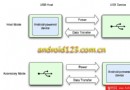 Android 3.1 USB 配件開發入門:Host Mode 與 Accessory Mode
從 Android 3.1 開始,官方正式支援把 USB 配件連接到 Android 裝置,並定義了一套配件通訊協議。而在 Android 2.3.4 上,透過附加函式庫
 跨瀏覽器測試 Web 應用程式的務實指南
前言:「要在所有瀏覽器上測試」聽起來像一道無解的咒語,真正動手時卻沒有想像中那麼可怕。本文盤點了從嚴謹全面到便宜速成的各類跨瀏覽器測試做法,最後的選擇取決於你手上有多少時
 用 HTML5 地理定位 API 打造行動混搭程式
摘要:這是五部曲系列的第一篇。本文聚焦行動 Web 應用程式近年最受歡迎的新技術之一——地理定位。高階智慧型手機多半內建 GPS,本文示範如何透過標準 API 取得位置,
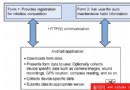 用 Android 與 XML 打造動態表單應用(上):從架構到資料模型
在行動應用開發中,若每一份表單都要重新撰寫版面,維護成本會快速上升。本文以 Android 與 XML 為核心,示範如何打造一套可動態載入表單的資料收集架構:表單定義放在