編輯:關於android開發
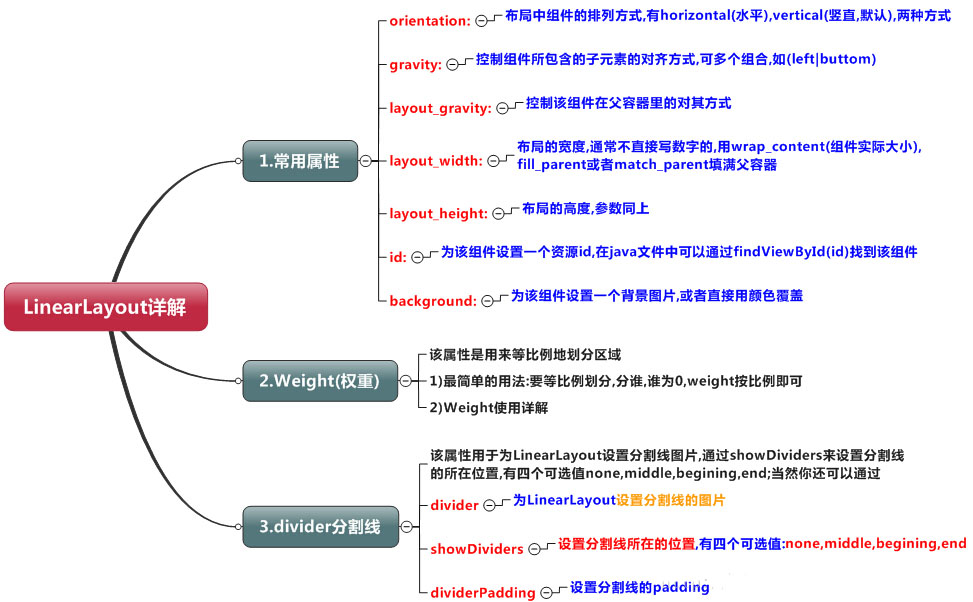
學習導圖(圖片在網上下載)
知識點詳解(演示效果方便組件沒有設置id)
(1)gravity和Layout_gravity
android:gravity 屬性是對該view中內容的限定.比如一個button 上面的text. 你可以設置該text 相對於view的靠左,靠右等位置.
android:layout_gravity是用來設置該view相對與父view 的位置.比如一個button 在linearlayout裡,你想把該button放在linearlayout裡靠左、靠右等位置就可以通過該屬性設置.
(2)weight權重(以水平為例)
(a)當width = 0或者 width = wrap_content的時候,按照權重比例計算!:2: 3
<?xml version="1.0" encoding="utf-8"?>
<LinearLayout
xmlns:android="http://schemas.android.com/apk/res/android" ![]() android:layout_width="match_parent"
android:layout_height="match_parent"
android:orientation="horizontal">
<TextView
android:id="@+id/text1"
android:layout_width="0dp"
android:layout_height="match_parent"
android:layout_weight="1"
android:background="@android:color/holo_red_dark"
android:text="Text1"/>
<TextView
android:id="@+id/text2"
android:layout_width="0dp"
android:layout_height="match_parent"
android:layout_weight="2"
android:background="@android:color/holo_blue_bright"
android:text="Text2"/>
<TextView
android:id="@+id/text3"
android:layout_width="0dp"
android:layout_height="match_parent"
android:background="@android:color/white"
android:layout_weight="3"
android:text="Text3"/>
</LinearLayout>
android:layout_width="match_parent"
android:layout_height="match_parent"
android:orientation="horizontal">
<TextView
android:id="@+id/text1"
android:layout_width="0dp"
android:layout_height="match_parent"
android:layout_weight="1"
android:background="@android:color/holo_red_dark"
android:text="Text1"/>
<TextView
android:id="@+id/text2"
android:layout_width="0dp"
android:layout_height="match_parent"
android:layout_weight="2"
android:background="@android:color/holo_blue_bright"
android:text="Text2"/>
<TextView
android:id="@+id/text3"
android:layout_width="0dp"
android:layout_height="match_parent"
android:background="@android:color/white"
android:layout_weight="3"
android:text="Text3"/>
</LinearLayout>
(b)當width = fill_parent/match_parent的時候
第一步:當三個都為match_parent的時候屏幕只有一個 1 -3 = -2;
第二步:計算每個TextView占有的比例 1/6,2/6,3/6;
第三步: 1 -2*1/6 = 2/3; 1 - 2*2/6 = 1/3; 1 - 2*3/6 = 0;
第四步:2:1:0
<?xml version="1.0" encoding="utf-8"?>
<LinearLayoutxmlns:android="http://schemas.android.com/apk/res/android"
    android:layout_width="match_parent"
    android:layout_height="match_parent"
    android:orientation="horizontal">
    <TextView
        android:id="@+id/text1"
        android:layout_width="match_parent"
        android:layout_height="match_parent"
        android:layout_weight="1"
        android:background="@android:color/holo_red_dark"
        android:text="Text1"
        android:gravity="center"
        android:textSize="40sp"/>
    <TextView
        android:id="@+id/text2"
        android:layout_width="match_parent"
        android:layout_height="match_parent"
        android:layout_weight="2"
        android:background="@android:color/holo_blue_bright"
        android:text="Text2"
        android:gravity="center"
        android:textSize="40sp"/>
    <TextView
        android:id="@+id/text3"
        android:layout_width="match_parent"
        android:layout_height="match_parent"
        android:background="@android:color/white"
        android:layout_weight="3"
        android:text="Text3"
        android:gravity="center"
        android:textSize="40sp"/>
</LinearLayout>
(3)分割線
<View
android:layout_marginLeft="20sp"
android:layout_marginRight="20sp"
android:layout_width="3"
android:layout_height="match_parent" ![]() android:background="#ff00ee" />
android:background="#ff00ee" />
案例(底部導航)
<?xml version="1.0" encoding="utf-8"?>
<LinearLayout
xmlns:android="http://schemas.android.com/apk/res/android"
android:layout_width="match_parent"
android:layout_height="match_parent" ![]() android:orientation="horizontal"
>
<LinearLayout
android:layout_width="match_parent"
android:layout_height="80sp"
android:layout_gravity="bottom"
android:background="@android:color/holo_purple">
<LinearLayout
android:layout_width="0sp"
android:layout_height="match_parent"
android:layout_weight="1"
android:orientation="vertical"
android:gravity="center">
<ImageView
android:layout_width="60dp"
android:layout_height="60dp"
android:src="@mipmap/ic_launcher"/>
<TextView
android:layout_width="wrap_content"
android:layout_height="wrap_content"
android:text="one"
android:textSize="20sp"/>
</LinearLayout>
 <View
            android:layout_marginLeft="20sp"
            android:layout_marginRight="20sp"
            android:layout_width="3"
            android:layout_height="match_parent"
            android:background="#ff00ee" />
<LinearLayout
android:layout_width="0sp"
android:layout_height="match_parent"
android:layout_weight="1"
android:orientation="vertical"
android:gravity="center">
<ImageView
android:layout_width="60dp"
android:layout_height="60dp"
android:src="@mipmap/ic_launcher"/>
<TextView
android:layout_width="wrap_content"
android:layout_height="wrap_content"
android:text="two"
android:textSize="20sp"/>
</LinearLayout>
<View
android:layout_marginLeft="20sp"
android:layout_marginRight="20sp"
android:layout_width="3"
android:layout_height="match_parent"
android:background="#ff00ee" />
<LinearLayout
android:layout_width="0sp"
android:layout_height="match_parent"
android:layout_weight="1"
android:orientation="vertical"
android:gravity="center">
<ImageView
android:layout_width="60dp"
android:layout_height="60dp"
android:src="@mipmap/ic_launcher"/>
<TextView
android:layout_width="wrap_content"
android:layout_height="wrap_content"
android:text="three"
android:textSize="20sp"/>
</LinearLayout>
</LinearLayout>
</LinearLayout>
android:orientation="horizontal"
>
<LinearLayout
android:layout_width="match_parent"
android:layout_height="80sp"
android:layout_gravity="bottom"
android:background="@android:color/holo_purple">
<LinearLayout
android:layout_width="0sp"
android:layout_height="match_parent"
android:layout_weight="1"
android:orientation="vertical"
android:gravity="center">
<ImageView
android:layout_width="60dp"
android:layout_height="60dp"
android:src="@mipmap/ic_launcher"/>
<TextView
android:layout_width="wrap_content"
android:layout_height="wrap_content"
android:text="one"
android:textSize="20sp"/>
</LinearLayout>
<View
android:layout_marginLeft="20sp"
android:layout_marginRight="20sp"
android:layout_width="3"
android:layout_height="match_parent"
android:background="#ff00ee" />
<LinearLayout
android:layout_width="0sp"
android:layout_height="match_parent"
android:layout_weight="1"
android:orientation="vertical"
android:gravity="center">
<ImageView
android:layout_width="60dp"
android:layout_height="60dp"
android:src="@mipmap/ic_launcher"/>
<TextView
android:layout_width="wrap_content"
android:layout_height="wrap_content"
android:text="two"
android:textSize="20sp"/>
</LinearLayout>
<View
android:layout_marginLeft="20sp"
android:layout_marginRight="20sp"
android:layout_width="3"
android:layout_height="match_parent"
android:background="#ff00ee" />
<LinearLayout
android:layout_width="0sp"
android:layout_height="match_parent"
android:layout_weight="1"
android:orientation="vertical"
android:gravity="center">
<ImageView
android:layout_width="60dp"
android:layout_height="60dp"
android:src="@mipmap/ic_launcher"/>
<TextView
android:layout_width="wrap_content"
android:layout_height="wrap_content"
android:text="three"
android:textSize="20sp"/>
</LinearLayout>
</LinearLayout>
</LinearLayout>
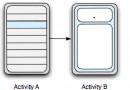 詳解Android Fragment之一:Fragment概述及用法
Fragment一般是宿主Activity UI的一部分或一種行為,作為Act
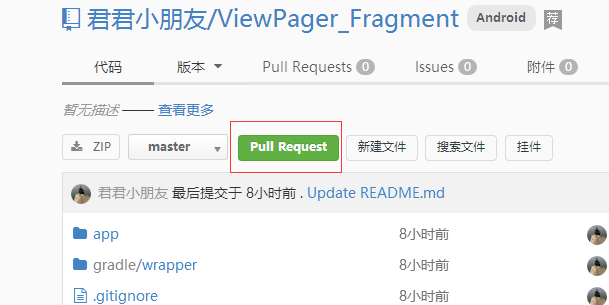 git 上的pull request 是什麼意思?,gitpull
git 上的pull request 是什麼意思?,gitpull 1、git 上有常見的pull request 功能
 GridView的簡單使用,
GridView的簡單使用, 測試代碼: activity_main.xml: <RelativeLayout xmlns:android=http
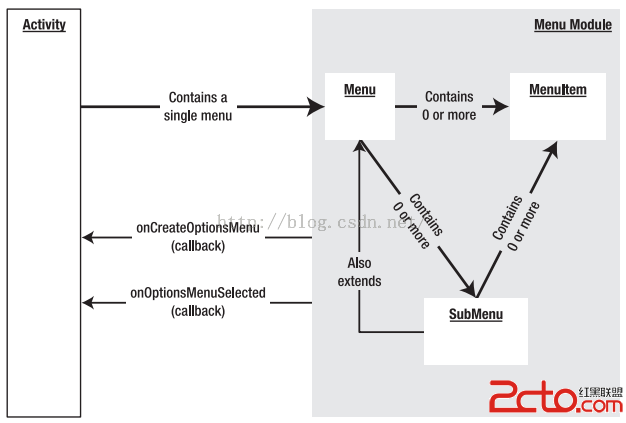 Android開發之Menu:OptionMenu(選項菜單)、ContextMenu(上下文菜單)、SubMenu(子菜單)
Android開發之Menu:OptionMenu(選項菜單)、ContextMenu(上下文菜單)、SubMenu(子菜單) 菜單的概念,現在已經很普及了。 W
 ViewPager與android.support.design.widget.TabLayout雙向交互聯動切換,tablayoutviewpager
ViewPager與android.support.design.wid