編輯:關於android開發
案例:
    <Button
                   android:id="@+id/btn_start"
               android:layout_width="match_parent"
               android:layout_height="wrap_parent"
               android:layout_alignParentTop="true"
               android:layout_centerHorizontal="true"
               android:layout_marginTop="50dp"
               android:onClick="doStart"
               android:text="Start Service"/>

                   <Button
                   android:layout_marginTop="20dp"
                   android:id="@+id/btn_stop"
               android:layout_width="match_parent"
               android:layout_height="wrap_parent"
               android:layout_alignParentTop="true"
               android:layout_centerHorizontal="true"
               android:layout_marginTop="50dp"
               android:onClick="doStop"
               android:text="Start Service"/>
public void doStart(View view){
		       Intent intent = new Intent(this,SampleService.class);
		       startService(intent);
		}

		public void doStop(View view){
		   Intent intent = new Intent(this,SampleService.class);
		       stopService(intent);
		}
public class SampleService exteds Service{

      public void onCreate(){
      Log.d(tag,"onCreate")
         super.onCreate();
      }


      public int onStartCommand(Intent intent,int flags,int startId){
      Log.d(tag,"onStartCommand");
      return super.onStartCommand(intent,flags,startId);

      }

      public void onDestroy(){
      Log.d(tag,"onDestroy");
         super.onDestroy();
      }


      }
AndroidMainfest.xml案例:
MainActivity:
package com.edu.hpu.service;

import android.app.Activity;
import android.content.Intent;
import android.os.Bundle;
import android.view.Menu;
import android.view.MenuItem;
import android.view.View;

public class MainActivity extends Activity {

	@Override
	protected void onCreate(Bundle savedInstanceState) {
		super.onCreate(savedInstanceState);
		setContentView(R.layout.activity_main);
	}

	public void startMusic(View view){
		Intent intent = new Intent(this,PlayerMusicService.class);
		startService(intent);
	}

	@Override
	protected void onDestroy() {
		// TODO Auto-generated method stub
		Intent intent = new Intent(this,PlayerMusicService.class);
		stopService(intent);
		super.onDestroy();
	}

}
布局:
    <RelativeLayout xmlns:android="http://schemas.android.com/apk/res/android"
        xmlns:tools="http://schemas.android.com/tools"
        android:layout_width="match_parent"
        android:layout_height="match_parent"
        >

        <Button
            android:id="@+id/button1"
            android:layout_width="fill_parent"
            android:layout_height="wrap_content"
            android:layout_alignParentTop="true"
            android:layout_centerHorizontal="true"
            android:layout_marginTop="136dp"
            android:onClick="startMusic"
            android:text="播放音樂" />

    </RelativeLayout>
Service類:
package com.edu.hpu.service;

import java.io.IOException;

import android.app.Service;
import android.content.Intent;
import android.media.MediaPlayer;
import android.os.Environment;
import android.os.IBinder;

public class PlayerMusicService extends Service{
    private MediaPlayer player;

	@Override
	public void onCreate() {
             try {
				 player = new MediaPlayer();
				 player.reset();
				 player.setDataSource(Environment.getExternalStorageDirectory().getAbsolutePath() + "/Music/Groove Coverage - She.mp3");
				 player.prepare();
				 player.start();
			} catch (IllegalArgumentException e) {
				// TODO: handle exception
				e.printStackTrace();
			}catch(SecurityException e){
				e.printStackTrace();
			}
             catch(IllegalStateException  e){
 				e.printStackTrace();
 			}
             catch(IOException  e){
  				e.printStackTrace();
  			}

	}

	@Override
	public void onDestroy() {
		// TODO Auto-generated method stub
		player.release();
		player = null;
		super.onDestroy();
	}
	@Override
	public IBinder onBind(Intent intent) {
		// TODO Auto-generated method stub
		return null;
	}

}
配置:
		   關於MediaPlayer
		      MediaPlayer支持主流的音頻、視頻文件的播放,亦支持播放
		      非本機的媒體文件;
		      MediaPlayer會開啟子線程播放歌曲;
		      可調用pause()方法暫停播放,調用seekTo()方法快進到指定的
		      位置開始播放;
	              可調用prepareAsync()方法加載歌曲,並配置OnPreparedListener,
		      在監聽器用調用MediaPlayer的start()方法;
		    通常為MediaPlayer配置OnCompletionListener,以實現在播放完成後的處理
 解析網絡json數據,模擬美團界面顯示。,json
解析網絡json數據,模擬美團界面顯示。,json 1 <?xml version=1.0 encoding=UTF-8?> 2 <RelativeL
 Creating Lists and Cards 創建列表和卡片,
Creating Lists and Cards 創建列表和卡片,To create complex lists and cards with material des
 Android AsyncTask 深度理解、簡單封裝、任務隊列分析、自定義線程池,androidasynctask
Android AsyncTask 深度理解、簡單封裝、任務隊列分析、自定義線程池,androidasynctask前言:由於最近在做SDK的功能,需要設計線程池。看了很
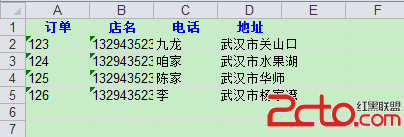 android中生成excel
android中生成excel 都說程序員不爽產品經理,其實有的時候遇到一些奇葩的後台開發人員也會很不順心。最近項目有這樣一個要求,要生成一個excel然後發郵件給客