編輯:關於android開發
<?xml version="1.0" encoding="utf-8"?>
<FrameLayout
    xmlns:android="http://schemas.android.com/apk/res/android"
    android:id="@+id/root"
    android:layout_width="match_parent"
    android:layout_height="match_parent">

    <ImageView
        android:id="@+id/iv_a"
        android:src="@drawable/stefanie01"
        android:scaleType="fitXY"
        android:layout_width="match_parent"
        android:layout_height="match_parent"/>
    <ImageView
        android:id="@+id/iv_b"
        android:src="@drawable/stefanie02"
        android:scaleType="fitXY"
        android:layout_width="match_parent"
        android:layout_height="match_parent"/>
</FrameLayout>
 1 package com.lyp.www.a2d;
 2
 3 import android.support.v7.app.AppCompatActivity;
 4 import android.os.Bundle;
 5 import android.view.View;
 6 import android.view.animation.Animation;
 7 import android.view.animation.ScaleAnimation;
 8 import android.widget.FrameLayout;
 9 import android.widget.ImageView;
10
11 public class MainActivity extends AppCompatActivity {
12
13     private FrameLayout flRoot;
14     private ImageView ivA;
15     private ImageView ivB;
16
17     boolean flag = true;
18
19     private ScaleAnimation anim1=
20             new ScaleAnimation(0,1,1,1, Animation.RELATIVE_TO_PARENT,0.5f,Animation.RELATIVE_TO_PARENT,0.5f);
21     private ScaleAnimation anim2=
22             new ScaleAnimation(1,0,1,1, Animation.RELATIVE_TO_PARENT,0.5f,Animation.RELATIVE_TO_PARENT,0.5f);
23
24     @Override
25     protected void onCreate(Bundle savedInstanceState) {
26         super.onCreate(savedInstanceState);
27         setContentView(R.layout.activity_main);
28
29         initView();
30         flRoot.setOnClickListener(new View.OnClickListener() {
31             @Override
32             public void onClick(View v) {
33                 if (flag) {
34                     ivA.startAnimation(anim2);
35                     flag=false;
36                 }else {
37                     ivB.startAnimation(anim2);
38                     flag=true;
39                 }
40             }
41         });
42
43     }
44
45     private void showImageA() {
46         ivB.setVisibility(View.INVISIBLE);
47         ivA.setVisibility(View.VISIBLE);
48     }
49
50     private void showImageB() {
51         ivA.setVisibility(View.INVISIBLE);
52         ivB.setVisibility(View.VISIBLE);
53     }
54
55     private void initView() {
56         flRoot = (FrameLayout) findViewById(R.id.root);
57         ivA = (ImageView) findViewById(R.id.iv_a);
58         ivB = (ImageView) findViewById(R.id.iv_b);
59         anim1.setDuration(600);
60         anim2.setDuration(600);
61
62         anim2.setAnimationListener(new Animation.AnimationListener() {
63             @Override
64             public void onAnimationStart(Animation animation) {
65
66             }
67
68             @Override
69             public void onAnimationEnd(Animation animation) {
70                 if (flag){
71                     ivB.setAnimation(null);
72                     showImageA();
73                     ivA.startAnimation(anim1);
74                 }else {
75                     ivA.setAnimation(null);
76                     showImageB();
77                     ivB.startAnimation(anim1);
78                 }
79             }
80
81             @Override
82             public void onAnimationRepeat(Animation animation) {
83
84             }
85         });
86     }
87 }
 Android5.0開發范例大全 讀書筆記(三),android5.0范例
Android5.0開發范例大全 讀書筆記(三),android5.0范例(二)用戶交互 2.14轉發觸摸事件 1.TouchDelegate很適合簡單的觸摸轉發,它指定
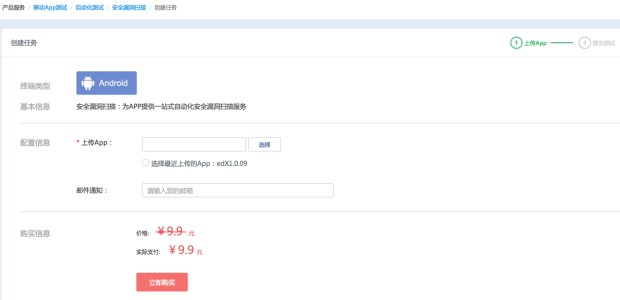 國內APP漏洞掃描收費情況調查,國內app漏洞掃描收費
國內APP漏洞掃描收費情況調查,國內app漏洞掃描收費概述 上一次分享了應用加固的評測後,很多人想看看漏洞掃描相關的對比數據。其實在選擇市面上這些移動安全類的產品時,經常
 Android平台Camera實時濾鏡實現方法探討(七)--濾鏡基本制作方法(一)
Android平台Camera實時濾鏡實現方法探討(七)--濾鏡基本制作方法(一) 關於如何制作濾鏡,知乎的這篇問答中的最高票給了比較專業的回答 另外,githunb
 Android之利用HTTP網絡通信實現與PHP的交互(三),android網絡通信
Android之利用HTTP網絡通信實現與PHP的交互(三),android網絡通信 Android與PHP的交互是通過Http網絡編程來實現的,利用php訪