編輯:關於android開發
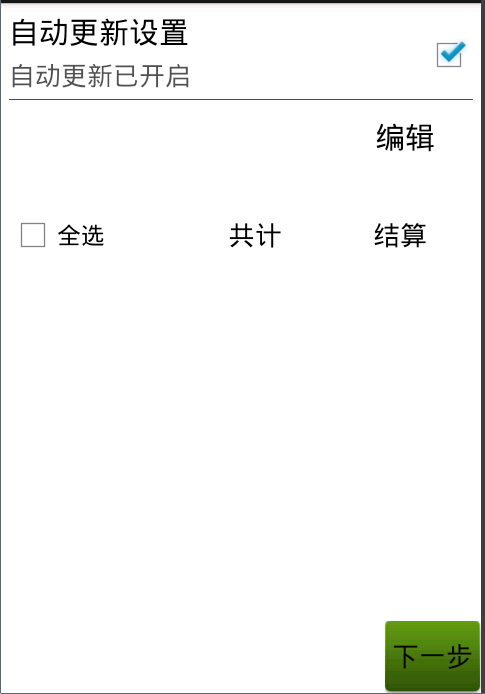
如圖當我點擊下一個時會跳轉到別個界面,當我用手勢向右滑動的時候也調轉到下一頁
其中點擊最上面的RelativeLayout則CheckBox會被點擊,並用SharedPreferences來記錄是否被點擊了
package com.org.demo.wangfeng.demo;

import com.org.wangfeng.R;

import android.app.Activity;
import android.app.AlertDialog;
import android.app.AlertDialog.Builder;
import android.content.DialogInterface;
import android.content.Intent;
import android.content.SharedPreferences;
import android.os.Bundle;
import android.util.Log;
import android.view.GestureDetector;
import android.view.MotionEvent;
import android.view.View;
import android.view.GestureDetector.SimpleOnGestureListener;
import android.view.View.OnClickListener;
import android.widget.Button;
import android.widget.CheckBox;
import android.widget.LinearLayout;
import android.widget.RelativeLayout;
import android.widget.TextView;
import android.widget.Toast;

public class FirstDemo extends Activity {
    // 跳轉到下個界面的按鈕 在跳轉到其他界面時設置了動畫
    private Button bb_frist;

    private GestureDetector mDectector;
    // 第一個模塊是否設置自動更新的設置
    private RelativeLayout rl_settring;
    private TextView tv_desc;
    private CheckBox cb_status;
    // 設置一個SharedPreferences來判斷是否設置了自動更新設置
    private SharedPreferences mPreferences;
    // 第二個模塊設置編輯還是完成的界面
    private TextView bb_select;
    private TextView tv_accout, tv_delete;
    private LinearLayout ll_selectone, ll_selecttwo;

    @Override
    protected void onCreate(Bundle savedInstanceState) {
        // TODO Auto-generated method stub
        super.onCreate(savedInstanceState);
        setContentView(R.layout.fristdemo);

        mPreferences = getSharedPreferences("config", MODE_PRIVATE);

        bb_frist = (Button) findViewById(R.id.bb_frist);
        bb_frist.setOnClickListener(new View.OnClickListener() {

            @Override
            public void onClick(View arg0) {
                // TODO Auto-generated method stub
                startActivity(new Intent(FirstDemo.this, TwoDemo.class));
                finish();
                // 設置界面滑動的動畫
                overridePendingTransition(R.anim.tran_in, R.anim.tran_out);// 下一頁
            }
        });

        // 手勢識別器
        mDectector = new GestureDetector(this, new SimpleOnGestureListener() {

            /**
             * 監聽手勢滑動事件 e1表示滑動的起點,e2表示滑動終點 velocityX表示水平速度 velocityY表示垂直速度
             */
            @Override
            public boolean onFling(MotionEvent e1, MotionEvent e2,
                    float velocityX, float velocityY) {

                // 判斷縱向滑動幅度是否過大, 過大的話不允許切換界面
                if (Math.abs(e2.getRawY() - e1.getRawY()) > 100) {
                    Toast.makeText(FirstDemo.this, "不能這樣劃哦!",
                            Toast.LENGTH_SHORT).show();
                    return true;
                }

                // 判斷滑動是否過慢
                if (Math.abs(velocityX) < 100) {
                    Toast.makeText(FirstDemo.this, "滑動的太慢了!",
                            Toast.LENGTH_SHORT).show();
                    return true;
                }

                // 向右劃,上一頁
                if (e2.getRawX() - e1.getRawX() > 200) {
                    // showPreviousPage();
                    return true;
                }

                // 向左劃, 下一頁
                if (e1.getRawX() - e2.getRawX() > 200) {
                    // showNextPage();
                    startActivity(new Intent(FirstDemo.this, TwoDemo.class));
                    finish();
                    // 設置界面滑動的動畫
                    overridePendingTransition(R.anim.tran_in, R.anim.tran_out);// 下一頁
                    return true;
                }

                return super.onFling(e1, e2, velocityX, velocityY);
            }
        });

        rl_settring = (RelativeLayout) findViewById(R.id.rl_settring);
        tv_desc = (TextView) findViewById(R.id.tv_desc);
        cb_status = (CheckBox) findViewById(R.id.cb_status);

        boolean autoUpdata = mPreferences.getBoolean("auto_update", false);

        if (autoUpdata) {
            // 自動更新已開啟
            tv_desc.setText("自動更新已開啟");
            cb_status.setChecked(true);
        } else {
            tv_desc.setText("自動更新已關閉");
            cb_status.setChecked(false);
        }

        rl_settring.setOnClickListener(new OnClickListener() {

            @Override
            public void onClick(View arg0) {
                // TODO Auto-generated method stub
                if (cb_status.isChecked()) {
                    tv_desc.setText("自動更新已關閉");
                    cb_status.setChecked(false);
                    mPreferences.edit().putBoolean("auto_update", false)
                            .commit();
                } else {
                    tv_desc.setText("自動更新已開啟");
                    cb_status.setChecked(true);
                    mPreferences.edit().putBoolean("auto_update", true)
                            .commit();
                }

            }
        });

        bb_select = (TextView) findViewById(R.id.bb_select);
        tv_accout = (TextView) findViewById(R.id.tv_accout);
        tv_delete = (TextView) findViewById(R.id.tv_delete);
        ll_selectone = (LinearLayout) findViewById(R.id.ll_selectone);
        ll_selecttwo = (LinearLayout) findViewById(R.id.ll_selecttwo);

        bb_select.setOnClickListener(new OnClickItemClass());
        tv_accout.setOnClickListener(new OnClickListener() {

            @Override
            public void onClick(View arg0) {
                // TODO Auto-generated method stub
                AlertDialog.Builder builder = new Builder(FirstDemo.this);
                builder.setTitle("是否結算");
                builder.setMessage("是否結算");
                builder.setPositiveButton("確定",
                        new DialogInterface.OnClickListener() {

                            @Override
                            public void onClick(DialogInterface arg0, int arg1) {
                                // TODO Auto-generated method stub

                            }
                        });
                builder.setNegativeButton("否定", null);
                builder.create().show();
            }
        });
        tv_delete.setOnClickListener(new OnClickListener() {

            @Override
            public void onClick(View arg0) {
                // TODO Auto-generated method stub
                AlertDialog.Builder builder = new Builder(FirstDemo.this);
                builder.setTitle("是否刪除");
                builder.setMessage("是否刪除當前信息");
                builder.setPositiveButton("確定",
                        new DialogInterface.OnClickListener() {

                            @Override
                            public void onClick(DialogInterface arg0, int arg1) {
                                // TODO Auto-generated method stub
                                Toast.makeText(FirstDemo.this, "刪除成功",
                                        Toast.LENGTH_SHORT).show();
                            }
                        });
                builder.setNegativeButton("取消",
                        new DialogInterface.OnClickListener() {

                            @Override
                            public void onClick(DialogInterface arg0, int arg1) {
                                // TODO Auto-generated method stub

                            }
                        });
                builder.create().show();
            }
        });
    }

    private class OnClickItemClass implements View.OnClickListener {

        @Override
        public void onClick(View arg0) {
            // TODO Auto-generated method stub
            // ll_selectone.setVisibility(View.GONE);
            // ll_selecttwo.setVisibility(View.VISIBLE);
            Log.d("jiejie", "ddddddddddddd" + bb_select.getText());
            if (bb_select.getText().toString().equals("編輯")) {
                ll_selectone.setVisibility(View.GONE);
                ll_selecttwo.setVisibility(View.VISIBLE);
                bb_select.setText("完成");
                Log.d("jiejie", "ddbb_select.getText().equals(wancheng)dd"
                        + bb_select.getText());
            } else {
                ll_selectone.setVisibility(View.VISIBLE);
                ll_selecttwo.setVisibility(View.GONE);
                bb_select.setText("編輯");
                Log.d("jiejie", "ddbb_select.getText().equals(bianji)dd"
                        + bb_select.getText());
            }
        }

    }

    @Override
    public boolean onTouchEvent(MotionEvent event) {
        mDectector.onTouchEvent(event);// 委托手勢識別器處理觸摸事件
        return super.onTouchEvent(event);
    }
}
<?xml version="1.0" encoding="utf-8"?>
<RelativeLayout xmlns:android="http://schemas.android.com/apk/res/android"
    android:layout_width="match_parent"
    android:layout_height="match_parent" >

    <RelativeLayout
        android:id="@+id/rl_settring"
        android:layout_width="match_parent"
        android:layout_height="70dp"
        android:padding="5dp" >

        <TextView
            android:id="@+id/tv_title"
            android:layout_width="wrap_content"
            android:layout_height="wrap_content"
            android:text="自動更新設置"
            android:textColor="#000"
            android:textSize="20sp" />

        <TextView
            android:id="@+id/tv_desc"
            android:layout_width="wrap_content"
            android:layout_height="wrap_content"
            android:layout_below="@id/tv_title"
            android:layout_marginTop="3dp"
            android:text="ddddddd"
            android:textColor="#a000"
            android:textSize="17sp" />

        <CheckBox
            android:id="@+id/cb_status"
            android:layout_width="wrap_content"
            android:layout_height="wrap_content"
            android:layout_alignParentRight="true"
            android:layout_centerVertical="true"
            android:clickable="false"
            android:focusable="false"
            android:focusableInTouchMode="false" />

        <View
            android:layout_width="match_parent"
            android:layout_height="0.2dp"
            android:layout_alignParentBottom="true"
            android:background="#a000" />
    </RelativeLayout>

    <RelativeLayout
        android:layout_width="match_parent"
        android:layout_height="120dp"
        android:layout_below="@id/rl_settring"
        android:padding="5dp" >

        <TextView
            android:id="@+id/bb_select"
            android:layout_width="wrap_content"
            android:layout_height="wrap_content"
            android:layout_alignParentRight="true"
            android:layout_marginRight="25dp"
            android:text="編輯"
            android:textColor="#000"
            android:textSize="20sp" />

        <LinearLayout
            android:id="@+id/ll_selectone"
            android:layout_width="match_parent"
            android:layout_height="60dp"
            android:layout_alignParentBottom="true"
            android:orientation="horizontal" >

            <CheckBox
                android:layout_width="0dp"
                android:layout_height="match_parent"
                android:layout_weight="1.2"
                android:text="全選" />

            <TextView
                android:layout_width="0dp"
                android:layout_height="match_parent"
                android:layout_weight="1"
                android:gravity="center"
                android:text="共計"
                android:textColor="#000"
                android:textSize="18sp" />

            <TextView
                android:id="@+id/tv_accout"
                android:layout_width="0dp"
                android:layout_height="match_parent"
                android:layout_weight="1"
                android:gravity="center"
                android:text="結算"
                android:textColor="#000"
                android:textSize="18sp" />
        </LinearLayout>

        <LinearLayout
            android:id="@+id/ll_selecttwo"
            android:layout_width="match_parent"
            android:layout_height="60dp"
            android:layout_alignParentBottom="true"
            android:orientation="horizontal"
            android:visibility="gone" >

            <CheckBox
                android:layout_width="0dp"
                android:layout_height="match_parent"
                android:layout_weight="1.2"
                android:text="全選" />

            <TextView
                android:layout_width="0dp"
                android:layout_height="match_parent"
                android:layout_weight="1"
                android:gravity="center"
                android:text="移到收藏夾"
                android:textColor="#000"
                android:textSize="18sp" />

            <TextView
                android:id="@+id/tv_delete"
                android:layout_width="0dp"
                android:layout_height="match_parent"
                android:layout_weight="1"
                android:gravity="center"
                android:text="刪除"
                android:textColor="#000"
                android:textSize="18sp" />
        </LinearLayout>
    </RelativeLayout>

    <Button
        android:id="@+id/bb_frist"
        android:layout_width="wrap_content"
        android:layout_height="wrap_content"
        android:layout_alignParentBottom="true"
        android:layout_alignParentRight="true"
        android:background="@drawable/btn_selector"
        android:text="@string/next" />

</RelativeLayout>
tran_in.xml
<?xml version="1.0" encoding="utf-8"?>
<translate xmlns:android="http://schemas.android.com/apk/res/android"
    android:duration="300"
    android:fromXDelta="100%p"
    android:toXDelta="0" >

</translate>


tran_out.xml
<?xml version="1.0" encoding="utf-8"?>
<translate xmlns:android="http://schemas.android.com/apk/res/android"
    android:duration="500"
    android:fromXDelta="0"
    android:toXDelta="-100%p" >

</translate>


tran_previous_in.xml
<?xml version="1.0" encoding="utf-8"?>
<translate xmlns:android="http://schemas.android.com/apk/res/android"
    android:duration="500"
    android:fromXDelta="-100%p"
    android:toXDelta="0" >

</translate>


tran_previous_out.xml
<?xml version="1.0" encoding="utf-8"?>
<translate xmlns:android="http://schemas.android.com/apk/res/android"
    android:duration="500"
    android:fromXDelta="0"
    android:toXDelta="100%p" >

</translate>
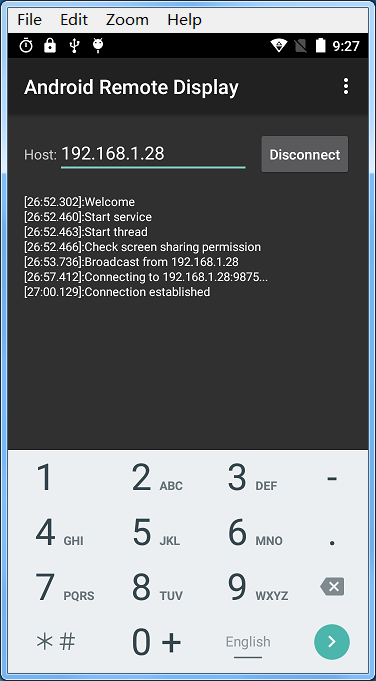 Remote Displayer for Android,displayerandroid
Remote Displayer for Android,displayerandroid應用截圖: 作者:sunrain_hjb
 Linux內核系列—11.操作系統開發之ELF格式,linuxelf
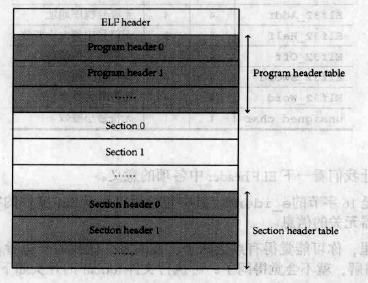
Linux內核系列—11.操作系統開發之ELF格式,linuxelfELF文件的結構如下圖所示: ELF文件由4部分組成,分別是ELF頭(ELF header)、程序頭
 生命不息,折騰不止
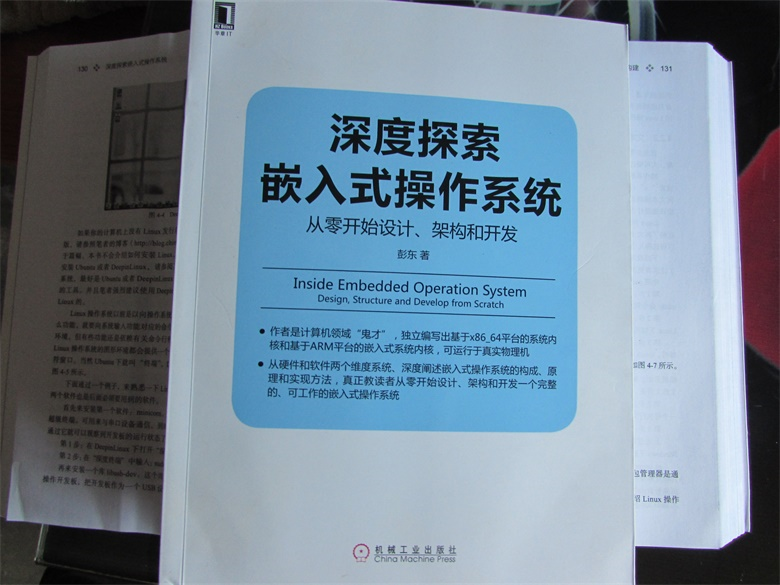
生命不息,折騰不止截止到今天,我個人已經折騰了四個小玩意兒:高歌一曲(音樂播放器)、LMOS(x86_64體系的操作系統內核)、LMOSEM(ARM體系的操作系統內核),
 Android中Canvas繪圖之PorterDuffXfermode使用及工作原理詳解
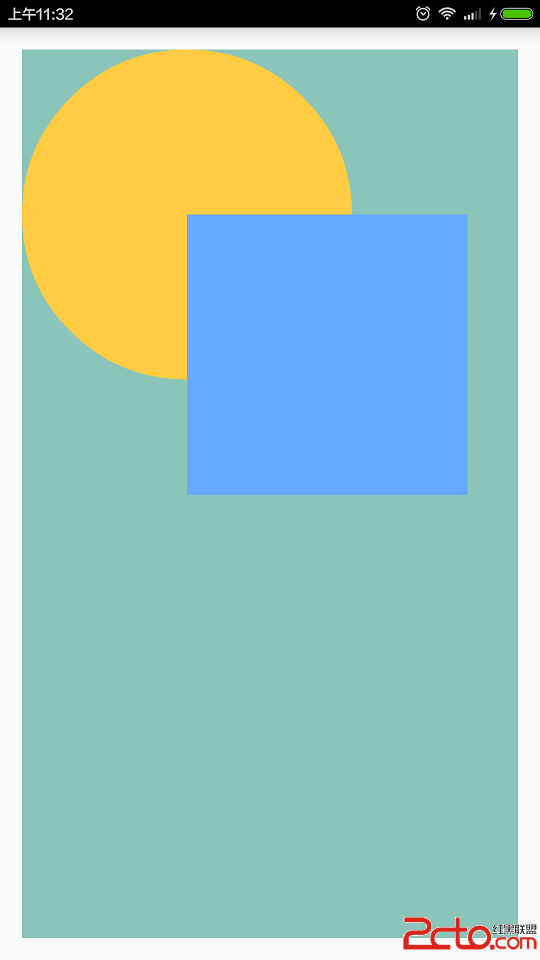
Android中Canvas繪圖之PorterDuffXfermode使用及工作原理詳解 概述 類android.graphics.PorterDuffXfermode