編輯:關於android開發
package com.example.imagescale;

import android.os.Bundle;
import android.app.Activity;
import android.graphics.Bitmap;
import android.graphics.BitmapFactory;
import android.graphics.Canvas;
import android.graphics.Color;
import android.graphics.Matrix;
import android.graphics.Paint;
import android.view.Menu;
import android.view.View;
import android.view.View.OnClickListener;
import android.widget.Button;
import android.widget.ImageView;

public class MainActivity extends Activity {
    private ImageView iv1,iv2;
    private Button bt,bt2,bt3,bt4;
    private Bitmap bp;
    @Override
    protected void onCreate(Bundle savedInstanceState) {
        super.onCreate(savedInstanceState);
        setContentView(R.layout.activity_main);
        iv1=(ImageView)this.findViewById(R.id.imageView1);
        iv2=(ImageView)this.findViewById(R.id.imageView2);
        bt=(Button)this.findViewById(R.id.button1);
        bt2=(Button)this.findViewById(R.id.button2);
        bt3=(Button)this.findViewById(R.id.button3);
        bt4=(Button)this.findViewById(R.id.button4);
        bt.setOnClickListener(new OnClickListener() {
                @Override
                public void onClick(View arg0) {
                    // TODO Auto-generated method stub
                    bp = BitmapFactory.decodeResource(getResources(), R.drawable.xh);
                       //iv1.setImageBitmap(bp);
                       //對照圖片
                       //以bp在高、寬決定Canvas畫布的大小
                       Bitmap bp2 = Bitmap.createBitmap(bp.getWidth(), bp.getHeight(), bp.getConfig());//
                       Canvas canvas = new Canvas(bp2);
                       Paint paint = new Paint();
                       paint.setColor(Color.BLACK);
                       Matrix matrix = new Matrix();
                    matrix.setScale(0.5f, 1);
                    canvas.drawBitmap(bp, matrix, paint);
                   iv2.setImageBitmap(bp2);
                }
            });
        bt2.setOnClickListener(new OnClickListener() {
            @Override
            public void onClick(View arg0) {
                // TODO Auto-generated method stub
                bp = BitmapFactory.decodeResource(getResources(), R.drawable.xh);
                   //iv1.setImageBitmap(bp);
                   //對照圖片
                   //以bp在高、寬決定Canvas畫布的大小
                   Bitmap bp2 = Bitmap.createBitmap(bp.getWidth(), bp.getHeight(), bp.getConfig());//
                   Canvas canvas = new Canvas(bp2);
                   Paint paint = new Paint();
                   paint.setColor(Color.BLACK);
                   Matrix matrix = new Matrix();
                   matrix.setScale(1, -1);
                   matrix.postTranslate(0, bp.getHeight());
                canvas.drawBitmap(bp, matrix, paint);
               iv2.setImageBitmap(bp2);
            }
        });
        bt3.setOnClickListener(new OnClickListener() {
            @Override
            public void onClick(View arg0) {
                // TODO Auto-generated method stub
                bp = BitmapFactory.decodeResource(getResources(), R.drawable.xh);
                   //iv1.setImageBitmap(bp);
                   //對照圖片
                   //以bp在高、寬決定Canvas畫布的大小
                   Bitmap bp2 = Bitmap.createBitmap(bp.getWidth(), bp.getHeight(), bp.getConfig());//
                   Canvas canvas = new Canvas(bp2);
                   Paint paint = new Paint();
                   paint.setColor(Color.BLACK);
                   Matrix matrix = new Matrix();
                   matrix.setRotate(90, bp.getWidth()/2, bp.getHeight()/2);
                   canvas.drawBitmap(bp, matrix, paint);
               iv2.setImageBitmap(bp2);
            }
        });
        bt4.setOnClickListener(new OnClickListener() {
            @Override
            public void onClick(View arg0) {
                // TODO Auto-generated method stub
                bp = BitmapFactory.decodeResource(getResources(), R.drawable.xh);
                   //iv1.setImageBitmap(bp);
                   //對照圖片
                   //以bp在高、寬決定Canvas畫布的大小
                   Bitmap bp2 = Bitmap.createBitmap(bp.getWidth(), bp.getHeight(), bp.getConfig());//
                   Canvas canvas = new Canvas(bp2);
                   Paint paint = new Paint();
                   paint.setColor(Color.BLACK);
                   Matrix matrix = new Matrix();
                   matrix.setTranslate(100, 100);
                canvas.drawBitmap(bp, matrix, paint);
               iv2.setImageBitmap(bp2);
            }
        });
                //原始圖片
                //bp = BitmapFactory.decodeResource(getResources(), R.drawable.xh);
                   //iv1.setImageBitmap(bp);
                   //對照圖片
                   //以bp在高、寬決定Canvas畫布的大小
                   //Bitmap bp2 = Bitmap.createBitmap(bp.getWidth(), bp.getHeight(), bp.getConfig());//
                   //Canvas canvas = new Canvas(bp2);
                   //Paint paint = new Paint();
                   //paint.setColor(Color.BLACK);
                   //Matrix matrix = new Matrix();
                   //1.縮放
                       //方法一:使用矩陣
                       /*matrix.setValues(new float[]{
                               0.5f,0,0,
                               0,1,0,
                               0,0,1
                       });*/
                       //方法二:
                       //matrix.setScale(0.5f, 1);
                   //2.旋轉
                       //以圖片左上角為中心旋轉
                       //matrix.setRotate(15);
                       //以圖片中心旋轉
                       //matrix.setRotate(90, bp.getWidth()/2, bp.getHeight()/2);
                       //消除鋸齒
                       //paint.setAntiAlias(true);
                   //3.平移
                       //matrix.setTranslate(50, 50);
                   //4.鏡子效果
                       //matrix.setScale(-1, 1);
                       //matrix.postTranslate(bp.getWidth(), 0);
                    //5.倒影效果
                       //matrix.setScale(1, -1);
                       //matrix.postTranslate(0, bp.getHeight());

                       //canvas.drawBitmap(bp, matrix, paint);
                       //iv2.setImageBitmap(bp2);

    }


    @Override
    public boolean onCreateOptionsMenu(Menu menu) {
        // Inflate the menu; this adds items to the action bar if it is present.
        getMenuInflater().inflate(R.menu.main, menu);
        return true;
    }

}
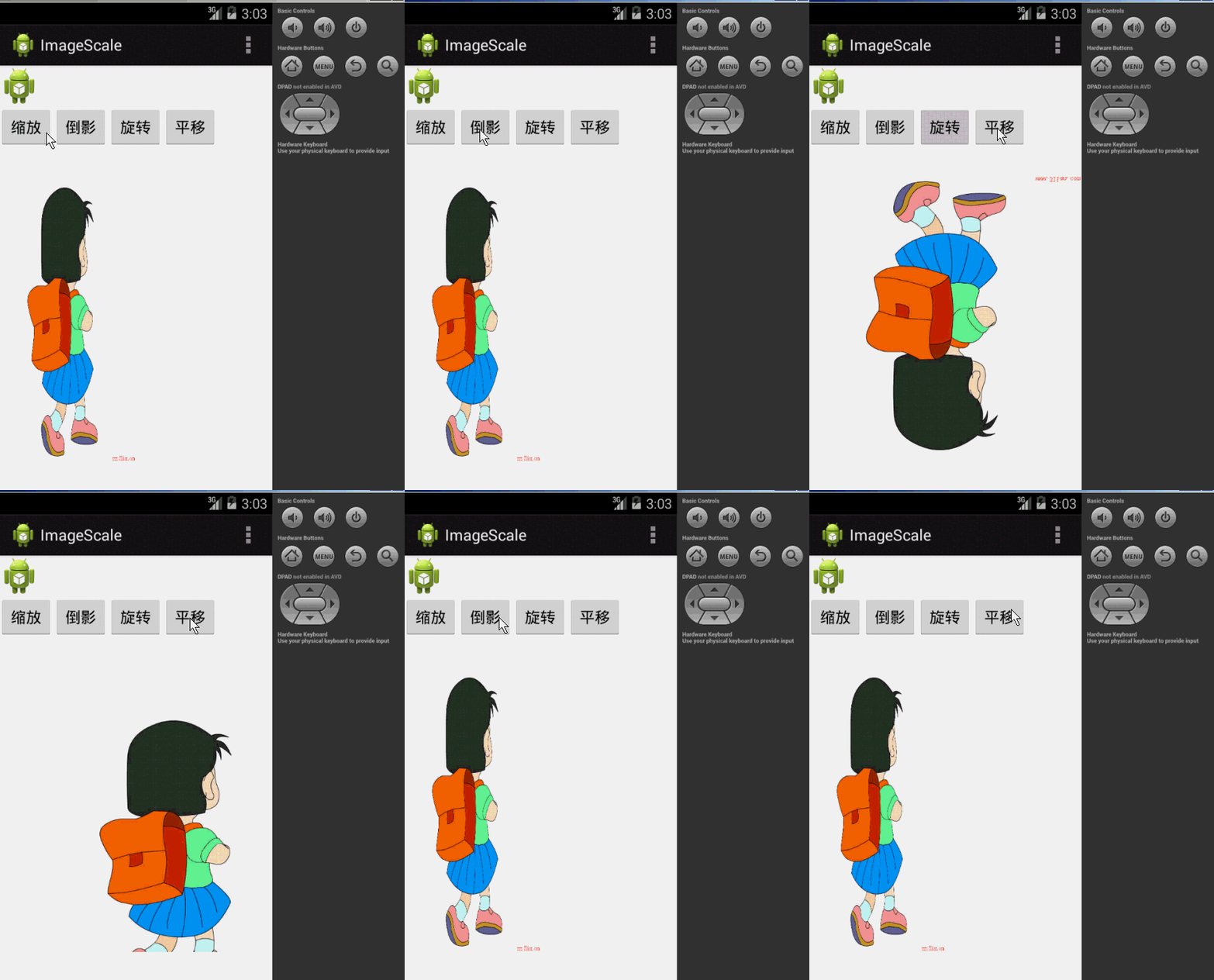
執行效果圖:
 android 和Ubuntu 同步使用Xmind
android 和Ubuntu 同步使用Xmind故事起源於我一直習慣於使用腦圖來整理思路,平時使用Xmind利用金山的快盤在辦公室和家裡的機器之間自動同步,很方便。最近
 Android:應用寶省流量更新
Android:應用寶省流量更新 應用寶省流量更新介紹 應用寶省流量更新(SDK),是應用寶提供給開發者輕松實現應用省流量更新的功能,可以幫助開發者縮短更新過程,提高應用
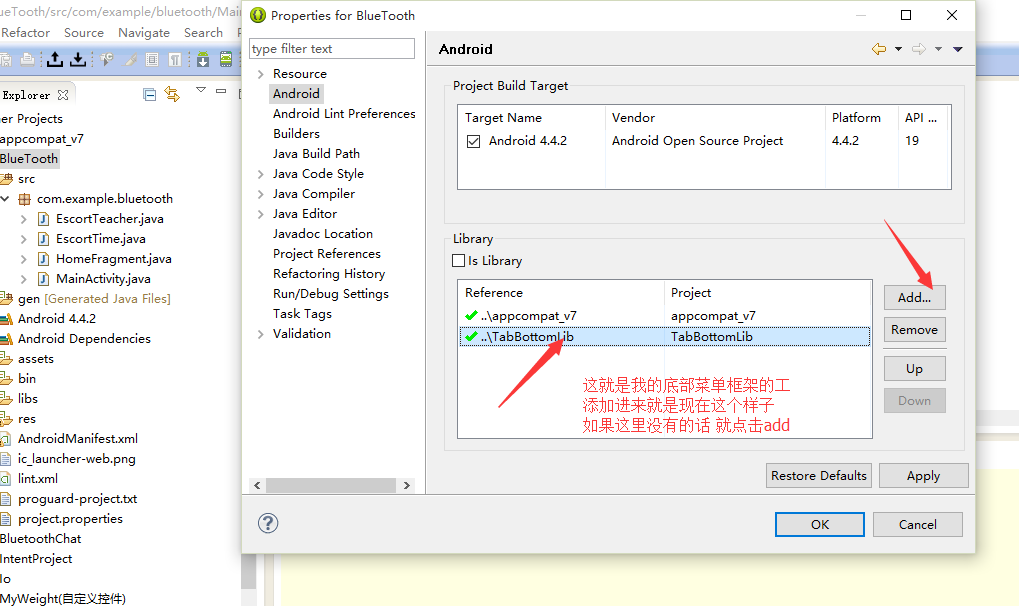 關於使用底部菜單欄的使用。。。,使用底部菜單欄..
關於使用底部菜單欄的使用。。。,使用底部菜單欄..要使用它的話, 首先, 你要引用你的庫 到你的當前工程裡面, 操作方式如下,右鍵你當前的工程, build
 Android中使用ViewPager實現屏幕頁面切換和頁面輪播效果,androidviewpager
Android中使用ViewPager實現屏幕頁面切換和頁面輪播效果,androidviewpager之前關於如何實現屏幕頁面切換,寫過一篇博文《Android中使用Vi