編輯:關於android開發
LabelView是在github上一個開源的標簽庫。其項目主頁是:https://github.com/linger1216//labelview
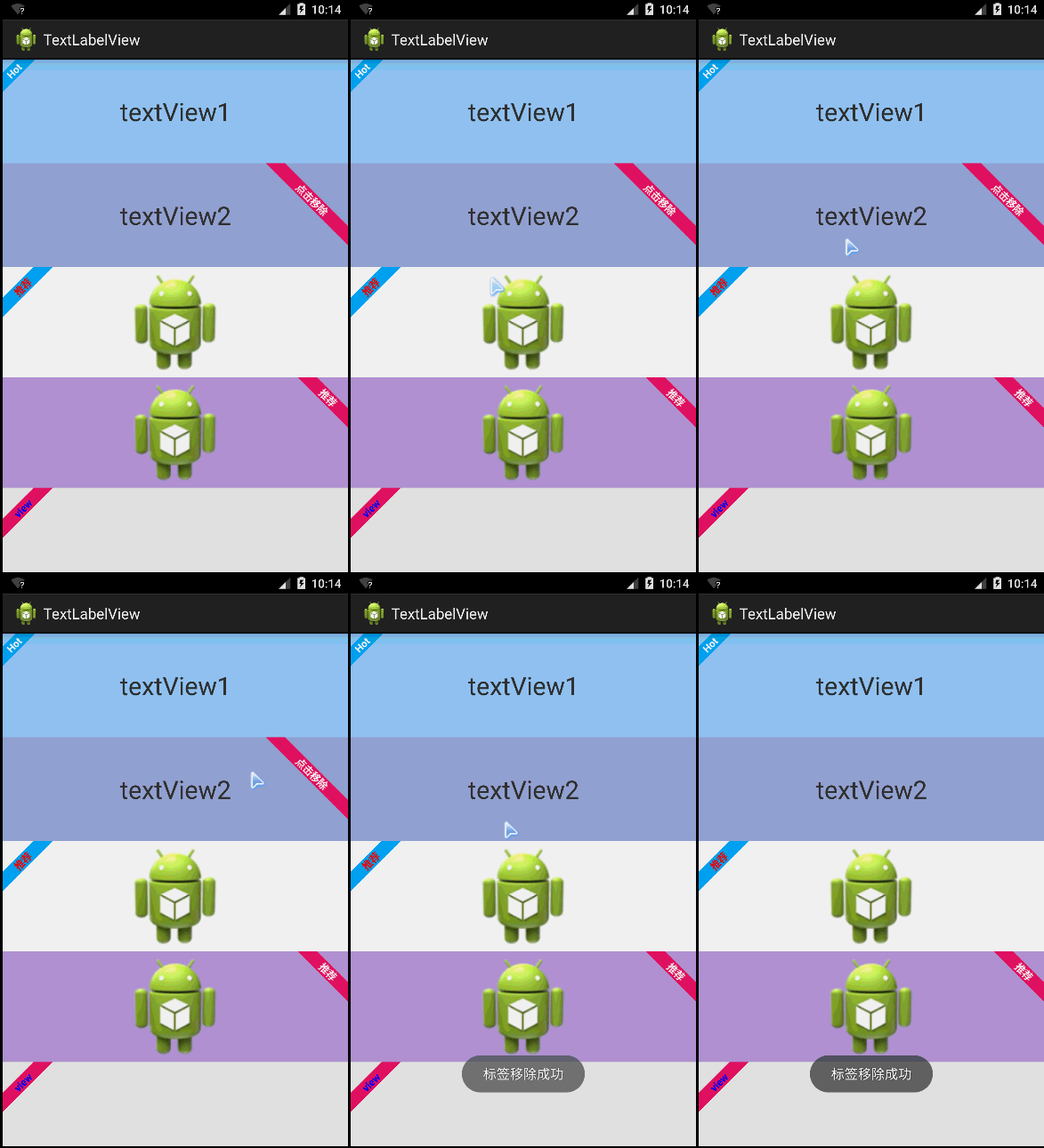
LabelView為一個TextView,ImageView或者為ListView中適配器getView返回的View,增加一個左上角或者右上角的標簽
這種需求設計在商城類APP、電商類APP中比較常用,這些APP展示的商品,通常會增加一些促銷或者該類商品的特征。
LabelView集成自Android TextView,可以像使用Android TextView一樣使用LabelView,LabelView使用簡單,如代碼所示:
布局代碼:
 1 <LinearLayout xmlns:android="http://schemas.android.com/apk/res/android"
 2     xmlns:tools="http://schemas.android.com/tools"
 3     android:layout_width="match_parent"
 4     android:layout_height="match_parent"
 5     android:orientation="vertical"
 6     tools:context="com.zzw.textlabelview.MainActivity" >
 7
 8     <TextView
 9         android:id="@+id/textView1"
10         android:layout_width="match_parent"
11         android:layout_height="wrap_content"
12         android:layout_weight="1"
13         android:background="#90CAF9"
14         android:gravity="center"
15         android:text="textView1"
16         android:textSize="30sp" />
17
18     <TextView
19         android:id="@+id/textView2"
20         android:layout_width="match_parent"
21         android:layout_height="wrap_content"
22         android:layout_weight="1"
23         android:background="#9FA8DA"
24         android:gravity="center"
25         android:text="textView2"
26         android:textSize="30sp" />
27
28     <ImageView
29         android:id="@+id/imageView1"
30         android:layout_width="match_parent"
31         android:layout_height="wrap_content"
32         android:layout_weight="1"
33         android:src="@drawable/ic_launcher" />
34
35     <ImageView
36         android:id="@+id/imageView2"
37         android:layout_width="match_parent"
38         android:layout_height="wrap_content"
39         android:layout_weight="1"
40         android:background="#B39DDB"
41         android:src="@drawable/ic_launcher" />
42
43   <View
44         android:id="@+id/view"
45         android:layout_width="match_parent"
46         android:layout_height="100dip"
47         android:background="#e0e0e0" >
48     </View>
49
50 </LinearLayout>
JAVA代碼:
 1 package com.zzw.textlabelview;
 2
 3 import com.lid.lib.LabelView;
 4 import com.lid.lib.LabelView.Gravity;
 5
 6 import android.app.Activity;
 7 import android.graphics.Color;
 8 import android.os.Bundle;
 9 import android.view.View;
10 import android.view.View.OnClickListener;
11 import android.widget.Toast;
12
13 public class MainActivity extends Activity {
14
15     @Override
16     protected void onCreate(Bundle savedInstanceState) {
17         super.onCreate(savedInstanceState);
18         setContentView(R.layout.activity_main);
19
20         //為TextView1左上角添加一個標簽
21         LabelView label1 = new LabelView(this);
22         label1.setText("Hot");
23         label1.setBackgroundColor(0xff03a9f4);
24         label1.setTargetView(findViewById(R.id.textView1), 4, Gravity.LEFT_TOP);
25
26         //為TextView2右上角添加一個標簽,點擊標簽移除
27         final LabelView label2 = new LabelView(this);
28         label2.setText("點擊移除");
29         label2.setBackgroundColor(0xffE91E63);
30         label2.setTargetView(findViewById(R.id.textView2), 20,
31                 Gravity.RIGHT_TOP);
32         findViewById(R.id.textView2).setOnClickListener(new OnClickListener() {
33
34             @Override
35             public void onClick(View v) {
36                 label2.remove();
37                 Toast.makeText(getApplicationContext(), "標簽移除成功", 0).show();
38             }
39         });
40
41         //為ImageView1添加一個左上角標簽,並且自定義標簽字顏色
42         LabelView label3 = new LabelView(this);
43         label3.setText("推薦");
44         label3.setTextColor(Color.RED);
45         label3.setBackgroundColor(0xff03a9f4);
46         label3.setTargetView(findViewById(R.id.imageView1), 10,
47                 Gravity.LEFT_TOP);
48
49         //為IamgeView2添加一個右上角標簽
50         LabelView label4 = new LabelView(this);
51         label4.setText("推薦");
52         label4.setBackgroundColor(0xffE91E63);
53         label4.setTargetView(findViewById(R.id.imageView2), 10,
54                 Gravity.RIGHT_TOP);
55
56         //為一個View添加一個左上角標簽(ListView用)
57         LabelView label5 = new LabelView(this);
58         label5.setText("view");
59         label5.setTextColor(Color.BLUE);
60         label5.setBackgroundColor(0xffE91E63);
61         label5.setTargetView(findViewById(R.id.view), 10, Gravity.LEFT_TOP);
62     }
63 }
 Android模擬登錄評論CSDN
Android模擬登錄評論CSDN 有時候作為非官方開發的APP集成了官方的所有信息,但是現在需要實現另一個功能那就是登錄發表評論到官方的網站,而非官方的APP並不知道官
 Android SurfaceView的生命周期,androidsurfaceview
Android SurfaceView的生命周期,androidsurfaceview本文利用SurfaceView來實現視頻的播放 本文地址:http://www.cn
 Android 面試題--Activity,android--activity
Android 面試題--Activity,android--activity1、什麼是 Activity?Activity是Android組件中最基本也是最為常見用的四
 【Android】不彈root請求框檢測手機是否root,androidroot
【Android】不彈root請求框檢測手機是否root,androidroot由於項目需要root安裝軟件,並且希望在合適的時候引導用戶去開啟root安裝,故需要檢測手