編輯:關於android開發
<!-- 定義基礎布局TableLayout -->
<TableLayout xmlns:android="http://schemas.android.com/apk/res/android"
    xmlns:tools="http://schemas.android.com/tools"
    android:layout_width="match_parent"
    android:layout_height="match_parent"
    android:orientation="vertical"
    android:paddingBottom="@dimen/activity_vertical_margin"
    android:paddingLeft="@dimen/activity_horizontal_margin"
    android:paddingRight="@dimen/activity_horizontal_margin"
    android:paddingTop="@dimen/activity_vertical_margin" >
    <!-- 定義TableRow控件,代表第一行 -->
    <TableRow android:orientation="horizontal" >

        <TextView
            android:layout_width="wrap_content"
            android:layout_height="match_parent"
            android:gravity="center"
            android:textSize="20dp"
            android:layout_weight="1"
            android:text="學生姓名" />

        <TextView
            android:layout_width="match_parent"
            android:layout_height="match_parent"
            android:layout_weight="1"
            android:textSize="20dp"
            android:gravity="center"
            android:text="數學成績" />

        <TextView
            android:layout_width="match_parent"
            android:layout_height="match_parent"
            android:layout_weight="1"
            android:textSize="20dp"
            android:gravity="center"
            android:text="語文成績" />
    </TableRow>
    <!-- 定義TableRow控件,代表第二行 -->
    <TableRow android:orientation="horizontal" >

        <TextView
            android:layout_width="wrap_content"
            android:layout_height="match_parent"
            android:layout_weight="1"
            android:gravity="center"
            android:text="張三" />

        <TextView
            android:layout_width="wrap_content"
            android:layout_height="match_parent"
            android:layout_weight="1"
            android:gravity="center"
            android:text="90" />

        <TextView
            android:layout_width="wrap_content"
            android:layout_height="match_parent"
            android:layout_weight="1"
            android:gravity="center"
            android:text="83" />
    </TableRow>
    <!-- 定義TableRow控件,代表第三行 -->
    <TableRow android:orientation="horizontal" >

        <TextView
            android:layout_width="match_parent"
            android:layout_height="match_parent"
            android:layout_weight="1"
            android:gravity="center"
            android:text="李四" />

        <TextView
            android:layout_width="wrap_content"
            android:layout_height="match_parent"
            android:layout_weight="1"
            android:gravity="center"
            android:text="83" />

        <TextView
            android:layout_width="wrap_content"
            android:layout_height="match_parent"
            android:layout_weight="1"
            android:gravity="center"
            android:text="83" />
    </TableRow>
    <!-- 定義TableRow控件,代表第四行 -->
    <TableRow android:orientation="horizontal" >

        <TextView
            android:layout_width="match_parent"
            android:layout_height="match_parent"
            android:layout_weight="1"
            android:gravity="center"
            android:text="王五" />

        <TextView
            android:layout_width="wrap_content"
            android:layout_height="match_parent"
            android:layout_weight="1"
            android:gravity="center"
            android:text="81" />

        <TextView
            android:layout_width="wrap_content"
            android:layout_height="match_parent"
            android:layout_weight="1"
            android:gravity="center"
            android:text="82" />
    </TableRow>

</TableLayout>
 Android 在外部存儲讀寫文件,android讀寫
Android 在外部存儲讀寫文件,android讀寫本文主要介紹android中如何在外部存儲讀寫數據 sd卡的路徑 sdcard:2.3之前的sd卡路徑 mnt/sd
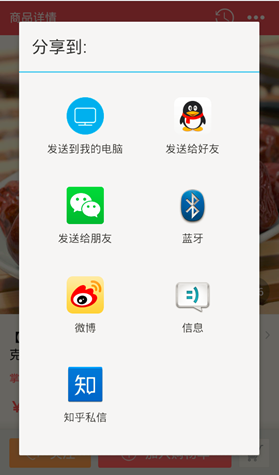 Android 不一樣的原生分享,android分享
Android 不一樣的原生分享,android分享Android做分享功能百度一下就兩種方案,其一是用系統原生的Activity,最終彈出一個對話框,下面這種的還好,像
 從源碼的角度理解四大組件的工作過程——Android開發藝術探索筆記
從源碼的角度理解四大組件的工作過程——Android開發藝術探索筆記 系統對四大組件的過程進行了很大程度的封裝,日常開發中並不需要了解底層的工作原理,那麼研究這些原理
 【轉】連接MySQL數據庫(android,php,MySQL),mysqlandroid
【轉】連接MySQL數據庫(android,php,MySQL),mysqlandroid管理MySQL數據庫最簡單和最便利的方式是PHP腳本。運行PHP腳本使用HTTP