編輯:關於android開發
《類似通訊錄分組的Android PinnedSectionListView,分組標簽懸停滑入滑出》
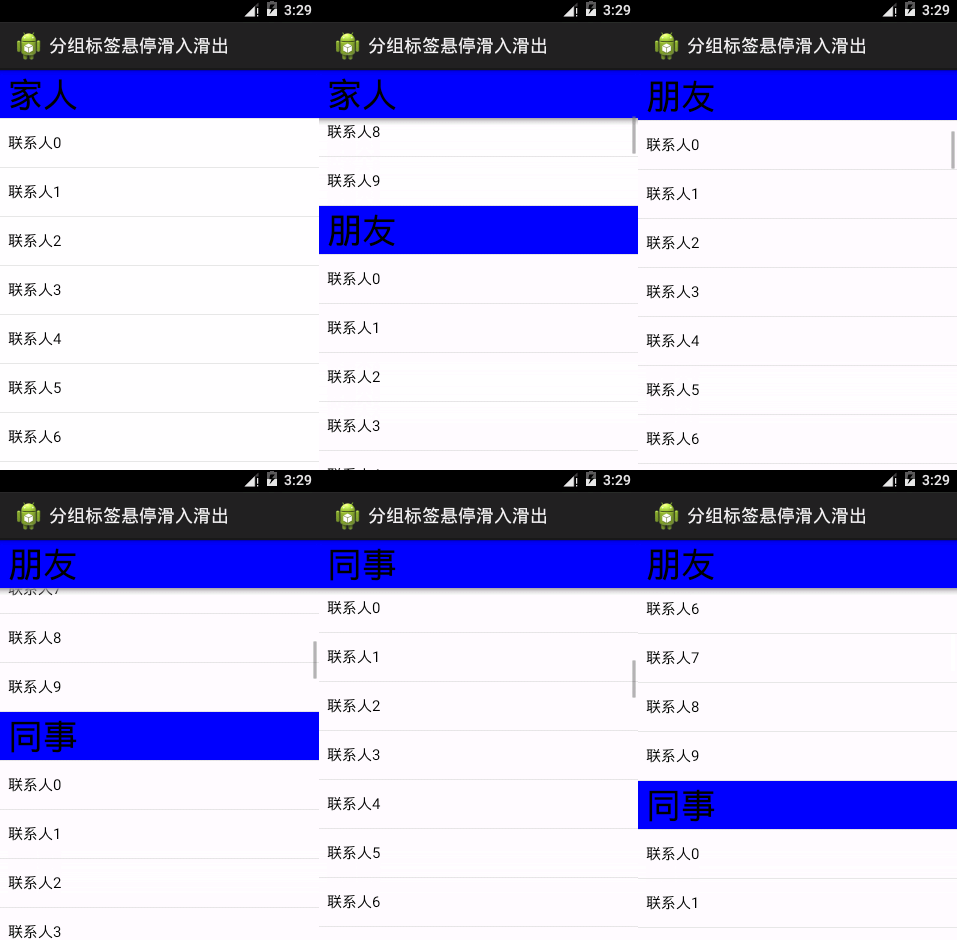
常用的聯系人、通訊錄,會按照聯系人的姓氏從A,B,C,,,X,Y,Z,這樣歸類排列下去,方便用戶快速查找和定位。PinnedSectionListView是一個第三方的開源框架,在github上的鏈接地址是:https://github.com/beworker/pinned-section-listview 。分組的標簽會懸停在ListView的頂部,直到該分組被滑出/滑入整個ListView的可視界面而呈現出彈入彈出效果。
將PinnedSectionListView類放入自己的項目中:
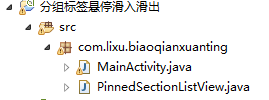
PinnedSectionListView類代碼:
  1 package com.lixu.biaoqianxuanting;
  2 /*
  3  * Copyright (C) 2013 Sergej Shafarenka, halfbit.de
  4  *
  5  * Licensed under the Apache License, Version 2.0 (the "License");
  6  * you may not use this file kt in compliance with the License.
  7  * You may obtain a copy of the License at
  8  *
  9  * http://www.apache.org/licenses/LICENSE-2.0
 10  *
 11  * Unless required by applicable law or agreed to in writing, software
 12  * distributed under the License is distributed on an "AS IS" BASIS,
 13  * WITHOUT WARRANTIES OR CONDITIONS OF ANY KIND, either express or implied.
 14  * See the License for the specific language governing permissions and
 15  * limitations under the License.
 16  */
 17
 18 import android.content.Context;
 19 import android.database.DataSetObserver;
 20 import android.graphics.Canvas;
 21 import android.graphics.Color;
 22 import android.graphics.PointF;
 23 import android.graphics.Rect;
 24 import android.graphics.drawable.GradientDrawable;
 25 import android.graphics.drawable.GradientDrawable.Orientation;
 26 import android.os.Parcelable;
 27 import android.util.AttributeSet;
 28 import android.view.MotionEvent;
 29 import android.view.SoundEffectConstants;
 30 import android.view.View;
 31 import android.view.ViewConfiguration;
 32 import android.view.accessibility.AccessibilityEvent;
 33 import android.widget.AbsListView;
 34 import android.widget.HeaderViewListAdapter;
 35 import android.widget.ListAdapter;
 36 import android.widget.ListView;
 37 import android.widget.SectionIndexer;
 38
 39
 40 /**
 41  * ListView, which is capable to pin section views at its top while the rest is still scrolled.
 42  */
 43 public class PinnedSectionListView extends ListView {
 44
 45     //-- inner classes
 46
 47     /** List adapter to be implemented for being used with PinnedSectionListView adapter. */
 48     public static interface PinnedSectionListAdapter extends ListAdapter {
 49         /** This method shall return 'true' if views of given type has to be pinned. */
 50         boolean isItemViewTypePinned(int viewType);
 51     }
 52
 53     /** Wrapper class for pinned section view and its position in the list. */
 54     static class PinnedSection {
 55         public View view;
 56         public int position;
 57         public long id;
 58     }
 59
 60     //-- class fields
 61
 62     // fields used for handling touch events
 63     private final Rect mTouchRect = new Rect();
 64     private final PointF mTouchPoint = new PointF();
 65     private int mTouchSlop;
 66     private View mTouchTarget;
 67     private MotionEvent mDownEvent;
 68
 69     // fields used for drawing shadow under a pinned section
 70     private GradientDrawable mShadowDrawable;
 71     private int mSectionsDistanceY;
 72     private int mShadowHeight;
 73
 74     /** Delegating listener, can be null. */
 75     OnScrollListener mDelegateOnScrollListener;
 76
 77     /** Shadow for being recycled, can be null. */
 78     PinnedSection mRecycleSection;
 79
 80     /** shadow instance with a pinned view, can be null. */
 81     PinnedSection mPinnedSection;
 82
 83     /** Pinned view Y-translation. We use it to stick pinned view to the next section. */
 84     int mTranslateY;
 85
 86     /** Scroll listener which does the magic */
 87     private final OnScrollListener mOnScrollListener = new OnScrollListener() {
 88
 89         @Override public void onScrollStateChanged(AbsListView view, int scrollState) {
 90             if (mDelegateOnScrollListener != null) { // delegate
 91                 mDelegateOnScrollListener.onScrollStateChanged(view, scrollState);
 92             }
 93         }
 94
 95         @Override
 96         public void onScroll(AbsListView view, int firstVisibleItem, int visibleItemCount, int totalItemCount) {
 97
 98             if (mDelegateOnScrollListener != null) { // delegate
 99                 mDelegateOnScrollListener.onScroll(view, firstVisibleItem, visibleItemCount, totalItemCount);
100             }
101
102             // get expected adapter or fail fast
103             ListAdapter adapter = getAdapter();
104             if (adapter == null || visibleItemCount == 0) return; // nothing to do
105
106             final boolean isFirstVisibleItemSection =
107                     isItemViewTypePinned(adapter, adapter.getItemViewType(firstVisibleItem));
108
109             if (isFirstVisibleItemSection) {
110                 View sectionView = getChildAt(0);
111                 if (sectionView.getTop() == getPaddingTop()) { // view sticks to the top, no need for pinned shadow
112                     destroyPinnedShadow();
113                 } else { // section doesn't stick to the top, make sure we have a pinned shadow
114                     ensureShadowForPosition(firstVisibleItem, firstVisibleItem, visibleItemCount);
115                 }
116
117             } else { // section is not at the first visible position
118                 int sectionPosition = findCurrentSectionPosition(firstVisibleItem);
119                 if (sectionPosition > -1) { // we have section position
120                     ensureShadowForPosition(sectionPosition, firstVisibleItem, visibleItemCount);
121                 } else { // there is no section for the first visible item, destroy shadow
122                     destroyPinnedShadow();
123                 }
124             }
125         };
126
127     };
128
129     /** Default change observer. */
130     private final DataSetObserver mDataSetObserver = new DataSetObserver() {
131         @Override public void onChanged() {
132             recreatePinnedShadow();
133         };
134         @Override public void onInvalidated() {
135             recreatePinnedShadow();
136         }
137     };
138
139     //-- constructors
140
141     public PinnedSectionListView(Context context, AttributeSet attrs) {
142         super(context, attrs);
143         initView();
144     }
145
146     public PinnedSectionListView(Context context, AttributeSet attrs, int defStyle) {
147         super(context, attrs, defStyle);
148         initView();
149     }
150
151     private void initView() {
152         setOnScrollListener(mOnScrollListener);
153         mTouchSlop = ViewConfiguration.get(getContext()).getScaledTouchSlop();
154         initShadow(true);
155     }
156
157     //-- public API methods
158
159     public void setShadowVisible(boolean visible) {
160         initShadow(visible);
161         if (mPinnedSection != null) {
162             View v = mPinnedSection.view;
163             invalidate(v.getLeft(), v.getTop(), v.getRight(), v.getBottom() + mShadowHeight);
164         }
165     }
166
167     //-- pinned section drawing methods
168
169     public void initShadow(boolean visible) {
170         if (visible) {
171             if (mShadowDrawable == null) {
172                 mShadowDrawable = new GradientDrawable(Orientation.TOP_BOTTOM,
173                         new int[] { Color.parseColor("#ffa0a0a0"), Color.parseColor("#50a0a0a0"), Color.parseColor("#00a0a0a0")});
174                 mShadowHeight = (int) (8 * getResources().getDisplayMetrics().density);
175             }
176         } else {
177             if (mShadowDrawable != null) {
178                 mShadowDrawable = null;
179                 mShadowHeight = 0;
180             }
181         }
182     }
183
184     /** Create shadow wrapper with a pinned view for a view at given position */
185     void createPinnedShadow(int position) {
186
187         // try to recycle shadow
188         PinnedSection pinnedShadow = mRecycleSection;
189         mRecycleSection = null;
190
191         // create new shadow, if needed
192         if (pinnedShadow == null) pinnedShadow = new PinnedSection();
193         // request new view using recycled view, if such
194         View pinnedView = getAdapter().getView(position, pinnedShadow.view, PinnedSectionListView.this);
195
196         // read layout parameters
197         LayoutParams layoutParams = (LayoutParams) pinnedView.getLayoutParams();
198         if (layoutParams == null) {
199             layoutParams = (LayoutParams) generateDefaultLayoutParams();
200             pinnedView.setLayoutParams(layoutParams);
201         }
202
203         int heightMode = MeasureSpec.getMode(layoutParams.height);
204         int heightSize = MeasureSpec.getSize(layoutParams.height);
205
206         if (heightMode == MeasureSpec.UNSPECIFIED) heightMode = MeasureSpec.EXACTLY;
207
208         int maxHeight = getHeight() - getListPaddingTop() - getListPaddingBottom();
209         if (heightSize > maxHeight) heightSize = maxHeight;
210
211         // measure & layout
212         int ws = MeasureSpec.makeMeasureSpec(getWidth() - getListPaddingLeft() - getListPaddingRight(), MeasureSpec.EXACTLY);
213         int hs = MeasureSpec.makeMeasureSpec(heightSize, heightMode);
214         pinnedView.measure(ws, hs);
215         pinnedView.layout(0, 0, pinnedView.getMeasuredWidth(), pinnedView.getMeasuredHeight());
216         mTranslateY = 0;
217
218         // initialize pinned shadow
219         pinnedShadow.view = pinnedView;
220         pinnedShadow.position = position;
221         pinnedShadow.id = getAdapter().getItemId(position);
222
223         // store pinned shadow
224         mPinnedSection = pinnedShadow;
225     }
226
227     /** Destroy shadow wrapper for currently pinned view */
228     void destroyPinnedShadow() {
229         if (mPinnedSection != null) {
230             // keep shadow for being recycled later
231             mRecycleSection = mPinnedSection;
232             mPinnedSection = null;
233         }
234     }
235
236     /** Makes sure we have an actual pinned shadow for given position. */
237     void ensureShadowForPosition(int sectionPosition, int firstVisibleItem, int visibleItemCount) {
238         if (visibleItemCount < 2) { // no need for creating shadow at all, we have a single visible item
239             destroyPinnedShadow();
240             return;
241         }
242
243         if (mPinnedSection != null
244                 && mPinnedSection.position != sectionPosition) { // invalidate shadow, if required
245             destroyPinnedShadow();
246         }
247
248         if (mPinnedSection == null) { // create shadow, if empty
249             createPinnedShadow(sectionPosition);
250         }
251
252         // align shadow according to next section position, if needed
253         int nextPosition = sectionPosition + 1;
254         if (nextPosition < getCount()) {
255             int nextSectionPosition = findFirstVisibleSectionPosition(nextPosition,
256                     visibleItemCount - (nextPosition - firstVisibleItem));
257             if (nextSectionPosition > -1) {
258                 View nextSectionView = getChildAt(nextSectionPosition - firstVisibleItem);
259                 final int bottom = mPinnedSection.view.getBottom() + getPaddingTop();
260                 mSectionsDistanceY = nextSectionView.getTop() - bottom;
261                 if (mSectionsDistanceY < 0) {
262                     // next section overlaps pinned shadow, move it up
263                     mTranslateY = mSectionsDistanceY;
264                 } else {
265                     // next section does not overlap with pinned, stick to top
266                     mTranslateY = 0;
267                 }
268             } else {
269                 // no other sections are visible, stick to top
270                 mTranslateY = 0;
271                 mSectionsDistanceY = Integer.MAX_VALUE;
272             }
273         }
274
275     }
276
277     int findFirstVisibleSectionPosition(int firstVisibleItem, int visibleItemCount) {
278         ListAdapter adapter = getAdapter();
279
280         int adapterDataCount = adapter.getCount();
281         if (getLastVisiblePosition() >= adapterDataCount) return -1; // dataset has changed, no candidate
282
283         if (firstVisibleItem+visibleItemCount >= adapterDataCount){//added to prevent index Outofbound (in case)
284             visibleItemCount = adapterDataCount-firstVisibleItem;
285         }
286
287         for (int childIndex = 0; childIndex < visibleItemCount; childIndex++) {
288             int position = firstVisibleItem + childIndex;
289             int viewType = adapter.getItemViewType(position);
290             if (isItemViewTypePinned(adapter, viewType)) return position;
291         }
292         return -1;
293     }
294
295     int findCurrentSectionPosition(int fromPosition) {
296         ListAdapter adapter = getAdapter();
297
298         if (fromPosition >= adapter.getCount()) return -1; // dataset has changed, no candidate
299
300         if (adapter instanceof SectionIndexer) {
301             // try fast way by asking section indexer
302             SectionIndexer indexer = (SectionIndexer) adapter;
303             int sectionPosition = indexer.getSectionForPosition(fromPosition);
304             int itemPosition = indexer.getPositionForSection(sectionPosition);
305             int typeView = adapter.getItemViewType(itemPosition);
306             if (isItemViewTypePinned(adapter, typeView)) {
307                 return itemPosition;
308             } // else, no luck
309         }
310
311         // try slow way by looking through to the next section item above
312         for (int position=fromPosition; position>=0; position--) {
313             int viewType = adapter.getItemViewType(position);
314             if (isItemViewTypePinned(adapter, viewType)) return position;
315         }
316         return -1; // no candidate found
317     }
318
319     void recreatePinnedShadow() {
320         destroyPinnedShadow();
321         ListAdapter adapter = getAdapter();
322         if (adapter != null && adapter.getCount() > 0) {
323             int firstVisiblePosition = getFirstVisiblePosition();
324             int sectionPosition = findCurrentSectionPosition(firstVisiblePosition);
325             if (sectionPosition == -1) return; // no views to pin, exit
326             ensureShadowForPosition(sectionPosition,
327                     firstVisiblePosition, getLastVisiblePosition() - firstVisiblePosition);
328         }
329     }
330
331     @Override
332     public void setOnScrollListener(OnScrollListener listener) {
333         if (listener == mOnScrollListener) {
334             super.setOnScrollListener(listener);
335         } else {
336             mDelegateOnScrollListener = listener;
337         }
338     }
339
340     @Override
341     public void onRestoreInstanceState(Parcelable state) {
342         super.onRestoreInstanceState(state);
343         post(new Runnable() {
344             @Override public void run() { // restore pinned view after configuration change
345                 recreatePinnedShadow();
346             }
347         });
348     }
349
350     @Override
351     public void setAdapter(ListAdapter adapter) {
352
353         // assert adapter in debug mode
354         if (BuildConfig.DEBUG && adapter != null) {
355             if (!(adapter instanceof PinnedSectionListAdapter))
356                 throw new IllegalArgumentException("Does your adapter implement PinnedSectionListAdapter?");
357             if (adapter.getViewTypeCount() < 2)
358                 throw new IllegalArgumentException("Does your adapter handle at least two types" +
359                         " of views in getViewTypeCount() method: items and sections?");
360         }
361
362         // unregister observer at old adapter and register on new one
363         ListAdapter oldAdapter = getAdapter();
364         if (oldAdapter != null) oldAdapter.unregisterDataSetObserver(mDataSetObserver);
365         if (adapter != null) adapter.registerDataSetObserver(mDataSetObserver);
366
367         // destroy pinned shadow, if new adapter is not same as old one
368         if (oldAdapter != adapter) destroyPinnedShadow();
369
370         super.setAdapter(adapter);
371     }
372
373     @Override
374     protected void onLayout(boolean changed, int l, int t, int r, int b) {
375         super.onLayout(changed, l, t, r, b);
376         if (mPinnedSection != null) {
377             int parentWidth = r - l - getPaddingLeft() - getPaddingRight();
378             int shadowWidth = mPinnedSection.view.getWidth();
379             if (parentWidth != shadowWidth) {
380                 recreatePinnedShadow();
381             }
382         }
383     }
384
385     @Override
386     protected void dispatchDraw(Canvas canvas) {
387         super.dispatchDraw(canvas);
388
389         if (mPinnedSection != null) {
390
391             // prepare variables
392             int pLeft = getListPaddingLeft();
393             int pTop = getListPaddingTop();
394             View view = mPinnedSection.view;
395
396             // draw child
397             canvas.save();
398
399             int clipHeight = view.getHeight() +
400                     (mShadowDrawable == null ? 0 : Math.min(mShadowHeight, mSectionsDistanceY));
401             canvas.clipRect(pLeft, pTop, pLeft + view.getWidth(), pTop + clipHeight);
402
403             canvas.translate(pLeft, pTop + mTranslateY);
404             drawChild(canvas, mPinnedSection.view, getDrawingTime());
405
406             if (mShadowDrawable != null && mSectionsDistanceY > 0) {
407                 mShadowDrawable.setBounds(mPinnedSection.view.getLeft(),
408                         mPinnedSection.view.getBottom(),
409                         mPinnedSection.view.getRight(),
410                         mPinnedSection.view.getBottom() + mShadowHeight);
411                 mShadowDrawable.draw(canvas);
412             }
413
414             canvas.restore();
415         }
416     }
417
418     //-- touch handling methods
419
420     @Override
421     public boolean dispatchTouchEvent(MotionEvent ev) {
422
423         final float x = ev.getX();
424         final float y = ev.getY();
425         final int action = ev.getAction();
426
427         if (action == MotionEvent.ACTION_DOWN
428                 && mTouchTarget == null
429                 && mPinnedSection != null
430                 && isPinnedViewTouched(mPinnedSection.view, x, y)) { // create touch target
431
432             // user touched pinned view
433             mTouchTarget = mPinnedSection.view;
434             mTouchPoint.x = x;
435             mTouchPoint.y = y;
436
437             // copy down event for eventually be used later
438             mDownEvent = MotionEvent.obtain(ev);
439         }
440
441         if (mTouchTarget != null) {
442             if (isPinnedViewTouched(mTouchTarget, x, y)) { // forward event to pinned view
443                 mTouchTarget.dispatchTouchEvent(ev);
444             }
445
446             if (action == MotionEvent.ACTION_UP) { // perform onClick on pinned view
447                 super.dispatchTouchEvent(ev);
448                 performPinnedItemClick();
449                 clearTouchTarget();
450
451             } else if (action == MotionEvent.ACTION_CANCEL) { // cancel
452                 clearTouchTarget();
453
454             } else if (action == MotionEvent.ACTION_MOVE) {
455                 if (Math.abs(y - mTouchPoint.y) > mTouchSlop) {
456
457                     // cancel sequence on touch target
458                     MotionEvent event = MotionEvent.obtain(ev);
459                     event.setAction(MotionEvent.ACTION_CANCEL);
460                     mTouchTarget.dispatchTouchEvent(event);
461                     event.recycle();
462
463                     // provide correct sequence to super class for further handling
464                     super.dispatchTouchEvent(mDownEvent);
465                     super.dispatchTouchEvent(ev);
466                     clearTouchTarget();
467
468                 }
469             }
470
471             return true;
472         }
473
474         // call super if this was not our pinned view
475         return super.dispatchTouchEvent(ev);
476     }
477
478     private boolean isPinnedViewTouched(View view, float x, float y) {
479         view.getHitRect(mTouchRect);
480
481         // by taping top or bottom padding, the list performs on click on a border item.
482         // we don't add top padding here to keep behavior consistent.
483         mTouchRect.top += mTranslateY;
484
485         mTouchRect.bottom += mTranslateY + getPaddingTop();
486         mTouchRect.left += getPaddingLeft();
487         mTouchRect.right -= getPaddingRight();
488         return mTouchRect.contains((int)x, (int)y);
489     }
490
491     private void clearTouchTarget() {
492         mTouchTarget = null;
493         if (mDownEvent != null) {
494             mDownEvent.recycle();
495             mDownEvent = null;
496         }
497     }
498
499     private boolean performPinnedItemClick() {
500         if (mPinnedSection == null) return false;
501
502         OnItemClickListener listener = getOnItemClickListener();
503         if (listener != null && getAdapter().isEnabled(mPinnedSection.position)) {
504             View view =  mPinnedSection.view;
505             playSoundEffect(SoundEffectConstants.CLICK);
506             if (view != null) {
507                 view.sendAccessibilityEvent(AccessibilityEvent.TYPE_VIEW_CLICKED);
508             }
509             listener.onItemClick(this, view, mPinnedSection.position, mPinnedSection.id);
510             return true;
511         }
512         return false;
513     }
514
515     public static boolean isItemViewTypePinned(ListAdapter adapter, int viewType) {
516         if (adapter instanceof HeaderViewListAdapter) {
517             adapter = ((HeaderViewListAdapter)adapter).getWrappedAdapter();
518         }
519         return ((PinnedSectionListAdapter) adapter).isItemViewTypePinned(viewType);
520     }
521
522 }
自己app的代碼:
  1 package com.lixu.biaoqianxuanting;
  2
  3 import java.util.ArrayList;
  4 import com.lixu.biaoqianxuanting.PinnedSectionListView.PinnedSectionListAdapter;
  5 import android.app.Activity;
  6 import android.content.Context;
  7 import android.graphics.Color;
  8 import android.os.Bundle;
  9 import android.view.LayoutInflater;
 10 import android.view.View;
 11 import android.view.ViewGroup;
 12 import android.widget.ArrayAdapter;
 13 import android.widget.TextView;
 14
 15 public class MainActivity extends Activity {
 16     private ArrayList<Data> data;
 17
 18     @Override
 19     protected void onCreate(Bundle savedInstanceState) {
 20         super.onCreate(savedInstanceState);
 21         setContentView(R.layout.activity_main);
 22
 23         String[] s = { "家人", "朋友", "同事", "同學", "基友", "情人", "老婆" };
 24
 25         data = new ArrayList<Data>();
 26         for (String n : s) {
 27             Data group = new Data();
 28             group.type = Data.GROUP;
 29             group.text = n;
 30             data.add(group);
 31             for (int i = 0; i < 10; i++) {
 32                 Data child = new Data();
 33                 child.type = Data.CHILD;
 34                 child.text = "聯系人" + i;
 35                 data.add(child);
 36             }
 37         }
 38
 39         PinnedSectionListView pslv = (PinnedSectionListView) findViewById(R.id.pslv);
 40         MyAdapter mMyAdapter = new MyAdapter(this, -1);
 41         pslv.setAdapter(mMyAdapter);
 42     }
 43
 44     // 定義一個存放數據類型的類
 45     private class Data {
 46         public static final int GROUP = 0;
 47         public static final int CHILD = 1;
 48         public int type;
 49         public String text;
 50         // 2個type child和group
 51         public static final int TYPE_COUNT = 2;
 52
 53     }
 54
 55     // 定義適配器要實現PinnedSectionListAdapter接口 來調用isItemViewTypePinned(int
 56     // viewType)方法
 57     private class MyAdapter extends ArrayAdapter implements PinnedSectionListAdapter {
 58         private LayoutInflater flater;
 59
 60         public MyAdapter(Context context, int resource) {
 61             super(context, resource);
 62
 63             flater = LayoutInflater.from(context);
 64         }
 65
 66         @Override
 67         public int getCount() {
 68             return data.size();
 69         }
 70
 71         @Override
 72         public View getView(int position, View convertView, ViewGroup parent) {
 73             int type = getItemViewType(position);
 74             switch (type) {
 75             case Data.GROUP:
 76                 if (convertView == null)
 77                     convertView = flater.inflate(android.R.layout.simple_list_item_1, null);
 78
 79                 TextView tv1 = (TextView) convertView.findViewById(android.R.id.text1);
 80
 81                 tv1.setText(data.get(position).text);
 82                 tv1.setBackgroundColor(Color.BLUE);
 83                 tv1.setTextSize(35);
 84
 85                 break;
 86
 87             case Data.CHILD:
 88                 if (convertView == null)
 89                     convertView = flater.inflate(android.R.layout.simple_list_item_1, null);
 90
 91                 TextView tv2 = (TextView) convertView.findViewById(android.R.id.text1);
 92
 93                 tv2.setText(data.get(position).text);
 94
 95                 tv2.setTextSize(15);
 96
 97                 break;
 98
 99             default:
100                 break;
101             }
102
103             return convertView;
104         }
105
106         // 返回列表類型 兩種 child和group
107         @Override
108         public int getViewTypeCount() {
109
110             return Data.TYPE_COUNT;
111         }
112
113         // 獲取列表類型
114         @Override
115         public int getItemViewType(int position) {
116             return data.get(position).type;
117         }
118
119         @Override
120         public Object getItem(int position) {
121             return data.get(position);
122         }
123
124         // 假設此方法返回皆為false。那麼PinnedSectionListView將退化成為一個基礎的ListView.
125         // 只不過退化後的ListView只是一個擁有兩個View Type的ListView。
126         // 從某種角度上講,此方法對於PinnedSectionListView至關重要,因為返回值true或false,將直接導致PinnedSectionListView是一個PinnedSectionListView,還是一個普通的ListView。
127         @Override
128         public boolean isItemViewTypePinned(int viewType) {
129             boolean type = false;
130             switch (viewType) {
131             case Data.GROUP:
132
133                 type = true;
134
135                 break;
136
137             case Data.CHILD:
138
139                 type = false;
140
141                 break;
142             default:
143                 type = false;
144                 break;
145             }
146             return type;
147         }
148
149     }
150
151 }
xml文件:
 1 <RelativeLayout xmlns:android="http://schemas.android.com/apk/res/android"
 2     xmlns:tools="http://schemas.android.com/tools"
 3     android:layout_width="match_parent"
 4     android:layout_height="match_parent" >
 5
 6     <com.lixu.biaoqianxuanting.PinnedSectionListView
 7         android:id="@+id/pslv"
 8         android:layout_width="match_parent"
 9         android:layout_height="match_parent" />
10
11 </RelativeLayout>
運行效果圖:
 Android 5.0 Settings源碼簡要分析
Android 5.0 Settings源碼簡要分析 概述: 先聲明:本人工作快兩年了,仍是菜鳥級別的,慚愧啊!以前遇到好多知識點都沒有記錄下來,感覺挺可惜的,現在有機會
 Weex 環境搭建(win7),weex環境搭建win7
Weex 環境搭建(win7),weex環境搭建win7安裝 Node.js 安裝 weex-toolkit 安裝好node.js後,打開CMD工具現在安裝weex-t
 Android Studio中使用AIDL進行進程間通信
Android Studio中使用AIDL進行進程間通信 什麼是AIDL aidl是 Android Interface definition language的縮寫,也
 OrmLite數據庫的使用方法,ormlite數據庫
OrmLite數據庫的使用方法,ormlite數據庫第一步:導入架包 1、將orm的兩個支持包放入project視圖下的你的工程的l