編輯:關於android開發
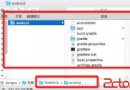
1.分別創建assets文件夾和res/raw文件夾:(要注意的raw文件是在res下new,然後創建一個名字為raw的文件夾)
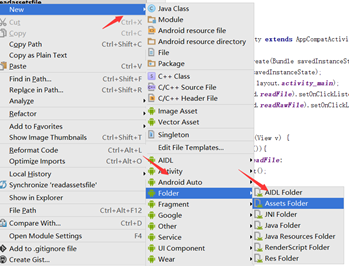
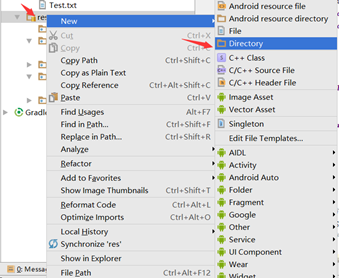
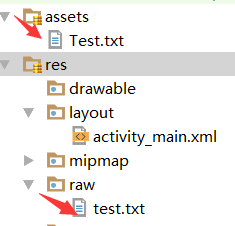
2.創建兩個txt文件,復制到asset和raw文件夾中:
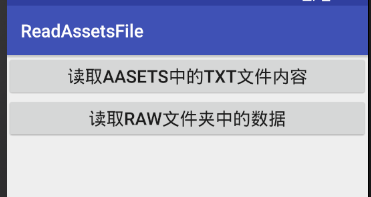
3.實現的效果:
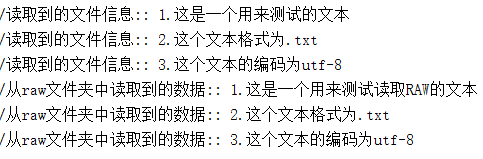
4.實現代碼:
(1)布局文件:

 1 <?xml version="1.0" encoding="utf-8"?>
 2 <LinearLayout xmlns:android="http://schemas.android.com/apk/res/android"
 3     xmlns:tools="http://schemas.android.com/tools"
 4     android:layout_width="match_parent"
 5     android:layout_height="match_parent"
 6     android:orientation="vertical"
 7     tools:context="base.readassetsfile.MainActivity">
 8     <Button
 9         android:textSize="20sp"
10         android:text="@string/aasets_txt"
11         android:id="@+id/readFile"
12         android:layout_width="match_parent"
13         android:layout_height="wrap_content" />
14     <Button
15         android:textSize="20sp"
16         android:text="@string/raw"
17         android:id="@+id/readRawFile"
18         android:layout_width="match_parent"
19         android:layout_height="wrap_content" />
20 </LinearLayout>
View Code
(2)具體實現:
 1 package base.readassetsfile;
 2
 3 import android.support.v7.app.AppCompatActivity;
 4 import android.os.Bundle;
 5 import android.util.Log;
 6 import android.view.View;
 7 import android.widget.EditText;
 8
 9 import java.io.BufferedReader;
10 import java.io.IOException;
11 import java.io.InputStream;
12 import java.io.InputStreamReader;
13 import java.io.OutputStream;
14 import java.io.UnsupportedEncodingException;
15
16 public class MainActivity extends AppCompatActivity implements View.OnClickListener {
17     @Override
18     protected void onCreate(Bundle savedInstanceState) {
19         super.onCreate(savedInstanceState);
20         setContentView(R.layout.activity_main);
21         findViewById(R.id.readFile).setOnClickListener(this);
22         findViewById(R.id.readRawFile).setOnClickListener(this);
23     }
24     @Override
25     public void onClick(View v) {
26         switch (v.getId()){
27             case R.id.readFile:
28                 readAsset();
29                 break;
30             case R.id.readRawFile:
31                 readRaw();
32                 break;
33         }
34     }
35     public void readAsset(){
36         try {
37             //獲取文件中的字節
38             InputStream inputStream=getResources().getAssets().open("Test.txt");
39             //將字節轉換為字符
40             InputStreamReader isReader=new InputStreamReader(inputStream,"UTF-8");
41             //使用bufferReader去讀取內容
42             BufferedReader reader=new BufferedReader(isReader);
43             String out="";
44             while((out=reader.readLine())!=null){
45                 Log.d("讀取到的文件信息:",out);
46             }
47         } catch (IOException e) {
48             e.printStackTrace();
49         }
50     }
51     public void readRaw(){
52         try {
53             //獲取文件中的內容
54             InputStream inputStream=getResources().openRawResource(R.raw.test);
55             //將文件中的字節轉換為字符
56             InputStreamReader isReader=new InputStreamReader(inputStream,"UTF-8");
57             //使用bufferReader去讀取字符
58             BufferedReader reader=new BufferedReader(isReader);
59             String out="";
60             try {
61                 while((out=reader.readLine())!=null){
62                     Log.d("從raw文件夾中讀取到的數據:",out);
63                 }
64             } catch (IOException e) {
65                 e.printStackTrace();
66             }
67         } catch (UnsupportedEncodingException e) {
68             e.printStackTrace();
69         }
70     }
71
72 }
View Code
 大叔也說Xamarin~Android篇~日志的記錄,xamarinandroid
大叔也說Xamarin~Android篇~日志的記錄,xamarinandroid無論哪個平台,開始哪種應用程序,日志總是少不了的,大家在Lind.DDD裡也可以看到大叔
 Android新手入門2016(12)--基於Layout文件的AlertDialog
Android新手入門2016(12)--基於Layout文件的AlertDialog 上一章學習了AlertDialog,後來發現還有基於Layout文件的AlertD
 RecyclerView,androidrecyclerview
RecyclerView,androidrecyclerview1.簡介 RecyclerView是一種新的視圖組,目標是為任何基於適配器的視圖提供相似的渲染方式。它
 硅谷社交6--添加聯系人--發送添加好友邀請,硅谷6--
硅谷社交6--添加聯系人--發送添加好友邀請,硅谷6-- 1.查找按鈕的處理 // 去服務器判斷當前查找的用戶是否存在 userInfo = new UserInfo(