編輯:關於android開發
《Android SwipeToDismiss:左右滑動刪除ListView條目Item》
Android的SwipeToDismiss是github上一個第三方開源框架(github上的項目鏈接地址:https://github.com/romannurik/Android-SwipeToDismiss )。該開源項目旨在:使得一個ListView的item在用戶的手指在屏幕上左滑或者右滑時候,刪除當前的這個ListView Item。
  1 package com.lixu.SwipeRefreshLayoutyongfa;
  2
  3 import java.util.ArrayList;
  4 import java.util.HashMap;
  5
  6 import com.lixu.SwipeRefreshLayoutyongfa.SwipeDismissListViewTouchListener.DismissCallbacks;
  7 import android.app.Activity;
  8 import android.content.Context;
  9 import android.os.AsyncTask;
 10 import android.os.Bundle;
 11 import android.support.v4.widget.SwipeRefreshLayout;
 12 import android.support.v4.widget.SwipeRefreshLayout.OnRefreshListener;
 13 import android.view.LayoutInflater;
 14 import android.view.View;
 15 import android.view.ViewGroup;
 16 import android.widget.ArrayAdapter;
 17 import android.widget.ImageView;
 18 import android.widget.ListView;
 19 import android.widget.TextView;
 20
 21 public class MainActivity extends Activity {
 22     private ArrayAdapter<String> adapter;
 23     private ArrayList<HashMap<String, Object>> data;
 24     private int count = 0;
 25     SwipeRefreshLayout srl;
 26     private int[] image = { R.drawable.beijing, R.drawable.chengdu, R.drawable.guangzhou, R.drawable.hangzhou,
 27             R.drawable.wuhan, R.drawable.xian, R.drawable.shenzhen };
 28
 29     private String[] city = { "北京", "成都", "廣州", "杭州", "武漢", "西安", "深圳" };
 30     private String KEY_IMAGE = "image";
 31     private String KEY_TXT = "txt";
 32
 33     private int i = 0;
 34     private int j = 0;
 35
 36     ListView lv;
 37
 38     SwipeDismissListViewTouchListener touchlistener;
 39
 40     @Override
 41     protected void onCreate(Bundle savedInstanceState) {
 42         super.onCreate(savedInstanceState);
 43         setContentView(R.layout.activity_main);
 44
 45         data = new ArrayList<HashMap<String, Object>>();
 46
 47         lv = (ListView) findViewById(R.id.lv);
 48
 49         srl = (SwipeRefreshLayout) findViewById(R.id.srl);
 50         // 設置刷新動畫的顏色.
 51         srl.setColorSchemeResources(android.R.color.holo_green_light, android.R.color.holo_blue_bright,
 52                 android.R.color.holo_red_light);
 53
 54         srl.setOnRefreshListener(new OnRefreshListener() {
 55             // SwipeRefreshLayout接管其包裹的ListView下拉事件。
 56             // 每一次對ListView的下拉動作,將觸發SwipeRefreshLayout的onRefresh()。
 57             @SuppressWarnings("unchecked")
 58             @Override
 59             public void onRefresh() {
 60
 61                 new MyAsyncTask().execute();
 62
 63             }
 64         });
 65         adapter = new MyAdapter(this, -1);
 66
 67         lv.setAdapter(adapter);
 68         addSwipeDismissListView();
 69         // 往listview裡面添加觸摸事件
 70         lv.setOnTouchListener(touchlistener);
 71     }
 72
 73     private void addSwipeDismissListView() {
 74         touchlistener = new SwipeDismissListViewTouchListener(lv, new DismissCallbacks() {
 75
 76             @Override
 77             public void onDismiss(ListView listView, int[] reverseSortedPositions) {
 78                 for (int pos : reverseSortedPositions)
 79                     // 獲取滑動的下標行後刪除這一行
 80                     data.remove(pos);
 81                 // 每次要刷新適配器
 82                 adapter.notifyDataSetChanged();
                Toast.makeText(getApplicationContext(), "刪除成功!", 0).show();
 83             }
 84
 85             @Override
 86             public boolean canDismiss(int position) {
 87                 return true;
 88             }
 89         });
 90     }
 91
 92     private class MyAdapter extends ArrayAdapter {
 93         private LayoutInflater flater;
 94
 95         public MyAdapter(Context context, int resource) {
 96             super(context, resource);
 97             flater = LayoutInflater.from(context);
 98         }
 99
100         @Override
101         public int getCount() {
102             return data.size();
103         }
104
105         @Override
106         public View getView(int position, View convertView, ViewGroup parent) {
107             if (convertView == null)
108                 convertView = flater.inflate(R.layout.item, null);
109
110             TextView tv = (TextView) convertView.findViewById(R.id.tv);
111             tv.setText(data.get(position).get(KEY_TXT) + "");
112
113             ImageView iv = (ImageView) convertView.findViewById(R.id.iv);
114             iv.setImageResource((Integer) data.get(position).get(KEY_IMAGE));
115
116             return convertView;
117         }
118     }
119
120     @SuppressWarnings("rawtypes")
121     private class MyAsyncTask extends AsyncTask {
122         private HashMap<String, Object> map;
123
124         @Override
125         protected void onPreExecute() {
126             // 刷新開始
127             srl.setRefreshing(true);
128             map = new HashMap<String, Object>();
129         }
130
131         @Override
132         protected Object doInBackground(Object... params) {
133             // 防止下標越界,到達數組長度後返回開始
134             if (i == image.length)
135                 i = 0;
136             if (j == city.length)
137                 j = 0;
138
139             map.put(KEY_IMAGE, image[i++]);
140             map.put(KEY_TXT, city[j++]);
141
142             // 處理一些耗時的事件
143             return map;
144         }
145
146         @SuppressWarnings("unchecked")
147         @Override
148         protected void onPostExecute(Object result) {
149             // 每次從頭部添加
150             data.add(0, (HashMap<String, Object>) result);
151             // 刷新適配器
152             adapter.notifyDataSetChanged();
153             // 刷新完畢
154             srl.setRefreshing(false);
155         }
156
157     }
158
159 }
需要用的SwipeDismissListViewTouchListener類
  1 package com.lixu.SwipeRefreshLayoutyongfa;
  2
  3 /*
  4  * Copyright 2013 Google Inc.
  5  *
  6  * Licensed under the Apache License, Version 2.0 (the "License");
  7  * you may not use this file except in compliance with the License.
  8  * You may obtain a copy of the License at
  9  *
 10  *     http://www.apache.org/licenses/LICENSE-2.0
 11  *
 12  * Unless required by applicable law or agreed to in writing, software
 13  * distributed under the License is distributed on an "AS IS" BASIS,
 14  * WITHOUT WARRANTIES OR CONDITIONS OF ANY KIND, either express or implied.
 15  * See the License for the specific language governing permissions and
 16  * limitations under the License.
 17  */
 18
 19 import android.animation.Animator;
 20 import android.animation.AnimatorListenerAdapter;
 21 import android.animation.ValueAnimator;
 22 import android.graphics.Rect;
 23 import android.os.SystemClock;
 24 import android.view.MotionEvent;
 25 import android.view.VelocityTracker;
 26 import android.view.View;
 27 import android.view.ViewConfiguration;
 28 import android.view.ViewGroup;
 29 import android.view.ViewPropertyAnimator;
 30 import android.widget.AbsListView;
 31 import android.widget.ListView;
 32
 33 import java.util.ArrayList;
 34 import java.util.Collections;
 35 import java.util.List;
 36
 37 /**
 38  * A {@link View.OnTouchListener} that makes the list items in a
 39  * {@link ListView} dismissable. {@link ListView} is given special treatment
 40  * because by default it handles touches for its list items... i.e. it's in
 41  * charge of drawing the pressed state (the list selector), handling list item
 42  * clicks, etc.
 43  *
 44  * <p>
 45  * After creating the listener, the caller should also call
 46  * {@link ListView#setOnScrollListener(AbsListView.OnScrollListener)}, passing
 47  * in the scroll listener returned by {@link #makeScrollListener()}. If a scroll
 48  * listener is already assigned, the caller should still pass scroll changes
 49  * through to this listener. This will ensure that this
 50  * {@link SwipeDismissListViewTouchListener} is paused during list view
 51  * scrolling.
 52  * </p>
 53  *
 54  * <p>
 55  * Example usage:
 56  * </p>
 57  *
 58  * <pre>
 59  * SwipeDismissListViewTouchListener touchListener = new SwipeDismissListViewTouchListener(
 60  *         listView, new SwipeDismissListViewTouchListener.OnDismissCallback() {
 61  *             public void onDismiss(ListView listView,
 62  *                     int[] reverseSortedPositions) {
 63  *                 for (int position : reverseSortedPositions) {
 64  *                     adapter.remove(adapter.getItem(position));
 65  *                 }
 66  *                 adapter.notifyDataSetChanged();
 67  *             }
 68  *         });
 69  * listView.setOnTouchListener(touchListener);
 70  * listView.setOnScrollListener(touchListener.makeScrollListener());
 71  * </pre>
 72  *
 73  * <p>
 74  * This class Requires API level 12 or later due to use of
 75  * {@link ViewPropertyAnimator}.
 76  * </p>
 77  *
 78  * <p>
 79  * For a generalized {@link View.OnTouchListener} that makes any view
 80  * dismissable, see {@link SwipeDismissTouchListener}.
 81  * </p>
 82  *
 83  * @see SwipeDismissTouchListener
 84  */
 85 public class SwipeDismissListViewTouchListener implements View.OnTouchListener {
 86     // Cached ViewConfiguration and system-wide constant values
 87     private int mSlop;
 88     private int mMinFlingVelocity;
 89     private int mMaxFlingVelocity;
 90     private long mAnimationTime;
 91
 92     // Fixed properties
 93     private ListView mListView;
 94     private DismissCallbacks mCallbacks;
 95     private int mViewWidth = 1; // 1 and not 0 to prevent dividing by zero
 96
 97     // Transient properties
 98     private List<PendingDismissData> mPendingDismisses = new ArrayList<PendingDismissData>();
 99     private int mDismissAnimationRefCount = 0;
100     private float mDownX;
101     private float mDownY;
102     private boolean mSwiping;
103     private int mSwipingSlop;
104     private VelocityTracker mVelocityTracker;
105     private int mDownPosition;
106     private View mDownView;
107     private boolean mPaused;
108
109     /**
110      * The callback interface used by {@link SwipeDismissListViewTouchListener}
111      * to inform its client about a successful dismissal of one or more list
112      * item positions.
113      */
114     public interface DismissCallbacks {
115         /**
116          * Called to determine whether the given position can be dismissed.
117          */
118         boolean canDismiss(int position);
119
120         /**
121          * Called when the user has indicated they she would like to dismiss one
122          * or more list item positions.
123          *
124          * @param listView
125          *            The originating {@link ListView}.
126          * @param reverseSortedPositions
127          *            An array of positions to dismiss, sorted in descending
128          *            order for convenience.
129          */
130         void onDismiss(ListView listView, int[] reverseSortedPositions);
131     }
132
133     /**
134      * Constructs a new swipe-to-dismiss touch listener for the given list view.
135      *
136      * @param listView
137      *            The list view whose items should be dismissable.
138      * @param callbacks
139      *            The callback to trigger when the user has indicated that she
140      *            would like to dismiss one or more list items.
141      */
142     public SwipeDismissListViewTouchListener(ListView listView,
143             DismissCallbacks callbacks) {
144         ViewConfiguration vc = ViewConfiguration.get(listView.getContext());
145         mSlop = vc.getScaledTouchSlop();
146         mMinFlingVelocity = vc.getScaledMinimumFlingVelocity() * 16;
147         mMaxFlingVelocity = vc.getScaledMaximumFlingVelocity();
148         mAnimationTime = listView.getContext().getResources()
149                 .getInteger(android.R.integer.config_shortAnimTime);
150         mListView = listView;
151         mCallbacks = callbacks;
152     }
153
154     /**
155      * Enables or disables (pauses or resumes) watching for swipe-to-dismiss
156      * gestures.
157      *
158      * @param enabled
159      *            Whether or not to watch for gestures.
160      */
161     public void setEnabled(boolean enabled) {
162         mPaused = !enabled;
163     }
164
165     /**
166      * Returns an {@link AbsListView.OnScrollListener} to be added to the
167      * {@link ListView} using
168      * {@link ListView#setOnScrollListener(AbsListView.OnScrollListener)}. If a
169      * scroll listener is already assigned, the caller should still pass scroll
170      * changes through to this listener. This will ensure that this
171      * {@link SwipeDismissListViewTouchListener} is paused during list view
172      * scrolling.</p>
173      *
174      * @see SwipeDismissListViewTouchListener
175      */
176     public AbsListView.OnScrollListener makeScrollListener() {
177         return new AbsListView.OnScrollListener() {
178             @Override
179             public void onScrollStateChanged(AbsListView absListView,
180                     int scrollState) {
181                 setEnabled(scrollState != AbsListView.OnScrollListener.SCROLL_STATE_TOUCH_SCROLL);
182             }
183
184             @Override
185             public void onScroll(AbsListView absListView, int i, int i1, int i2) {
186             }
187         };
188     }
189
190     @Override
191     public boolean onTouch(View view, MotionEvent motionEvent) {
192         if (mViewWidth < 2) {
193             mViewWidth = mListView.getWidth();
194         }
195
196         switch (motionEvent.getActionMasked()) {
197         case MotionEvent.ACTION_DOWN: {
198             if (mPaused) {
199                 return false;
200             }
201
202             // TODO: ensure this is a finger, and set a flag
203
204             // Find the child view that was touched (perform a hit test)
205             Rect rect = new Rect();
206             int childCount = mListView.getChildCount();
207             int[] listViewCoords = new int[2];
208             mListView.getLocationOnScreen(listViewCoords);
209             int x = (int) motionEvent.getRawX() - listViewCoords[0];
210             int y = (int) motionEvent.getRawY() - listViewCoords[1];
211             View child;
212             for (int i = 0; i < childCount; i++) {
213                 child = mListView.getChildAt(i);
214                 child.getHitRect(rect);
215                 if (rect.contains(x, y)) {
216                     mDownView = child;
217                     break;
218                 }
219             }
220
221             if (mDownView != null) {
222                 mDownX = motionEvent.getRawX();
223                 mDownY = motionEvent.getRawY();
224                 mDownPosition = mListView.getPositionForView(mDownView);
225                 if (mCallbacks.canDismiss(mDownPosition)) {
226                     mVelocityTracker = VelocityTracker.obtain();
227                     mVelocityTracker.addMovement(motionEvent);
228                 } else {
229                     mDownView = null;
230                 }
231             }
232             return false;
233         }
234
235         case MotionEvent.ACTION_CANCEL: {
236             if (mVelocityTracker == null) {
237                 break;
238             }
239
240             if (mDownView != null && mSwiping) {
241                 // cancel
242                 mDownView.animate().translationX(0).alpha(1)
243                         .setDuration(mAnimationTime).setListener(null);
244             }
245             mVelocityTracker.recycle();
246             mVelocityTracker = null;
247             mDownX = 0;
248             mDownY = 0;
249             mDownView = null;
250             mDownPosition = ListView.INVALID_POSITION;
251             mSwiping = false;
252             break;
253         }
254
255         case MotionEvent.ACTION_UP: {
256             if (mVelocityTracker == null) {
257                 break;
258             }
259
260             float deltaX = motionEvent.getRawX() - mDownX;
261             mVelocityTracker.addMovement(motionEvent);
262             mVelocityTracker.computeCurrentVelocity(1000);
263             float velocityX = mVelocityTracker.getXVelocity();
264             float absVelocityX = Math.abs(velocityX);
265             float absVelocityY = Math.abs(mVelocityTracker.getYVelocity());
266             boolean dismiss = false;
267             boolean dismissRight = false;
268             if (Math.abs(deltaX) > mViewWidth / 2 && mSwiping) {
269                 dismiss = true;
270                 dismissRight = deltaX > 0;
271             } else if (mMinFlingVelocity <= absVelocityX
272                     && absVelocityX <= mMaxFlingVelocity
273                     && absVelocityY < absVelocityX && mSwiping) {
274                 // dismiss only if flinging in the same direction as dragging
275                 dismiss = (velocityX < 0) == (deltaX < 0);
276                 dismissRight = mVelocityTracker.getXVelocity() > 0;
277             }
278             if (dismiss && mDownPosition != ListView.INVALID_POSITION) {
279                 // dismiss
280                 final View downView = mDownView; // mDownView gets null'd before
281                                                     // animation ends
282                 final int downPosition = mDownPosition;
283                 ++mDismissAnimationRefCount;
284                 mDownView.animate()
285                         .translationX(dismissRight ? mViewWidth : -mViewWidth)
286                         .alpha(0).setDuration(mAnimationTime)
287                         .setListener(new AnimatorListenerAdapter() {
288                             @Override
289                             public void onAnimationEnd(Animator animation) {
290                                 performDismiss(downView, downPosition);
291                             }
292                         });
293             } else {
294                 // cancel
295                 mDownView.animate().translationX(0).alpha(1)
296                         .setDuration(mAnimationTime).setListener(null);
297             }
298             mVelocityTracker.recycle();
299             mVelocityTracker = null;
300             mDownX = 0;
301             mDownY = 0;
302             mDownView = null;
303             mDownPosition = ListView.INVALID_POSITION;
304             mSwiping = false;
305             break;
306         }
307
308         case MotionEvent.ACTION_MOVE: {
309             if (mVelocityTracker == null || mPaused) {
310                 break;
311             }
312
313             mVelocityTracker.addMovement(motionEvent);
314             float deltaX = motionEvent.getRawX() - mDownX;
315             float deltaY = motionEvent.getRawY() - mDownY;
316             if (Math.abs(deltaX) > mSlop
317                     && Math.abs(deltaY) < Math.abs(deltaX) / 2) {
318                 mSwiping = true;
319                 mSwipingSlop = (deltaX > 0 ? mSlop : -mSlop);
320                 mListView.requestDisallowInterceptTouchEvent(true);
321
322                 // Cancel ListView's touch (un-highlighting the item)
323                 MotionEvent cancelEvent = MotionEvent.obtain(motionEvent);
324                 cancelEvent
325                         .setAction(MotionEvent.ACTION_CANCEL
326                                 | (motionEvent.getActionIndex() << MotionEvent.ACTION_POINTER_INDEX_SHIFT));
327                 mListView.onTouchEvent(cancelEvent);
328                 cancelEvent.recycle();
329             }
330
331             if (mSwiping) {
332                 mDownView.setTranslationX(deltaX - mSwipingSlop);
333                 mDownView.setAlpha(Math.max(0f,
334                         Math.min(1f, 1f - 2f * Math.abs(deltaX) / mViewWidth)));
335                 return true;
336             }
337             break;
338         }
339         }
340         return false;
341     }
342
343     class PendingDismissData implements Comparable<PendingDismissData> {
344         public int position;
345         public View view;
346
347         public PendingDismissData(int position, View view) {
348             this.position = position;
349             this.view = view;
350         }
351
352         @Override
353         public int compareTo(PendingDismissData other) {
354             // Sort by descending position
355             return other.position - position;
356         }
357     }
358
359     private void performDismiss(final View dismissView,
360             final int dismissPosition) {
361         // Animate the dismissed list item to zero-height and fire the dismiss
362         // callback when
363         // all dismissed list item animations have completed. This triggers
364         // layout on each animation
365         // frame; in the future we may want to do something smarter and more
366         // performant.
367
368         final ViewGroup.LayoutParams lp = dismissView.getLayoutParams();
369         final int originalHeight = dismissView.getHeight();
370
371         ValueAnimator animator = ValueAnimator.ofInt(originalHeight, 1)
372                 .setDuration(mAnimationTime);
373
374         animator.addListener(new AnimatorListenerAdapter() {
375             @Override
376             public void onAnimationEnd(Animator animation) {
377                 --mDismissAnimationRefCount;
378                 if (mDismissAnimationRefCount == 0) {
379                     // No active animations, process all pending dismisses.
380                     // Sort by descending position
381                     Collections.sort(mPendingDismisses);
382
383                     int[] dismissPositions = new int[mPendingDismisses.size()];
384                     for (int i = mPendingDismisses.size() - 1; i >= 0; i--) {
385                         dismissPositions[i] = mPendingDismisses.get(i).position;
386                     }
387                     mCallbacks.onDismiss(mListView, dismissPositions);
388
389                     // Reset mDownPosition to avoid MotionEvent.ACTION_UP trying
390                     // to start a dismiss
391                     // animation with a stale position
392                     mDownPosition = ListView.INVALID_POSITION;
393
394                     ViewGroup.LayoutParams lp;
395                     for (PendingDismissData pendingDismiss : mPendingDismisses) {
396                         // Reset view presentation
397                         pendingDismiss.view.setAlpha(1f);
398                         pendingDismiss.view.setTranslationX(0);
399                         lp = pendingDismiss.view.getLayoutParams();
400                         lp.height = originalHeight;
401                         pendingDismiss.view.setLayoutParams(lp);
402                     }
403
404                     // Send a cancel event
405                     long time = SystemClock.uptimeMillis();
406                     MotionEvent cancelEvent = MotionEvent.obtain(time, time,
407                             MotionEvent.ACTION_CANCEL, 0, 0, 0);
408                     mListView.dispatchTouchEvent(cancelEvent);
409
410                     mPendingDismisses.clear();
411                 }
412             }
413         });
414
415         animator.addUpdateListener(new ValueAnimator.AnimatorUpdateListener() {
416             @Override
417             public void onAnimationUpdate(ValueAnimator valueAnimator) {
418                 lp.height = (Integer) valueAnimator.getAnimatedValue();
419                 dismissView.setLayoutParams(lp);
420             }
421         });
422
423         mPendingDismisses.add(new PendingDismissData(dismissPosition,
424                 dismissView));
425         animator.start();
426     }
427 }
xml文件:
 1 <RelativeLayout xmlns:android="http://schemas.android.com/apk/res/android"
 2     xmlns:tools="http://schemas.android.com/tools"
 3     android:layout_width="match_parent"
 4     android:layout_height="match_parent"
 5     tools:context="com.lixu.SwipeRefreshLayoutyongfa.MainActivity" >
 6
 7     <android.support.v4.widget.SwipeRefreshLayout
 8         android:id="@+id/srl"
 9         android:layout_width="match_parent"
10         android:layout_height="match_parent" >
11
12         <ListView
13             android:id="@+id/lv"
14             android:layout_width="match_parent"
15             android:layout_height="match_parent" />
16     </android.support.v4.widget.SwipeRefreshLayout>
17
18 </RelativeLayout>
 1 <?xml version="1.0" encoding="utf-8"?>
 2 <LinearLayout xmlns:android="http://schemas.android.com/apk/res/android"
 3     android:layout_width="match_parent"
 4     android:layout_height="match_parent"
 5     android:orientation="vertical" >
 6
 7     <ImageView
 8         android:id="@+id/iv"
 9         android:layout_width="50dp"
10         android:layout_height="50dp" />
11
12     <TextView
13         android:id="@+id/tv"
14         android:layout_width="wrap_content"
15         android:layout_height="wrap_content"
16         android:textSize="25sp" />
17
18 </LinearLayout>
運行效果圖: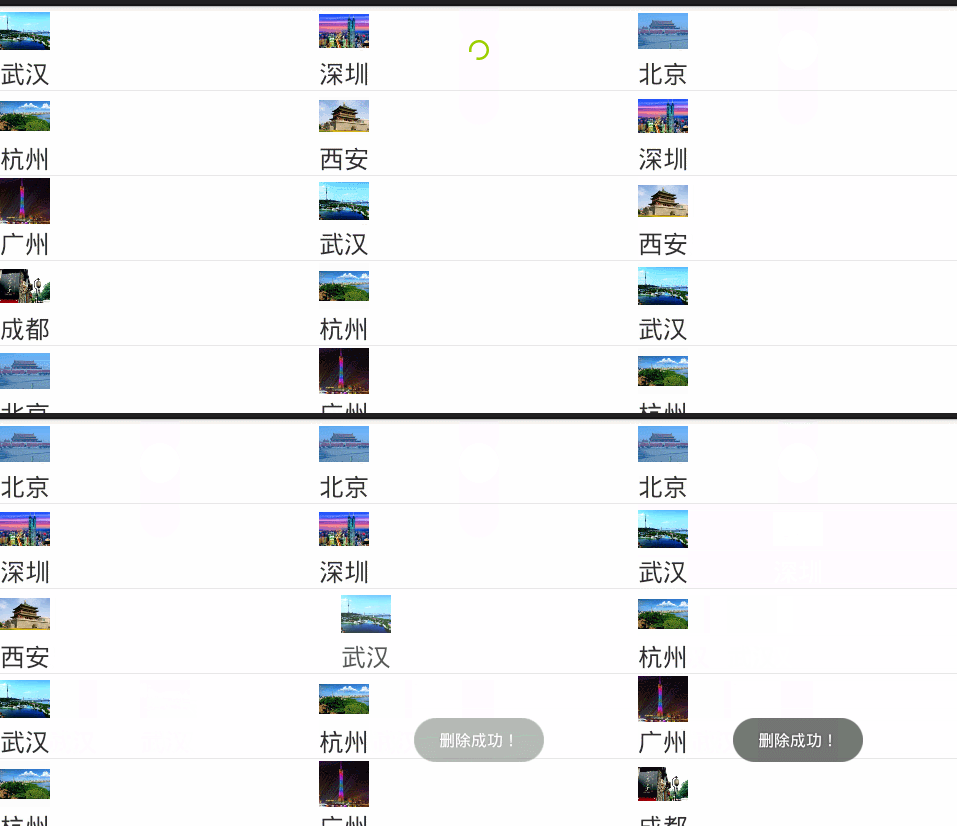
 idea使用優化,idea優化
idea使用優化,idea優化 1. 界面美觀 1.1. 主題 1.2. 改Project面板大小 2. 快捷鍵 2.1智能提示 2.2常用快捷鍵 3.編輯器調
 [轉]File Descriptor洩漏導致Crash: Too many open files,descriptorcrash
[轉]File Descriptor洩漏導致Crash: Too many open files,descriptorcrash在實際的Android開發過程中,我們遇到
 Android基礎入門教程——10.11 傳感器專題(2)——方向傳感器
Android基礎入門教程——10.11 傳感器專題(2)——方向傳感器 Android基礎入門教程——10.11 傳感器專題(2)—
 linux2.4.18----25.文件系統的構建
linux2.4.18----25.文件系統的構建一. 文件系統的構建1.busybox的編譯方法: 用虛擬機的redhat9.0進行編譯版本: busybox-1.00