編輯:關於android開發
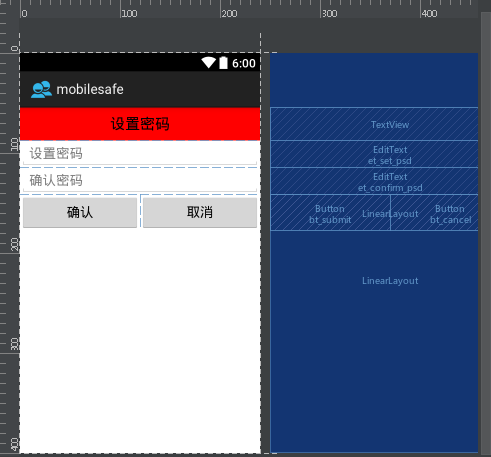
本文實現初次設置密碼驗證過程,首先實現如下效果
本文地址:http://www.cnblogs.com/wuyudong/p/5939823.html,轉載請注明出處。
布局如下:
<?xml version="1.0" encoding="utf-8"?>
<LinearLayout xmlns:android="http://schemas.android.com/apk/res/android"
    android:layout_width="match_parent"
    android:layout_height="match_parent"
    android:orientation="vertical">

    <TextView
        style="@style/TitleStyle"
        android:background="#f00"
        android:text="設置密碼"
        />

    <EditText
        android:id="@+id/et_set_psd"
        android:layout_width="match_parent"
        android:layout_height="wrap_content"
        android:hint="設置密碼"
        />

    <EditText
        android:id="@+id/et_confirm_psd"
        android:layout_width="match_parent"
        android:layout_height="wrap_content"
        android:hint="確認密碼"
        />

    <LinearLayout
        android:layout_width="match_parent"
        android:layout_height="wrap_content">

        <Button
            android:id="@+id/bt_submit"
            android:layout_width="0dp"
            android:layout_height="wrap_content"
            android:layout_weight="1"
            android:text="確認" />

        <Button
            android:id="@+id/bt_cancel"
            android:layout_width="0dp"
            android:layout_height="wrap_content"
            android:layout_weight="1"
            android:text="取消" />
    </LinearLayout>

</LinearLayout>
其中TitleStyle的代碼如下:
<resources>
    <!--
        Base application theme, dependent on API level. This theme is replaced
        by AppBaseTheme from res/values-vXX/styles.xml on newer devices.
    -->
    <style name="AppBaseTheme" parent="android:Theme.Light">
        <!--
            Theme customizations available in newer API levels can go in
            res/values-vXX/styles.xml, while customizations related to
            backward-compatibility can go here.
        -->
    </style>

    <!-- Application theme. -->
    <style name="AppTheme" parent="AppBaseTheme">

        <!-- 在去頭的同時還保持高版本的樣式主題 -->
        <!-- All customizations that are NOT specific to a particular API-level can go here. -->
        <item name="android:windowNoTitle">true</item>
    </style>

    <style name="TitleStyle">
        <item name="android:gravity">center</item>
        <item name="android:textSize">20sp</item>
        <item name="android:textColor">#000</item>
        <item name="android:padding">10dp</item>
        <item name="android:background">#0f0</item>
        <item name="android:layout_width">match_parent</item>
        <item name="android:layout_height">wrap_content</item>
    </style>

</resources>
 使用新版Android Studio檢測內存洩露和性能
使用新版Android Studio檢測內存洩露和性能 內存洩露,是Android開發者最頭疼的事。可能一處小小的內存洩露,都可能是毀於千裡之堤的蟻穴。 怎麼才能檢測內
 Afinal,afinal框架
Afinal,afinal框架1.注解功能 1)繼承:FinalActivity ( 需要復制 afinal_0.5.1_bin.jar到lib下) 2)@Vi
 Android性能優化之使用線程池處理異步任務
Android性能優化之使用線程池處理異步任務 說到線程,我想大家都不陌生,因為在開發時候或多或少都會用到線程,而通常創建線程有兩種方式: 1、繼承Thread類
 機頂盒上gridview+ScrollView的使用。,gridviewscrollview
機頂盒上gridview+ScrollView的使用。,gridviewscrollview最近在機頂盒上做一個gridview, 其焦點需要在item的子控件上,但g