編輯:關於android開發
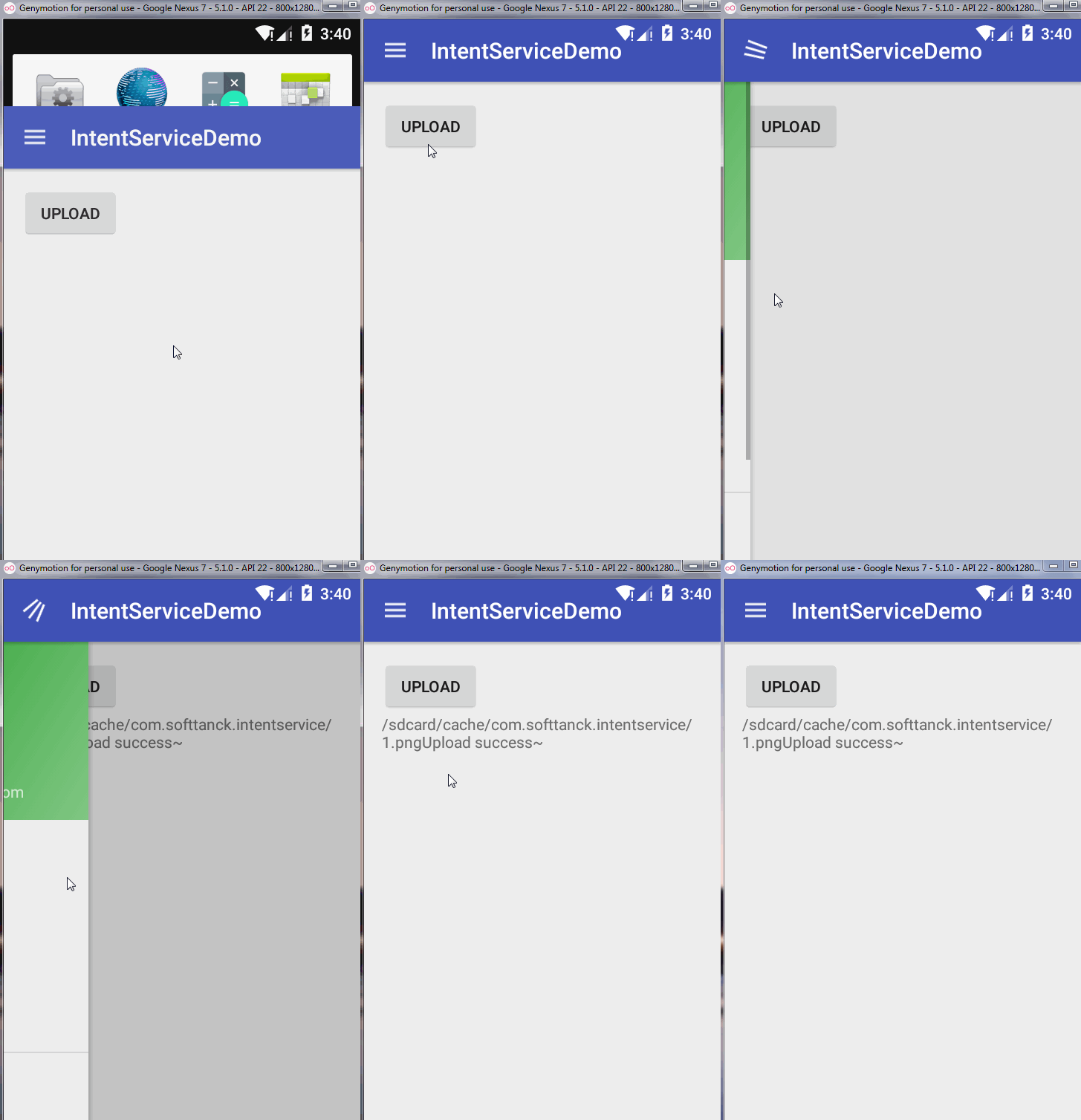
在即時聊天中可能會存在一個隱藏的Bug,這個Bug根據手機的網速和性能有關系,比如你即時聊天中,你發送一消息,你的網絡情況不是很好,這個時候你發送的消息一直處於發送狀態,然後你不想看了,就按退出,這個時候Activity或者Fragment被銷毀的時候就導致了這個消息被強行GC了,所以為了解決這個方案,我們可以使用IntentService,什麼是IntentService?
/*IntentService is a base class for {@link Service}s that handle asynchronous
requests (expressed as {@link Intent}s) on demand. Clients send requests
through {@link android.content.Context#startService(Intent)} calls; the
service is started as needed, handles each Intent in turn using a worker
thread, and stops itself when it runs out of work.*/
從這個解釋中可以看出來是一個異步服務,而且不用擔心他自己的生命周期.所以我們就可以使用它去發送消息,當然消息發送完畢後,我們肯定要通知界面更新UI,這個時候我們就需要使用廣播比較方便些.我們可以這樣寫一個IntentService:
package com.softtanck.intentservicedemo.service;

import android.app.IntentService;
import android.content.Context;
import android.content.Intent;

import com.softtanck.intentservicedemo.MainActivity;

/**
 * Created by winterfell on 11/17/2015.
 */
public class UpLoadImgService extends IntentService {


    public UpLoadImgService() {
        super("ceshi");
    }

    /**
     * Creates an IntentService.  Invoked by your subclass's constructor.
     *
     * @param name Used to name the worker thread, important only for debugging.
     */
    public UpLoadImgService(String name) {
        super(name);
    }


    public static void startUploadImg(Context context, String path) {
        Intent intent = new Intent(context, UpLoadImgService.class);
        intent.setAction(MainActivity.UPLOAD_IMG);
        intent.putExtra(MainActivity.EXTRA_IMG_PATH, path);
        context.startService(intent);
    }


    @Override
    protected void onHandleIntent(Intent intent) {

        if (null != intent) {
            String action = intent.getAction();

            if (action.equals(MainActivity.UPLOAD_IMG)) {
                //UpLoad file
                uploadImg(intent.getStringExtra(MainActivity.EXTRA_IMG_PATH));
            }
        }

    }

    private void uploadImg(String path) {
        try {
            Thread.sleep(2000);
            Intent intent = new Intent(MainActivity.UPLOAD_IMG);
            intent.putExtra(MainActivity.EXTRA_IMG_PATH, path);
            sendBroadcast(intent);
        } catch (InterruptedException e) {
            e.printStackTrace();
        }
    }
}
然後在需要的地方去調用:
UpLoadImgService.startUploadImg(MainActivity.this, "/sdcard/cache/com.softtanck.intentservice/1.png");
還有就是IntentService是繼承的Service,那麼它是怎麼實現異步線程的.?我們先粗略看一下它的源碼:
/*
 * Copyright (C) 2008 The Android Open Source Project
 *
 * Licensed under the Apache License, Version 2.0 (the "License");
 * you may not use this file except in compliance with the License.
 * You may obtain a copy of the License at
 *
 *      http://www.apache.org/licenses/LICENSE-2.0
 *
 * Unless required by applicable law or agreed to in writing, software
 * distributed under the License is distributed on an "AS IS" BASIS,
 * WITHOUT WARRANTIES OR CONDITIONS OF ANY KIND, either express or implied.
 * See the License for the specific language governing permissions and
 * limitations under the License.
 */

package android.app;

import android.annotation.WorkerThread;
import android.content.Intent;
import android.os.Handler;
import android.os.HandlerThread;
import android.os.IBinder;
import android.os.Looper;
import android.os.Message;

/**
 * IntentService is a base class for {@link Service}s that handle asynchronous
 * requests (expressed as {@link Intent}s) on demand.  Clients send requests
 * through {@link android.content.Context#startService(Intent)} calls; the
 * service is started as needed, handles each Intent in turn using a worker
 * thread, and stops itself when it runs out of work.
 *
 * This "work queue processor" pattern is commonly used to offload tasks
 * from an application's main thread.  The IntentService class exists to
 * simplify this pattern and take care of the mechanics.  To use it, extend
 * IntentService and implement {@link #onHandleIntent(Intent)}.  IntentService
 * will receive the Intents, launch a worker thread, and stop the service as
 * appropriate.
 *
 * All requests are handled on a single worker thread -- they may take as
 * long as necessary (and will not block the application's main loop), but
 * only one request will be processed at a time.
 *
 *
 * Developer Guides
 * For a detailed discussion about how to create services, read the
 * Services developer guide.
 *
 *
 * @see android.os.AsyncTask
 */
public abstract class IntentService extends Service {
    private volatile Looper mServiceLooper;
    private volatile ServiceHandler mServiceHandler;
    private String mName;
    private boolean mRedelivery;

    private final class ServiceHandler extends Handler {
        public ServiceHandler(Looper looper) {
            super(looper);
        }

        @Override
        public void handleMessage(Message msg) {
            onHandleIntent((Intent)msg.obj);
            stopSelf(msg.arg1);
        }
    }

    /**
     * Creates an IntentService.  Invoked by your subclass's constructor.
     *
     * @param name Used to name the worker thread, important only for debugging.
     */
    public IntentService(String name) {
        super();
        mName = name;
    }

    /**
     * Sets intent redelivery preferences.  Usually called from the constructor
     * with your preferred semantics.
     *
     * If enabled is true,
     * {@link #onStartCommand(Intent, int, int)} will return
     * {@link Service#START_REDELIVER_INTENT}, so if this process dies before
     * {@link #onHandleIntent(Intent)} returns, the process will be restarted
     * and the intent redelivered.  If multiple Intents have been sent, only
     * the most recent one is guaranteed to be redelivered.
     *
     * If enabled is false (the default),
     * {@link #onStartCommand(Intent, int, int)} will return
     * {@link Service#START_NOT_STICKY}, and if the process dies, the Intent
     * dies along with it.
     */
    public void setIntentRedelivery(boolean enabled) {
        mRedelivery = enabled;
    }

    @Override
    public void onCreate() {
        // TODO: It would be nice to have an option to hold a partial wakelock
        // during processing, and to have a static startService(Context, Intent)
        // method that would launch the service & hand off a wakelock.

        super.onCreate();
        HandlerThread thread = new HandlerThread("IntentService[" + mName + "]");//創建了一個HandlerThread
        thread.start();

        mServiceLooper = thread.getLooper();
        mServiceHandler = new ServiceHandler(mServiceLooper);
    }

    @Override
    public void onStart(Intent intent, int startId) {
        Message msg = mServiceHandler.obtainMessage();
        msg.arg1 = startId;
        msg.obj = intent;
        mServiceHandler.sendMessage(msg);
    }

    /**
     * You should not override this method for your IntentService. Instead,
     * override {@link #onHandleIntent}, which the system calls when the IntentService
     * receives a start request.
     * @see android.app.Service#onStartCommand
     */
    @Override
    public int onStartCommand(Intent intent, int flags, int startId) {
        onStart(intent, startId);
        return mRedelivery ? START_REDELIVER_INTENT : START_NOT_STICKY;
    }

    @Override
    public void onDestroy() {
        mServiceLooper.quit();
    }

    /**
     * Unless you provide binding for your service, you don't need to implement this
     * method, because the default implementation returns null.
     * @see android.app.Service#onBind
     */
    @Override
    public IBinder onBind(Intent intent) {
        return null;
    }

    /**
     * This method is invoked on the worker thread with a request to process.
     * Only one Intent is processed at a time, but the processing happens on a
     * worker thread that runs independently from other application logic.
     * So, if this code takes a long time, it will hold up other requests to
     * the same IntentService, but it will not hold up anything else.
     * When all requests have been handled, the IntentService stops itself,
     * so you should not call {@link #stopSelf}.
     *
     * @param intent The value passed to {@link
     *               android.content.Context#startService(Intent)}.
     */
    @WorkerThread
    protected abstract void onHandleIntent(Intent intent);
}
從源碼中可以看出在OnCreat的時候初始化了一個HandlerThread,然後通過Looper的Loop去從消息隊列裡面去,建立了Handler的通信,而HandlerMessage中調用一個抽象的方法就是我們繼承IntentService中的要實現的方法,該方法就是在線程中的,所以不需要再去開啟線程.它的生命周期也是由Service是管理的.
 Android 配置文件(activity)元素
Android 配置文件(activity)元素 語法: . . . 被包含在: 可以包含: 描述: 聲明實現了應用程序可視化
 Android開發之初識MVP模式
Android開發之初識MVP模式 各位親愛的小伙伴,有沒有想我啊,我胡漢wing又回來了。 很長一段時間沒有更新博客。。原因是。。從離職回到學校以後,一直在享受最
 總結一下Android中主題(Theme)的正確玩法,androidtheme
總結一下Android中主題(Theme)的正確玩法,androidtheme在AndroidManifest.xml文件中有<application androi
 RecyclerView,androidrecyclerview
RecyclerView,androidrecyclerview1.簡介 RecyclerView是一種新的視圖組,目標是為任何基於適配器的視圖提供相似的渲染方式。它