編輯:關於android開發
1.1、建立項目
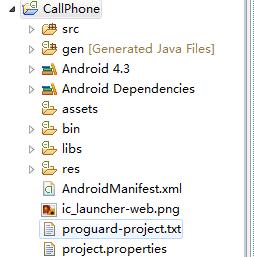
2.1、更改項目名稱
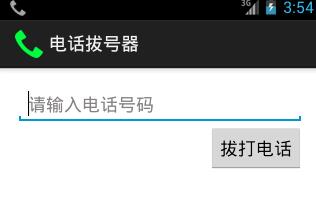
res/values下strings.xml中更改app_name電話拔號器
string.xml
<?xml version="1.0" encoding="utf-8"?>
<resources>

    <string name="app_name">電話拔號器</string>
    <string name="action_settings">Settings</string>
    <string name="hello_world">Hello world!</string>
    <string name="dail">拔打電話</string>
    <string name="defaul_prop">請輸入電話號碼</string>

</resources>
2.2、設置文件框與按鍵
<RelativeLayout xmlns:android="http://schemas.android.com/apk/res/android"
    xmlns:tools="http://schemas.android.com/tools"
    android:layout_width="match_parent"
    android:layout_height="match_parent"
    android:paddingBottom="@dimen/activity_vertical_margin"
    android:paddingLeft="@dimen/activity_horizontal_margin"
    android:paddingRight="@dimen/activity_horizontal_margin"
    android:paddingTop="@dimen/activity_vertical_margin"
    tools:context=".MainActivity" >

    <EditText
        android:id="@+id/et_number"
        android:layout_width="match_parent"
        android:layout_height="wrap_content"
        android:inputType="phone"
        android:hint="@string/defaul_prop">

        <requestFocus />
    </EditText>

    <Button
         android:id="@+id/btn_dail"
        android:layout_width="wrap_content"
        android:layout_height="wrap_content"
        android:layout_alignParentRight="true"
        android:layout_below="@+id/et_number"
        android:text="@string/dail" />

</RelativeLayout>
三、寫java代碼
3.1、MainActivity.java
package com.pb.dial;

import android.net.Uri;
import android.os.Bundle;
import android.view.View;
import android.view.View.OnClickListener;
import android.widget.Button;
import android.widget.EditText;
import android.app.Activity;
import android.content.Intent;


public class MainActivity extends Activity {

    @Override
    protected void onCreate(Bundle savedInstanceState) {
        super.onCreate(savedInstanceState);
        setContentView(R.layout.activity_main);

        //根據ID找到ID,拔號按鍵的ID
        Button bt_dail= (Button) findViewById(R.id.btn_dail);
        //為按鍵設置點擊事件
        bt_dail.setOnClickListener(new MyOnClickListener());

    }

    //單擊監聽事件
    private class MyOnClickListener implements OnClickListener{
        /**
         * 單擊按鍵被點擊時調用的方法
         */
        @Override
        public void onClick(View v) {

            //取出輸入框中的內容
            //先找到ID
            EditText et_number=(EditText) MainActivity.this.findViewById(R.id.et_number);
            //根據ID出內容
          String phoneNumber=et_number.getText().toString();


          //意圖,想做什麼事
          Intent intent=new Intent();
          //開始拔打電話
          intent.setAction(Intent.ACTION_CALL);
          //設置動作內容 uri:統一資源標識符,url的類型 統一資源定位符
          intent.setData(Uri.parse("tel:"+phoneNumber));
          //開啟新的界面
          startActivity(intent);

        }
    }
}
或者
package com.pb.dial;

import android.net.Uri;
import android.os.Bundle;
import android.text.TextUtils;
import android.view.View;
import android.view.View.OnClickListener;
import android.widget.Button;
import android.widget.EditText;
import android.widget.Toast;
import android.app.Activity;
import android.content.Intent;


public class MainActivity extends Activity implements OnClickListener{

    private Button bt_dail;
    private EditText et_number;

    @Override
    protected void onCreate(Bundle savedInstanceState) {
        super.onCreate(savedInstanceState);
        setContentView(R.layout.activity_main);

        //根據ID找到ID,拔號按鍵的ID
         bt_dail= (Button) findViewById(R.id.btn_dail);
      //取出輸入框中的內容
              //先找到ID

              //根據ID出內容
         et_number=(EditText) MainActivity.this.findViewById(R.id.et_number);
        //為按鍵設置點擊事件
        bt_dail.setOnClickListener(this);

    }

    @Override
    public void onClick(View v) {

      String phoneNumber=et_number.getText().toString().trim();

      //判斷內容是否為空 TextUtils是個工具類
      if(TextUtils.isEmpty(phoneNumber)){
          Toast.makeText(this, "電話號碼不能為空", Toast.LENGTH_LONG).show();
          //如果是內容類請將this改為MainActivity.this
          return;
      }

      //意圖,想做什麼事
      Intent intent=new Intent();
      //開始拔打電話
      intent.setAction(Intent.ACTION_CALL);
      //設置動作內容 uri:統一資源標識符,url的類型 統一資源定位符
      intent.setData(Uri.parse("tel:"+phoneNumber));
      //開啟新的界面
      startActivity(intent);

    }

    //單擊監聽事件
   /* private class MyOnClickListener implements OnClickListener{
        *//**
         * 單擊按鍵被點擊時調用的方法
         *//*
        @Override
        public void onClick(View v) {

            //取出輸入框中的內容
            //先找到ID
            EditText et_number=(EditText) MainActivity.this.findViewById(R.id.et_number);
            //根據ID出內容
          String phoneNumber=et_number.getText().toString();


          //意圖,想做什麼事
          Intent intent=new Intent();
          //開始拔打電話
          intent.setAction(Intent.ACTION_CALL);
          //設置動作內容 uri:統一資源標識符,url的類型 統一資源定位符
          intent.setData(Uri.parse("tel:"+phoneNumber));
          //開啟新的界面
          startActivity(intent);

        }
    }*/
}
3.2、添加權限
<!--添加權限 -->
<uses-permission android:name="android.permission.CALL_PHONE"/>
3.3、運行
 Android學習指南之三:Android模擬器的使用方法
由於Android模擬器是Android開發的必備工具,所以在我們開始Andr
 Android學習指南之四十五:用戶界面View之ImageSwitcher 和TextSwitcher
本節所講內容為Android中用於輪顯圖片的圖片切換器ImageSwitche
 cordova開發自定義插件
cordova開發自定義插件 由於最近工作需要,需要一個自定義插件,本人研究了很久終於做出一個最簡單的插件,是基於android平台來開發的,雖然寫博客很花時間,但是
 Android學習指南之十三:Gallery畫廊
我們在智能手機上應該都見過可以滑動操作的圖片集,在Android開發中我們是用