編輯:關於android開發
在Android群裡,經常會有人問我,Android Log是怎麼用的,今天我就把從網上以及SDK裡東拼西湊過來,讓大家先一睹為快,希望對大家入門Android Log有一定的幫助.
android.util.Log常用的方法有以下5個:Log.v() Log.d() Log.i() Log.w() 以及 Log.e() 。根據首字母對應VERBOSE,DEBUG,INFO, WARN,ERROR。
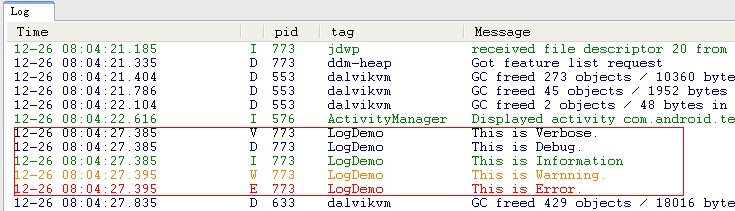
1、Log.v 的調試顏色為黑色的,任何消息都會輸出,這裡的v代表verbose啰嗦的意思,平時使用就是Log.v("","");
2、Log.d的輸出顏色是藍色的,僅輸出debug調試的意思,但他會輸出上層的信息,過濾起來可以通過DDMS的Logcat標簽來選擇.
3、Log.i的輸出為綠色,一般提示性的消息information,它不會輸出Log.v和Log.d的信息,但會顯示i、w和e的信息
4、Log.w的意思為橙色,可以看作為warning警告,一般需要我們注意優化Android代碼,同時選擇它後還會輸出Log.e的信息。
5、Log.e為紅色,可以想到error錯誤,這裡僅顯示紅色的錯誤信息,這些錯誤就需要我們認真的分析,查看棧的信息了。
下面是我做的一個簡單的LogDemo(Step By Step):
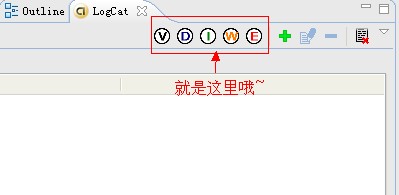
Step 1:准備工作(打開LogCat視窗).
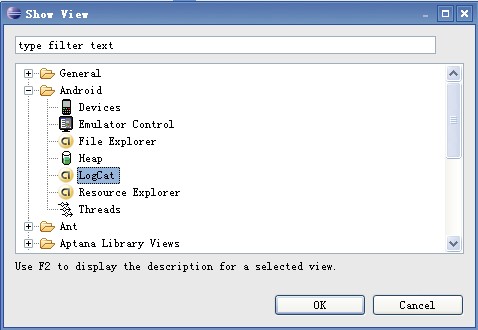
啟動Eclipse,在Window->Show View會出來一個對話框,當我們點擊Ok按鈕時,會在控制台窗口出現LogCat視窗.如下圖:
Step 2:新建一個Android工程,命名為LogDemo.
Step 3:設計UI界面,我們在這裡就加了一個Button按鈕(點擊按鈕出現Log日志信息).
Main.xml代碼如下:
<?xml version="1.0" encoding="utf-8"?>
<LinearLayout xmlns:android="http://schemas.android.com/apk/res/android"
    android:orientation="vertical"
    android:layout_width="fill_parent"
    android:layout_height="fill_parent"
    >
<TextView
    android:layout_width="fill_parent"
    android:layout_height="wrap_content"
    android:text="@string/hello"
    />
<Button
 android:id="@+id/bt"
 android:layout_width="wrap_content"
 android:layout_height="wrap_content"
 android:text="Presse Me Look Log"
/>
</LinearLayout>
Step 4:設計主類LogDemo.java,代碼如下:
package com.android.test;

import android.app.Activity;
import android.os.Bundle;
import android.util.Log;
import android.view.View;
import android.widget.Button;

public class LogDemo extends Activity {

 private static final String ACTIVITY_TAG="LogDemo";
 private Button bt;
    public void onCreate(Bundle savedInstanceState) {
        super.onCreate(savedInstanceState);
        setContentView(R.layout.main);
        //通過findViewById找到Button資源
        bt = (Button)findViewById(R.id.bt);
        //增加事件響應
        bt.setOnClickListener(new Button.OnClickListener(){
    @Override
   public void onClick(View v) {
    Log.v(LogDemo.ACTIVITY_TAG, "This is Verbose.");
    Log.d(LogDemo.ACTIVITY_TAG, "This is Debug.");
    Log.i(LogDemo.ACTIVITY_TAG, "This is Information");
    Log.w(LogDemo.ACTIVITY_TAG, "This is Warnning.");
    Log.e(LogDemo.ACTIVITY_TAG, "This is Error.");
   }

        });
    }

}
Step 5:運行LogDemo工程,效果如下:
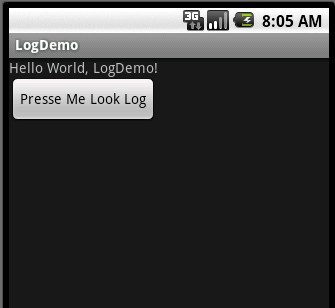
當我們點擊按鈕時,會觸發事件,在Logcat視窗下有如下效果:
 Linux0.11內核--內存管理之1.初始化,linux0.11內存管理
Linux0.11內核--內存管理之1.初始化,linux0.11內存管理【版權所有,轉載請注明出處。出處:http://www.cnblogs.com/joey-hua
 Android AsyncTask 深度理解、簡單封裝、任務隊列分析、自定義線程池,androidasynctask
Android AsyncTask 深度理解、簡單封裝、任務隊列分析、自定義線程池,androidasynctask前言:由於最近在做SDK的功能,需要設計線程池。看了很
 Android之操作SQLite,androidsqlite
Android之操作SQLite,androidsqlite1.SQLite簡介 SQLite是一款輕型的數據庫,是遵守ACID的關聯式數據庫管理系統,它的設計目標是嵌入
 【轉】Android Studio下加入百度地圖的使用 (一)——環境搭建,androidstudio
【轉】Android Studio下加入百度地圖的使用 (一)——環境搭建,androidstudio 最近有學 生要做畢業設計,會使用到定位及地圖信息的功能,特此研究
 Android應用項目中BaseAdapter、SimpleAdapter和ArrayAdapter中的三種適配器,simplearrayadapter
Android應用項目中BaseAdapter、SimpleAdapte