編輯:關於android開發
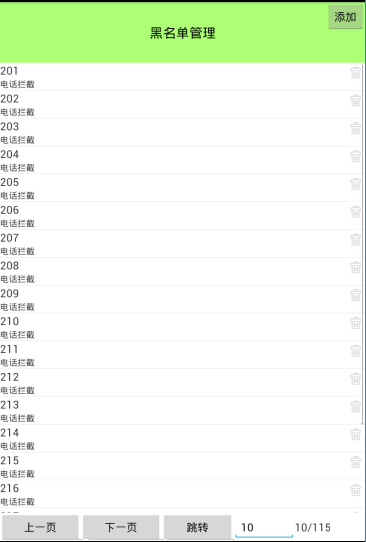
CallSafeActivity .java
public class CallSafeActivity extends Activity {

    private ListView list_view;
    private List<BlackNumberInfo> blackNumberInfos;
    private LinearLayout ll_pb;
    private BlackNumberDao dao;
    private CallSafeAdapter adapter;

    /**
     * 當前頁面
     */
    private int mCurrentPageNumber = 0;

    /**
     * 每頁展示20條數據
     */
    private int mPageSize = 20;
    private TextView tv_page_numbeer;
    /**
     * 一共有多少頁面
     */
    private int totalPage;
    private EditText et_page_number;

    @Override
    protected void onCreate(Bundle savedInstanceState) {
        super.onCreate(savedInstanceState);
        setContentView(R.layout.activity_callsafe);

        initUI();
        initData();
    }

    private Handler handler = new Handler() {
        @Override
        public void handleMessage(Message msg) {
            ll_pb.setVisibility(View.INVISIBLE);
            tv_page_numbeer.setText(mCurrentPageNumber +"/"+ totalPage );
            adapter = new CallSafeAdapter(blackNumberInfos, CallSafeActivity.this);
            list_view.setAdapter(adapter);
        }
    };

    private void initData() {

        new Thread() {
            @Override
            public void run() {


                dao = new BlackNumberDao(CallSafeActivity.this);
                //通過總的記錄數 / 每頁多少條數據
                totalPage = dao.getTotalNumber() / mPageSize;
                System.out.println("總的頁碼=="+totalPage);
                blackNumberInfos = dao.findBar(mCurrentPageNumber, mPageSize);
                handler.sendEmptyMessage(0);
            }
        }.start();


    }


    /**
     * 添加黑名單
     *
     * @param view
     */
    public void addBlackNumber(View view) {
        AlertDialog.Builder builder = new AlertDialog.Builder(this);
        final AlertDialog dialog = builder.create();
        View dialog_view = View.inflate(this, R.layout.dialog_add_blacknumber, null);
        final EditText et_number = (EditText) dialog_view.findViewById(R.id.et_number);

        Button btn_ok = (Button) dialog_view.findViewById(R.id.btn_ok);

        Button btn_cancel = (Button) dialog_view.findViewById(R.id.btn_cancel);

        final CheckBox cb_phone = (CheckBox) dialog_view.findViewById(R.id.cb_phone);

        final CheckBox cb_sms = (CheckBox) dialog_view.findViewById(R.id.cb_message);

        btn_cancel.setOnClickListener(new View.OnClickListener() {
            @Override
            public void onClick(View v) {
                dialog.dismiss();
            }
        });

        btn_ok.setOnClickListener(new View.OnClickListener() {
            @Override
            public void onClick(View v) {
                String str_number = et_number.getText().toString().trim();
                if(TextUtils.isEmpty(str_number)){
                  Toast.makeText(CallSafeActivity.this,"請輸入黑名單號碼",Toast.LENGTH_SHORT).show();
                    return;
                }

                String mode = "";

                if(cb_phone.isChecked()&& cb_sms.isChecked()){
                    mode = "1";
                }else if(cb_phone.isChecked()){
                    mode = "2";
                }else if(cb_sms.isChecked()){
                    mode = "3";
                }else{
                    Toast.makeText(CallSafeActivity.this,"請勾選攔截模式",Toast.LENGTH_SHORT).show();
                    return;
                }
                BlackNumberInfo blackNumberInfo = new BlackNumberInfo();
                blackNumberInfo.setNumber(str_number);
                blackNumberInfo.setMode(mode);
                blackNumberInfos.add(0,blackNumberInfo);
                //把電話號碼和攔截模式添加到數據庫。
                dao.add(str_number,mode);

                if(adapter == null){
                    adapter = new CallSafeAdapter(blackNumberInfos, CallSafeActivity.this);
                    list_view.setAdapter(adapter);
                }else{
                    adapter.notifyDataSetChanged();
                }

                dialog.dismiss();
            }
        });
        dialog.setView(dialog_view);
        dialog.show();
    }


    private void initUI() {
        ll_pb = (LinearLayout) findViewById(R.id.ll_pb);
        //展示加載的圓圈
        ll_pb.setVisibility(View.VISIBLE);
        list_view = (ListView) findViewById(R.id.list_view);
        tv_page_numbeer = (TextView) findViewById(R.id.tv_page_numbeer);
        et_page_number = (EditText) findViewById(R.id.et_page_number);
    }


    private class CallSafeAdapter extends MyBaseAdapter<BlackNumberInfo> {


        private CallSafeAdapter(List lists, Context mContext) {
            super(lists, mContext);
        }

        @Override
        public View getView(int position, View convertView, ViewGroup parent) {
            ViewHolder holder;
            if (convertView == null) {
                convertView = View.inflate(CallSafeActivity.this, R.layout.item_callsafe, null);
                holder = new ViewHolder();
                holder.tv_number = (TextView) convertView.findViewById(R.id.tv_number);
                holder.tv_mode = (TextView) convertView.findViewById(R.id.tv_mode);
                holder.iv_delete = (ImageView) convertView.findViewById(R.id.iv_delete);
                convertView.setTag(holder);
            } else {
                holder = (ViewHolder) convertView.getTag();
            }
            holder.tv_number.setText(lists.get(position).getNumber());
            String mode = lists.get(position).getMode();
            if (mode.equals("1")) {
                holder.tv_mode.setText("來電攔截+短信");
            } else if (mode.equals("2")) {
                holder.tv_mode.setText("電話攔截");
            } else if (mode.equals("3")) {
                holder.tv_mode.setText("短信攔截");
            }
            final BlackNumberInfo info = lists.get(position);
            holder.iv_delete.setOnClickListener(new View.OnClickListener() {
                @Override
                public void onClick(View v) {
                    String number = info.getNumber();
                    boolean result = dao.delete(number);
                    if(result){
                        Toast.makeText(CallSafeActivity.this,"刪除成功",Toast.LENGTH_SHORT).show();
                        lists.remove(info);
                        //刷新界面
                        adapter.notifyDataSetChanged();
                    }else{
                        Toast.makeText(CallSafeActivity.this,"刪除失敗",Toast.LENGTH_SHORT).show();
                    }
                }
            });

            return convertView;
        }


    }

    static class ViewHolder {
        TextView tv_number;
        TextView tv_mode;
        ImageView iv_delete;
    }

    /**
     * 上一頁
     *
     * @param view
     */
    public void prePage(View view) {

        if (mCurrentPageNumber <= 0) {
            Toast.makeText(this, "已經是第一頁了", Toast.LENGTH_SHORT).show();
            return;
        }
        mCurrentPageNumber--;
        initData();
    }

    /**
     * 下一頁
     *
     * @param view
     */
    public void nextPage(View view) {
        //判斷當前的頁碼不能大於總的頁數
        if (mCurrentPageNumber >= (totalPage - 1)) {
            Toast.makeText(this, "已經是最後一頁了", Toast.LENGTH_SHORT).show();
            return;
        }

        mCurrentPageNumber++;
        initData();
    }

    /**
     * 跳轉
     *
     * @param view
     */
    public void jump(View view) {
        String str_page_number = et_page_number.getText().toString().trim();
        if(TextUtils.isEmpty(str_page_number)){
           Toast.makeText(this,"請輸入正確的頁碼",Toast.LENGTH_SHORT).show();
        }else{

            int number = Integer.parseInt(str_page_number);
            if(number >=0 && number <= (totalPage - 1) ){

                mCurrentPageNumber = number;
                initData();

            }else{
                Toast.makeText(this,"請輸入正確的頁碼",Toast.LENGTH_SHORT).show();
            }
        }
    }

}
dialog_add_blacknumber.xml
<?xml version="1.0" encoding="utf-8"?>
<LinearLayout xmlns:android="http://schemas.android.com/apk/res/android"
    android:layout_width="match_parent"
    android:layout_height="match_parent"
    android:orientation="vertical" >

    <TextView
        android:layout_width="match_parent"
        android:layout_height="wrap_content"
        android:gravity="center"
        android:text="添加黑名單"
        android:textSize="30sp" />

    <EditText
        android:id="@+id/et_black"
        android:layout_width="match_parent"
        android:layout_height="wrap_content"
        android:hint="請輸入黑名單" />

    <LinearLayout
        android:layout_width="match_parent"
        android:layout_height="wrap_content"
        android:orientation="horizontal" >

        <CheckBox
            android:id="@+id/cb_message"
            android:layout_width="wrap_content"
            android:layout_height="wrap_content"
            android:layout_weight="1"
            android:text="短信攔截" />

        <CheckBox
            android:id="@+id/cb_phone"
            android:layout_width="wrap_content"
            android:layout_height="wrap_content"
            android:layout_weight="1"
            android:text="電話攔截" />
    </LinearLayout>

    <LinearLayout
        android:layout_width="match_parent"
        android:layout_height="wrap_content"
        android:orientation="horizontal" >

        <Button
            android:id="@+id/bt_ok"
            android:layout_width="wrap_content"
            android:layout_height="wrap_content"
            android:layout_weight="1"
            android:text="確定" />

        <Button
            android:id="@+id/bt_cancel"
            android:layout_width="wrap_content"
            android:layout_height="wrap_content"
            android:layout_weight="1"
            android:text="取消" />
    </LinearLayout>

</LinearLayout>
MyBaseAdapter.java
public abstract class MyBaseAdapter<T> extends BaseAdapter {

    public List<T> lists;
    public Context mContext;
    public MyBaseAdapter() {
        super();
        // TODO Auto-generated constructor stub
    }

    public MyBaseAdapter(List<T> lists,Context mContext) {
        this.lists = lists;
        this.mContext = mContext;
    }

    @Override
    public int getCount() {
        // TODO Auto-generated method stub
        return lists.size();
    }

    @Override
    public Object getItem(int position) {
        // TODO Auto-generated method stub
        return lists.get(position);
    }

    @Override
    public long getItemId(int position) {
        // TODO Auto-generated method stub
        return position;
    }
}
activity_callsafe.xml
<LinearLayout xmlns:android="http://schemas.android.com/apk/res/android"
    android:layout_width="match_parent"
    android:layout_height="match_parent"
    android:orientation="vertical"
    >

   <RelativeLayout
    android:layout_width="match_parent"
    android:layout_height="wrap_content"
    >
     <TextView
       ><FrameLayout
        android:layout_width="match_parent"
        android:layout_height="match_parent"
        android:layout_weight="11">

        <LinearLayout
            android:id="@+id/ll_pb"
            android:layout_width="match_parent"
            android:layout_height="match_parent"
            android:gravity="center"
            android:orientation="vertical"
            android:visibility="invisible"

            >

            <ProgressBar
                android:layout_width="wrap_content"
                android:layout_height="wrap_content" />

            <TextView
                android:layout_width="wrap_content"
                android:layout_height="wrap_content"
                android:text="玩命加載中..." />


        </LinearLayout>


        <include//這樣寫list view是為了在一個項目中,為了美觀整體性,list view基本上都要一致
            android:id="@+id/list_view"
            layout="@layout/list_view"></include>

    </FrameLayout>

    <LinearLayout
        android:layout_width="match_parent"
        android:layout_height="wrap_content"
        android:orientation="horizontal">

        <Button
            android:onClick="prePage"
            android:layout_width="wrap_content"
            android:layout_height="wrap_content"
            android:text="上一頁"
            android:layout_weight="1"/>

        <Button
            android:onClick="nextPage"
            android:layout_width="wrap_content"
            android:layout_height="wrap_content"
            android:text="下一頁"
            android:layout_weight="1"/>

        <Button
            android:onClick="jump"
            android:layout_width="wrap_content"
            android:layout_height="wrap_content"
            android:text="跳轉"
            android:layout_weight="1"/>

        <EditText
            android:id="@+id/et_page_number"
            android:layout_width="wrap_content"
            android:layout_height="wrap_content"
            android:layout_weight="1"/>

        <TextView
            android:id="@+id/tv_page_numbeer"
            android:layout_width="wrap_content"
            android:layout_height="wrap_content"
            android:text="0/10"
            android:textSize="18sp"
            android:layout_weight="1"/>

    </LinearLayout>
</LinearLayout>
list_view.xml
<?xml version="1.0" encoding="utf-8"?>
<ListView xmlns:android="http://schemas.android.com/apk/res/android"
    android:layout_width="match_parent"
    android:layout_height="match_parent"
    android:orientation="vertical" >
</ListView>
BlackNumberDao.java 對表進行增刪改查
//建立黑名單的數據庫
public class BlackNumberDao {

    private BlackNumberOpenHelper helper;

    public BlackNumberDao(Context context) {
        helper = new BlackNumberOpenHelper(context);
    }

    // 黑名單號碼和攔截模式
    public boolean add(String number, String mode) {

        SQLiteDatabase db = helper.getWritableDatabase();
        ContentValues contentValues = new ContentValues();
        contentValues.put("number", number);
        contentValues.put("mode", mode);
        long rowid = db.insert("blacknumber", null, contentValues);
        if (rowid == -1) {
            return false;
        } else {
            return true;
        }

    }

    // 通過電話號碼刪除
    public boolean delete(String number) {
        SQLiteDatabase db = helper.getWritableDatabase();
        // 所影響的行數
        int rownumber = db.delete("blacknumber", "number", new String[] { number });
        if (rownumber == 0) {
            return false;
        } else {
            return true;
        }

    }

    // 通過電話號碼修改攔截的模式
    public boolean changeNumberMode(String number, String mode) {

        SQLiteDatabase db = helper.getWritableDatabase();
        ContentValues contentValues = new ContentValues();
        contentValues.put("mode", mode);
        int rownumber = db.update("blacknumber", contentValues, number, new String[] { number });

        if (rownumber == 0) {
            return false;
        } else {
            return true;
        }

    }

    // 返回一個黑名單號碼攔截模式
    public String findNumber(String number) {
        String mode = "";
        SQLiteDatabase db = helper.getReadableDatabase();
        Cursor cursor = db.query("blacknumber", new String[] { mode }, "number=?", new String[] { number }, null, null,
                null);

        if (cursor.moveToNext()) {
            mode = cursor.getString(0);
        }
        cursor.close();
        db.close();
        return mode;

    }

    // 查找所有的黑名單
    public List<BlackNumberInfo> findAll() {
        SQLiteDatabase db = helper.getReadableDatabase();
        List<BlackNumberInfo> blackNumberInfos = new ArrayList<BlackNumberInfo>();
        Cursor cursor = db.query("blacknumber", new String[] { "number", "mode" }, null, null, null, null, null);
        while (cursor.moveToNext()) {
            BlackNumberInfo info = new BlackNumberInfo();
            info.setNumber(cursor.getString(0));
            info.setMode(cursor.getString(1));
            blackNumberInfos.add(info);
        }
        cursor.close();
        db.close();
        return blackNumberInfos;

    }

    // 進行分頁處理,pageNumber當前是哪一頁,pageSize每頁顯示多少數據,offset表示跳過,從第幾條開始
    public List<BlackNumberInfo> findBar(int pageNumber, int pageSize) {
        SQLiteDatabase db = helper.getReadableDatabase();
        Cursor cursor = db.rawQuery("select * from blacknumber limit ? offset ?",
                new String[] { String.valueOf(pageSize), String.valueOf(pageSize * pageNumber) });
        List<BlackNumberInfo> blackNumberInfos = new ArrayList<BlackNumberInfo>();
        while (cursor.moveToNext()) {
            BlackNumberInfo blackNumberInfo = new BlackNumberInfo();
            blackNumberInfo.setMode(cursor.getString(1));
            blackNumberInfo.setNumber(cursor.getString(0));
            blackNumberInfos.add(blackNumberInfo);
        }
        cursor.close();
        db.close();
        return blackNumberInfos;

    }

 /**
     * 獲取總的記錄數
     * @return
     */
    public int getTotalNumber(){
        SQLiteDatabase db = helper.getReadableDatabase();
        Cursor cursor = db.rawQuery("select count(*) from blacknumber", null);
        cursor.moveToNext();
        int count = cursor.getInt(0);
        cursor.close();
        db.close();
        return count;
    }

}
BlackNumberOpenHelper.java //創建了庫和表
public class BlackNumberOpenHelper extends SQLiteOpenHelper {

    public BlackNumberOpenHelper(Context context) {
        super(context, "safe.db", null, 1);
        //safe.db,創建的數據庫的名字
    }

/**
 * 主鍵,電話號碼,攔截模式:電話/短信攔截
 */
    @Override
    public void onCreate(SQLiteDatabase db) {
        // 創建表
        db.execSQL("create table blacknumber (_id integer primary key autoincrement,number varchar(20),mode varchar(2))");
    }

    @Override
    public void onUpgrade(SQLiteDatabase db, int oldVersion, int newVersion) {
        // 更新表

    }

}
BlackNumberInfo .java
//JavaBean對象
public class BlackNumberInfo {
    private String number;//黑名單電話號碼
    private String mode;//黑名單攔截模式
    //電話攔截+短信攔截


    public String getNumber() {
        return number;
    }

    public void setNumber(String number) {
        this.number = number;
    }
    public String getMode() {
        return mode;
    }
    public void setMode(String mode) {
        this.mode = mode;
    }
}
 翻翻git之---一個豐富的通知的工具庫 NotifyUtil
翻翻git之---一個豐富的通知的工具庫 NotifyUtil P2 正菜環節 今天上的是一個通知的工具庫,作者寫的比較全,使用起來頁比較方便,而且內容少,直接Co
 Android手機輸入法按鍵監聽-dispatchKeyEvent
Android手機輸入法按鍵監聽-dispatchKeyEvent 最近在項目開發中遇到一個關於手機輸入鍵盤的坑,特來記錄下。 應用場景: 項目中有一個界面是用viewp
 Android面試題--事件處理,android試題--事件
Android面試題--事件處理,android試題--事件1、Handler 機制 Android 中主線程也叫 UI 線程,那麼從名字上我們也知道主線程主要是用來創建
 Android動畫效果生動有趣的通知NiftyNotification(Android Toast替代品),androidnotification
Android動畫效果生動有趣的通知NiftyNotification(Android Toast替代品),androidnotificationNiftyNotific