編輯:關於android開發
《2048》是一款比較流行的數字游戲,最早於2014年3月20日發行。原版2048首先在GitHub上發布,原作者是Gabriele Cirulli,後被移植到各個平台。這款游戲是基於《1024》和《小3傳奇》的玩法開發而成的新型數字游戲。游戲源地址:http://gabrielecirulli.github.io/2048/
修改activity_main.xml文件
<LinearLayout xmlns:android="http://schemas.android.com/apk/res/android"
    xmlns:tools="http://schemas.android.com/tools"
    android:layout_width="match_parent"
    android:layout_height="match_parent"
    android:orientation="vertical"
    tools:context=".MainActivity" >

    <TextView
        android:layout_width="wrap_content"
        android:layout_height="wrap_content"
        android:text="@string/hello_world" />

</LinearLayout>
繼續修改activity_main.xml文件
<LinearLayout xmlns:android="http://schemas.android.com/apk/res/android"
    xmlns:tools="http://schemas.android.com/tools"
    android:layout_width="match_parent"
    android:layout_height="match_parent"
    android:orientation="vertical"
    tools:context=".MainActivity" >

    <LinearLayout
        android:layout_width="fill_parent"
        android:layout_height="wrap_content"
        android:orientation="horizontal" >

        <TextView
            android:layout_width="wrap_content"
            android:layout_height="wrap_content"
            android:text="@string/score" />

        <TextView
            android:id="@+id/tvScore"
            android:layout_width="wrap_content"
            android:layout_height="wrap_content" />
    </LinearLayout>

    <GridLayout
        android:id="@+id/gameView"
        android:layout_width="fill_parent"
        android:layout_height="0dp"
        android:layout_weight="1" >
    </GridLayout>

</LinearLayout>
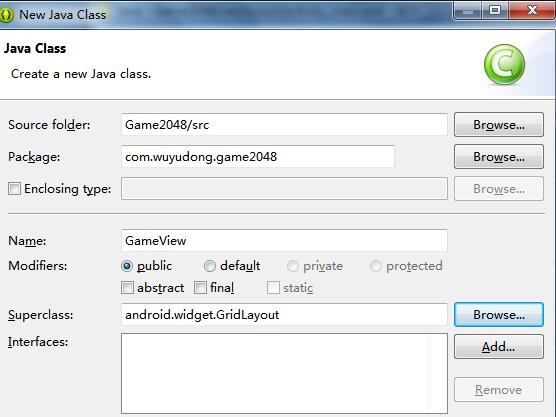
新建類GameView,繼承自GridLayout
package com.wuyudong.game2048;

import android.content.Context;
import android.util.AttributeSet;
import android.widget.GridLayout;

public class GameView extends GridLayout {

    public GameView(Context context, AttributeSet attrs, int defStyle) {
        super(context, attrs, defStyle);
        initGameView();
    }

    public GameView(Context context, AttributeSet attrs) {
        super(context, attrs);
        initGameView();
    }

    public GameView(Context context) {
        super(context);
        initGameView();
    }

    private void initGameView() {

    }

}
繼續修改activity_main.xml文件:
<LinearLayout xmlns:android="http://schemas.android.com/apk/res/android"
    xmlns:tools="http://schemas.android.com/tools"
    android:layout_width="match_parent"
    android:layout_height="match_parent"
    android:orientation="vertical"
    tools:context=".MainActivity" >

    <LinearLayout
        android:layout_width="fill_parent"
        android:layout_height="wrap_content"
        android:orientation="horizontal" >

        <TextView
            android:layout_width="wrap_content"
            android:layout_height="wrap_content"
            android:text="@string/score" />

        <TextView
            android:id="@+id/tvScore"
            android:layout_width="wrap_content"
            android:layout_height="wrap_content" />
    </LinearLayout>

    <!-- 把類GameView綁定到一起 -->
    <com.wuyudong.game2048.GameView
        android:id="@+id/gameView"
        android:layout_width="fill_parent"
        android:layout_height="0dp"
        android:layout_weight="1" >
    </com.wuyudong.game2048.GameView>

</LinearLayout>
添加觸控交互相關代碼
    private void initGameView() {
        setOnTouchListener(new OnTouchListener() {
            //記錄起始位置和偏移坐標
            private float startX, startY, offsetX, offsetY;

            @Override
            public boolean onTouch(View v, MotionEvent event) {
                switch (event.getAction()) {
                case MotionEvent.ACTION_DOWN: //監聽手指按下的初始位置坐標
                    startX = event.getX();
                    startY = event.getY();
                    break;

                case MotionEvent.ACTION_UP: //監聽手指離開時的位置坐標
                    offsetX = event.getX() - startX;
                    offsetY = event.getY() - startY;

                    if (Math.abs(offsetX) > Math.abs(offsetY)) {
                        if (offsetX < -5) {
                            System.out.println("left");
                        } else if (offsetX > 5) {
                            System.out.println("right");
                        }
                    } else {
                        if (offsetY < -5) {
                            System.out.println("up");
                        } else if (offsetY > 5) {
                            System.out.println("down");
                        }
                    }
                    break;
                default:
                    break;
                }

                return true;
            }
        });

    }
編寫卡片類Card.java
package com.wuyudong.game2048;

import android.content.Context;
import android.widget.FrameLayout;
import android.widget.TextView;

public class Card extends FrameLayout {

    public Card(Context context) {
        super(context);
        lable = new TextView(getContext());
        lable.setTextSize(32);

        LayoutParams lp = new LayoutParams(-1, -1);
        addView(lable, lp);
        setNum(0);
    }

    private int num = 0;

    public int getNum() {
        return num;
    }

    public void setNum(int num) {
        this.num = num;
        lable.setText(num + "");
    }

    public boolean equals(Card o) {
        return getNum() == o.getNum();
    }

    private TextView lable;

}
先添加相關代碼看看效果
    @Override
    protected void onSizeChanged(int w, int h, int oldw, int oldh) {
        super.onSizeChanged(w, h, oldw, oldh);
        int cardWidth = (Math.min(w, h) - 10) / 4;

        addCards(cardWidth, cardWidth);

    }

    private void addCards(int cardWith, int cardHeight){
        Card c;
        for (int y = 0; y < 4; y++) {
            for (int x = 0; x < 4; x++) {
                c=new Card(getContext());
                c.setNum(2);
                addView(c, cardWith, cardHeight);
            }
        }
    }
運行後的效果
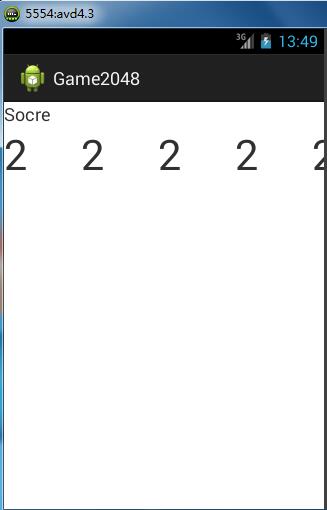
出現問題,所有的2都出現在同一行中,解決辦法:
在initGameView() 中添加代碼,指定為四列:setColumnCount(4);
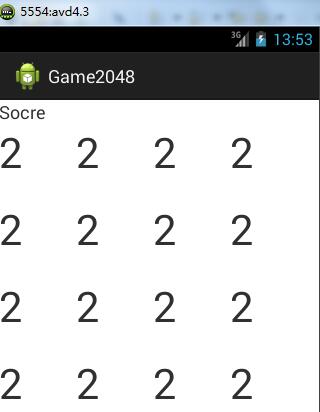
lable.setGravity(Gravity.CENTER);
接著添加相關的背景顏色以及卡片數字的背景顏色,還有卡片間距
setBackgroundColor(0xffbbada0); // 設置整體背景
lable.setBackgroundColor(0x33ffffff);
lable.setGravity(Gravity.CENTER);
lp.setMargins(10, 10, 0, 0);
運行後界面如下:
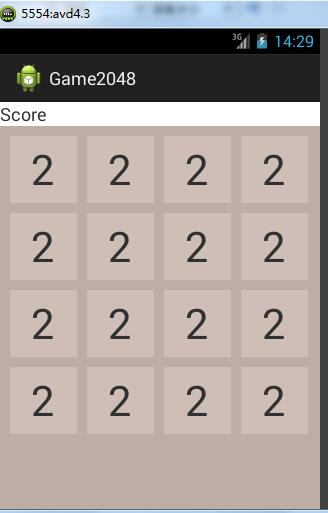
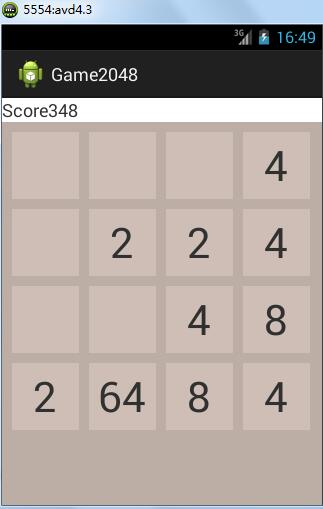
    protected void onSizeChanged(int w, int h, int oldw, int oldh) {
        super.onSizeChanged(w, h, oldw, oldh);
        int cardWidth = (Math.min(w, h) - 10) / 4;

        addCards(cardWidth, cardWidth);

        startGame();

    }

    private void startGame() {
        for (int y = 0; y < 4; y++) {
            for (int x = 0; x < 4; x++) {
                cardsMap[x][y].setNum(0);
            }
        }
        addRandomNum();
        addRandomNum();
    }

    private void addRandomNum() {
        emptyPoints.clear();// 清空
        for (int y = 0; y < 4; y++) {
            for (int x = 0; x < 4; x++) {
                if (cardsMap[x][y].getNum() <= 0) {
                    emptyPoints.add(new Point(x, y));
                }

            }
        }
        Point p = emptyPoints.remove((int) (Math.random() * emptyPoints.size()));
        cardsMap[p.x][p.y].setNum(Math.random() > 0.1 ? 2 : 4);

    }
    private void swipeLeft() { // 往左滑動手指
        for (int y = 0; y < 4; y++) {
            for (int x = 0; x < 4; x++) {

                for (int x1 = x + 1; x1 < 4; x1++) {
                    if (cardsMap[x1][y].getNum() > 0) {

                        if (cardsMap[x][y].getNum() <= 0) {
                            cardsMap[x][y].setNum(cardsMap[x1][y].getNum());
                            cardsMap[x1][y].setNum(0);

                            x--;
                            break;
                        } else if(cardsMap[x][y].equals(cardsMap[x1][y])){
                            cardsMap[x][y].setNum(cardsMap[x][y].getNum()*2);
                            cardsMap[x1][y].setNum(0);
                            break;
                        }
                    }
                }
            }
        }

    }

    private void swipeRight() {
        for (int y = 0; y < 4; y++) {
            for (int x = 3; x >=0; x--) {

                for (int x1 = x - 1; x1 >=0; x1--) {
                    if (cardsMap[x1][y].getNum() > 0) {

                        if (cardsMap[x][y].getNum() <= 0) {
                            cardsMap[x][y].setNum(cardsMap[x1][y].getNum());
                            cardsMap[x1][y].setNum(0);

                            x++;
                            break;
                        } else if(cardsMap[x][y].equals(cardsMap[x1][y])){
                            cardsMap[x][y].setNum(cardsMap[x][y].getNum()*2);
                            cardsMap[x1][y].setNum(0);
                            break;
                        }
                    }
                }
            }
        }


    }

    private void swipeUp() {
        for (int x = 0; x < 4; x++) {
            for (int y = 0; y < 4; y++) {

                for (int y1 = y + 1; y1 < 4; y1++) {
                    if (cardsMap[x][y1].getNum() > 0) {

                        if (cardsMap[x][y].getNum() <= 0) {
                            cardsMap[x][y].setNum(cardsMap[x][y1].getNum());
                            cardsMap[x][y1].setNum(0);

                            y--;
                            break;
                        } else if(cardsMap[x][y].equals(cardsMap[x][y1])){
                            cardsMap[x][y].setNum(cardsMap[x][y].getNum()*2);
                            cardsMap[x][y1].setNum(0);
                            break;
                        }
                    }
                }
            }
        }

    }

    private void swipeDown() {

        for (int x = 0; x < 4; x++) {
            for (int y = 3; y >=0; y--) {

                for (int y1 = y - 1; y1 >= 0; y1--) {
                    if (cardsMap[x][y1].getNum() > 0) {

                        if (cardsMap[x][y].getNum() <= 0) {
                            cardsMap[x][y].setNum(cardsMap[x][y1].getNum());
                            cardsMap[x][y1].setNum(0);

                            y++;
                            break;
                        } else if(cardsMap[x][y].equals(cardsMap[x][y1])){
                            cardsMap[x][y].setNum(cardsMap[x][y].getNum()*2);
                            cardsMap[x][y1].setNum(0);
                            break;
                        }
                    }
                }
            }
        }
    }

    private Card[][] cardsMap = new Card[4][4];
    private List<Point> emptyPoints = new ArrayList<Point>();
MainActivity.java 中添加相關代碼:
package com.wuyudong.game2048;

import android.os.Bundle;
import android.app.Activity;
import android.view.Menu;
import android.widget.TextView;

public class MainActivity extends Activity {

    public MainActivity() {
        mainActivity = this;
    }

    @Override
    protected void onCreate(Bundle savedInstanceState) {
        super.onCreate(savedInstanceState);
        setContentView(R.layout.activity_main);

        tvScore = (TextView) findViewById(R.id.tvScore);
    }

    @Override
    public boolean onCreateOptionsMenu(Menu menu) {
        // Inflate the menu; this adds items to the action bar if it is present.
        getMenuInflater().inflate(R.menu.main, menu);
        return true;
    }

    public void clearScore() {
        score = 0;
        showScore();
    }

    public void showScore() {
        tvScore.setText(score + "");
    }

    public void addScore(int s) {
        score += s;
        showScore();
    }

    private int score = 0;
    private TextView tvScore;
    private static MainActivity mainActivity = null;

    public static MainActivity getMainActivity() {
        return mainActivity;
    }

}
    private void checkComplete() {
        boolean complete = true;
        ALL: for (int y = 0; y < 4; y++) {
            for (int x = 0; x < 4; x++) {
                if (cardsMap[x][y].getNum() == 0
                        || (x > 0 && cardsMap[x][y].equals(cardsMap[x - 1][y]))
                        || (x < 3 && cardsMap[x][y].equals(cardsMap[x + 1][y]))
                        || (y > 0 && cardsMap[x][y].equals(cardsMap[x][y - 1]))
                        || (y < 3 && cardsMap[x][y].equals(cardsMap[x][y + 1]))) {

                    complete = false;
                    break ALL;
                }
            }
        }
        if (complete) {
            new AlertDialog.Builder(getContext())
                    .setTitle("Oh")
                    .setMessage("Game Over!")
                    .setPositiveButton("restart",
                            new DialogInterface.OnClickListener() {

                                @Override
                                public void onClick(DialogInterface dialog,
                                        int which) {
                                    startGame();

                                }
                            }).show();
        }

    }
 Gui系統之View體系(2)---View的setContent,---viewsetcontent
Gui系統之View體系(2)---View的setContent,---viewsetcontent1.從SetContentView講起 1.1Activty的set
 Jenkins 中運行Android lint和monkey
Jenkins 中運行Android lint和monkey 進入到相應job的配置頁面。 Lint: 1.在增加構建後操作中添加lint 2.在高級中添加lint
 EditText顯示明文與密碼,edittext顯示明文
EditText顯示明文與密碼,edittext顯示明文 布局 <?xml version=1.0 encoding=utf-8?> <LinearL
 我們為什麼要在Android中使用RxJava
我們為什麼要在Android中使用RxJava 感覺RxJava最近風生水起,不學習一下都不好意思了,灑家也是初學RxJava,也是感覺代碼好像更復雜更難懂了,看了一