編輯:關於android開發
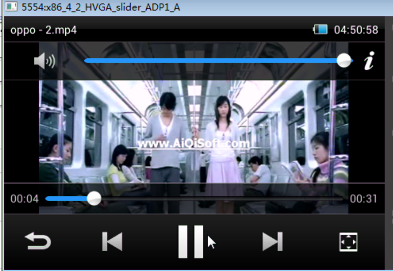
1_自定義VideoView-增加設置視頻大小方法
public class VideoView extends android.widget.VideoView {
    /**
     * Android系統在更加xml布局找這個類,並且實例化的時候,用該構造方法實例化
     *
     * @param context
     * @param attrs
     */
    public VideoView(Context context, AttributeSet attrs) {
        super(context, attrs);
    }

    public VideoView(Context context) {
        super(context);
    }

    @Override
    protected void onMeasure(int widthMeasureSpec, int heightMeasureSpec) {
//        super.onMeasure(widthMeasureSpec, heightMeasureSpec);
        setMeasuredDimension(widthMeasureSpec, heightMeasureSpec);
    }

    /**
     * 設置視頻畫面的寬和高
     * @param videoWidth
     * @param videoHeight
     */
    public void setVideoSize(int videoWidth, int videoHeight) {
        ViewGroup.LayoutParams layoutParams  =getLayoutParams();
        layoutParams.width = videoWidth;
        layoutParams.height = videoHeight;
        setLayoutParams(layoutParams);
    }

}
2_得到屏幕高和寬方法
在播放器中
wm = (WindowManager) getSystemService(WINDOW_SERVICE);
screenWidth = wm.getDefaultDisplay().getWidth();
screenHeight = wm.getDefaultDisplay().getHeight();

DisplayMetrics displayMetrics = new DisplayMetrics();
this.getWindowManager().getDefaultDisplay().getMetrics(displayMetrics);
screenWidth = displayMetrics.widthPixels;
screenHeight = displayMetrics.heightPixels;
3_視頻默認和全屏
一播放起來,在准備好了中設置視頻播放默認
/**
 * true全屏
 * flase默認
*/
private boolean isFullScreen = false;

/**
 *  視頻全屏和默認
 *  @param type
*/
public void setVideoType(int type){
	switch (type) {
		case SCREEN_FULL:
			videoview.setVideoSize(screenWidth, screenHeight);
			isFullScreen = true;
			btn_switch_screen.setBackgroundResource(R.drawable.btn_screen_dafult_selector);
			break;

		case SCREEN_DEFULT:
			//視頻的寬
			int mVideoWidth = videoWidth;
			//視頻的高
			int mVideoHeight = videoHeight;
			//屏幕的寬
			int width = screenWidth;
			//屏幕的寬
			int height = screenHeight;
			if (mVideoWidth > 0 && mVideoHeight > 0) {
				if ( mVideoWidth * height  > width * mVideoHeight ) {
					//Log.i("@@@", "image too tall, correcting");
					height = width * mVideoHeight / mVideoWidth;
				} else if ( mVideoWidth * height  < width * mVideoHeight ) {
					//Log.i("@@@", "image too wide, correcting");
					width = height * mVideoWidth / mVideoHeight;
				} else {
					//Log.i("@@@", "aspect ratio is correct: " +
					//width+"/"+height+"="+
					//mVideoWidth+"/"+mVideoHeight);
				}
			}
			videoview.setVideoSize(width, height);
			btn_switch_screen.setBackgroundResource(R.drawable.btn_screen_full_selector);
			isFullScreen = false;

			break;
    }

}
4_屏幕保持不鎖屏
//設置屏幕不鎖屏
getWindow().setFlags(WindowManager.LayoutParams.FLAG_KEEP_SCREEN_ON, WindowManager.LayoutParams.FLAG_KEEP_SCREEN_ON);
5_點擊按鈕的時候實現切換播放模式
case R.id.btn_switch_screen:
	if(isFullScreen){
	   setVideoType(SCREEN_DEFUALT);
	}else{
	   setVideoType(SCREEN_FULL);
	}
break
 優雲mobile專家淺談:Android應用HTTP框架選型,mobileandroid
優雲mobile專家淺談:Android應用HTTP框架選型,mobileandroid 我們知道,Android應用主要是通過客戶端-服務器的方式進行數據交互,一般在A
 android:數據存貯方式-SharedPreference
android:數據存貯方式-SharedPreference SharedPreference: 1.是一種輕型的數據存貯方式 2.本質是基於xml文件存貯key_
 Android MediaPlayer 音樂播放
Android MediaPlayer 音樂播放 主要使用 android.media.MediaPlayer; android.widget.SeekBar; &nbs
 sqlite 增刪改查,sqlite增刪改
sqlite 增刪改查,sqlite增刪改 PersonDao1.java package mm.shandong.com.testsqlsqllite.