編輯:關於android開發
主要使用
android.media.MediaPlayer;
android.widget.SeekBar;
<!--{cke_protected}{C}%3C!%2D%2D%3Fxml%20version%3D%221.0%22%20encoding%3D%22utf-8%22%3F%2D%2D%3E-->
<linearlayout xmlns:android="http://schemas.android.com/apk/res/android" android:id="@+id/Layout01" android:layout_width="fill_parent" android:layout_height="fill_parent" android:orientation="vertical">

    <listview android:id="@id/android:list" android:layout_width="fill_parent" android:layout_height="0dp" android:layout_weight="1" android:drawselectorontop="false">

    <textview android:layout_width="wrap_content" android:layout_height="wrap_content" android:id="@+id/tv_name">

      <seekbar android:paddingleft="10dip" android:paddingright="10dip" android:layout_gravity="bottom" android:id="@+id/seekBar1" android:layout_width="fill_parent" android:layout_height="wrap_content">

    <linearlayout android:layout_width="fill_parent" android:layout_height="wrap_content" android:orientation="horizontal" android:gravity="center"><button android:id="@+id/last" android:layout_width="wrap_content" android:layout_height="wrap_content" android:background="@drawable/last"></button><button android:id="@+id/stop" android:layout_width="wrap_content" android:layout_height="wrap_content" android:background="@drawable/stop"></button><button android:id="@+id/start" android:layout_width="wrap_content" android:layout_height="wrap_content" android:background="@drawable/start"></button><button android:id="@+id/pause" android:layout_width="wrap_content" android:layout_height="wrap_content" android:layout_x="190px" android:layout_y="70px" android:background="@drawable/pause" android:visibility="gone"></button><button android:id="@+id/next" android:layout_width="wrap_content" android:layout_height="wrap_content" android:background="@drawable/next"></button>
    </linearlayout>

</seekbar></textview></listview></linearlayout>
package com.tt;

import android.widget.Button;
import android.widget.SeekBar;
import android.widget.TextView;

public class viewHolder {

	public static Button start;
	public static Button stop;
	public static Button pause;
	public static Button next;
	public static Button last;

	public static TextView tv_name;
	public static SeekBar seekBar;
}
package com.tt;

import java.io.File;
import java.io.FilenameFilter;

public class MusicFilter implements FilenameFilter{

	@Override
	public boolean accept(File dir, String filename) {
		// TODO Auto-generated method stub
		return (filename.endsWith(".mp3"));
	}


}
package com.tt;

import java.io.File;
import java.util.ArrayList;
import java.util.List;

import android.app.ListActivity;
import android.media.MediaPlayer;
import android.media.MediaPlayer.OnCompletionListener;
import android.os.Bundle;
import android.os.Handler;
import android.view.KeyEvent;
import android.view.View;
import android.view.View.OnClickListener;
import android.widget.ArrayAdapter;
import android.widget.Button;
import android.widget.ListView;
import android.widget.SeekBar;
import android.widget.SeekBar.OnSeekBarChangeListener;
import android.widget.TextView;

public class musicActivity extends ListActivity {
	// 播放對象
	private MediaPlayer myMediaPlayer;
	// 播放列表
	private List myMusicList = new ArrayList();
	// 當前播放歌曲的索引
	private int currentListItem = 0;
	// 音樂的路徑
	private static final String MUSIC_PATH = new String("/sdcard/");

	/** Called when the activity is first created. */
	@Override
	public void onCreate(Bundle savedInstanceState) {
		super.onCreate(savedInstanceState);
		setContentView(R.layout.main);
		myMediaPlayer = new MediaPlayer();

		findView();
		musicList();
		listener();
	}

	// 綁定音樂
	void musicList() {
		File home = new File(MUSIC_PATH);
		if (home.listFiles(new MusicFilter()).length > 0) {
			for (File file : home.listFiles(new MusicFilter())) {
				myMusicList.add(file.getName());
			}
			ArrayAdapter musicList = new ArrayAdapter(
					musicActivity.this, R.layout.musicitme, myMusicList);
			setListAdapter(musicList);
		}
	}

	// 獲取按鈕
	void findView() {
		viewHolder.start = (Button) findViewById(R.id.start);
		viewHolder.stop = (Button) findViewById(R.id.stop);
		viewHolder.next = (Button) findViewById(R.id.next);
		viewHolder.pause = (Button) findViewById(R.id.pause);
		viewHolder.last = (Button) findViewById(R.id.last);

		viewHolder.tv_name = (TextView) findViewById(R.id.tv_name);
		viewHolder.seekBar = (SeekBar) findViewById(R.id.seekBar1);
	}

	boolean ispause = false;

	Handler handler = new Handler() {

	};
	Runnable runnable = new Runnable() {

		@Override
		public void run() {
			// TODO Auto-generated method stub
			if (myMediaPlayer.isPlaying()) {
				viewHolder.seekBar.setProgress(myMediaPlayer
						.getCurrentPosition());
			}
			handler.postDelayed(runnable, 500);
		}
	};

	// 監聽事件
	void listener() {
		// 停止
		viewHolder.stop.setOnClickListener(new OnClickListener() {

			@Override
			public void onClick(View v) {
				// TODO Auto-generated method stub
				try {
					if (myMediaPlayer.isPlaying()) {
						myMediaPlayer.stop();
					}
				} catch (IllegalStateException e) {
					// TODO Auto-generated catch block
					e.printStackTrace();
				}
				viewHolder.start.setBackgroundDrawable(getResources()
						.getDrawable(R.drawable.start));
				handler.removeCallbacks(runnable);
			}
		});

		// 開始
		viewHolder.start.setOnClickListener(new OnClickListener() {

			@Override
			public void onClick(View v) {
				// TODO Auto-generated method stub

				try {
					if (null != myMediaPlayer && myMediaPlayer.isPlaying()) {
						ispause = true;
						myMediaPlayer.pause();
						v.setBackgroundDrawable(getResources().getDrawable(
								R.drawable.start));
					} else {
						if (!ispause) {
							playMusic(MUSIC_PATH
									+ myMusicList.get(currentListItem));
						} else {
							myMediaPlayer.start();
						}
						ispause = false;
						v.setBackgroundDrawable(getResources().getDrawable(
								R.drawable.pause));
					}

				} catch (IllegalStateException e) {
					// TODO Auto-generated catch block
					e.printStackTrace();
				}

			}
		});
		// 下一首
		viewHolder.next.setOnClickListener(new OnClickListener() {

			@Override
			public void onClick(View v) {
				// TODO Auto-generated method stub
				nextMusic();
			}
		});
		// 暫停
		viewHolder.pause.setOnClickListener(new OnClickListener() {

			@Override
			public void onClick(View v) {
				// TODO Auto-generated method stub
				if (myMediaPlayer.isPlaying()) {
					myMediaPlayer.pause();
				} else {
					myMediaPlayer.start();
				}
			}
		});
		// 上一首
		viewHolder.last.setOnClickListener(new OnClickListener() {

			@Override
			public void onClick(View v) {
				// TODO Auto-generated method stub

				lastMusic();
			}
		});

	}

	// 下一首
		void nextMusic() {
			if (++currentListItem >= myMusicList.size()) {
				currentListItem = 0;
			} else {
				playMusic(MUSIC_PATH + myMusicList.get(currentListItem));
			}
		}

		// 上一首
		void lastMusic() {
			if (currentListItem != 0) {
				if (--currentListItem < 0) {
					currentListItem = myMusicList.size();
				} else {
					playMusic(MUSIC_PATH + myMusicList.get(currentListItem));
				}
			} else {
				playMusic(MUSIC_PATH + myMusicList.get(currentListItem));
			}
		}

	// 播放音樂
	void playMusic(String path) {
		try {
			myMediaPlayer.reset();
			myMediaPlayer.setDataSource(path);
			myMediaPlayer.prepare();
			myMediaPlayer.start();
			myMediaPlayer.setOnCompletionListener(new OnCompletionListener() {

				@Override
				public void onCompletion(MediaPlayer mp) {
					// TODO Auto-generated method stub
					nextMusic();
				}
			});

			ispause = false;
			viewHolder.start.setBackgroundDrawable(getResources().getDrawable(
					R.drawable.pause));

			viewHolder.tv_name.setText(myMusicList.get(currentListItem));
			viewHolder.seekBar.setMax(myMediaPlayer.getDuration());// 設置音頻的總時間長度
																	// ,毫秒
			viewHolder.seekBar
					.setOnSeekBarChangeListener(new OnSeekBarChangeListener() {

						@Override
						public void onStopTrackingTouch(SeekBar seekBar) {
							// TODO Auto-generated method stub

						}

						@Override
						public void onStartTrackingTouch(SeekBar seekBar) {
							// TODO Auto-generated method stub

						}

						@Override
						public void onProgressChanged(SeekBar seekBar,
								int progress, boolean fromUser) {
							// TODO Auto-generated method stub
							if (fromUser) {
								myMediaPlayer.seekTo(progress);
							}
						}
					});
			handler.post(runnable);

		} catch (Exception e) {
			// TODO: handle exception
			e.printStackTrace();
		}
	}


	// 當用戶返回時結束音樂並釋放音樂對象
	@Override
	public boolean onKeyDown(int keyCode, KeyEvent event) {
		// TODO Auto-generated method stub
		if (keyCode == KeyEvent.KEYCODE_BACK) {
			myMediaPlayer.stop();
			myMediaPlayer.release();
			this.finish();
			return true;
		}
		return super.onKeyDown(keyCode, event);
	}

	// 當選擇列表項時播放音樂
	@Override
	protected void onListItemClick(ListView l, View v, int position, long id) {
		// TODO Auto-generated method stub
		currentListItem = position;
		playMusic(MUSIC_PATH + myMusicList.get(currentListItem));

	}

}
SeekBar源碼
/*
 * Copyright (C) 2006 The Android Open Source Project
 *
 * Licensed under the Apache License, Version 2.0 (the "License");
 * you may not use this file except in compliance with the License.
 * You may obtain a copy of the License at
 *
 *      http://www.apache.org/licenses/LICENSE-2.0
 *
 * Unless required by applicable law or agreed to in writing, software
 * distributed under the License is distributed on an "AS IS" BASIS,
 * WITHOUT WARRANTIES OR CONDITIONS OF ANY KIND, either express or implied.
 * See the License for the specific language governing permissions and
 * limitations under the License.
 */

package android.widget;

import android.content.Context;
import android.util.AttributeSet;


/**
 * A SeekBar is an extension of ProgressBar that adds a draggable thumb. The user can touch
 * the thumb and drag left or right to set the current progress level or use the arrow keys.
 * Placing focusable widgets to the left or right of a SeekBar is discouraged.
 *
* Clients of the SeekBar can attach a {@link SeekBar.OnSeekBarChangeListener} to * be notified of the user's actions. * * @attr ref android.R.styleable#SeekBar_thumb */ public class SeekBar extends AbsSeekBar { /** * A callback that notifies clients when the progress level has been * changed. This includes changes that were initiated by the user through a * touch gesture or arrow key/trackball as well as changes that were initiated * programmatically. */ public interface OnSeekBarChangeListener { /** * Notification that the progress level has changed. Clients can use the fromUser parameter * to distinguish user-initiated changes from those that occurred programmatically. * * @param seekBar The SeekBar whose progress has changed * @param progress The current progress level. This will be in the range 0..max where max * was set by {@link ProgressBar#setMax(int)}. (The default value for max is 100.) * @param fromUser True if the progress change was initiated by the user. */ void onProgressChanged(SeekBar seekBar, int progress, boolean fromUser); /** * Notification that the user has started a touch gesture. Clients may want to use this * to disable advancing the seekbar. * @param seekBar The SeekBar in which the touch gesture began */ void onStartTrackingTouch(SeekBar seekBar); /** * Notification that the user has finished a touch gesture. Clients may want to use this * to re-enable advancing the seekbar. * @param seekBar The SeekBar in which the touch gesture began */ void onStopTrackingTouch(SeekBar seekBar); } private OnSeekBarChangeListener mOnSeekBarChangeListener; public SeekBar(Context context) { this(context, null); } public SeekBar(Context context, AttributeSet attrs) { this(context, attrs, com.android.internal.R.attr.seekBarStyle); } public SeekBar(Context context, AttributeSet attrs, int defStyle) { super(context, attrs, defStyle); } @Override void onProgressRefresh(float scale, boolean fromUser) { super.onProgressRefresh(scale, fromUser); if (mOnSeekBarChangeListener != null) { mOnSeekBarChangeListener.onProgressChanged(this, getProgress(), fromUser); } } /** * Sets a listener to receive notifications of changes to the SeekBar's progress level. Also * provides notifications of when the user starts and stops a touch gesture within the SeekBar. * * @param l The seek bar notification listener * * @see SeekBar.OnSeekBarChangeListener */ public void setOnSeekBarChangeListener(OnSeekBarChangeListener l) { mOnSeekBarChangeListener = l; } @Override void onStartTrackingTouch() { super.onStartTrackingTouch(); if (mOnSeekBarChangeListener != null) { mOnSeekBarChangeListener.onStartTrackingTouch(this); } } @Override void onStopTrackingTouch() { super.onStopTrackingTouch(); if (mOnSeekBarChangeListener != null) { mOnSeekBarChangeListener.onStopTrackingTouch(this); } } }
MediaPlayer源碼
/*
 * Copyright (C) 2006 The Android Open Source Project
 *
 * Licensed under the Apache License, Version 2.0 (the "License");
 * you may not use this file except in compliance with the License.
 * You may obtain a copy of the License at
 *
 *      http://www.apache.org/licenses/LICENSE-2.0
 *
 * Unless required by applicable law or agreed to in writing, software
 * distributed under the License is distributed on an "AS IS" BASIS,
 * WITHOUT WARRANTIES OR CONDITIONS OF ANY KIND, either express or implied.
 * See the License for the specific language governing permissions and
 * limitations under the License.
 */

package android.media;

import android.content.ContentResolver;
import android.content.Context;
import android.content.res.AssetFileDescriptor;
import android.net.Uri;
import android.os.Handler;
import android.os.Looper;
import android.os.Message;
import android.os.Parcel;
import android.os.ParcelFileDescriptor;
import android.os.PowerManager;
import android.util.Log;
import android.view.Surface;
import android.view.SurfaceHolder;
import android.graphics.Bitmap;
import android.graphics.SurfaceTexture;
import android.media.AudioManager;

import java.io.FileDescriptor;
import java.io.IOException;
import java.util.Map;
import java.util.Set;
import java.lang.ref.WeakReference;

/**
 * MediaPlayer class can be used to control playback
 * of audio/video files and streams. An example on how to use the methods in
 * this class can be found in {@link android.widget.VideoView}.
 *
 *
Topics covered here are: *
For more information about how to use MediaPlayer, read the * Media Playback developer guide.
* * * *Playback control of audio/video files and streams is managed as a state * machine. The following diagram shows the life cycle and the states of a * MediaPlayer object driven by the supported playback control operations. * The ovals represent the states a MediaPlayer object may reside * in. The arcs represent the playback control operations that drive the object * state transition. There are two types of arcs. The arcs with a single arrow * head represent synchronous method calls, while those with * a double arrow head represent asynchronous method calls.
* *From this state diagram, one can see that a MediaPlayer object has the * following states:
*new or * after {@link #reset()} is called, it is in the Idle state; and after * {@link #release()} is called, it is in the End state. Between these * two states is the life cycle of the MediaPlayer object. *
new is in the * Idle state, while those created with one * of the overloaded convenient create methods are NOT * in the Idle state. In fact, the objects are in the Prepared * state if the creation using create method is successful. *setDataSource * methods in an invalid state.IllegalArgumentException * and IOException that may be thrown from the overloaded * setDataSource methods.Valid Sates
Invalid States
Comments
attachAuxEffect
{Initialized, Prepared, Started, Paused, Stopped, PlaybackCompleted}
{Idle, Error}
This method must be called after setDataSource. * Calling it does not change the object state.
getAudioSessionId
any
{}
This method can be called in any state and calling it does not change * the object state.
getCurrentPosition
{Idle, Initialized, Prepared, Started, Paused, Stopped, * PlaybackCompleted}
{Error}
Successful invoke of this method in a valid state does not change the * state. Calling this method in an invalid state transfers the object * to the Error state.
getDuration
{Prepared, Started, Paused, Stopped, PlaybackCompleted}
{Idle, Initialized, Error}
Successful invoke of this method in a valid state does not change the * state. Calling this method in an invalid state transfers the object * to the Error state.
getVideoHeight
{Idle, Initialized, Prepared, Started, Paused, Stopped, * PlaybackCompleted}
{Error}
Successful invoke of this method in a valid state does not change the * state. Calling this method in an invalid state transfers the object * to the Error state.
getVideoWidth
{Idle, Initialized, Prepared, Started, Paused, Stopped, * PlaybackCompleted}
{Error}
Successful invoke of this method in a valid state does not change * the state. Calling this method in an invalid state transfers the * object to the Error state.
isPlaying
{Idle, Initialized, Prepared, Started, Paused, Stopped, * PlaybackCompleted}
{Error}
Successful invoke of this method in a valid state does not change * the state. Calling this method in an invalid state transfers the * object to the Error state.
pause
{Started, Paused}
{Idle, Initialized, Prepared, Stopped, PlaybackCompleted, Error}
Successful invoke of this method in a valid state transfers the * object to the Paused state. Calling this method in an * invalid state transfers the object to the Error state.
prepare
{Initialized, Stopped}
{Idle, Prepared, Started, Paused, PlaybackCompleted, Error}
Successful invoke of this method in a valid state transfers the * object to the Prepared state. Calling this method in an * invalid state throws an IllegalStateException.
prepareAsync
{Initialized, Stopped}
{Idle, Prepared, Started, Paused, PlaybackCompleted, Error}
Successful invoke of this method in a valid state transfers the * object to the Preparing state. Calling this method in an * invalid state throws an IllegalStateException.
release
any
{}
After {@link #release()}, the object is no longer available.
reset
{Idle, Initialized, Prepared, Started, Paused, Stopped, * PlaybackCompleted, Error}
{}
After {@link #reset()}, the object is like being just created.
seekTo
{Prepared, Started, Paused, PlaybackCompleted}
{Idle, Initialized, Stopped, Error}
Successful invoke of this method in a valid state does not change * the state. Calling this method in an invalid state transfers the * object to the Error state.
setAudioSessionId
{Idle}
{Initialized, Prepared, Started, Paused, Stopped, PlaybackCompleted, * Error}
This method must be called in idle state as the audio session ID must be known before * calling setDataSource. Calling it does not change the object state.
setAudioStreamType
{Idle, Initialized, Stopped, Prepared, Started, Paused, * PlaybackCompleted}
{Error}
Successful invoke of this method does not change the state. In order for the * target audio stream type to become effective, this method must be called before * prepare() or prepareAsync().
setAuxEffectSendLevel
any
{}
Calling this method does not change the object state.
setDataSource
{Idle}
{Initialized, Prepared, Started, Paused, Stopped, PlaybackCompleted, * Error}
Successful invoke of this method in a valid state transfers the * object to the Initialized state. Calling this method in an * invalid state throws an IllegalStateException.
setDisplay
any
{}
This method can be called in any state and calling it does not change * the object state.
setSurface
any
{}
This method can be called in any state and calling it does not change * the object state.
setLooping
{Idle, Initialized, Stopped, Prepared, Started, Paused, * PlaybackCompleted}
{Error}
Successful invoke of this method in a valid state does not change * the state. Calling this method in an * invalid state transfers the object to the Error state.
isLooping
any
{}
This method can be called in any state and calling it does not change * the object state.
setOnBufferingUpdateListener
any
{}
This method can be called in any state and calling it does not change * the object state.
setOnCompletionListener
any
{}
This method can be called in any state and calling it does not change * the object state.
setOnErrorListener
any
{}
This method can be called in any state and calling it does not change * the object state.
setOnPreparedListener
any
{}
This method can be called in any state and calling it does not change * the object state.
setOnSeekCompleteListener
any
{}
This method can be called in any state and calling it does not change * the object state.
setScreenOnWhilePlaying any
{}
This method can be called in any state and calling it does not change * the object state.
setVolume
{Idle, Initialized, Stopped, Prepared, Started, Paused, * PlaybackCompleted}
{Error}
Successful invoke of this method does not change the state. * setWakeMode
any
{}
This method can be called in any state and calling it does not change * the object state.
start
{Prepared, Started, Paused, PlaybackCompleted}
{Idle, Initialized, Stopped, Error}
Successful invoke of this method in a valid state transfers the * object to the Started state. Calling this method in an * invalid state transfers the object to the Error state.
stop
{Prepared, Started, Stopped, Paused, PlaybackCompleted}
{Idle, Initialized, Error}
Successful invoke of this method in a valid state transfers the * object to the Stopped state. Calling this method in an * invalid state transfers the object to the Error state.
* * *
One may need to declare a corresponding WAKE_LOCK permission {@link * android.R.styleable#AndroidManifestUsesPermission
This class requires the {@link android.Manifest.permission#INTERNET} permission * when used with network-based content. * * *
Applications may want to register for informational and error * events in order to be informed of some internal state update and * possible runtime errors during playback or streaming. Registration for * these events is done by properly setting the appropriate listeners (via calls * to * {@link #setOnPreparedListener(OnPreparedListener)}setOnPreparedListener, * {@link #setOnVideoSizeChangedListener(OnVideoSizeChangedListener)}setOnVideoSizeChangedListener, * {@link #setOnSeekCompleteListener(OnSeekCompleteListener)}setOnSeekCompleteListener, * {@link #setOnCompletionListener(OnCompletionListener)}setOnCompletionListener, * {@link #setOnBufferingUpdateListener(OnBufferingUpdateListener)}setOnBufferingUpdateListener, * {@link #setOnInfoListener(OnInfoListener)}setOnInfoListener, * {@link #setOnErrorListener(OnErrorListener)}setOnErrorListener, etc). * In order to receive the respective callback * associated with these listeners, applications are required to create * MediaPlayer objects on a thread with its own Looper running (main UI * thread by default has a Looper running). * */ public class MediaPlayer { /** Constant to retrieve only the new metadata since the last call. // FIXME: unhide. // FIXME: add link to getMetadata(boolean, boolean) {@hide} */ public static final boolean METADATA_UPDATE_ONLY = true; /** Constant to retrieve all the metadata. // FIXME: unhide. // FIXME: add link to getMetadata(boolean, boolean) {@hide} */ public static final boolean METADATA_ALL = false; /** Constant to enable the metadata filter during retrieval. // FIXME: unhide. // FIXME: add link to getMetadata(boolean, boolean) {@hide} */ public static final boolean APPLY_METADATA_FILTER = true; /** Constant to disable the metadata filter during retrieval. // FIXME: unhide. // FIXME: add link to getMetadata(boolean, boolean) {@hide} */ public static final boolean BYPASS_METADATA_FILTER = false; static { System.loadLibrary("media_jni"); native_init(); } private final static String TAG = "MediaPlayer"; // Name of the remote interface for the media player. Must be kept // in sync with the 2nd parameter of the IMPLEMENT_META_INTERFACE // macro invocation in IMediaPlayer.cpp private final static String IMEDIA_PLAYER = "android.media.IMediaPlayer"; private int mNativeContext; // accessed by native methods private int mNativeSurfaceTexture; // accessed by native methods private int mListenerContext; // accessed by native methods private SurfaceHolder mSurfaceHolder; private EventHandler mEventHandler; private PowerManager.WakeLock mWakeLock = null; private boolean mScreenOnWhilePlaying; private boolean mStayAwake; /** * Default constructor. Consider using one of the create() methods for * synchronously instantiating a MediaPlayer from a Uri or resource. *
When done with the MediaPlayer, you should call {@link #release()}, * to free the resources. If not released, too many MediaPlayer instances may * result in an exception.
*/ public MediaPlayer() { Looper looper; if ((looper = Looper.myLooper()) != null) { mEventHandler = new EventHandler(this, looper); } else if ((looper = Looper.getMainLooper()) != null) { mEventHandler = new EventHandler(this, looper); } else { mEventHandler = null; } /* Native setup requires a weak reference to our object. * It's easier to create it here than in C++. */ native_setup(new WeakReferenceWhen done with the MediaPlayer, you should call {@link #release()}, * to free the resources. If not released, too many MediaPlayer instances will * result in an exception.
* * @param context the Context to use * @param uri the Uri from which to get the datasource * @return a MediaPlayer object, or null if creation failed */ public static MediaPlayer create(Context context, Uri uri) { return create (context, uri, null); } /** * Convenience method to create a MediaPlayer for a given Uri. * On success, {@link #prepare()} will already have been called and must not be called again. *When done with the MediaPlayer, you should call {@link #release()}, * to free the resources. If not released, too many MediaPlayer instances will * result in an exception.
* * @param context the Context to use * @param uri the Uri from which to get the datasource * @param holder the SurfaceHolder to use for displaying the video * @return a MediaPlayer object, or null if creation failed */ public static MediaPlayer create(Context context, Uri uri, SurfaceHolder holder) { try { MediaPlayer mp = new MediaPlayer(); mp.setDataSource(context, uri); if (holder != null) { mp.setDisplay(holder); } mp.prepare(); return mp; } catch (IOException ex) { Log.d(TAG, "create failed:", ex); // fall through } catch (IllegalArgumentException ex) { Log.d(TAG, "create failed:", ex); // fall through } catch (SecurityException ex) { Log.d(TAG, "create failed:", ex); // fall through } return null; } // Note no convenience method to create a MediaPlayer with SurfaceTexture sink. /** * Convenience method to create a MediaPlayer for a given resource id. * On success, {@link #prepare()} will already have been called and must not be called again. *When done with the MediaPlayer, you should call {@link #release()}, * to free the resources. If not released, too many MediaPlayer instances will * result in an exception.
* * @param context the Context to use * @param resid the raw resource id (R.raw.This function has the MediaPlayer access the low-level power manager * service to control the device's power usage while playing is occurring. * The parameter is a combination of {@link android.os.PowerManager} wake flags. * Use of this method requires {@link android.Manifest.permission#WAKE_LOCK} * permission. * By default, no attempt is made to keep the device awake during playback. * * @param context the Context to use * @param mode the power/wake mode to set * @see android.os.PowerManager */ public void setWakeMode(Context context, int mode) { boolean washeld = false; if (mWakeLock != null) { if (mWakeLock.isHeld()) { washeld = true; mWakeLock.release(); } mWakeLock = null; } PowerManager pm = (PowerManager)context.getSystemService(Context.POWER_SERVICE); mWakeLock = pm.newWakeLock(mode|PowerManager.ON_AFTER_RELEASE, MediaPlayer.class.getName()); mWakeLock.setReferenceCounted(false); if (washeld) { mWakeLock.acquire(); } } /** * Control whether we should use the attached SurfaceHolder to keep the * screen on while video playback is occurring. This is the preferred * method over {@link #setWakeMode} where possible, since it doesn't * require that the application have permission for low-level wake lock * access. * * @param screenOn Supply true to keep the screen on, false to allow it * to turn off. */ public void setScreenOnWhilePlaying(boolean screenOn) { if (mScreenOnWhilePlaying != screenOn) { if (screenOn && mSurfaceHolder == null) { Log.w(TAG, "setScreenOnWhilePlaying(true) is ineffective without a SurfaceHolder"); } mScreenOnWhilePlaying = screenOn; updateSurfaceScreenOn(); } } private void stayAwake(boolean awake) { if (mWakeLock != null) { if (awake && !mWakeLock.isHeld()) { mWakeLock.acquire(); } else if (!awake && mWakeLock.isHeld()) { mWakeLock.release(); } } mStayAwake = awake; updateSurfaceScreenOn(); } private void updateSurfaceScreenOn() { if (mSurfaceHolder != null) { mSurfaceHolder.setKeepScreenOn(mScreenOnWhilePlaying && mStayAwake); } } /** * Returns the width of the video. * * @return the width of the video, or 0 if there is no video, * no display surface was set, or the width has not been determined * yet. The OnVideoSizeChangedListener can be registered via * {@link #setOnVideoSizeChangedListener(OnVideoSizeChangedListener)} * to provide a notification when the width is available. */ public native int getVideoWidth(); /** * Returns the height of the video. * * @return the height of the video, or 0 if there is no video, * no display surface was set, or the height has not been determined * yet. The OnVideoSizeChangedListener can be registered via * {@link #setOnVideoSizeChangedListener(OnVideoSizeChangedListener)} * to provide a notification when the height is available. */ public native int getVideoHeight(); /** * Checks whether the MediaPlayer is playing. * * @return true if currently playing, false otherwise */ public native boolean isPlaying(); /** * Seeks to specified time position. * * @param msec the offset in milliseconds from the start to seek to * @throws IllegalStateException if the internal player engine has not been * initialized */ public native void seekTo(int msec) throws IllegalStateException; /** * Gets the current playback position. * * @return the current position in milliseconds */ public native int getCurrentPosition(); /** * Gets the duration of the file. * * @return the duration in milliseconds */ public native int getDuration(); /** * Gets the media metadata. * * @param update_only controls whether the full set of available * metadata is returned or just the set that changed since the * last call. See {@see #METADATA_UPDATE_ONLY} and {@see * #METADATA_ALL}. * * @param apply_filter if true only metadata that matches the * filter is returned. See {@see #APPLY_METADATA_FILTER} and {@see * #BYPASS_METADATA_FILTER}. * * @return The metadata, possibly empty. null if an error occured. // FIXME: unhide. * {@hide} */ public Metadata getMetadata(final boolean update_only, final boolean apply_filter) { Parcel reply = Parcel.obtain(); Metadata data = new Metadata(); if (!native_getMetadata(update_only, apply_filter, reply)) { reply.recycle(); return null; } // Metadata takes over the parcel, don't recycle it unless // there is an error. if (!data.parse(reply)) { reply.recycle(); return null; } return data; } /** * Set a filter for the metadata update notification and update * retrieval. The caller provides 2 set of metadata keys, allowed * and blocked. The blocked set always takes precedence over the * allowed one. * Metadata.MATCH_ALL and Metadata.MATCH_NONE are 2 sets available as * shorthands to allow/block all or no metadata. * * By default, there is no filter set. * * @param allow Is the set of metadata the client is interested * in receiving new notifications for. * @param block Is the set of metadata the client is not interested * in receiving new notifications for. * @return The call status code. * // FIXME: unhide. * {@hide} */ public int setMetadataFilter(Set setDataSource methods. * @throws IllegalStateException if it is called in an invalid state */ public native void setAudioSessionId(int sessionId) throws IllegalArgumentException, IllegalStateException; /** * Returns the audio session ID. * * @return the audio session ID. {@see #setAudioSessionId(int)} * Note that the audio session ID is 0 only if a problem occured when the MediaPlayer was contructed. */ public native int getAudioSessionId(); /** * Attaches an auxiliary effect to the player. A typical auxiliary effect is a reverberation * effect which can be applied on any sound source that directs a certain amount of its * energy to this effect. This amount is defined by setAuxEffectSendLevel(). * {@see #setAuxEffectSendLevel(float)}. *
After creating an auxiliary effect (e.g. * {@link android.media.audiofx.EnvironmentalReverb}), retrieve its ID with * {@link android.media.audiofx.AudioEffect#getId()} and use it when calling this method * to attach the player to the effect. *
To detach the effect from the player, call this method with a null effect id. *
This method must be called after one of the overloaded setDataSource * methods. * @param effectId system wide unique id of the effect to attach */ public native void attachAuxEffect(int effectId); /* Do not change these values (starting with KEY_PARAMETER) without updating * their counterparts in include/media/mediaplayer.h! */ /* * Key used in setParameter method. * Indicates the index of the timed text track to be enabled/disabled. * The index includes both the in-band and out-of-band timed text. * The index should start from in-band text if any. Application can retrieve the number * of in-band text tracks by using MediaMetadataRetriever::extractMetadata(). * Note it might take a few hundred ms to scan an out-of-band text file * before displaying it. */ private static final int KEY_PARAMETER_TIMED_TEXT_TRACK_INDEX = 1000; /* * Key used in setParameter method. * Used to add out-of-band timed text source path. * Application can add multiple text sources by calling setParameter() with * KEY_PARAMETER_TIMED_TEXT_ADD_OUT_OF_BAND_SOURCE multiple times. */ private static final int KEY_PARAMETER_TIMED_TEXT_ADD_OUT_OF_BAND_SOURCE = 1001; // There are currently no defined keys usable from Java with get*Parameter. // But if any keys are defined, the order must be kept in sync with include/media/mediaplayer.h. // private static final int KEY_PARAMETER_... = ...; /** * Sets the parameter indicated by key. * @param key key indicates the parameter to be set. * @param value value of the parameter to be set. * @return true if the parameter is set successfully, false otherwise * {@hide} */ public native boolean setParameter(int key, Parcel value); /** * Sets the parameter indicated by key. * @param key key indicates the parameter to be set. * @param value value of the parameter to be set. * @return true if the parameter is set successfully, false otherwise * {@hide} */ public boolean setParameter(int key, String value) { Parcel p = Parcel.obtain(); p.writeString(value); boolean ret = setParameter(key, p); p.recycle(); return ret; } /** * Sets the parameter indicated by key. * @param key key indicates the parameter to be set. * @param value value of the parameter to be set. * @return true if the parameter is set successfully, false otherwise * {@hide} */ public boolean setParameter(int key, int value) { Parcel p = Parcel.obtain(); p.writeInt(value); boolean ret = setParameter(key, p); p.recycle(); return ret; } /** * Gets the value of the parameter indicated by key. * @param key key indicates the parameter to get. * @param reply value of the parameter to get. */ private native void getParameter(int key, Parcel reply); /** * Gets the value of the parameter indicated by key. * The caller is responsible for recycling the returned parcel. * @param key key indicates the parameter to get. * @return value of the parameter. * {@hide} */ public Parcel getParcelParameter(int key) { Parcel p = Parcel.obtain(); getParameter(key, p); return p; } /** * Gets the value of the parameter indicated by key. * @param key key indicates the parameter to get. * @return value of the parameter. * {@hide} */ public String getStringParameter(int key) { Parcel p = Parcel.obtain(); getParameter(key, p); String ret = p.readString(); p.recycle(); return ret; } /** * Gets the value of the parameter indicated by key. * @param key key indicates the parameter to get. * @return value of the parameter. * {@hide} */ public int getIntParameter(int key) { Parcel p = Parcel.obtain(); getParameter(key, p); int ret = p.readInt(); p.recycle(); return ret; } /** * Sets the send level of the player to the attached auxiliary effect * {@see #attachAuxEffect(int)}. The level value range is 0 to 1.0. *
By default the send level is 0, so even if an effect is attached to the player * this method must be called for the effect to be applied. *
Note that the passed level value is a raw scalar. UI controls should be scaled * logarithmically: the gain applied by audio framework ranges from -72dB to 0dB, * so an appropriate conversion from linear UI input x to level is: * x == 0 -> level = 0 * 0 < x <= R -> level = 10^(72*(x-R)/20/R) * @param level send level scalar */ public native void setAuxEffectSendLevel(float level); /** * @param request Parcel destinated to the media player. The * Interface token must be set to the IMediaPlayer * one to be routed correctly through the system. * @param reply[out] Parcel that will contain the reply. * @return The status code. */ private native final int native_invoke(Parcel request, Parcel reply); /** * @param update_only If true fetch only the set of metadata that have * changed since the last invocation of getMetadata. * The set is built using the unfiltered * notifications the native player sent to the * MediaPlayerService during that period of * time. If false, all the metadatas are considered. * @param apply_filter If true, once the metadata set has been built based on * the value update_only, the current filter is applied. * @param reply[out] On return contains the serialized * metadata. Valid only if the call was successful. * @return The status code. */ private native final boolean native_getMetadata(boolean update_only, boolean apply_filter, Parcel reply); /** * @param request Parcel with the 2 serialized lists of allowed * metadata types followed by the one to be * dropped. Each list starts with an integer * indicating the number of metadata type elements. * @return The status code. */ private native final int native_setMetadataFilter(Parcel request); private static native final void native_init(); private native final void native_setup(Object mediaplayer_this); private native final void native_finalize(); /** * @param index The index of the text track to be turned on. * @return true if the text track is enabled successfully. * {@hide} */ public boolean enableTimedTextTrackIndex(int index) { if (index < 0) { return false; } return setParameter(KEY_PARAMETER_TIMED_TEXT_TRACK_INDEX, index); } /** * Enables the first timed text track if any. * @return true if the text track is enabled successfully * {@hide} */ public boolean enableTimedText() { return enableTimedTextTrackIndex(0); } /** * Disables timed text display. * @return true if the text track is disabled successfully. * {@hide} */ public boolean disableTimedText() { return setParameter(KEY_PARAMETER_TIMED_TEXT_TRACK_INDEX, -1); } /** * @param reply Parcel with audio/video duration info for battery tracking usage * @return The status code. * {@hide} */ public native static int native_pullBatteryData(Parcel reply); @Override protected void finalize() { native_finalize(); } /* Do not change these values without updating their counterparts * in include/media/mediaplayer.h! */ private static final int MEDIA_NOP = 0; // interface test message private static final int MEDIA_PREPARED = 1; private static final int MEDIA_PLAYBACK_COMPLETE = 2; private static final int MEDIA_BUFFERING_UPDATE = 3; private static final int MEDIA_SEEK_COMPLETE = 4; private static final int MEDIA_SET_VIDEO_SIZE = 5; private static final int MEDIA_TIMED_TEXT = 99; private static final int MEDIA_ERROR = 100; private static final int MEDIA_INFO = 200; private class EventHandler extends Handler { private MediaPlayer mMediaPlayer; public EventHandler(MediaPlayer mp, Looper looper) { super(looper); mMediaPlayer = mp; } @Override public void handleMessage(Message msg) { if (mMediaPlayer.mNativeContext == 0) { Log.w(TAG, "mediaplayer went away with unhandled events"); return; } switch(msg.what) { case MEDIA_PREPARED: if (mOnPreparedListener != null) mOnPreparedListener.onPrepared(mMediaPlayer); return; case MEDIA_PLAYBACK_COMPLETE: if (mOnCompletionListener != null) mOnCompletionListener.onCompletion(mMediaPlayer); stayAwake(false); return; case MEDIA_BUFFERING_UPDATE: if (mOnBufferingUpdateListener != null) mOnBufferingUpdateListener.onBufferingUpdate(mMediaPlayer, msg.arg1); return; case MEDIA_SEEK_COMPLETE: if (mOnSeekCompleteListener != null) mOnSeekCompleteListener.onSeekComplete(mMediaPlayer); return; case MEDIA_SET_VIDEO_SIZE: if (mOnVideoSizeChangedListener != null) mOnVideoSizeChangedListener.onVideoSizeChanged(mMediaPlayer, msg.arg1, msg.arg2); return; case MEDIA_ERROR: // For PV specific error values (msg.arg2) look in // opencore/pvmi/pvmf/include/pvmf_return_codes.h Log.e(TAG, "Error (" + msg.arg1 + "," + msg.arg2 + ")"); boolean error_was_handled = false; if (mOnErrorListener != null) { error_was_handled = mOnErrorListener.onError(mMediaPlayer, msg.arg1, msg.arg2); } if (mOnCompletionListener != null && ! error_was_handled) { mOnCompletionListener.onCompletion(mMediaPlayer); } stayAwake(false); return; case MEDIA_INFO: if (msg.arg1 != MEDIA_INFO_VIDEO_TRACK_LAGGING) { Log.i(TAG, "Info (" + msg.arg1 + "," + msg.arg2 + ")"); } if (mOnInfoListener != null) { mOnInfoListener.onInfo(mMediaPlayer, msg.arg1, msg.arg2); } // No real default action so far. return; case MEDIA_TIMED_TEXT: if (mOnTimedTextListener != null) { if (msg.obj == null) { mOnTimedTextListener.onTimedText(mMediaPlayer, null); } else { if (msg.obj instanceof byte[]) { TimedText text = new TimedText((byte[])(msg.obj)); mOnTimedTextListener.onTimedText(mMediaPlayer, text); } } } return; case MEDIA_NOP: // interface test message - ignore break; default: Log.e(TAG, "Unknown message type " + msg.what); return; } } } /** * Called from native code when an interesting event happens. This method * just uses the EventHandler system to post the event back to the main app thread. * We use a weak reference to the original MediaPlayer object so that the native * code is safe from the object disappearing from underneath it. (This is * the cookie passed to native_setup().) */ private static void postEventFromNative(Object mediaplayer_ref, int what, int arg1, int arg2, Object obj) { MediaPlayer mp = (MediaPlayer)((WeakReference)mediaplayer_ref).get(); if (mp == null) { return; } if (mp.mEventHandler != null) { Message m = mp.mEventHandler.obtainMessage(what, arg1, arg2, obj); mp.mEventHandler.sendMessage(m); } } /** * Interface definition for a callback to be invoked when the media * source is ready for playback. */ public interface OnPreparedListener { /** * Called when the media file is ready for playback. * * @param mp the MediaPlayer that is ready for playback */ void onPrepared(MediaPlayer mp); } /** * Register a callback to be invoked when the media source is ready * for playback. * * @param listener the callback that will be run */ public void setOnPreparedListener(OnPreparedListener listener) { mOnPreparedListener = listener; } private OnPreparedListener mOnPreparedListener; /** * Interface definition for a callback to be invoked when playback of * a media source has completed. */ public interface OnCompletionListener { /** * Called when the end of a media source is reached during playback. * * @param mp the MediaPlayer that reached the end of the file */ void onCompletion(MediaPlayer mp); } /** * Register a callback to be invoked when the end of a media source * has been reached during playback. * * @param listener the callback that will be run */ public void setOnCompletionListener(OnCompletionListener listener) { mOnCompletionListener = listener; } private OnCompletionListener mOnCompletionListener; /** * Interface definition of a callback to be invoked indicating buffering * status of a media resource being streamed over the network. */ public interface OnBufferingUpdateListener { /** * Called to update status in buffering a media stream received through * progressive HTTP download. The received buffering percentage * indicates how much of the content has been buffered or played. * For example a buffering update of 80 percent when half the content * has already been played indicates that the next 30 percent of the * content to play has been buffered. * * @param mp the MediaPlayer the update pertains to * @param percent the percentage (0-100) of the content * that has been buffered or played thus far */ void onBufferingUpdate(MediaPlayer mp, int percent); } /** * Register a callback to be invoked when the status of a network * stream's buffer has changed. * * @param listener the callback that will be run. */ public void setOnBufferingUpdateListener(OnBufferingUpdateListener listener) { mOnBufferingUpdateListener = listener; } private OnBufferingUpdateListener mOnBufferingUpdateListener; /** * Interface definition of a callback to be invoked indicating * the completion of a seek operation. */ public interface OnSeekCompleteListener { /** * Called to indicate the completion of a seek operation. * * @param mp the MediaPlayer that issued the seek operation */ public void onSeekComplete(MediaPlayer mp); } /** * Register a callback to be invoked when a seek operation has been * completed. * * @param listener the callback that will be run */ public void setOnSeekCompleteListener(OnSeekCompleteListener listener) { mOnSeekCompleteListener = listener; } private OnSeekCompleteListener mOnSeekCompleteListener; /** * Interface definition of a callback to be invoked when the * video size is first known or updated */ public interface OnVideoSizeChangedListener { /** * Called to indicate the video size * * @param mp the MediaPlayer associated with this callback * @param width the width of the video * @param height the height of the video */ public void onVideoSizeChanged(MediaPlayer mp, int width, int height); } /** * Register a callback to be invoked when the video size is * known or updated. * * @param listener the callback that will be run */ public void setOnVideoSizeChangedListener(OnVideoSizeChangedListener listener) { mOnVideoSizeChangedListener = listener; } private OnVideoSizeChangedListener mOnVideoSizeChangedListener; /** * Interface definition of a callback to be invoked when a * timed text is available for display. * {@hide} */ public interface OnTimedTextListener { /** * Called to indicate an avaliable timed text * * @param mp the MediaPlayer associated with this callback * @param text the timed text sample which contains the text * needed to be displayed and the display format. * {@hide} */ public void onTimedText(MediaPlayer mp, TimedText text); } /** * Register a callback to be invoked when a timed text is available * for display. * * @param listener the callback that will be run * {@hide} */ public void setOnTimedTextListener(OnTimedTextListener listener) { mOnTimedTextListener = listener; } private OnTimedTextListener mOnTimedTextListener; /* Do not change these values without updating their counterparts * in include/media/mediaplayer.h! */ /** Unspecified media player error. * @see android.media.MediaPlayer.OnErrorListener */ public static final int MEDIA_ERROR_UNKNOWN = 1; /** Media server died. In this case, the application must release the * MediaPlayer object and instantiate a new one. * @see android.media.MediaPlayer.OnErrorListener */ public static final int MEDIA_ERROR_SERVER_DIED = 100; /** The video is streamed and its container is not valid for progressive * playback i.e the video's index (e.g moov atom) is not at the start of the * file. * @see android.media.MediaPlayer.OnErrorListener */ public static final int MEDIA_ERROR_NOT_VALID_FOR_PROGRESSIVE_PLAYBACK = 200; /** * Interface definition of a callback to be invoked when there * has been an error during an asynchronous operation (other errors * will throw exceptions at method call time). */ public interface OnErrorListener { /** * Called to indicate an error. * * @param mp the MediaPlayer the error pertains to * @param what the type of error that has occurred: *
 Android 中間人攻擊
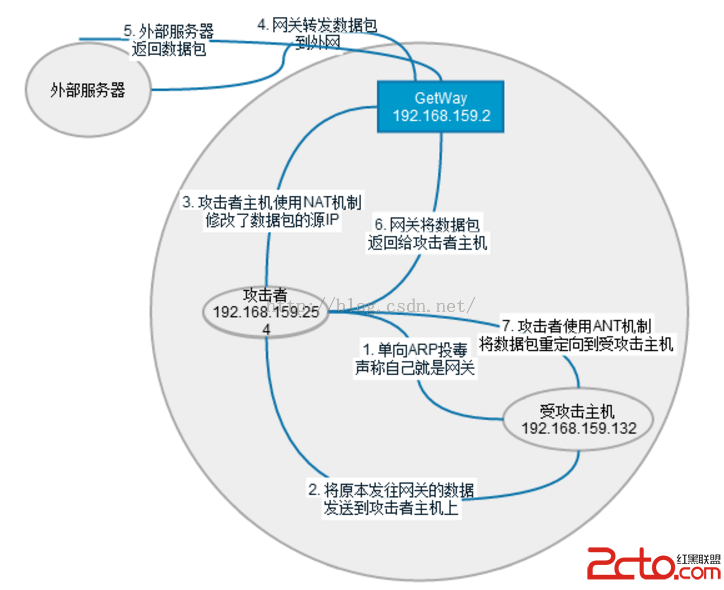
Android 中間人攻擊 0x00 Android中間人攻擊的思路就是劫持局域網中被攻擊機器和服務器間的對話。被攻擊機器和服務器表面上工作正常,實際上已經被中間人劫
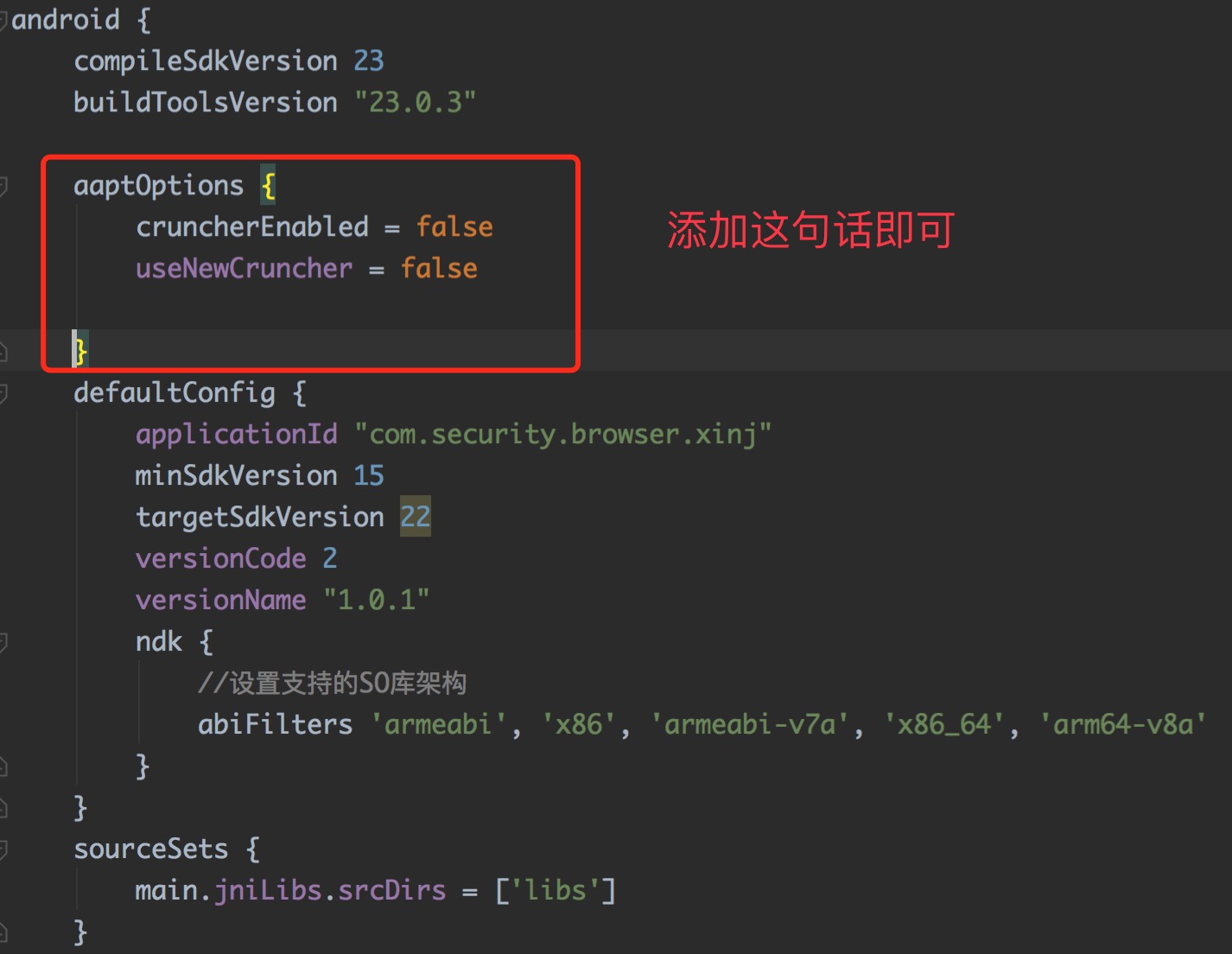 Android Gradle Build Error:Some file crunching failed, see logs for details解決辦法,gradlecrunching
Android Gradle Build Error:Some file crunching failed, see logs for details解決辦法,gradl
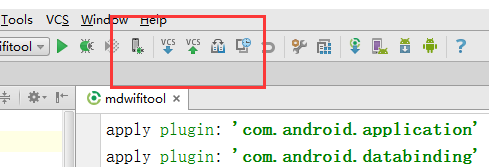 如何處理Android Studio 上面關於 update 和 commit 小箭頭的消失,androidcommit
如何處理Android Studio 上面關於 update 和 commit 小箭頭的消失,androidcommit問題: android
 CAS實現SSO單點登錄原理
CAS實現SSO單點登錄原理1.CAS簡介1.1.What is CAS?CAS(Central Authentication Service) 是Yale大學發起的一個