編輯:關於android開發
實現效果:
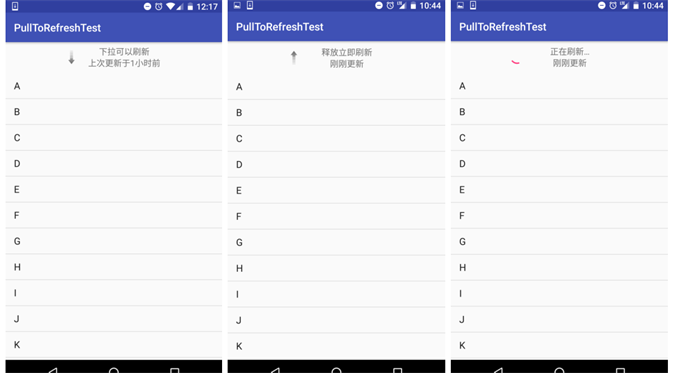
圖片素材: 

--> 首先, 寫先下拉刷新時的刷新布局 pull_to_refresh.xml:

--> 然後, 也是主要的, 自定義下拉刷新的 View (包含下拉刷新所有操作) RefreshView.java:
  1 package com.dragon.android.tofreshlayout;
  2
  3 import android.content.Context;
  4 import android.content.SharedPreferences;
  5 import android.os.AsyncTask;
  6 import android.os.SystemClock;
  7 import android.preference.PreferenceManager;
  8 import android.util.AttributeSet;
  9 import android.view.LayoutInflater;
 10 import android.view.MotionEvent;
 11 import android.view.View;
 12 import android.view.ViewConfiguration;
 13 import android.view.animation.RotateAnimation;
 14 import android.widget.ImageView;
 15 import android.widget.LinearLayout;
 16 import android.widget.ListView;
 17 import android.widget.ProgressBar;
 18 import android.widget.TextView;
 19
 20 public class RefreshView extends LinearLayout implements View.OnTouchListener {
 21
 22     private static final String TAG = RefreshView.class.getSimpleName();
 23
 24     public enum PULL_STATUS {
 25         STATUS_PULL_TO_REFRESH(0), // 下拉狀態
 26         STATUS_RELEASE_TO_REFRESH(1), // 釋放立即刷新狀態
 27         STATUS_REFRESHING(2), // 正在刷新狀態
 28         STATUS_REFRESH_FINISHED(3); // 刷新完成或未刷新狀態
 29
 30         private int status; // 狀態
 31
 32         PULL_STATUS(int value) {
 33             this.status = value;
 34         }
 35
 36         public int getValue() {
 37             return this.status;
 38         }
 39     }
 40
 41     // 下拉頭部回滾的速度
 42     public static final int SCROLL_SPEED = -20;
 43     // 一分鐘的毫秒值,用於判斷上次的更新時間
 44     public static final long ONE_MINUTE = 60 * 1000;
 45     // 一小時的毫秒值,用於判斷上次的更新時間
 46     public static final long ONE_HOUR = 60 * ONE_MINUTE;
 47     // 一天的毫秒值,用於判斷上次的更新時間
 48     public static final long ONE_DAY = 24 * ONE_HOUR;
 49     // 一月的毫秒值,用於判斷上次的更新時間
 50     public static final long ONE_MONTH = 30 * ONE_DAY;
 51     // 一年的毫秒值,用於判斷上次的更新時間
 52     public static final long ONE_YEAR = 12 * ONE_MONTH;
 53     // 上次更新時間的字符串常量,用於作為 SharedPreferences 的鍵值
 54     private static final String UPDATED_AT = "updated_at";
 55
 56     // 下拉刷新的回調接口
 57     private PullToRefreshListener mListener;
 58
 59     private SharedPreferences preferences; // 用於存儲上次更新時間
 60     private View header; // 下拉頭的View
 61     private ListView listView; // 需要去下拉刷新的ListView
 62
 63     private ProgressBar progressBar; // 刷新時顯示的進度條
 64     private ImageView arrow; // 指示下拉和釋放的箭頭
 65     private TextView description; // 指示下拉和釋放的文字描述
 66     private TextView updateAt; // 上次更新時間的文字描述
 67
 68     private MarginLayoutParams headerLayoutParams; // 下拉頭的布局參數
 69     private long lastUpdateTime; // 上次更新時間的毫秒值
 70
 71     // 為了防止不同界面的下拉刷新在上次更新時間上互相有沖突,使用id來做區分
 72     private int mId = -1;
 73
 74     private int hideHeaderHeight; // 下拉頭的高度
 75
 76     /**
 77      * 當前處理什麼狀態,可選值有 STATUS_PULL_TO_REFRESH, STATUS_RELEASE_TO_REFRESH, STATUS_REFRESHING 和 STATUS_REFRESH_FINISHED
 78      */
 79     private PULL_STATUS currentStatus = PULL_STATUS.STATUS_REFRESH_FINISHED;
 80
 81     // 記錄上一次的狀態是什麼,避免進行重復操作
 82     private PULL_STATUS lastStatus = currentStatus;
 83
 84     private float yDown; // 手指按下時的屏幕縱坐標
 85
 86     private int touchSlop; // 在被判定為滾動之前用戶手指可以移動的最大值。
 87
 88     private boolean loadOnce; // 是否已加載過一次layout,這裡onLayout中的初始化只需加載一次
 89
 90     private boolean ableToPull; // 當前是否可以下拉,只有ListView滾動到頭的時候才允許下拉
 91
 92     /**
 93      * 下拉刷新控件的構造函數,會在運行時動態添加一個下拉頭的布局
 94      */
 95     public RefreshView(Context context, AttributeSet attrs) {
 96         super(context, attrs);
 97
 98         preferences = PreferenceManager.getDefaultSharedPreferences(context);
 99         header = LayoutInflater.from(context).inflate(R.layout.pull_to_refresh, null, true);
100         progressBar = (ProgressBar) header.findViewById(R.id.progress_bar);
101         arrow = (ImageView) header.findViewById(R.id.arrow);
102         description = (TextView) header.findViewById(R.id.description);
103         updateAt = (TextView) header.findViewById(R.id.updated_at);
104         touchSlop = ViewConfiguration.get(context).getScaledTouchSlop();
105
106         refreshUpdatedAtValue();
107         setOrientation(VERTICAL);
108         addView(header, 0);
109
110         //Log.d(TAG, "RefreshView Constructor() getChildAt(0): " + getChildAt(0));
111         //Log.d(TAG, "RefreshView Constructor() getChildAt(0): " + getChildAt(1));
112
113 //        listView = (ListView) getChildAt(1);
114 //        listView.setOnTouchListener(this);
115     }
116
117     /**
118      * 進行一些關鍵性的初始化操作,比如:將下拉頭向上偏移進行隱藏,給 ListView 注冊 touch 事件
119      */
120     @Override
121     protected void onLayout(boolean changed, int l, int t, int r, int b) {
122         super.onLayout(changed, l, t, r, b);
123         if (changed && !loadOnce) {
124             hideHeaderHeight = -header.getHeight();
125
126             headerLayoutParams = (MarginLayoutParams) header.getLayoutParams();
127             headerLayoutParams.topMargin = hideHeaderHeight;
128             listView = (ListView) getChildAt(1);
129             //Log.d(TAG, "onLayout() getChildAt(0): " + getChildAt(0));
130             //Log.d(TAG, "onLayout() listView: " + listView);
131             listView.setOnTouchListener(this);
132             loadOnce = true;
133         }
134     }
135
136     /**
137      * 當 ListView 被觸摸時調用,其中處理了各種下拉刷新的具體邏輯
138      */
139     @Override
140     public boolean onTouch(View v, MotionEvent event) {
141         setCanAbleToPull(event); // 判斷是否可以下拉
142         if (ableToPull) {
143             switch (event.getAction()) {
144                 case MotionEvent.ACTION_DOWN:
145                     yDown = event.getRawY();
146                     break;
147                 case MotionEvent.ACTION_MOVE:
148                     // 獲取移動中的 Y 軸的位置
149                     float yMove = event.getRawY();
150                     // 獲取從按下到移動過程中移動的距離
151                     int distance = (int) (yMove - yDown);
152
153                     // 如果手指是上滑狀態,並且下拉頭是完全隱藏的,就屏蔽下拉事件
154                     if (distance <= 0 && headerLayoutParams.topMargin <= hideHeaderHeight) {
155                         return false;
156                     }
157                     if (distance < touchSlop) {
158                         return false;
159                     }
160                     // 判斷是否已經在刷新狀態
161                     if (currentStatus != PULL_STATUS.STATUS_REFRESHING) {
162                         // 判斷設置的 topMargin 是否 > 0, 默認初始設置為 -header.getHeight()
163                         if (headerLayoutParams.topMargin > 0) {
164                             currentStatus = PULL_STATUS.STATUS_RELEASE_TO_REFRESH;
165                         } else {
166                             // 否則狀態為下拉中的狀態
167                             currentStatus = PULL_STATUS.STATUS_PULL_TO_REFRESH;
168                         }
169                         // 通過偏移下拉頭的 topMargin 值,來實現下拉效果
170                         headerLayoutParams.topMargin = (distance / 2) + hideHeaderHeight;
171                         header.setLayoutParams(headerLayoutParams);
172                     }
173                     break;
174                 case MotionEvent.ACTION_UP:
175                 default:
176                     if (currentStatus == PULL_STATUS.STATUS_RELEASE_TO_REFRESH) {
177                         // 松手時如果是釋放立即刷新狀態,就去調用正在刷新的任務
178                         new RefreshingTask().execute();
179                     } else if (currentStatus == PULL_STATUS.STATUS_PULL_TO_REFRESH) {
180                         // 松手時如果是下拉狀態,就去調用隱藏下拉頭的任務
181                         new HideHeaderTask().execute();
182                     }
183                     break;
184             }
185             // 時刻記得更新下拉頭中的信息
186             if (currentStatus == PULL_STATUS.STATUS_PULL_TO_REFRESH
187                     || currentStatus == PULL_STATUS.STATUS_RELEASE_TO_REFRESH) {
188                 updateHeaderView();
189                 // 當前正處於下拉或釋放狀態,要讓 ListView 失去焦點,否則被點擊的那一項會一直處於選中狀態
190                 listView.setPressed(false);
191                 listView.setFocusable(false);
192                 listView.setFocusableInTouchMode(false);
193                 lastStatus = currentStatus;
194                 // 當前正處於下拉或釋放狀態,通過返回 true 屏蔽掉 ListView 的滾動事件
195                 return true;
196             }
197         }
198         return false;
199     }
200
201     /**
202      * 給下拉刷新控件注冊一個監聽器
203      *
204      * @param listener 監聽器的實現
205      * @param id       為了防止不同界面的下拉刷新在上次更新時間上互相有沖突,不同界面在注冊下拉刷新監聽器時一定要傳入不同的 id
206      */
207     public void setOnRefreshListener(PullToRefreshListener listener, int id) {
208         mListener = listener;
209         mId = id;
210     }
211
212     /**
213      * 當所有的刷新邏輯完成後,記錄調用一下,否則你的 ListView 將一直處於正在刷新狀態
214      */
215     public void finishRefreshing() {
216         currentStatus = PULL_STATUS.STATUS_REFRESH_FINISHED;
217         preferences.edit().putLong(UPDATED_AT + mId, System.currentTimeMillis()).commit();
218         new HideHeaderTask().execute();
219     }
220
221     /**
222      * 根據當前 ListView 的滾動狀態來設定 {@link #ableToPull}
223      * 的值,每次都需要在 onTouch 中第一個執行,這樣可以判斷出當前應該是滾動 ListView,還是應該進行下拉
224      */
225     private void setCanAbleToPull(MotionEvent event) {
226         View firstChild = listView.getChildAt(0);
227         if (firstChild != null) {
228             // 獲取 ListView 中第一個Item的位置
229             int firstVisiblePos = listView.getFirstVisiblePosition();
230             // 判斷第一個子控件的 Top 是否和第一個 Item 位置相等
231             if (firstVisiblePos == 0 && firstChild.getTop() == 0) {
232                 if (!ableToPull) {
233                     // getRawY() 獲得的是相對屏幕 Y 方向的位置
234                     yDown = event.getRawY();
235                 }
236                 // 如果首個元素的上邊緣,距離父布局值為 0,就說明 ListView 滾動到了最頂部,此時應該允許下拉刷新
237                 ableToPull = true;
238             } else {
239                 if (headerLayoutParams.topMargin != hideHeaderHeight) {
240                     headerLayoutParams.topMargin = hideHeaderHeight;
241                     header.setLayoutParams(headerLayoutParams);
242                 }
243                 ableToPull = false;
244             }
245         } else {
246             // 如果 ListView 中沒有元素,也應該允許下拉刷新
247             ableToPull = true;
248         }
249     }
250
251     /**
252      * 更新下拉頭中的信息
253      */
254     private void updateHeaderView() {
255         if (lastStatus != currentStatus) {
256             if (currentStatus == PULL_STATUS.STATUS_PULL_TO_REFRESH) {
257                 description.setText(getResources().getString(R.string.pull_to_refresh));
258                 arrow.setVisibility(View.VISIBLE);
259                 progressBar.setVisibility(View.GONE);
260                 rotateArrow();
261             } else if (currentStatus == PULL_STATUS.STATUS_RELEASE_TO_REFRESH) {
262                 description.setText(getResources().getString(R.string.release_to_refresh));
263                 arrow.setVisibility(View.VISIBLE);
264                 progressBar.setVisibility(View.GONE);
265                 rotateArrow();
266             } else if (currentStatus == PULL_STATUS.STATUS_REFRESHING) {
267                 description.setText(getResources().getString(R.string.refreshing));
268                 progressBar.setVisibility(View.VISIBLE);
269                 arrow.clearAnimation();
270                 arrow.setVisibility(View.GONE);
271             }
272             refreshUpdatedAtValue();
273         }
274     }
275
276     /**
277      * 根據當前的狀態來旋轉箭頭
278      */
279     private void rotateArrow() {
280         float pivotX = arrow.getWidth() / 2f;
281         float pivotY = arrow.getHeight() / 2f;
282         float fromDegrees = 0f;
283         float toDegrees = 0f;
284         if (currentStatus == PULL_STATUS.STATUS_PULL_TO_REFRESH) {
285             fromDegrees = 180f;
286             toDegrees = 360f;
287         } else if (currentStatus == PULL_STATUS.STATUS_RELEASE_TO_REFRESH) {
288             fromDegrees = 0f;
289             toDegrees = 180f;
290         }
291         RotateAnimation animation = new RotateAnimation(fromDegrees, toDegrees, pivotX, pivotY);
292         animation.setDuration(100);
293         animation.setFillAfter(true);
294         arrow.startAnimation(animation);
295     }
296
297     /**
298      * 刷新下拉頭中上次更新時間的文字描述
299      */
300     private void refreshUpdatedAtValue() {
301         lastUpdateTime = preferences.getLong(UPDATED_AT + mId, -1);
302         long currentTime = System.currentTimeMillis();
303         long timePassed = currentTime - lastUpdateTime;
304         long timeIntoFormat;
305         String updateAtValue;
306         if (lastUpdateTime == -1) {
307             updateAtValue = getResources().getString(R.string.not_updated_yet);
308         } else if (timePassed < 0) {
309             updateAtValue = getResources().getString(R.string.time_error);
310         } else if (timePassed < ONE_MINUTE) {
311             updateAtValue = getResources().getString(R.string.updated_just_now);
312         } else if (timePassed < ONE_HOUR) {
313             timeIntoFormat = timePassed / ONE_MINUTE;
314             String value = timeIntoFormat + "分鐘";
315             updateAtValue = String.format(getResources().getString(R.string.updated_at), value);
316         } else if (timePassed < ONE_DAY) {
317             timeIntoFormat = timePassed / ONE_HOUR;
318             String value = timeIntoFormat + "小時";
319             updateAtValue = String.format(getResources().getString(R.string.updated_at), value);
320         } else if (timePassed < ONE_MONTH) {
321             timeIntoFormat = timePassed / ONE_DAY;
322             String value = timeIntoFormat + "天";
323             updateAtValue = String.format(getResources().getString(R.string.updated_at), value);
324         } else if (timePassed < ONE_YEAR) {
325             timeIntoFormat = timePassed / ONE_MONTH;
326             String value = timeIntoFormat + "個月";
327             updateAtValue = String.format(getResources().getString(R.string.updated_at), value);
328         } else {
329             timeIntoFormat = timePassed / ONE_YEAR;
330             String value = timeIntoFormat + "年";
331             updateAtValue = String.format(getResources().getString(R.string.updated_at), value);
332         }
333         updateAt.setText(updateAtValue);
334     }
335
336     /**
337      * 正在刷新的任務,在此任務中會去回調注冊進來的下拉刷新監聽器
338      */
339     class RefreshingTask extends AsyncTask<Void, Integer, Void> {
340
341         @Override
342         protected Void doInBackground(Void... params) {
343             int topMargin = headerLayoutParams.topMargin;
344             while (true) {
345                 topMargin = topMargin + SCROLL_SPEED;
346                 if (topMargin <= 0) {
347                     topMargin = 0;
348                     break;
349                 }
350                 publishProgress(topMargin);
351                 SystemClock.sleep(10);
352             }
353             currentStatus = PULL_STATUS.STATUS_REFRESHING;
354             publishProgress(0);
355             if (mListener != null) {
356                 mListener.onRefresh();
357             }
358             return null;
359         }
360
361         @Override
362         protected void onProgressUpdate(Integer... topMargin) {
363             updateHeaderView();
364             headerLayoutParams.topMargin = topMargin[0];
365             header.setLayoutParams(headerLayoutParams);
366         }
367
368     }
369
370     /**
371      * 隱藏下拉頭的任務,當未進行下拉刷新或下拉刷新完成後,此任務將會使下拉頭重新隱藏
372      */
373     class HideHeaderTask extends AsyncTask<Void, Integer, Integer> {
374
375         @Override
376         protected Integer doInBackground(Void... params) {
377             int topMargin = headerLayoutParams.topMargin;
378             while (true) {
379                 topMargin = topMargin + SCROLL_SPEED;
380                 if (topMargin <= hideHeaderHeight) {
381                     topMargin = hideHeaderHeight;
382                     break;
383                 }
384                 publishProgress(topMargin);
385                 SystemClock.sleep(10);
386             }
387             return topMargin;
388         }
389
390         @Override
391         protected void onProgressUpdate(Integer ... topMargin) {
392             headerLayoutParams.topMargin = topMargin[0];
393             header.setLayoutParams(headerLayoutParams);
394         }
395
396         @Override
397         protected void onPostExecute(Integer topMargin) {
398             headerLayoutParams.topMargin = topMargin;
399             header.setLayoutParams(headerLayoutParams);
400             currentStatus = PULL_STATUS.STATUS_REFRESH_FINISHED;
401         }
402     }
403
404     /**
405      * 下拉刷新的監聽器,使用下拉刷新的地方應該注冊此監聽器來獲取刷新回調
406      */
407     public interface PullToRefreshListener {
408         // 刷新時會去回調此方法,在方法內編寫具體的刷新邏輯。注意此方法是在子線程中調用的, 可以不必另開線程來進行耗時操作
409         void onRefresh();
410     }
411 }
--> 第三步, 寫主布局:
--> 最後, Java 代碼添加 ListView 的數據:
程序 Demo: 鏈接:http://pan.baidu.com/s/1ge6Llw3 密碼:skna
***************其實還應該再封裝的...*****************
 App解讀,新聞解讀app
App解讀,新聞解讀app一直不懂別人口中說的原生開發、混合式開發。今天突然看了一篇文章講解的是什麼叫做原生App?移動 Web App?混合APP?分享給大家。 原生A
 與MySQL傳統復制相比,GTID有哪些獨特的復制姿勢?
與MySQL傳統復制相比,GTID有哪些獨特的復制姿勢?本文為DBA+社群的投稿文章:http://dbaplus.cn/news-11-857-1.html與MySQL
 安卓應用的界面編程(4),安卓界面編程
安卓應用的界面編程(4),安卓界面編程第三組UI組件:ImageView及其子類 主要功能是顯示圖片,任何Drawable對象都可使用ImageView來顯
 Android開發通用的工具類
Android開發通用的工具類 Android開發通用的工具類 在開發中有些代碼都是重復性的,如果能把這些代碼集中的分類提取出來(比如網絡連接、數據保存等),然後再以後寫