編輯:關於android開發
效果預覽圖:
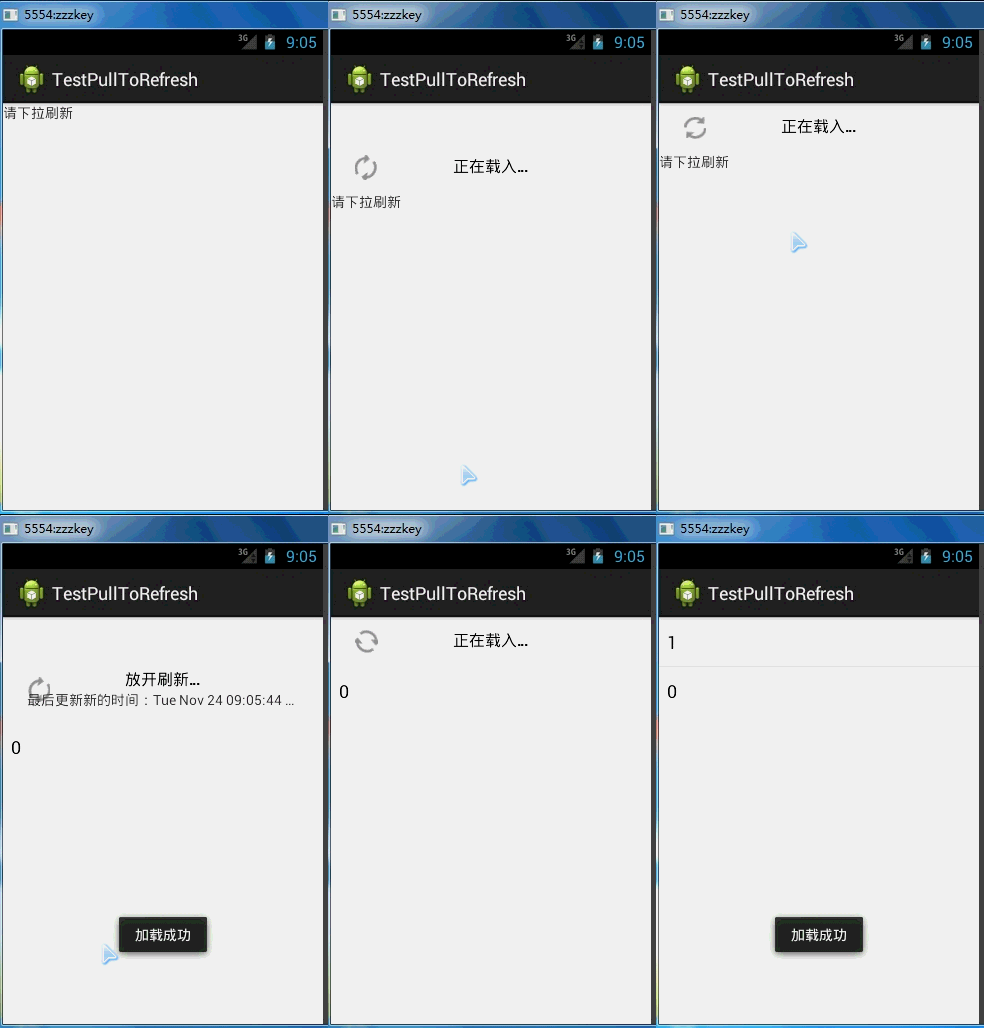
下載地址:https://github.com/chrisbanes/Android-PullToRefresh
activity_main.xml:
 1 <RelativeLayout xmlns:android="http://schemas.android.com/apk/res/android"
 2     xmlns:tools="http://schemas.android.com/tools"
 3     android:layout_width="match_parent"
 4     android:layout_height="match_parent"
 5     tools:context="com.zzw.testpulltorefresh.MainActivity" >
 6
 7     <com.handmark.pulltorefresh.library.PullToRefreshListView
 8         android:id="@+id/listView"
 9         android:layout_width="match_parent"
10         android:layout_height="match_parent" />
11
12 </RelativeLayout>
MainActuvity.java:
 1 package com.zzw.testpulltorefresh;
 2
 3 import java.util.ArrayList;
 4 import java.util.Date;
 5
 6 import com.handmark.pulltorefresh.library.PullToRefreshBase;
 7 import com.handmark.pulltorefresh.library.PullToRefreshBase.Mode;
 8 import com.handmark.pulltorefresh.library.PullToRefreshBase.OnRefreshListener;
 9 import com.handmark.pulltorefresh.library.PullToRefreshListView;
10
11 import android.app.Activity;
12 import android.os.AsyncTask;
13 import android.os.Bundle;
14 import android.os.SystemClock;
15 import android.widget.Adapter;
16 import android.widget.ArrayAdapter;
17 import android.widget.ListView;
18 import android.widget.TextView;
19 import android.widget.Toast;
20
21 public class MainActivity extends Activity {
22
23     private PullToRefreshListView listView;
24     private ArrayList<String> data;
25     private ArrayAdapter adapter;
26     private int count = 0;
27
28     @Override
29     protected void onCreate(Bundle savedInstanceState) {
30         super.onCreate(savedInstanceState);
31         setContentView(R.layout.activity_main);
32
33         data = new ArrayList<String>();
34
35         listView = (PullToRefreshListView) findViewById(R.id.listView);
36         // 設置向下滑動時刷新
37          listView.setMode(Mode.PULL_FROM_START);
38         // 支持下拉和上拉  listView.setMode(Mode.BOTH);
39         // 設置監聽
40         listView.setOnRefreshListener(new OnRefreshListener<ListView>() {
41
42             @Override
43             public void onRefresh(PullToRefreshBase<ListView> refreshView) {
44                 // 在這完成業務邏輯
45                 new MyAsyncTask().execute();
46             }
47         });
48
49         adapter = new ArrayAdapter(this, android.R.layout.simple_list_item_1, data);
50         listView.setAdapter(adapter);
51
52         // 設置如果數據為空的時候顯示什麼
53         TextView textView = new TextView(this);
54         textView.setText("請下拉刷新");
55         listView.setEmptyView(textView);
56     }
57
58     private class MyAsyncTask extends AsyncTask {
59
60         @Override
61         protected void onPreExecute() {
62             // 開始刷新
63             listView.setRefreshing();
64         }
65
66         @Override
67         protected Object doInBackground(Object... params) {
68             // 假設耗時時間為3秒
69             SystemClock.sleep(3000);
70             return count++;
71         }
72
73         @Override
74         protected void onPostExecute(Object result) {
75
76             data.add(0, result + "");
77             adapter.notifyDataSetChanged();
78
79             // 設置標簽
80             listView.setLastUpdatedLabel("最後更新新的時間:" + new Date());
81
82             // 刷新完成
83             listView.onRefreshComplete();
84             Toast.makeText(getApplicationContext(), "加載成功", 0).show();
85         }
86     }
87
88 }
 Android安全開發之ZIP文件目錄遍歷,androidzip
Android安全開發之ZIP文件目錄遍歷,androidzip1、ZIP文件目錄遍歷簡介 ZIP壓縮包文件中允許存在“../”的字符串,攻擊者可
 Android WebView和JavaScript交互,androidwebview
Android WebView和JavaScript交互,androidwebview JavaScript在現在的網頁設計中用得很多,Android 的WebView
 android:listview實現qq,微信好友列表(頭像,昵稱,個性簽名)
android:listview實現qq,微信好友列表(頭像,昵稱,個性簽名) 首先附上運行結果: 如果你沒有學過listview請你先看一看基本知識。不想再說的那
 Android源碼裝飾模式---ContextWrapper
Android源碼裝飾模式---ContextWrapper 如果說Android源碼中哪個地方裝飾模式應用的最明顯的話,那肯定是非ContextWrapper莫屬了