編輯:關於android開發
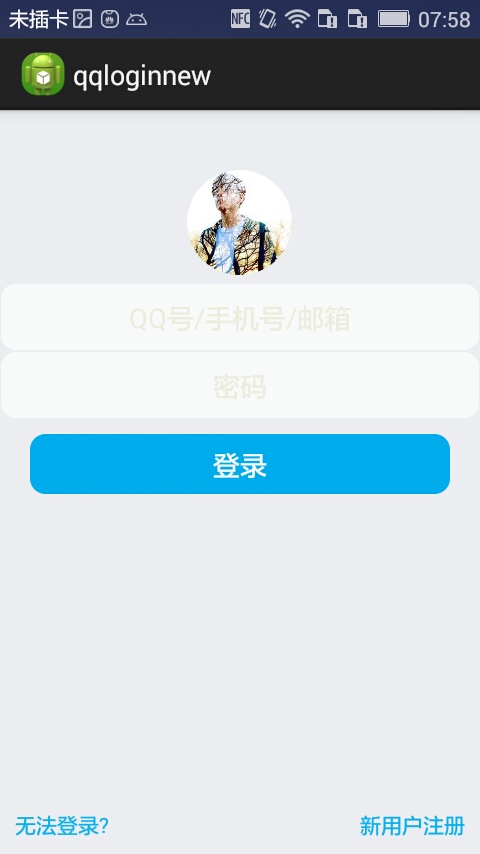
首先過程中碰到的幾個問題:
1、對 EditText 進行自定義背景
2、運行時自動 EditText 自動獲得焦點
3、在獲得焦點時即清空 hint ,而不是輸入後清空
4、清空按鈕的出現時機(在得到焦點並且有輸入內容時)
.........
--- 這些問題都有一一解決 ---
以下是代碼:
布局 fragment_main(問題2)

Button 和 EditText 的背景(問題1)
strings
MainActivity (問題3、4.....)
  1 package com.dragon.android.qqloginnew;
  2
  3 import android.app.Activity;
  4 import android.os.Bundle;
  5 import android.text.Editable;
  6 import android.text.TextWatcher;
  7 import android.view.View;
  8 import android.view.View.OnClickListener;
  9 import android.view.View.OnFocusChangeListener;
 10 import android.widget.Button;
 11 import android.widget.EditText;
 12
 13 public class MainActivity extends Activity {
 14     private EditText editText1;
 15     private EditText editText2;
 16     // private Button button;
 17     private Button clearButton1;
 18     private Button clearButton2;
 19
 20     // 得到strings中的屬性
 21     // private String string2 = getResources().getString(R.string.inaccount);
 22
 23     @Override
 24     protected void onCreate(Bundle savedInstanceState) {
 25         super.onCreate(savedInstanceState);
 26         setContentView(R.layout.fragment_main);
 27
 28         editText1 = (EditText) findViewById(R.id.editText1);
 29         editText2 = (EditText) findViewById(R.id.editText2);
 30
 31         // button = (Button) findViewById(R.id.button1);
 32         clearButton1 = (Button) findViewById(R.id.button2);
 33         clearButton2 = (Button) findViewById(R.id.button3);
 34
 35         // 對EditText進行焦點變更監聽
 36         editText1.setOnFocusChangeListener(new EditTextListener(clearButton1));
 37         editText2.setOnFocusChangeListener(new EditTextListener(clearButton2));
 38
 39         // 對清空按鈕進行點擊監聽
 40         clearButton1.setOnClickListener(new ClearButtonListener());
 41         clearButton2.setOnClickListener(new ClearButtonListener());
 42
 43         // 對EditText進行編輯監聽
 44         editText1.addTextChangedListener(new MyEditTextWatcher(editText1));
 45         editText2.addTextChangedListener(new MyEditTextWatcher(editText2));
 46     }
 47
 48     /**
 49      * 對EditText的內容進行實時監控
 50      *
 51      * @author Auser
 52      *
 53      */
 54     class MyEditTextWatcher implements TextWatcher {
 55         private CharSequence temp;
 56         private EditText editText;
 57
 58         public MyEditTextWatcher(EditText editText) {
 59             this.editText = editText;
 60         }
 61
 62         @Override
 63         // int start開始的位置, int count被改變的舊內容數, int after改變後的內容數量
 64         public void beforeTextChanged(CharSequence s, int start, int count,
 65                 int after) {
 66             // 這裡的s表示改變之前的內容,通常start和count組合,可以在s中讀取本次改變字段中被改變的內容。而after表示改變後新的內容的數量。
 67         }
 68
 69         @Override
 70         // int start開始的位置, int before改變前的內容數量, int count新增量
 71         public void onTextChanged(CharSequence s, int start, int before,
 72                 int count) {
 73             // 這裡的s表示改變之後的內容,通常start和count組合,可以在s中讀取本次改變字段中新的內容。而before表示被改變的內容的數量。
 74             temp = s;
 75         }
 76
 77         @Override
 78         // 表示最終內容
 79         public void afterTextChanged(Editable s) {
 80             if (temp.length() > 0) {
 81                 // 設置清空按鈕為可見
 82                 if (editText == editText1) {
 83                     clearButton1.setVisibility(View.VISIBLE);
 84                 } else if (editText == editText2) {
 85                     clearButton2.setVisibility(View.VISIBLE);
 86                 }
 87             } else {
 88                 // 設置清空按鈕不可見
 89                 if (editText == editText1) {
 90                     clearButton1.setVisibility(View.INVISIBLE);
 91                 } else if (editText == editText2) {
 92                     clearButton2.setVisibility(View.INVISIBLE);
 93                 }
 94             }
 95         }
 96     }
 97
 98     /**
 99      * 清空按鈕點擊事件
100      *
101      * @author
102      *
103      */
104     class ClearButtonListener implements OnClickListener {
105
106         @Override
107         public void onClick(View view) {
108             if (view == clearButton1) {
109                 editText1.setText("");
110             } else if (view == clearButton2) {
111                 editText2.setText("");
112             }
113         }
114     }
115
116     /**
117      * 焦點變更事件
118      *
119      * @author Auser
120      *
121      */
122     class EditTextListener implements OnFocusChangeListener {
123         private Button clear;
124
125         public EditTextListener(Button clear) {
126             this.clear = clear;
127         }
128
129         @Override
130         public void onFocusChange(View v, boolean hasFocus) {
131             EditText textView = (EditText) v;
132             String hint;
133             if (hasFocus) {
134                 // 當獲取焦點時如果內容不為空則清空按鈕可見
135                 if (!textView.getText().toString().equals("")) {
136                     clear.setVisibility(View.VISIBLE);
137                 }
138                 // if (textView == editText2) {
139                 // // 設置輸入格式為不可見的密碼格式
140                 // textView.setInputType(InputType.TYPE_CLASS_TEXT
141                 // | InputType.TYPE_TEXT_VARIATION_PASSWORD);
142                 // }
143                 hint = textView.getHint().toString();
144                 // 給TextView添加額外的數據
145                 textView.setTag(hint);
146                 textView.setHint("");
147             } else {
148                 // 當失去焦點時清空按鈕不可見
149                 clear.setVisibility(View.INVISIBLE);
150                 // if (textView == editText2) {
151                 // // 設置輸入格式為可見的密碼格式
152                 // textView.setInputType(InputType.TYPE_CLASS_TEXT
153                 // | InputType.TYPE_TEXT_VARIATION_VISIBLE_PASSWORD);
154                 // }
155                 // 取出之前添加的額外數據
156                 hint = textView.getTag().toString();
157                 textView.setHint(hint);
158             }
159         }
160     }
161 }
圖片素材
a.png clear.png
-------------------------一個初步的登錄界面------------------------
 Android學習筆記(25):帶動畫效果的View切換ViewAnimator及其子類
Android學習筆記(25):帶動畫效果的View切換ViewAnimator及其子類 ViewAnimator可以實現帶動畫效果的View切換,其派生的子類是一些帶動
 Android:廣播接收器(BroadCastReceiver)要點隨筆。,
Android:廣播接收器(BroadCastReceiver)要點隨筆。,@@@描述 廣播接收器可以收到&nbs
 Android之側滑導航欄,android滑導航欄
Android之側滑導航欄,android滑導航欄今天學習的新內容是側滑導航欄,我想大家肯定都比較熟悉了,因為這個效果在qq裡面也有,最近一直跟室友們玩的游戲是快速讓自己
 Android中使用Notification實現進度通知欄(示例三),notification進度條
Android中使用Notification實現進度通知欄(示例三),notification進度條我們在使用APP的過程中,軟件會偶爾提示我們進行版本更新,我們點擊確認