編輯:關於android開發
今天碰到一個一個會話失效的問題,從網上找了個方法可以處理http://blog.csdn.net/aa7704/article/details/50611588#comments
還有list的下拉刷新和上拉加載的完成程序的例子
如下是代碼
先看下登錄保存定義保存的Cookie
package com.examle.hello.util;

import com.lidroid.xutils.util.PreferencesCookieStore;

import android.app.Application;

public class MyApplication extends Application {
    /**
     * 用PreferencesVookisStore持久化cookie到本地
     */
    public static PreferencesCookieStore presCookieStore;
    public static String jsesionid = "";// 保存sessionid

    @Override
    public void onCreate() {
        // TODO Auto-generated method stub
        super.onCreate();
        presCookieStore = new PreferencesCookieStore(getApplicationContext());
    }
}

下面是PullToRefreshListView的使用 代碼在適配器 getview的方法重復調用了多次我沒有想到處理的方法
package com.examle.hello.text;

import java.text.SimpleDateFormat;
import java.util.ArrayList;
import java.util.Date;
import java.util.List;

import org.json.JSONArray;
import org.json.JSONException;
import org.json.JSONObject;

import com.examle.hello.adapter.ReceiveListAdapter;
import com.examle.hello.util.MyApplication;
import com.handmark.pulltorefresh.library.PullToRefreshBase;
import com.handmark.pulltorefresh.library.PullToRefreshBase.Mode;
import com.handmark.pulltorefresh.library.PullToRefreshBase.OnRefreshListener2;
import com.handmark.pulltorefresh.library.PullToRefreshListView;
import com.lidroid.xutils.HttpUtils;
import com.lidroid.xutils.exception.HttpException;
import com.lidroid.xutils.http.RequestParams;
import com.lidroid.xutils.http.ResponseInfo;
import com.lidroid.xutils.http.callback.RequestCallBack;
import com.lidroid.xutils.http.client.HttpRequest.HttpMethod;

import android.os.AsyncTask;
import android.os.Bundle;
import android.support.v4.app.Fragment;
import android.util.Log;
import android.view.LayoutInflater;
import android.view.View;
import android.view.ViewGroup;
import android.widget.ListView;

/**
 * 短信接收的界面
 * @author zh
 *
 */
public class MainReceiveFragment extends Fragment {
    private PullToRefreshListView listView;
    private ReceiveListAdapter adpter;
    private int j ;
    private List<JSONObject> dataList = new ArrayList<JSONObject>();
    private String urlString = "http://111.39.245.157:9527/cmppbs/getCmpp30DeliverList.action";
    @Override
    public View onCreateView(LayoutInflater inflater, ViewGroup container,
            Bundle savedInstanceState) {
        // TODO Auto-generated method stub
        return inflater.inflate(R.layout.receivefragment, null, false);
    }

    @Override
    public void onActivityCreated(Bundle savedInstanceState) {
        // TODO Auto-generated method stub
        super.onActivityCreated(savedInstanceState);
        initView();

    }

    private void initView() {
        // TODO Auto-generated method stub
        listView =(PullToRefreshListView) getActivity().findViewById(R.id.expand_list);

        listView.setMode(Mode.BOTH);
        setHttp();
        OnRefreshListener2<ListView> mListener2 = new OnRefreshListener2<ListView>() {

            @Override
            public void onPullDownToRefresh(
                    PullToRefreshBase<ListView> refreshView) {
                // TODO Auto-generated method stub
                SimpleDateFormat simpleDateFormat = new SimpleDateFormat("yyyy-MM-dd hh:mm:ss");
                String date = simpleDateFormat.format(new Date());
                refreshView.getLoadingLayoutProxy().setLastUpdatedLabel(date);
                new UpFresh().execute();
            }

            @Override
            public void onPullUpToRefresh(
                    PullToRefreshBase<ListView> refreshView) {
                // TODO Auto-generated method stub
                new MyTask().execute();
            }
        };
        listView.setOnRefreshListener(mListener2);
        j=2;
    }

    /**
     * 進行網絡的請求默認加載第一頁
     */
    private void setHttp(){
         HttpUtils httpUtils = new HttpUtils();
        RequestParams requestParams = new RequestParams();
        httpUtils.configCurrentHttpCacheExpiry(100);
        httpUtils.configCookieStore(MyApplication.presCookieStore);
        requestParams.addBodyParameter("page", "1");
        requestParams.addBodyParameter("rows", "3");
        requestParams.addBodyParameter("order", "desc");
        httpUtils.send(HttpMethod.POST, urlString, requestParams, new RequestCallBack<String>() {

            @Override
            public void onFailure(HttpException arg0, String arg1) {
                // TODO Auto-generated method stub

            }

            @Override
            public void onSuccess(ResponseInfo<String> arg0) {
                // TODO Auto-generated method stub
                Log.d("jiejie", arg0.result);
                if(arg0.result !=null){
                    try {
                        JSONObject object=new JSONObject(arg0.result);
                        JSONArray array = object.getJSONArray("rows");
                        for (int i = 0; i < array.length(); i++) {
                            JSONObject dataJsonObject =array.getJSONObject(i);
                            dataList.add(dataJsonObject);
                        }
                        ListView listView2 = listView.getRefreshableView();
                        adpter = new ReceiveListAdapter(getActivity(),dataList);
                        listView2.setAdapter(adpter);
                    } catch (JSONException e) {
                        // TODO Auto-generated catch block
                        e.printStackTrace();
                    }
                }
            }


        });
    }
    /**
     * 上拉加載
     * @author zh
     *
     */
    class MyTask extends AsyncTask<Void, Void, String[]>{

        @Override
        protected String[] doInBackground(Void... arg0) {
            // TODO Auto-generated method stub
            try {
                Thread.sleep(1000);
            } catch (InterruptedException e) {
                e.printStackTrace();
            }
            return null;
        }
        @Override
        protected void onPostExecute(String[] result) {
            // TODO Auto-generated method stub
            RequestParams requestParams = new RequestParams();
            requestParams.addBodyParameter("page", j+"");
            requestParams.addBodyParameter("rows", "3");
            requestParams.addBodyParameter("order", "desc");
            HttpUtils httpUtils = new HttpUtils();
            httpUtils.configCurrentHttpCacheExpiry(100);
            httpUtils.configCookieStore(MyApplication.presCookieStore);
            httpUtils.send(HttpMethod.POST, urlString, requestParams, new RequestCallBack<String>() {

                @Override
                public void onFailure(HttpException arg0, String arg1) {
                    // TODO Auto-generated method stub

                }

                @Override
                public void onSuccess(ResponseInfo<String> arg0) {
                    // TODO Auto-generated method stub
                    Log.d("jiejie", arg0.result);
                    if(arg0.result!=null){
                        try {
                            JSONObject object=new JSONObject(arg0.result);
                            JSONArray list=object.getJSONArray("rows");
                            JSONObject data;
                            for (int i = 0; i < list.length(); i++) {
                                data = list.getJSONObject(i);
                                dataList.add(data);
                                /*Toast.makeText(getActivity(), dataList.get(0).toString(), Toast.LENGTH_LONG).show();*/
                            }
                            adpter.notifyDataSetChanged();
                            listView.onRefreshComplete();
                        } catch (JSONException e) {
                            // TODO Auto-generated catch block
                            e.printStackTrace();
                        }
                    }
                }
            });
            super.onPostExecute(result);
            j++;
        }
    }

    class UpFresh extends AsyncTask<Void, Void, String[]>{

        @Override
        protected String[] doInBackground(Void... arg0) {
            // TODO Auto-generated method stub
            return null;
        }
        @Override
        protected void onPostExecute(String[] result) {
            // TODO Auto-generated method stub
            String url3="http://111.39.245.157:9527/cmppbs/getCmpp30DeliverList.action";
            RequestParams requestParams = new RequestParams();
            requestParams.addBodyParameter("page", "1");
            requestParams.addBodyParameter("rows", "3");
            requestParams.addBodyParameter("order", "desc");
            HttpUtils httpUtilss = new HttpUtils();
            httpUtilss.configCurrentHttpCacheExpiry(100);
            httpUtilss.configCookieStore(MyApplication.presCookieStore);
            httpUtilss.send(HttpMethod.POST, url3, requestParams, new RequestCallBack<String>() {

                @Override
                public void onFailure(HttpException arg0, String arg1) {
                    // TODO Auto-generated method stub

                }

                @Override
                public void onSuccess(ResponseInfo<String> arg0) {
                    // TODO Auto-generated method stub
                    dataList.clear();
                    if(arg0.result !=null){
                        try {
                            JSONObject object = new JSONObject(arg0.result);
                            JSONArray list = object.getJSONArray("rows");
                            JSONObject data;
                            for(int i =0;i<list.length();i++){
                                data = list.getJSONObject(i);
                                dataList.add(data);
                            }
                            adpter.notifyDataSetChanged();
                            listView.onRefreshComplete();
                        } catch (JSONException e) {
                            // TODO Auto-generated catch block
                            e.printStackTrace();
                        }
                    }
                }
            });
            super.onPostExecute(result);
        }
    }

}
package com.examle.hello.adapter;

import java.util.List;

import org.json.JSONException;
import org.json.JSONObject;

import com.examle.hello.text.R;

import android.content.Context;
import android.util.Log;
import android.view.View;
import android.view.ViewGroup;
import android.widget.BaseAdapter;
import android.widget.TextView;

/**
 * 短信接收的適配器
 * @author zh
 *
 */
public class ReceiveListAdapter extends BaseAdapter {
    private Context context;
    private List<JSONObject> dataList;


    public ReceiveListAdapter(Context context, List<JSONObject> dataList) {
        this.context = context;
        this.dataList = dataList;
    }

    @Override
    public int getCount() {
        // TODO Auto-generated method stub
        return dataList.size();
    }

    @Override
    public Object getItem(int arg0) {
        // TODO Auto-generated method stub
        return arg0;
    }

    @Override
    public long getItemId(int arg0) {
        // TODO Auto-generated method stub
        return arg0;
    }

    @Override
    public View getView(int arg0, View arg1, ViewGroup arg2) {
        // TODO Auto-generated method stub
        ViewHolder holder = null;
        if(arg1 == null){
            holder = new ViewHolder();
            arg1 = View.inflate(context, R.layout.notereceive, null);
            holder.tv_item_r_yewu=(TextView)arg1.findViewById(R.id.item_r_yewu);
            holder.tv_item_r_phone=(TextView)arg1.findViewById(R.id.item_r_phone);
            holder.tv_item_r_content=(TextView)arg1.findViewById(R.id.item_r_content);
            holder.tv_item_r_time=(TextView)arg1.findViewById(R.id.item_r_time);
            arg1.setTag(holder);
        }else {
            holder = (ViewHolder) arg1.getTag();
        }
        try {
            Log.d("jiejie", "數據"+dataList);
            holder.tv_item_r_content.setText(dataList.get(arg0).getString("msgContent"));
            holder.tv_item_r_phone.setText(dataList.get(arg0).getString("srcTerminalId"));
            holder.tv_item_r_time.setText(dataList.get(arg0).getString("moDate"));
            holder.tv_item_r_yewu.setText(dataList.get(arg0).getString("tpPid"));
        } catch (JSONException e) {
            // TODO Auto-generated catch block
            e.printStackTrace();
        }
        return arg1;
    }
    static class ViewHolder{
        TextView tv_item_r_yewu;
        TextView tv_item_r_phone;
        TextView tv_item_r_content;
        TextView tv_item_r_time;
    }
}
 提高效率的 Android Studio 技巧匯總,androidstudio
提高效率的 Android Studio 技巧匯總,androidstudio這是從Philippe Breault的系列文章《Android Studio Tips O
 獲取手機屏幕密度。,獲取屏幕密度
獲取手機屏幕密度。,獲取屏幕密度 1 package com.km.screeninfo; 2 3 import android.os.Bundle; 4
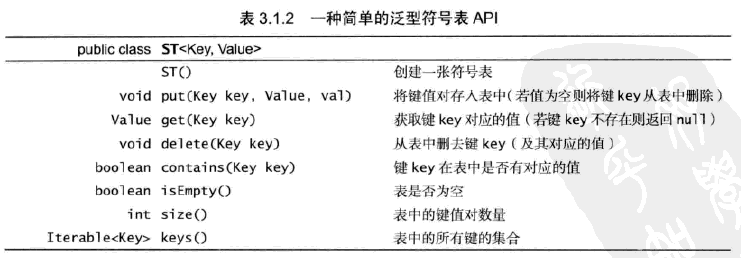 算法—符號表,算法符號
算法—符號表,算法符號定義:符號表是一種存儲鍵值對的數據結構,支持兩種操作:插入(put),即將一組新的鍵值對存入表中;查找(get),即根據給定的鍵得到相應的值。 1
 Android源碼裝飾模式---ContextWrapper
Android源碼裝飾模式---ContextWrapper 如果說Android源碼中哪個地方裝飾模式應用的最明顯的話,那肯定是非ContextWrapper莫屬了