編輯:關於android開發
新人剛學習Android兩周,寫一個隨筆算是對兩周學習成果的鞏固,不足之處歡迎各位建議和完善。
這次寫的是一個簡單登錄案例,大概功能如下:
注冊的賬戶信息用SharedPreferences存儲;
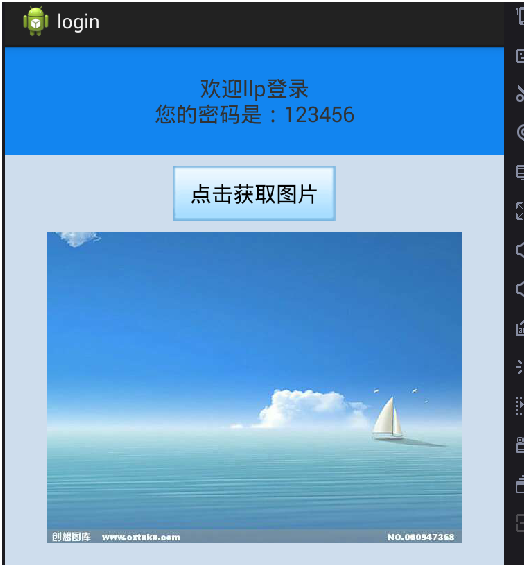
登錄成功後跳轉到成功頁面,在成功頁面聯網請求圖片並寫入到外部存儲;
然後讀出顯示在成功頁面;
注冊xml代碼:
 1 <?xml version="1.0" encoding="utf-8"?>
 2 <manifest xmlns:android="http://schemas.android.com/apk/res/android"
 3     package="com.qf.login"
 4     android:versionCode="1"
 5     android:versionName="1.0" >
 6
 7     <uses-sdk
 8         android:minSdkVersion="14"
 9         android:targetSdkVersion="21" />
10     <!--聯網權限  -->
11     <uses-permission android:name="android.permission.INTERNET"/>
12     <!--在SD卡中創建與刪除文件權限  -->
13     <uses-permission android:name="android.permission.MOUNT_UNMOUNT_FILESYSTEMS"/>
14     <!--向SD卡寫入數據權限  -->
15     <uses-permission android:name="android.permission.WRITE_EXTERNAL_STORAGE"/>
16
17     <application
18         android:allowBackup="true"
19         android:icon="@drawable/ic_launcher"
20         android:label="@string/app_name"
21         android:theme="@style/AppTheme" >
22         <activity
23             android:name=".MainActivity"
24             android:label="@string/app_name" >
25             <intent-filter>
26                 <action android:name="android.intent.action.MAIN" />
27
28                 <category android:name="android.intent.category.LAUNCHER" />
29             </intent-filter>
30         </activity>
31         <activity
32             android:name=".Register"
33             ></activity>
34         <activity
35             android:name=".SuccessLogin"
36             ></activity>
37     </application>
38
39 </manifest>
MainActivity:
 1 <LinearLayout xmlns:android="http://schemas.android.com/apk/res/android"
 2     xmlns:tools="http://schemas.android.com/tools"
 3     android:layout_width="match_parent"
 4     android:layout_height="match_parent"
 5     android:orientation="vertical" >
 6
 7     <LinearLayout
 8         android:layout_width="match_parent"
 9         android:layout_height="wrap_content"
10         android:orientation="horizontal"
11         android:paddingTop="50dp" >
12
13         <TextView
14             android:layout_width="0dp"
15             android:layout_height="wrap_content"
16             android:layout_weight="1"
17             android:gravity="center_horizontal"
18             android:text="賬號" />
19
20         <EditText
21             android:id="@+id/et1"
22             android:layout_width="0dp"
23             android:layout_height="wrap_content"
24             android:layout_marginRight="5dp"
25             android:layout_weight="4"
26             android:background="@drawable/app_pref_bg" />
27     </LinearLayout>
28
29     <LinearLayout
30         android:layout_width="match_parent"
31         android:layout_height="wrap_content"
32         android:layout_marginTop="10dp"
33         android:orientation="horizontal" >
34
35         <TextView
36             android:layout_width="0dp"
37             android:layout_height="wrap_content"
38             android:layout_weight="1"
39             android:gravity="center_horizontal"
40             android:text="密碼" />
41
42         <EditText
43             android:id="@+id/et2"
44             android:layout_width="0dp"
45             android:layout_height="wrap_content"
46             android:layout_marginRight="5dp"
47             android:layout_weight="4"
48             android:background="@drawable/app_pref_bg"
49             android:inputType="textPassword" />
50     </LinearLayout>
51     <LinearLayout
52         android:layout_width="match_parent"
53         android:layout_height="wrap_content"
54         android:layout_marginTop="10dp"
55         android:orientation="horizontal">
56         <Button
57             android:id="@+id/btn1"
58             android:layout_width="70dp"
59             android:layout_height="45dp"
60             android:layout_marginLeft="90dp"
61             android:text="登錄"
62             android:gravity="center"
63             />
64          <Button
65             android:id="@+id/btn2"
66             android:layout_width="70dp"
67             android:layout_height="45dp"
68             android:layout_marginLeft="20dp"
69             android:text="注冊"
70             android:gravity="center"
71             />
72
73     </LinearLayout>
74
75 </LinearLayout>
注冊布局xml:
<?xml version="1.0" encoding="utf-8"?>
<LinearLayout xmlns:android="http://schemas.android.com/apk/res/android"
    android:layout_width="match_parent"
    android:layout_height="match_parent"
    android:orientation="vertical" >

    <LinearLayout
        android:layout_width="match_parent"
        android:layout_height="wrap_content"
        android:orientation="horizontal"
        android:paddingTop="50dp" >

        <TextView
            android:layout_width="0dp"
            android:layout_height="wrap_content"
            android:layout_weight="1"
            android:gravity="center_horizontal"
            android:text="賬號" />

        <EditText
            android:id="@+id/et1"
            android:layout_width="0dp"
            android:layout_height="wrap_content"
            android:layout_marginRight="5dp"
            android:layout_weight="4"
            android:background="@drawable/app_pref_bg" />
    </LinearLayout>

    <LinearLayout
        android:layout_width="match_parent"
        android:layout_height="wrap_content"
        android:layout_marginTop="10dp"
        android:orientation="horizontal" >

        <TextView
            android:layout_width="0dp"
            android:layout_height="wrap_content"
            android:layout_weight="1"
            android:gravity="center_horizontal"
            android:text="密碼" />

        <EditText
            android:id="@+id/et2"
            android:layout_width="0dp"
            android:layout_height="wrap_content"
            android:layout_marginRight="5dp"
            android:layout_weight="4"
            android:background="@drawable/app_pref_bg"
            android:inputType="textPassword" />
    </LinearLayout>

    <LinearLayout
        android:layout_width="match_parent"
        android:layout_height="wrap_content"
        android:layout_marginTop="10dp"
        android:orientation="horizontal" >

        <Button
            android:id="@+id/btn1"
            android:layout_width="70dp"
            android:layout_height="45dp"
            android:layout_marginLeft="110dp"
            android:gravity="center"
            android:text="注冊" />
    </LinearLayout>

</LinearLayout>
登錄成功布局xml:
<?xml version="1.0" encoding="utf-8"?>
<LinearLayout xmlns:android="http://schemas.android.com/apk/res/android"
    android:id="@+id/ll"
    android:layout_width="match_parent"
    android:layout_height="match_parent"
    android:background="#CEDDED"
    android:orientation="vertical" >
    <TextView
        android:id="@+id/tv"
        android:layout_width="match_parent"
        android:layout_height="100dp"
        android:background="#1285F0"
        android:textSize="20sp"
        android:gravity="center"
        />
    <Button
        android:id="@+id/btn"
        android:layout_width="150dp"
        android:layout_height="50dp"
        android:text="點擊獲取圖片"
        android:background="@drawable/btn1"
        android:textSize="20sp"
        android:gravity="center"
        android:layout_gravity="center_horizontal"
        android:layout_marginTop="10dp"

        />
    <ImageView
        android:id="@+id/iv"
        android:layout_width="wrap_content"
        android:layout_height="wrap_content"
        android:layout_gravity="center_horizontal"
        android:layout_marginTop="10dp"

        />
</LinearLayout>
登錄主頁面JAVA代碼:
 1 package com.qf.login;
 2
 3 import android.app.Activity;
 4 import android.content.Context;
 5 import android.content.Intent;
 6 import android.content.SharedPreferences;
 7 import android.os.Bundle;
 8 import android.text.TextUtils;
 9 import android.view.View;
10 import android.view.View.OnClickListener;
11 import android.widget.Button;
12 import android.widget.EditText;
13 import android.widget.Toast;
14
15 public class MainActivity extends Activity implements OnClickListener {
16     private EditText et1;
17     private EditText et2;
18
19     @Override
20     protected void onCreate(Bundle savedInstanceState) {
21         super.onCreate(savedInstanceState);
22         setContentView(R.layout.activity_main);
23
24           et1 = (EditText) findViewById(R.id.et1);
25           et2 = (EditText) findViewById(R.id.et2);
26         Button btn1 = (Button) findViewById(R.id.btn1);
27         Button btn2 = (Button) findViewById(R.id.btn2);
28
29         btn1.setOnClickListener(this);
30         btn2.setOnClickListener(this);
31     }
32
33     public void login() {
34         //獲得輸入的賬戶信息
35         String username = et1.getText().toString().trim();
36         String password = et2.getText().toString().trim();
37         //獲得SharPreferences中存儲的賬戶信息
38         SharedPreferences sp=getSharedPreferences("userinfo", Context.MODE_PRIVATE);
39
40         // d.判斷用戶名密碼
41         if (TextUtils.isEmpty(username) || TextUtils.isEmpty(password)) {
42             Toast.makeText(MainActivity.this, "用戶名密碼不能為空", Toast.LENGTH_SHORT)
43                     .show();
44             return;
45         }else if(username.equals(sp.getString("user", ""))&&password.equals(sp.getString("password", ""))){
46             //跳轉到登錄成功頁面
47             Intent intent=new Intent(MainActivity.this,SuccessLogin.class);
48
49             startActivity(intent);
50         }else if(!username.equals(sp.getString("user", ""))){
51             Toast.makeText(MainActivity.this, "用戶名不存在!請注冊", Toast.LENGTH_SHORT).show();
52         }
53         else{
54             Toast.makeText(MainActivity.this, "密碼錯誤", Toast.LENGTH_SHORT).show();
55         }
56     }
57
58     @Override
59     public void onClick(View v) {
60         switch (v.getId()) {
61         case R.id.btn1:
62             login();
63             break;
64         case R.id.btn2:
65             Intent intent = new Intent(MainActivity.this, Register.class);
66             startActivity(intent);
67             break;
68         default:
69             break;
70         }
71
72     }
73
74
75
76 }
注冊頁面JAVA代碼:
 1 package com.qf.login;
 2
 3 import android.app.Activity;
 4 import android.content.Context;
 5 import android.content.Intent;
 6 import android.content.SharedPreferences;
 7 import android.content.SharedPreferences.Editor;
 8 import android.os.Bundle;
 9 import android.view.View;
10 import android.view.View.OnClickListener;
11 import android.widget.Button;
12 import android.widget.EditText;
13 import android.widget.Toast;
14
15 public class Register extends Activity{
16     @Override
17     protected void onCreate(Bundle savedInstanceState) {
18         // TODO Auto-generated method stub
19         super.onCreate(savedInstanceState);
20         setContentView(R.layout.register);
21
22         final EditText et1=(EditText) findViewById(R.id.et1);
23         final EditText et2=(EditText) findViewById(R.id.et2);
24         Button btn=(Button) findViewById(R.id.btn1);
25
26         btn.setOnClickListener(new OnClickListener() {
27
28             @Override
29             public void onClick(View v) {
30                 //獲得主頁面傳過來的intent
31                 Intent intent=getIntent();
32                 //獲得輸入的賬戶信息
33                 String username=et1.getText().toString().trim();
34                 String password=et2.getText().toString().trim();
35                 //SharPreferences存儲賬戶信息
36                 SharedPreferences sp=getSharedPreferences("userinfo", Context.MODE_PRIVATE);
37                 Editor editor=sp.edit();
38                 editor.putString("user", username);
39                 editor.putString("password", password);
40                 editor.commit();
41
42                 Toast.makeText(Register.this, "注冊成功", Toast.LENGTH_SHORT).show();
43                 //跳回到登錄頁面
44                 finish();
45             }
46         });
47     }
48 }
登錄成功頁面JAVA代碼:
package com.qf.login;

import java.io.File;

import java.io.FileInputStream;
import java.io.FileNotFoundException;
import java.io.FileOutputStream;

import android.app.Activity;
import android.content.Context;
import android.content.Intent;
import android.content.SharedPreferences;
import android.graphics.Bitmap;
import android.graphics.Bitmap.CompressFormat;
import android.graphics.BitmapFactory;
import android.os.Bundle;
import android.os.Environment;
import android.util.Log;
import android.view.View;
import android.view.View.OnClickListener;
import android.widget.Button;
import android.widget.ImageView;
import android.widget.TextView;

public class SuccessLogin extends Activity {
    Bitmap bmp;
    ImageView iv;
    String str_url = "http://pic1.cxtuku.com/00/09/47/b36872529f7c.jpg";

    @Override
    protected void onCreate(Bundle savedInstanceState) {
        // TODO Auto-generated method stub
        super.onCreate(savedInstanceState);
        setContentView(R.layout.success);
        // 獲得intent對象
        Intent intent = getIntent();
        //獲得存儲在SharPreferences的賬戶信息
        SharedPreferences sp = getSharedPreferences("userinfo",
                Context.MODE_PRIVATE);

        iv = (ImageView) findViewById(R.id.iv);

        TextView tv = (TextView) findViewById(R.id.tv);
        tv.setText("歡迎" + sp.getString("user", "") + "登錄" + "\n" + "您的密碼是:"
                + sp.getString("password", ""));

        Button btn = (Button) findViewById(R.id.btn);
        //監聽點擊事件,聯網請求異步加載圖片
        btn.setOnClickListener(new OnClickListener() {

            @Override
            public void onClick(View v) {
                //開啟異步線程
                MyBitmapTask task = new MyBitmapTask();
                task.execute(str_url);
                task.setMyInterface(new MyInterface() {

                    @Override
                    public void getImageBitmap(Bitmap bmp) {
                        // TODO Auto-generated method stub

                        //寫入到外部存儲(SD卡)
                        writeToOutStoragePublic(bmp);
                        //從SD卡中讀出圖片並顯示在屏幕
                        readFromOutStoragePublic();
                    }
                });

            }
        });

    }

    private void writeToOutStoragePublic(Bitmap bmp) {

        if (Environment.getExternalStorageState().equals(
                Environment.MEDIA_MOUNTED)) {

            File filepath = Environment
                    .getExternalStoragePublicDirectory(Environment.DIRECTORY_PICTURES);
            File file = new File(filepath, "dahai.jpg");
            try {
                FileOutputStream fos = new FileOutputStream(file);
                bmp.compress(CompressFormat.JPEG, 60, fos);
            } catch (Exception e) {
                // TODO Auto-generated catch block
                e.printStackTrace();
            }
        }
    }

    private void readFromOutStoragePublic() {
        if (Environment.getExternalStorageState().equals(
                Environment.MEDIA_MOUNTED)) {
            File filepath = Environment
                    .getExternalStoragePublicDirectory(Environment.DIRECTORY_PICTURES);
            File file = new File(filepath, "dahai.jpg");
            try {
                FileInputStream fis = new FileInputStream(file);
                bmp = BitmapFactory.decodeStream(fis);
                iv.setImageBitmap(bmp);
            } catch (Exception e) {
                // TODO Auto-generated catch block
                e.printStackTrace();
            }

        }
    }

}
自定義聯網請求工具類代碼:
 1 package com.qf.login;
 2
 3 import java.io.InputStream;
 4 import java.net.HttpURLConnection;
 5 import java.net.URL;
 6
 7 import android.graphics.Bitmap;
 8 import android.graphics.BitmapFactory;
 9
10 public class HttpUtils {
11
12     public static Bitmap downloadImage(String str_url) {
13         Bitmap bmp = null;
14         try {
15             URL url = new URL(str_url);
16             HttpURLConnection conn = (HttpURLConnection) url.openConnection();
17             InputStream is = conn.getInputStream();
18             bmp = BitmapFactory.decodeStream(is);
19         } catch (Exception e) {
20             // TODO Auto-generated catch block
21             e.printStackTrace();
22         }
23         return bmp;
24     };
25
26 }
自定義接口傳值:
1 package com.qf.login;
2
3 import android.graphics.Bitmap;
4
5 public interface MyInterface {
6     void getImageBitmap(Bitmap bmp);
7
8
9 }
自定義Task類加載圖片:
 1 package com.qf.login;
 2
 3 import android.graphics.Bitmap;
 4 import android.os.AsyncTask;
 5
 6 public class MyBitmapTask extends AsyncTask<String, Void, Bitmap> {
 7     MyInterface myInterface;
 8
 9
10     public void setMyInterface(MyInterface myInterface) {
11         this.myInterface = myInterface;
12     }
13     @Override
14     protected Bitmap doInBackground(String... params) {
15         //加載圖片
16         Bitmap bmp=HttpUtils.downloadImage(params[0]);
17         return bmp;
18     }
19     @Override
20     protected void onPostExecute(Bitmap result) {
21         // TODO Auto-generated method stub
22         super.onPostExecute(result);
23         //調用接口實現的方法
24         myInterface.getImageBitmap(result);
25     }
26 }
運行結果展示:
代碼中若有不足歡迎留言建議!謝謝
 《Android源碼設計模式解析與實戰》讀書筆記(十八)
《Android源碼設計模式解析與實戰》讀書筆記(十八) 第十八章、代理模式 代理模式也稱委托模式,是結構型設計模式之一。是應用廣泛的模式之一。 1.定義 為其他對
 第三篇 安卓Android應用程序目錄結構解析,安卓android
第三篇 安卓Android應用程序目錄結構解析,安卓android建立的HelloWorld的應用項目,其代碼是由ADT插件自動生成的,形成Android項目特有的結構
 硅谷社交3--登錄頁面,硅谷社交3--
硅谷社交3--登錄頁面,硅谷社交3-- 1.頁面布局 <?xml version=1.0 encoding=utf-8?> <LinearLayout
 Android上在兩個Activity之間傳遞Bitmap對象
Android上在兩個Activity之間傳遞Bitmap對象 Android上在兩個Activity之間傳遞Bitmap對象 因為我做Android應用的時間不長,