編輯:關於android開發
內部存儲空間
RAM內存:運行內存,相當於電腦的內存
ROM內存:存儲內存,相當於電腦的硬盤
外部存儲空間
SD卡:相當於電腦的移動硬盤
* 2.2之前,sd卡路徑:sdcard
* 4.3之前,sd卡路徑:mnt/sdcard
* 4.3開始,sd卡路徑:storage/sdcard
* 所有存儲設備,都會被劃分成若干個區塊,每個區塊有固定的大小
* 存儲設備的總大小 = 區塊大小 * 區塊數量
文件訪問權限
* 指的是誰能訪問這個文件
* 在Android中,每一個應用,都是一個獨立的用戶
* 使用10個字母表示 drwxrwxrwx
* 第一個字母:
* d:表示文件夾
* -:表示文件
* 第一組rwx:表示的是文件擁有者(owner)對文件的權限
* r:read,讀
* w:write
* x:execute
* 第二組rwx:表示的是跟文件擁有者屬於同一用戶組的用戶(grouper)對文件的權限
* 第三組rwx:表示的其他用戶(other)對文件的權限
在內部存儲空間中讀寫文件
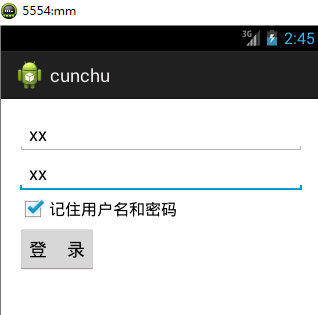
小案例:用戶輸入賬號密碼,勾選“記住賬號密碼”,點擊登錄按鈕,登錄的同時持久化保存賬號和密碼
布局文件:
<LinearLayout xmlns:android="http://schemas.android.com/apk/res/android"
    xmlns:tools="http://schemas.android.com/tools"
    android:layout_width="match_parent"
    android:layout_height="match_parent"
    tools:context=".MainActivity"
    android:orientation="vertical" >

    <EditText
        android:id="@+id/et1"
        android:layout_width="fill_parent"
        android:layout_height="wrap_content"
        android:hint="用戶名:" />

    <EditText
        android:id="@+id/et2"
        android:layout_width="fill_parent"
        android:layout_height="wrap_content"
        android:hint="密   碼:" />

    <CheckBox
        android:id="@+id/checkBox1"
        android:layout_width="wrap_content"
        android:layout_height="wrap_content"
        android:text="記住用戶名和密碼" />

    <Button
        android:id="@+id/button1"
        android:layout_width="wrap_content"
        android:layout_height="wrap_content"
        android:onClick="login"
        android:text="登     錄" />

</LinearLayout>
public class MainActivity extends Activity {

    @Override
    protected void onCreate(Bundle savedInstanceState) {
        super.onCreate(savedInstanceState);
        setContentView(R.layout.activity_main);
    }


   public void login(View v){
       EditText et1 = (EditText) findViewById(R.id.et1);
       EditText et2 = (EditText) findViewById(R.id.et2);

       String username = et1.getText().toString();
       String pwd = et2.getText().toString();
       // 判斷用戶是否勾選保存賬號密碼
       CheckBox cb = (CheckBox) findViewById(R.id.checkBox1);
       if(cb.isChecked()){
           //將用戶名和密碼寫到本地文件,用IO流來寫
           File file = new File("data/data/com.example.cunchu/info.txt");//內部存儲空間的路徑
           FileOutputStream fos;
        try {
            fos = new FileOutputStream(file);
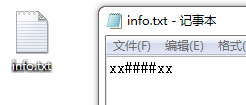
            fos.write((username+"####"+pwd).getBytes());
            fos.close();
        } catch (Exception e) {
            // TODO Auto-generated catch block
            e.printStackTrace();
        }

       }
       System.out.print("登錄成功!!!");
       Toast.makeText(this,"登錄成功!!!", Toast.LENGTH_SHORT).show();
   }

}

public void read(){
        try {
            FileInputStream  fis = new FileInputStream("data/data/com.example.cunchu/info.txt");
            BufferedReader br = new BufferedReader(new InputStreamReader(fis));
            String text = br.readLine();
            String []s = text.split("####");
            EditText et1 = (EditText) findViewById(R.id.et1);
            EditText et2 = (EditText) findViewById(R.id.et2);
           //讀取到數據之後,回顯至輸入框
            et1.setText(s[0]);
            et2.setText(s[1]);

        } catch (Exception e) {
            // TODO Auto-generated catch block
            e.printStackTrace();
        }


    }
運行結果:

使用路徑api讀寫文件
getFilesDir()得到的file對象的路徑是data/data/com.itheima.rwinrom2/files
* 存放在這個路徑下的文件,只要你不刪,它就一直在
getCacheDir()得到的file對象的路徑是data/data/com.itheima.rwinrom2/cache
* 存放在這個路徑下的文件,當內存不足時,有可能被刪除
系統管理應用界面的清除緩存,會清除cache文件夾下的東西,清除數據,會清除整個包名目錄下的東西
如果有時需要直接復制項目
需要改動的地方:
* 項目名字
* 應用包名
* R文件重新導包
在外部存儲空間中讀寫文件
在內部存儲讀寫和外部存儲 讀寫 文件,都是用IO流讀寫,不同的是,路徑不同。
 TCPCOPY 1.0 安裝使用
TCPCOPY 1.0 安裝使用TCPCOPY 1.0 安裝使用簡介TCPCOPY 是一個 tcp 流量的實時復制工具,其1.0版本由網易工程師 @tcpcopy 開發和
 ACCESS 觸發器delete table事件變量使用及連續刪除
ACCESS 觸發器delete table事件變量使用及連續刪除ACCESS的TABLE DELETE 事件觸發後,會出現一個[舊]的記錄,這條記錄非常有用,可以用來作
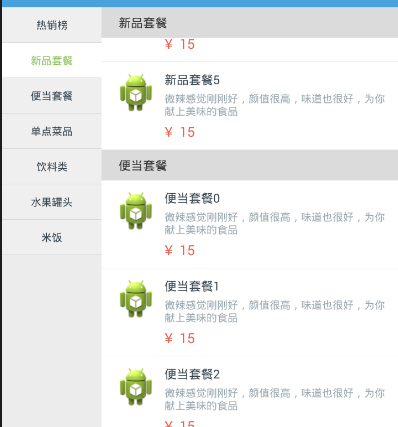 仿餓了點餐界面2個ListView聯動,界面listview聯動
仿餓了點餐界面2個ListView聯動,界面listview聯動如圖是效果圖 是仿餓了的點餐界面 1.點擊左側的ListView,通過在在適配器中設置Item來改變顏色,
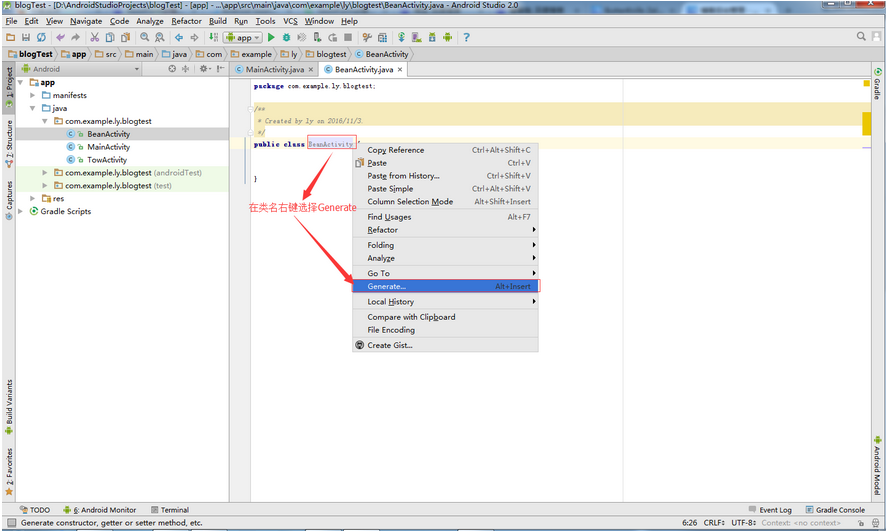 GsonFormat插件從配置到使用,gsonformat插件配置
GsonFormat插件從配置到使用,gsonformat插件配置說明:目前多數服務器端都以json格式返回,那麼相對應的解析時建立的實體類如果你還在自己挨個寫的話,那就