編輯:關於android開發

public class MyDialog extends Dialog {
在style中建立新樣式繼承
@android:style/Theme.Dialog
或者
@android:style/Theme.Holo.Dialog
 <!-- <style name="MyDialog" parent="@android:style/Theme.Dialog">-->
    <style name="MyDialog" parent="@android:style/Theme.Holo.Dialog">
        <!-- 是否有邊框 -->
        <item name="android:windowFrame">@null</item>
        <!--是否在懸浮Activity之上  -->
        <item name="android:windowIsFloating">true</item>
        <!--標題  -->
        <item name="android:windowNoTitle">true</item>
        <!--陰影  -->
        <item name="android:windowIsTranslucent">true</item><!--半透明-->
        <!-- 進入和退出的動畫 -->
        <item name="android:windowAnimationStyle">@style/MyDialogAnimation</item>

        <!-- 點外邊可以消失  -->
        <item name="android:windowCloseOnTouchOutside">true</item>

    </style>


    <style name="MyDialogAnimation">
        <!--進入 -->
        <item name="android:windowEnterAnimation">@anim/dialog_enter</item>
        <!--退出-->
        <item name="android:windowExitAnimation">@anim/dialog_exit</item>
    </style>
進入動畫
dialog_enter
dialog_exit
系統自帶的可以找到直接拿來用在SDK下找到
目錄\sdk\platforms\對應的API版本
<set xmlns:android="http://schemas.android.com/apk/res/android"
        android:shareInterpolator="false" >
    <scale android:fromXScale="0.9" android:toXScale="1.0"
           android:fromYScale="0.9" android:toYScale="1.0"
           android:pivotX="50%" android:pivotY="50%"

           android:duration="200" />
    <alpha android:fromAlpha="0.0" android:toAlpha="1.0"
            android:duration="200" />

</set>
退出
<set xmlns:android="http://schemas.android.com/apk/res/android"
     android:shareInterpolator="false">
    <scale
        android:duration="200"
        android:fromXScale="1.0"
        android:fromYScale="1.0"
        android:pivotX="50%"
        android:pivotY="50%"
        android:toXScale="0.9"
        android:toYScale="0.9"/>
    <alpha
        android:duration="200"
        android:fromAlpha="1.0"
        android:toAlpha="0.0"/>

</set>
Context mContext;

    public MyDialog(Context context) {
        super(context, R.style.MyDialog);
        this.mContext=context;


    }
@Override
    protected void onCreate(Bundle savedInstanceState) {
        super.onCreate(savedInstanceState);
        setContentView(R.layout.layout_dialog);
    }
布局文件就是2個TextView
@Override
    public void show() {
        super.show();
        /**
         * 設置寬度全屏,要設置在show的後面
         */
        LayoutParams layoutParams = getWindow().getAttributes();
        layoutParams.gravity=Gravity.BOTTOM;
        layoutParams.width= LayoutParams.MATCH_PARENT;
        layoutParams.height= LayoutParams.WRAP_CONTENT;

        getWindow().getDecorView().setPadding(0, 0, 0, 0);

        getWindow().setAttributes(layoutParams);

    }
/**
 * Dialog 2016年7月30日
 */
public class MyDialog extends Dialog {
    Context mContext;

    public MyDialog(Context context) {
        super(context, R.style.MyDialog);
        this.mContext=context;


    }

    @Override
    protected void onCreate(Bundle savedInstanceState) {
        super.onCreate(savedInstanceState);
        setContentView(R.layout.layout_dialog);
    }

    @Override
    public void show() {
        super.show();
        /**
         * 設置寬度全屏,要設置在show的後面
         */
        LayoutParams layoutParams = getWindow().getAttributes();
        layoutParams.gravity=Gravity.BOTTOM;
        layoutParams.width= LayoutParams.MATCH_PARENT;
        layoutParams.height= LayoutParams.WRAP_CONTENT;

        getWindow().getDecorView().setPadding(0, 0, 0, 0);

        getWindow().setAttributes(layoutParams);

    }

}
 水滴效果的下拉刷新--第三方開源 開源--WaveSwipeRefreshLayout,swiperefreshlayout
水滴效果的下拉刷新--第三方開源 開源--WaveSwipeRefreshLayout,swiperefreshlayout 下載地址:https://github.co
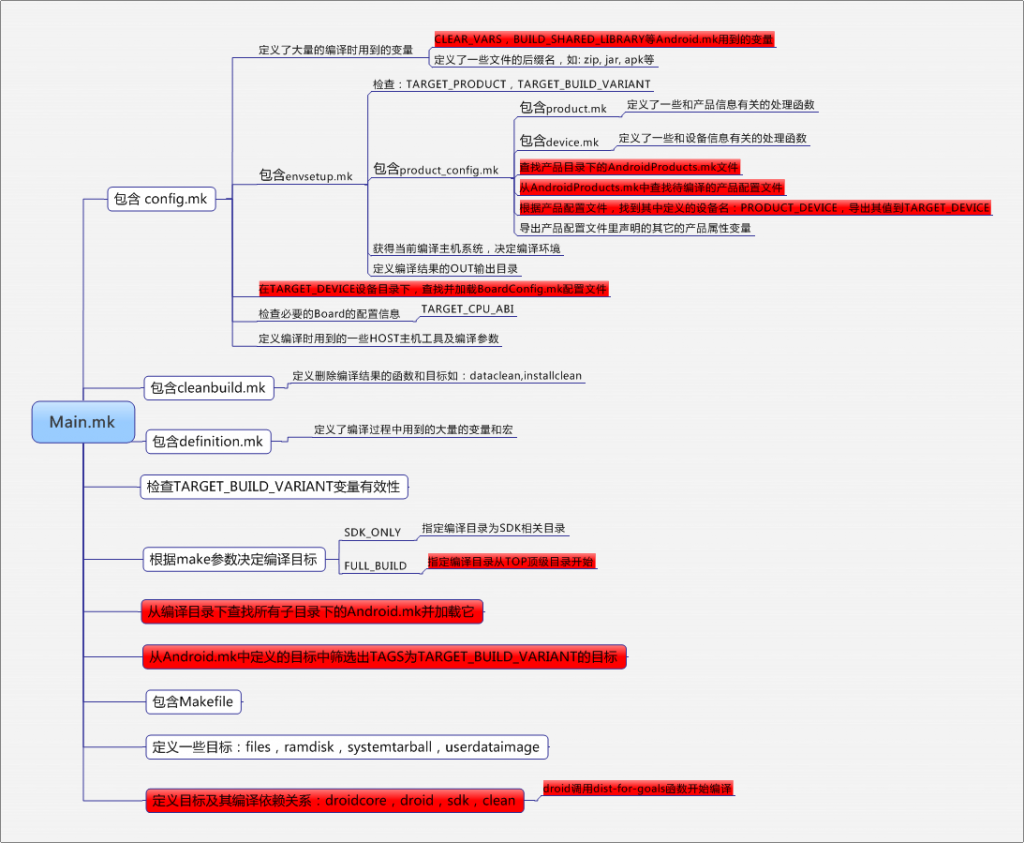 android編譯系統學習,android編譯學習
android編譯系統學習,android編譯學習近日接手了後續android新平台項目搭建的任務。 本文內容基於sprd公司提供的android5.1源碼。 一、一般的
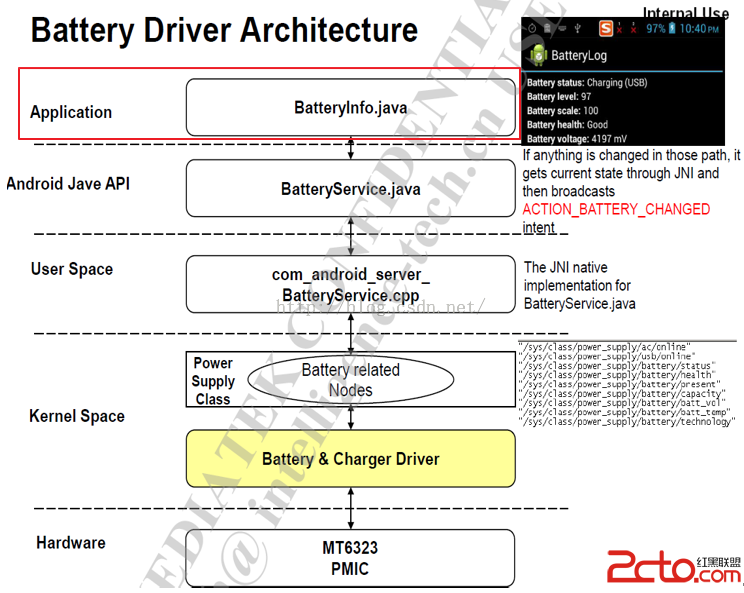 MSM8909+Android5.1.1之BSP開發---電池管理2---BatteryInfo.java
MSM8909+Android5.1.1之BSP開發---電池管理2---BatteryInfo.java MSM8909+Android5.1.1之BSP開發---電池
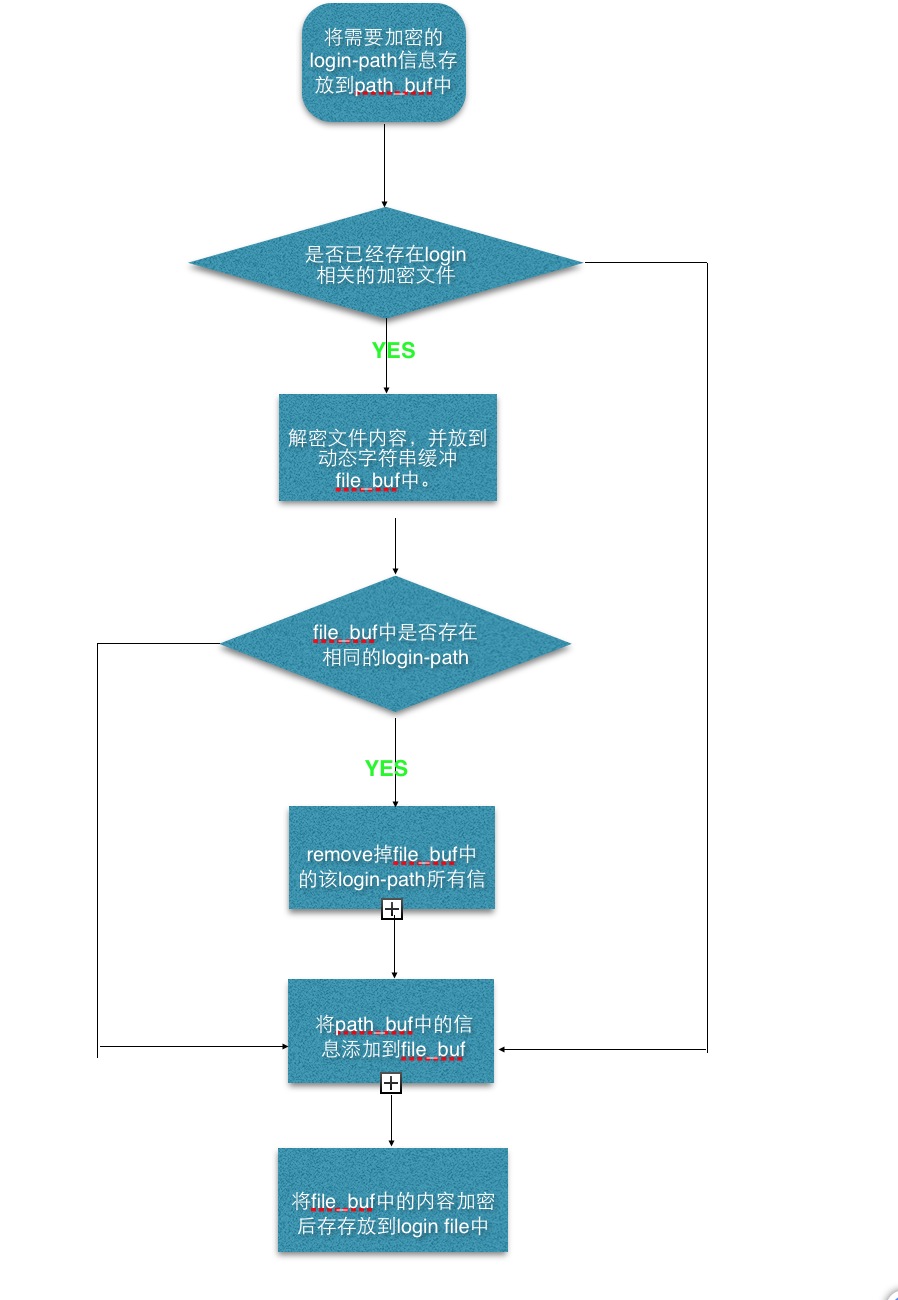 MySQL新特性之mysql_config_editor源碼解析
MySQL新特性之mysql_config_editor源碼解析從mysql5.6開始,mysql推出了加密工具mysql_config_editor。在此之前我們通過將