編輯:關於android開發
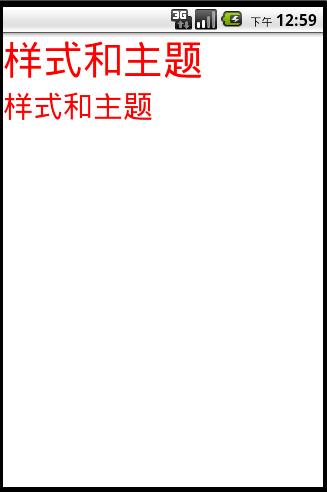
簡單練習自定義樣式和主題,樣式是加在View上,主題是加在Application或者Activity上
styles.xml
<?xml version="1.0" encoding="utf-8"?>
<resources xmlns:android="http://schemas.android.com/apk/res/android">
    <!-- 自定義樣式 -->
    <style name="MyFont">
        <item name="android:textColor">#ff0000</item>
        <item name="android:textSize">40sp</item>
    </style>
    <style name="MyFontSon" parent="@style/MyFont">
        <item name="android:textSize">30sp</item>
    </style>
    <!-- 自定義主題 -->
    <style name="MyTheme">
        <item name='android:windowNoTitle'>true</item>
        <item name="android:background">#ffffff</item>
    </style>
</resources>
activity_main.xml
<?xml version="1.0" encoding="utf-8"?>
<LinearLayout xmlns:android="http://schemas.android.com/apk/res/android"
    android:layout_width="match_parent"
    android:layout_height="match_parent"
    android:orientation="vertical" >

    <TextView

        android:layout_width="match_parent"
        android:layout_height="wrap_content"
        android:text="樣式和主題"
        />
    <TextView

        android:layout_width="match_parent"
        android:layout_height="wrap_content"
        android:text="樣式和主題"
        />
</LinearLayout>
Manifest.xml
<application
        android:allowBackup="true"
        android:icon="@drawable/ic_launcher"
        android:label="ss"
        android:theme="@style/MyTheme" >
 菜鳥Android之路(上),菜鳥android之路
菜鳥Android之路(上),菜鳥android之路自己為什麼要學android 本人作為應屆畢業生,自己進入社會前做過好多夢,可是呢,現實還是打敗了無邪!!面對社會的
 android https正確調用方案(防中間人劫持),androidhttps
android https正確調用方案(防中間人劫持),androidhttps以下內容為原創,歡迎轉載,轉載請注明 來自博客園:http://www.cnblogs.c
 linux性能測試與監控 sar 命令
linux性能測試與監控 sar 命令sar(System Activity Reporter系統活動情況報告)是目前Linux上最為全面的系統性能分析工具之一,可以從多
 Android面試准備 第二天 第五例 數據存儲
Android面試准備 第二天 第五例 數據存儲 5、Activity用SharedPreferences保存數據,大小有木有限制? 個人理解:SharedPrefere