編輯:關於android開發
本文實現一個簡易的人品計算器來實踐在不同Actitity之間數據傳遞
intent的數據傳遞
從A界面打開B界面 把A界面的數據傳遞給B界面
1. intent.setData(uri) -- intent.getData();
可以傳遞簡單的文本數據。
2. intent.putExtra(name, value)
8大基本類型的數據,數組都可以傳遞
String對象 可以傳遞 charSequence
可以序列化的對象(序列化到文件) Serializable 也可以傳遞
可以序列化的對象(序列化到內存) Parcelable 也可以傳遞 bitmap
可以傳遞 一個map集合 Bundle extras = new Bundle();
本文地址:http://www.cnblogs.com/wuyudong/p/5679191.html,轉載請注明源地址。
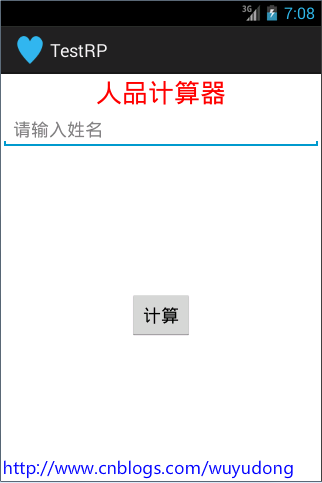
新建項目,activity_main.xml中的代碼如下:
<LinearLayout xmlns:android="http://schemas.android.com/apk/res/android"
    xmlns:tools="http://schemas.android.com/tools"
    android:layout_width="match_parent"
    android:layout_height="match_parent"
    android:orientation="vertical"
    tools:context=".MainActivity" >

    <TextView
        android:layout_width="fill_parent"
        android:layout_height="wrap_content"
        android:gravity="center_horizontal"
        android:text="人品計算器"
        android:textColor="#ff0000"
        android:textSize="26sp" />

    <EditText
        android:id="@+id/et_name"
        android:layout_width="match_parent"
        android:layout_height="wrap_content"
        android:hint="請輸入姓名" >
    </EditText>

    <RelativeLayout
        android:layout_width="match_parent"
        android:layout_height="match_parent" >

        <Button
            android:layout_centerInParent="true"
            android:onClick="click"
            android:layout_width="wrap_content"
            android:layout_height="wrap_content"
            android:text="計算"
            >
        </Button>
    </RelativeLayout>

</LinearLayout>
界面如下:
輸入姓名後,點擊按鈕跳轉到另一個結果界面:activity_result.xml
<?xml version="1.0" encoding="utf-8"?>
<LinearLayout xmlns:android="http://schemas.android.com/apk/res/android"
    android:layout_width="match_parent"
    android:layout_height="match_parent"
    android:orientation="vertical" >

    <TextView
        android:layout_width="match_parent"
        android:layout_height="wrap_content"
        android:text="測試結果:"
        android:textColor="#ff0000"
        android:textSize="20sp" />

    <TextView
        android:id="@+id/tv_result"
        android:text="xxx:"
        android:layout_width="match_parent"
        android:layout_height="wrap_content"
        android:textColor="#99000000"
        android:textSize="17sp" />

    <ProgressBar
        android:id="@+id/progressBar1"
        android:max="100"

        android:layout_width="fill_parent"
        android:layout_height="wrap_content" />

</LinearLayout>
界面如下:
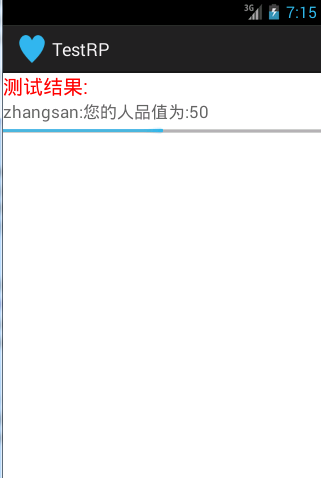
ResultActivity.java代碼如下:
package com.wuyudong.testrp;

import java.util.Random;

import android.app.Activity;
import android.content.Intent;
import android.os.Bundle;
import android.widget.ProgressBar;
import android.widget.TextView;

public class ResultActivity extends Activity {

    @Override
    protected void onCreate(Bundle savedInstanceState) {
        super.onCreate(savedInstanceState);
        setContentView(R.layout.activity_result);
        TextView tv_result = (TextView) findViewById(R.id.tv_result);

        Intent intent = getIntent();

        String name = intent.getStringExtra("name");
        Random rm = new Random();
        int rp = rm.nextInt(101);
        tv_result.setText(name + ":您的人品值為:" + rp);

        ProgressBar pb = (ProgressBar)findViewById(R.id.progressBar1);
        pb.setProgress(rp);

    }
}
 viewpager和fragment預加載的解決,viewpagerfragment
viewpager和fragment預加載的解決,viewpagerfragment在使用Viewpager和fragment處理中會出現預加載的問題,最近看別人的代碼,
 Android自定義對話框,android自定義
Android自定義對話框,android自定義在android中有自帶的對話框,為了美觀,很多開發者會使用自定義對話框,如下圖: 點擊“彈出自定義對話框按
 《Android源碼設計模式解析與實戰》讀書筆記(十六)
《Android源碼設計模式解析與實戰》讀書筆記(十六) 第十六章、訪問者模式 訪問者模式是一種行為型模式,它是23種設計模式中最復雜的一個,雖然使用頻率不高,但是並
 Android 熱修復使用Gradle Plugin1.5改造Nuwa插件
Android 熱修復使用Gradle Plugin1.5改造Nuwa插件 隨著谷歌的Gradle插件版本的不斷升級,Gradle插件現在最新的已經到了2.1.0-b