編輯:關於android開發
本文實現一個基於Android的網絡HTML查看器
新建項目,項目布局文件如下:
<LinearLayout xmlns:android="http://schemas.android.com/apk/res/android"
    xmlns:tools="http://schemas.android.com/tools"
    android:layout_width="match_parent"
    android:layout_height="match_parent"
    android:orientation="vertical"
    tools:context=".MainActivity" >

    <EditText
        android:id="@+id/et_path"
        android:layout_width="fill_parent"
        android:layout_height="wrap_content"
        android:hint="請輸入html路徑" />

    <Button
        android:layout_width="fill_parent"
        android:layout_height="wrap_content"
        android:onClick="click"
        android:text="查看" />

    <ScrollView
        android:layout_width="fill_parent"
        android:layout_height="fill_parent" >

        <TextView
            android:id="@+id/tv_content"
            android:layout_width="fill_parent"
            android:layout_height="fill_parent" >
        </TextView>
    </ScrollView>

</LinearLayout>
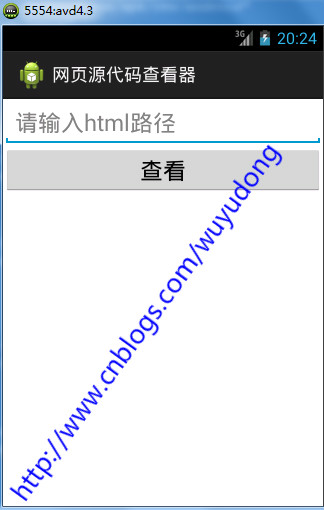
新建工具類StreamTools.java:
package com.wuyudong.htmlviewer.utils;

import java.io.ByteArrayOutputStream;
import java.io.InputStream;


public class StreamTools {
    /**
     * 把輸入流的內容轉化成字符串
     *
     * @param is
     * @return
     */
    public static String readInputStream(InputStream is) {
        try {
            ByteArrayOutputStream baos = new ByteArrayOutputStream();
            int len = 0;
            byte[] buffer = new byte[1024];
            while ((len = is.read(buffer)) != -1) {
                baos.write(buffer, 0, len);
            }
            is.close();
            baos.close();
            byte[] result = baos.toByteArray();
            return new String(result);
        } catch (Exception e) {
            e.printStackTrace();
            return null;
        }

    }

}
完整代碼如下:
package com.wuyudong.htmlviewer;

import java.io.InputStream;
import java.io.StreamCorruptedException;
import java.net.HttpURLConnection;
import java.net.URL;

import com.wuyudong.htmlviewer.utils.StreamTools;

import android.os.Bundle;
import android.os.Handler;
import android.os.Message;
import android.app.Activity;
import android.text.TextUtils;
import android.view.Menu;
import android.view.View;
import android.widget.EditText;
import android.widget.TextView;
import android.widget.Toast;

public class MainActivity extends Activity {

    protected static final int ERROR = 1;
    protected static final int SHOW_TEXT = 2;

    private TextView tv_content;
    private EditText et_path;

    // 定義一個消息處理器
    private Handler handler = new Handler() {
        public void handleMessage(android.os.Message msg) {
            switch (msg.what) {
            case ERROR:
                Toast.makeText(MainActivity.this, "獲取數據失敗", 0).show();
                break;
            case SHOW_TEXT:
                String text = (String) msg.obj;
                tv_content.setText(text);
                break;
            }
        };
    };

    @Override
    protected void onCreate(Bundle savedInstanceState) {
        super.onCreate(savedInstanceState);
        setContentView(R.layout.activity_main);

        tv_content = (TextView) findViewById(R.id.tv_content);
        et_path = (EditText) findViewById(R.id.et_path);

    }

    public void click(View view) {
        final String path = et_path.getText().toString().trim();
        if (TextUtils.isEmpty(path)) {
            Toast.makeText(this, "路徑不能為空", 0).show();
        } else {
            new Thread() {
                public void run() {
                    try {
                        URL url = new URL(path);
                        HttpURLConnection conn = (HttpURLConnection) url
                                .openConnection();
                        conn.setRequestMethod("GET");
                        conn.setConnectTimeout(5000);
                        conn.setReadTimeout(5000);
                        conn.setRequestProperty(
                                "User-Agent",
                                "Mozilla/5.0 (Windows NT 6.1; WOW64) AppleWebKit/537.36 (KHTML, like Gecko) Chrome/45.0.2454.101 Safari/537.36");

                        int code = conn.getResponseCode();
                        if (code == 200) {
                            InputStream is = conn.getInputStream();
                            String result = StreamTools.readInputStream(is);
                            // tv_content.setText(result);
                            Message msg = new Message();
                            msg.what = SHOW_TEXT;
                            msg.obj = result;
                            handler.sendMessage(msg);
                        } else {
                            Message msg = new Message();
                            msg.what = ERROR;
                            handler.sendMessage(msg);
                        }
                    } catch (Exception e) {
                        e.printStackTrace();
                        Message msg = new Message();
                        msg.what = ERROR;
                        handler.sendMessage(msg);

                    }

                };
            }.start();

        }

    }

}
 我的android學習經歷12,android學習經歷12
我的android學習經歷12,android學習經歷12自動匹配輸入的內容(文章最後有一個問題有興趣的可以解答一下,謝謝大神了) 這個主要是兩個控件MultiAutoC
 2015 Android Dev Summit(安卓開發峰會)第一天,androidsummit
2015 Android Dev Summit(安卓開發峰會)第一天,androidsummit今年的Google I/O沒有抽到票,不能到現場參加。不過11月舉行的An
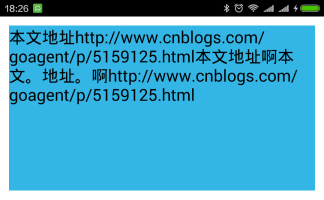 android textview 自動換行 整齊排版,androidtextview
android textview 自動換行 整齊排版,androidtextview一、問題在哪裡? textview顯示長文字時會進行自動折行,如果遇到一些特殊情況,自
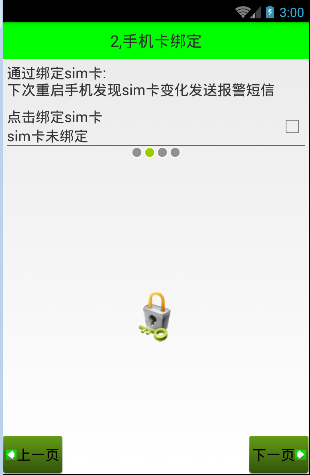 Android 手機衛士--綁定sim卡序列號,androidsim
Android 手機衛士--綁定sim卡序列號,androidsim現在開始具體 處理每一個導航頁面的邏輯,首先看第二個導航頁 本文地址:http://www.cnbl