編輯:關於android開發
首先給大家分享多線程下載核心類:
按 Ctrl+C 復制代碼 按 Ctrl+C 復制代碼下面是界面的邏輯代碼:

  1 package com.example.urltest;
  2
  3 import android.app.Activity;
  4 import android.app.AlertDialog;
  5 import android.app.ProgressDialog;
  6 import android.content.DialogInterface;
  7 import android.os.Bundle;
  8 import android.os.Message;
  9 import android.view.View;
 10 import android.view.View.OnClickListener;
 11 import android.widget.Button;
 12 import android.widget.EditText;
 13 import android.widget.ProgressBar;
 14 import android.widget.TextView;
 15 import android.widget.Toast;
 16
 17 import java.io.IOException;
 18 import java.util.Timer;
 19 import java.util.TimerTask;
 20
 21 public class MultiThreadDown extends Activity {
 22     EditText url, target;
 23     Button downButton;
 24     ProgressBar bar;
 25     ProgressDialog progressDialog;
 26     View downView;
 27     DownUtil downUtil;
 28     private int mDownStatus;
 29     private int threadNum = 6; // 默認的線程數
 30     android.os.Handler handler = new android.os.Handler() {
 31
 32         @Override
 33         public void handleMessage(Message msg) {
 34             if (msg.what == 0x123) {
 35                 bar.setProgress(mDownStatus);
 36                 if (mDownStatus >= 100) {
 37                     Toast.makeText(MultiThreadDown.this, "下載完成", Toast.LENGTH_SHORT).show();
 38                 }
 39                 // Log.i("csx", "" + mDownStatus);
 40
 41             }
 42         }
 43
 44     };
 45
 46     @Override
 47     protected void onCreate(Bundle savedInstanceState) {
 48
 49         super.onCreate(savedInstanceState);
 50         setContentView(R.layout.layout_down);
 51         url = (EditText) findViewById(R.id.url);
 52
 53         downButton = (Button) findViewById(R.id.down);
 54         bar = (ProgressBar) findViewById(R.id.bar);
 55         progressDialog = new ProgressDialog(this);
 56         progressDialog.setTitle("嘗試連接");
 57         progressDialog.setMessage("正在連接...");
 58         downButton.setOnClickListener(new DownButtonOnClickListener());
 59
 60     }
 61
 62     private class DownButtonOnClickListener implements OnClickListener {
 63
 64         EditText targetFilePath, fileName;
 65         TextView fileSize;
 66         Thread connectionThread;
 67
 68         public Thread instanceOfConnectionThread() {
 69             return new Thread() {
 70
 71                 @Override
 72                 public void run() {
 73                     try {
 74                         downUtil.getFileInformation();
 75
 76                     } catch (IOException e1) {
 77                         e1.printStackTrace();
 78                     }
 79
 80                 }
 81
 82             };
 83         }
 84
 85         @Override
 86         public void onClick(View v) {
 87
 88             String urlPath = url.getText().toString();
 89             if (urlPath == null || urlPath.equals("")) {
 90                 return;
 91             }
 92             progressDialog.show();
 93             downUtil = new DownUtil(urlPath, threadNum);
 94             connectionThread = instanceOfConnectionThread();
 95             connectionThread.start();
 96
 97             int connectionNum = 3;
 98             while (!downUtil.isGetFileInformation() && connectionNum > 0) {// 循環請求連接,如果3次之後還沒有連接成功,就退出
 99                 if (!connectionThread.isAlive()) {
100                     connectionThread = null;
101                     connectionThread = instanceOfConnectionThread();
102                     connectionThread.start();
103                     connectionNum--;
104                 }
105
106             }
107
108             progressDialog.cancel();
109             if (!downUtil.isGetFileInformation()) {
110                 Toast.makeText(MultiThreadDown.this, "請求失敗!", Toast.LENGTH_SHORT).show();
111                 return;
112             }
113             downView = getLayoutInflater().inflate(R.layout.layout_download_view, null);
114             targetFilePath = (EditText) downView.findViewById(R.id.editText_target_path);
115             fileName = (EditText) downView.findViewById(R.id.editText_file_name);
116             fileSize = (TextView) downView.findViewById(R.id.textView_file_size);
117             targetFilePath.setText(downUtil.getDefaultTargetPath());
118             fileName.setText(downUtil.getFileName());
119             fileSize.append("" + ((double) downUtil.getFileSize()) / 1024 + "k");
120
121             new AlertDialog.Builder(MultiThreadDown.this).setView(downView)
122                     .setPositiveButton("確定", new DialogInterface.OnClickListener() {
123
124                         @Override
125                         public void onClick(DialogInterface dialog, int which) {
126                             if (!downUtil.isGetFileInformation()) {
127                                 dialog.dismiss();
128                                 return;
129                             }
130                             final String path = targetFilePath.getText().toString();
131                             final String name = fileName.getText().toString();
132
133                             new Thread() {
134
135                                 @Override
136                                 public void run() {
137                                     try {
138                                         downUtil.download(path, name);
139                                     } catch (IOException e) {
140                                         // TODO Auto-generated catch block
141                                         e.printStackTrace();
142                                     }
143
144                                     final Timer timer = new Timer();
145                                     TimerTask task = new TimerTask() {
146
147                                         @Override
148                                         public void run() {
149
150                                             mDownStatus = (int) (downUtil.getCompleteRate() * 100);
151                                             handler.sendEmptyMessage(0x123);
152                                             if (mDownStatus >= 100) {
153                                                 timer.cancel();
154                                             }
155
156                                         }
157                                     };
158                                     timer.schedule(task, 0, 100);
159
160                                 }
161
162                             }.start();
163
164                         }
165                     }).setNegativeButton("取消", null)
166                     .setTitle(downUtil.isGetFileInformation() ? "鏈接可用" : "鏈接不可用").show();
167
168         }
169     }
170
171 }
下面是主頁面布局:layout_down.xml
 1 <?xml version="1.0" encoding="utf-8"?>
 2 <LinearLayout xmlns:android="http://schemas.android.com/apk/res/android"
 3     android:layout_width="match_parent"
 4     android:layout_height="match_parent"
 5     android:orientation="vertical" >
 6
 7     <ScrollView
 8         android:id="@+id/scrollView1"
 9         android:layout_width="match_parent"
10         android:layout_height="wrap_content" >
11
12         <LinearLayout
13             android:layout_width="match_parent"
14             android:layout_height="match_parent"
15             android:orientation="vertical" >
16
17             <TextView
18                 android:layout_width="match_parent"
19                 android:layout_height="wrap_content"
20                 android:text="要下載的資源的URL:" />
21
22             <EditText
23                 android:id="@+id/url"
24                 android:layout_width="match_parent"
25                 android:layout_height="wrap_content"
26                 android:text="在在這裡輸入URL" />
27
28             <Button
29                 android:id="@+id/down"
30                 android:layout_width="match_parent"
31                 android:layout_height="wrap_content"
32                 android:text="下載" />
33             <!-- 定義一個水平進度條,用於顯示下載進度 -->
34
35             <ProgressBar
36                 android:id="@+id/bar"
37
38                 android:layout_width="match_parent"
39                 android:layout_height="wrap_content"
40                 android:max="100" />
41         </LinearLayout>
42     </ScrollView>
43
44 </LinearLayout>
下面是下載選項dialog布局:layout_download_view.xml
 1 <?xml version="1.0" encoding="utf-8"?>
 2 <LinearLayout xmlns:android="http://schemas.android.com/apk/res/android"
 3     android:layout_width="match_parent"
 4     android:layout_height="match_parent"
 5     android:orientation="vertical" >
 6
 7     <TextView
 8         android:id="@+id/textView1"
 9         android:layout_width="wrap_content"
10         android:layout_height="wrap_content"
11         android:text="下載路徑:" />
12
13     <EditText
14         android:id="@+id/editText_target_path"
15         android:layout_width="match_parent"
16         android:layout_height="wrap_content"
17         android:ems="10" >
18
19         <requestFocus />
20     </EditText>
21
22     <TextView
23         android:id="@+id/textView2"
24         android:layout_width="wrap_content"
25         android:layout_height="wrap_content"
26         android:text="文件名:" />
27
28     <EditText
29         android:id="@+id/editText_file_name"
30         android:layout_width="match_parent"
31         android:layout_height="wrap_content"
32         android:maxLines="1"
33         android:ems="10" />
34
35     <TextView
36         android:id="@+id/textView_file_size"
37         android:layout_width="wrap_content"
38         android:layout_height="wrap_content"
39         android:text="文件大小:" />
40
41 </LinearLayout>
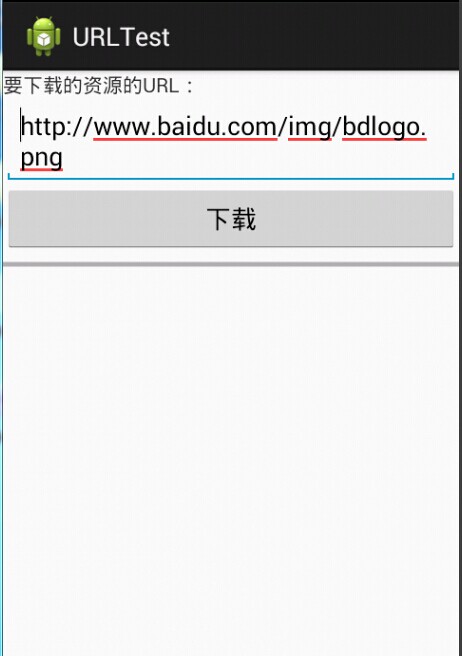
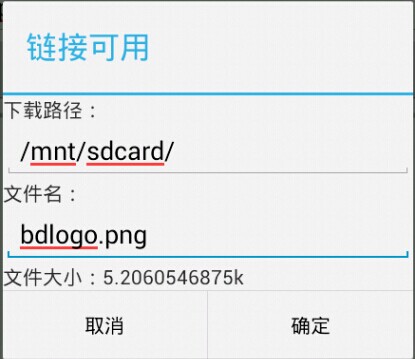
效果圖如下:輸入URL,點擊下載彈出對話框,輸入路徑和文件名 點擊確定開始下載
 手機安全衛士——閃屏頁相關處理,手機安全衛士
手機安全衛士——閃屏頁相關處理,手機安全衛士根據功能模塊劃分(Android開發推薦此方法) - Activity mo
 硅谷社交8--聯系人列表頁面,硅谷社交8--聯系人
硅谷社交8--聯系人列表頁面,硅谷社交8--聯系人 1.是否有邀請信息紅點的設置 // 獲取當前是否有新的邀請信息 boolean is_notify = SpUtil
 Android客戶端和服務器端數據交互,android服務器端
Android客戶端和服務器端數據交互,android服務器端 網上有很多例子來演示Android客戶端和服務器端數據如何實現交互不過這些例子大多比較繁雜,對於
 安卓第一天筆記,安卓第一天
安卓第一天筆記,安卓第一天安卓第一天筆記 1.移動通信的發展G--(generation) 1G:模擬制式 2G:GSM/CDMA 2.5G:GPRS 2.75G:EDG