編輯:關於android開發
1.先要得到SharedPerference對象:(三種方法)
1).使用Context類中的 getSharedPreferences() 方法,它接收兩個參數,第一個參數為文件名稱,第二個參數為操作模式。
操作模式MODE_PRAVITE :只有當前程序才能對這個文件進行讀寫。MODE_MULTI_PROCESS :多個進程中對同一個文件進行讀寫。
如:
SharedPreferences spf = getSharedPreferences("data",Context.MODE_PRIVATE);
2).使用Activity類中的 getPreferences() 方法,它只接收一個參數--操作模式,並且會將當前活動的類名作為文件名。
如:
SharedPreferences spf = getPreferences(MODE_PRIVATE);
3).使用PreferenceManager類中的 getDefaultSharedPreferences() 方法,它接收一個Context參數,並且用包名作為前綴來命名文件。
如:
SharedPreferences spf = PreferenceManager.getDefaultSharedPreferences(this);
2.再得到SharedPreferences.Editor對象:
使用SharedPreferences對象的 edit() 方法。
SharedPreference.Editor editor = spf.edit();
3.開始添加數據:
以鍵值對的方式寫入數據。
editor.putInt("age",22);
editor.putString("name","Visen");
editor.putBoolean("singleDog",false)
4.提交操作:
editor.commit();
提供了一系列的get方法進行數據的讀取。如:
String name = editor.getString("name"," ");
如果鍵所對應的值不存在,則填入設定的默認值。
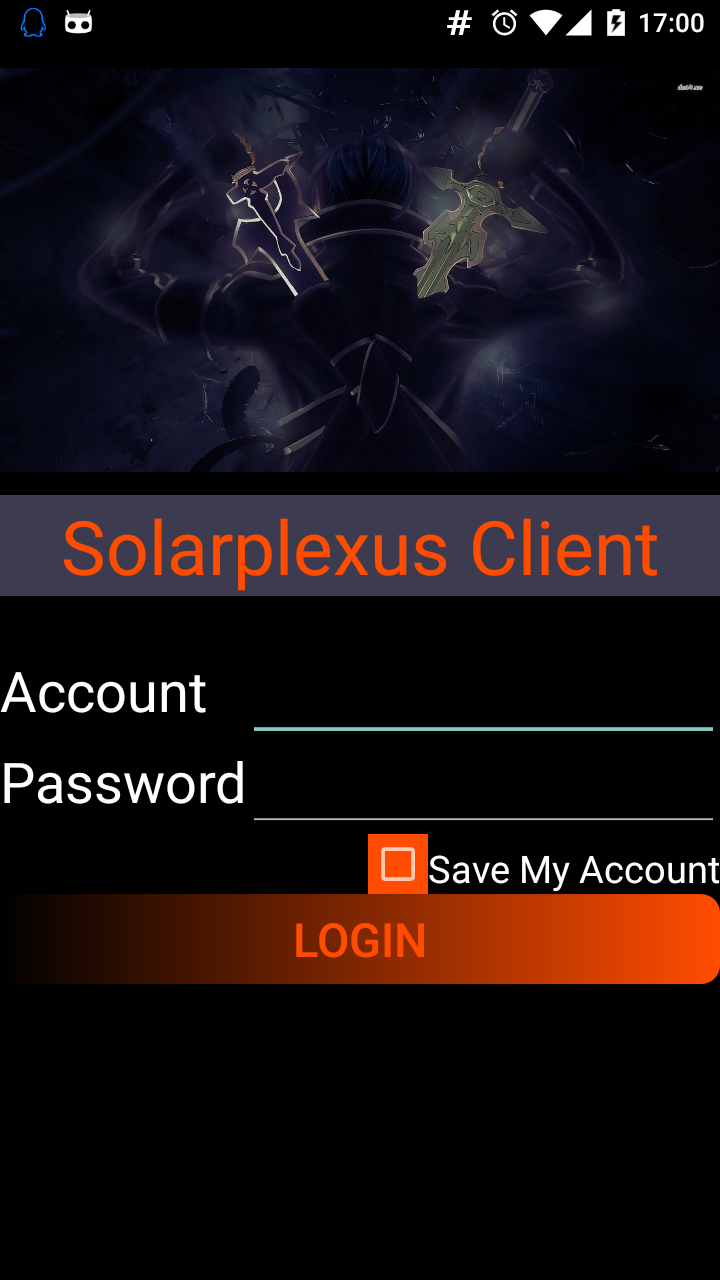
login.xml 登錄布局頁面
<?xml version="1.0" encoding="utf-8"?>
<TableLayout xmlns:android="http://schemas.android.com/apk/res/android"
    android:layout_width="match_parent"
    android:layout_height="match_parent"
    android:background="@color/black"
    android:stretchColumns="1">


    <LinearLayout
        android:layout_height="wrap_content"
        android:background="@color/black"
        android:orientation="vertical">

        <ImageView
            android:layout_width="match_parent"
            android:layout_height="240dp"
            android:src="@drawable/image1"/>
        <TextView
            android:layout_width="match_parent"
            android:layout_height="wrap_content"
            android:text="@string/title"
            android:textSize="40sp"
            android:textColor="@color/red"
            android:gravity="center"
            android:background="@color/cyan"/>
    </LinearLayout>

   <TableRow
       android:layout_marginTop="30dp">
       <TextView
           android:layout_height="wrap_content"
           android:text="@string/account"
           android:textSize="30sp"
           android:textColor="@color/white"/>
       <EditText
           android:id="@+id/account"
           android:layout_height="wrap_content"
           android:inputType="text"
           android:textSize="20sp"
           android:textColor="@color/red"
           android:gravity="center"
           android:singleLine="true"/>
   </TableRow>

    <TableRow>
        <TextView
            android:layout_height="wrap_content"
            android:text="@string/password"
            android:textSize="30sp"
            android:textColor="@color/white"/>
        <EditText
            android:id="@+id/passWord"
            android:layout_height="wrap_content"
            android:inputType="textPassword"
            android:textSize="20sp"
            android:textColor="@color/red"
            android:gravity="center" />
    </TableRow>

    <TableLayout
        android:layout_height="wrap_content"
        android:stretchColumns="0">

        <TableRow>
            <CheckBox
                android:id="@+id/saveSelect"
                android:background="@color/red"
                android:layout_gravity="end"/>
            <TextView
                android:layout_height="wrap_content"
                android:text="@string/saveSelect"
                android:textSize="20sp"
                android:textColor="@color/white"
                android:gravity="center"
                android:layout_gravity="bottom"/>
        </TableRow>

        <TableRow>
            <Button
                android:layout_height="wrap_content"
                android:id="@+id/login"
                android:gravity="center"
                android:layout_span="2"
                android:text="@string/login"
                android:textSize="25sp"
                android:textColor="@color/red"
                android:background="@drawable/black_bt"/>
        </TableRow>
    </TableLayout>
</TableLayout>
Login.java
public class Login extends AppCompatActivity {

    private SharedPreferences spf;
    private SharedPreferences.Editor spfe;

    private int num = 0;
    private EditText account = null;
    private EditText passWord = null;
    private CheckBox saveSelect = null;
    private Button login = null ;

    @Override
    protected void onCreate(Bundle saveInstanceState){

        //加載布局
        super.onCreate(saveInstanceState);
        setContentView(R.layout.login);

        //初始化控件
        account = (EditText)findViewById(R.id.account);
        passWord = (EditText)findViewById(R.id.passWord);
        saveSelect = (CheckBox)findViewById(R.id.saveSelect);
        login = (Button)findViewById(R.id.login);

        //使用Context的getSharedPreferences(String name,int mode)方法得到SharedPreferences對象;
        spf = getSharedPreferences("data", Context.MODE_PRIVATE);
        //使用SharedPreferences對象的edit()方法得到 SharedPreferences.Editor 的對象;
        spfe = spf.edit();

        //復選框是否被選中,若為選中狀態,則保存過賬戶,要恢復數據
        if(spf.getBoolean("isSelect",false)){//選中標志,默認值為false
            String acc = spf.getString("account","");
            String pas = spf.getString("passWord","");
            account.setText(acc);
            passWord.setText(pas);
            saveSelect.setChecked(true);
        }

        //設置登錄按鈕監聽事件
        login.setOnClickListener(new View.OnClickListener() {
            @Override
            public void onClick(View v) {
                //確認帳號密碼
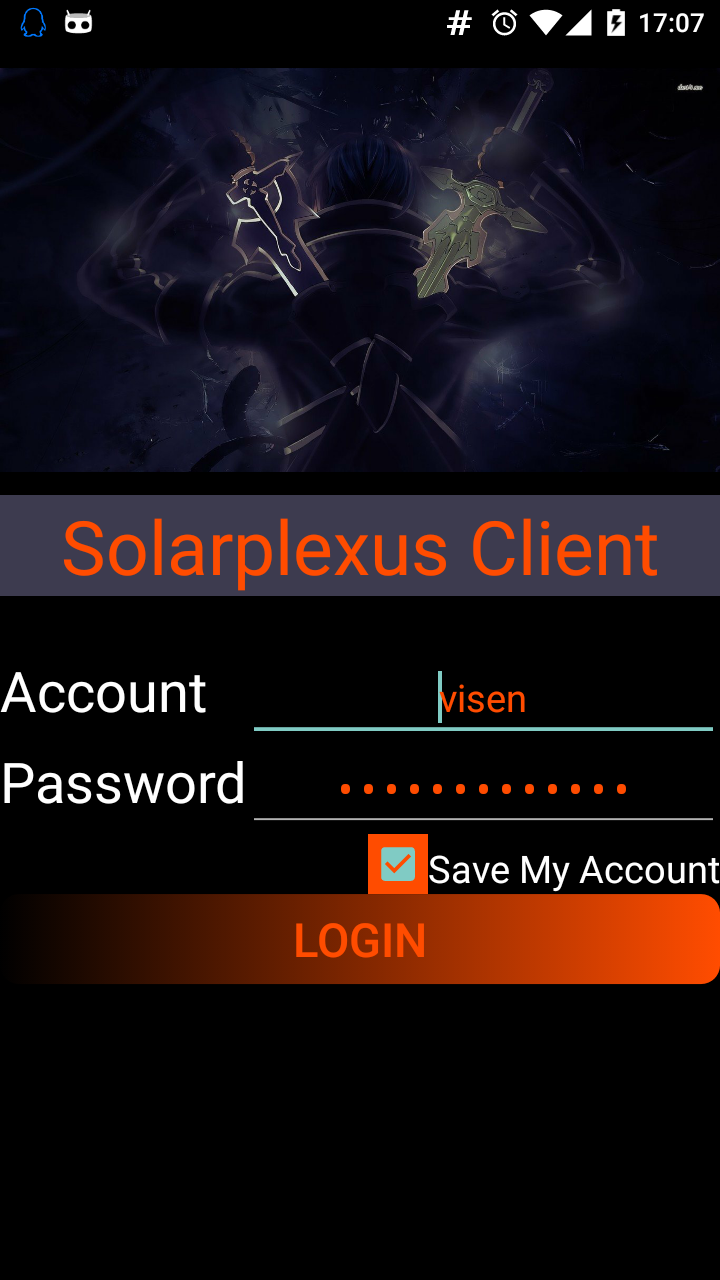
                if(account.getText().toString().equals("visen") && passWord.getText().toString().equals("dsy402645063!")){

                    //復選框是否被勾選,若被勾選,則需要保存賬戶後登錄;否則直接登錄且不保存賬戶
                    if(saveSelect.isChecked()){
                        saveDate();
                    }else {
                        spfe.clear();
                        spfe.commit();
                    }

                    //頁面跳轉
                    Intent intent = new Intent(Login.this,MainActivity.class);
                    startActivity(intent);
                    finish();
                }else {//賬戶或密碼錯誤
                    Toast.makeText(Login.this, "account or password is invalid", Toast.LENGTH_SHORT).show();
                }
            }
        });

    }

    public void saveDate(){

        //讀取EditText中的內容
        String acc = account.getText().toString();
        String pas = passWord.getText().toString();
        //保存數據
        spfe.putString("account",acc);
        spfe.putString("passWord",pas);
        spfe.putBoolean("isSelect",true);
        //提交
        spfe.commit();
    }

    @Override
    public void onBackPressed(){
        num++;
        if(num == 2){
            super.onBackPressed();
        }else{
            Toast.makeText(Login.this, "再按一次退出程序", Toast.LENGTH_SHORT).show();
        }
    }
}
 記CBS一次動人心魄的數據保衛戰
記CBS一次動人心魄的數據保衛戰接觸分布式存儲已經有一年多的時間了,首次遇到存儲側三份數據都有異常的情況,三份數據異常意味著客戶數據的丟失,這個對雲存儲來講是致命的打擊。
 【lushengduan】01、搭建安卓App開發環境 編寫程序HelloWorld,lushengduan安卓
【lushengduan】01、搭建安卓App開發環境 編寫程序HelloWorld,lushengduan安卓一、搭建開發環境 1、JDK環境變量 JDK下載 鏈接:
 The Genymotion Virtual device could not obtain an IP address解決辦法,genymotionobtain
The Genymotion Virtual device could not obtain an IP address解決辦法,genymotionobtain打開Ge
 【轉】連接MySQL數據庫(android,php,MySQL),mysqlandroid
【轉】連接MySQL數據庫(android,php,MySQL),mysqlandroid管理MySQL數據庫最簡單和最便利的方式是PHP腳本。運行PHP腳本使用HTTP