編輯:關於android開發
(一).前言:
今天我們的項目繼續更新,今天我們主要講解消息總線EventBus的基本使用方法,後面一篇我們會從源碼的角度稍微分析一下實現過程。
FastDev4Android框架項目地址:https://github.com/jiangqqlmj/FastDev4Android
(二).簡介:
以前我們做組件間的消息分發更新,一般會采用觀察者模式,或者接口數據回調的相關方式。但是這樣的做法雖然可以解決我們的問題,但是組件之間的耦合比較嚴重,而且代碼也不易閱讀和相關維護。為了解決這樣的問題我們可以使用消息總線EventBus框架。
EventBus是一款針對Android優化的發布/訂閱事件總線。主要功能是替代Intent,Handler,BroadCast在Fragment,Activity,Service,線程之間傳遞消息.優點是開銷小,代碼更優雅。以及將發送者和接收者解耦。EventBus開源站點地址:https://github.com/greenrobot/EventBus。
整個訂閱和接受的架構如下圖:
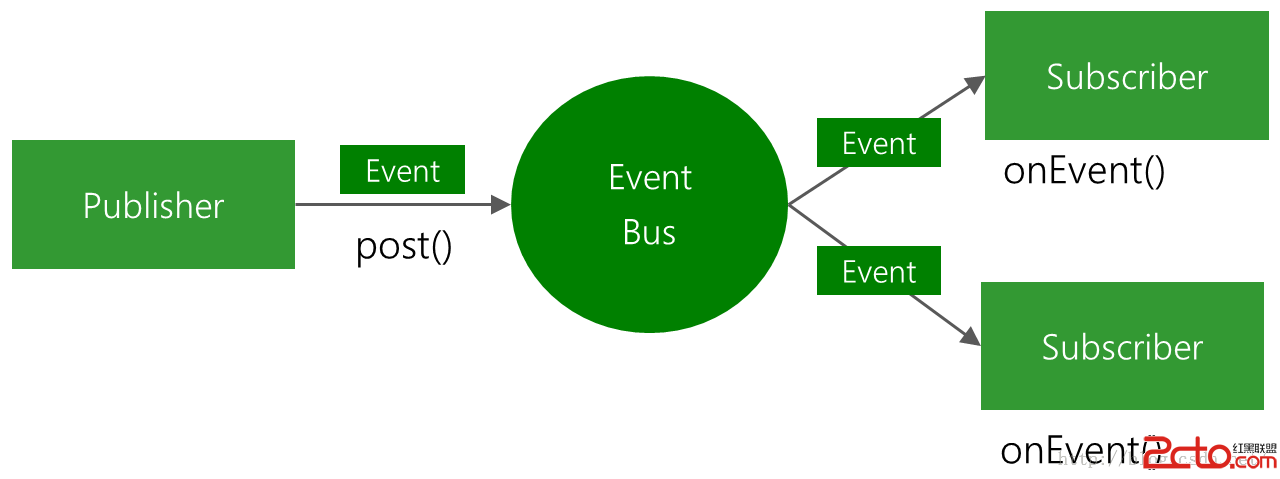
EventBus的特點如下:
(三).使用方式
3.1.AndroidStudio進行Gradle配置如下:
compile 'de.greenrobot:eventbus:2.4.0'
3.2.事件對象定義
publicclass MessageEvent { /* Additional fields if needed */ }
3.3.在接收頁面進行注冊
eventBus.register(this);
3.4.接收消息方法實現
public voidonEvent(AnyEventType event) {/* Do something */};
3.5.消息發送
eventBus.post(event);
OK上面是官方的使用說明,現在我們來具體使用一個實例來展示一下EventBus的基本使用。
(四).具體事例
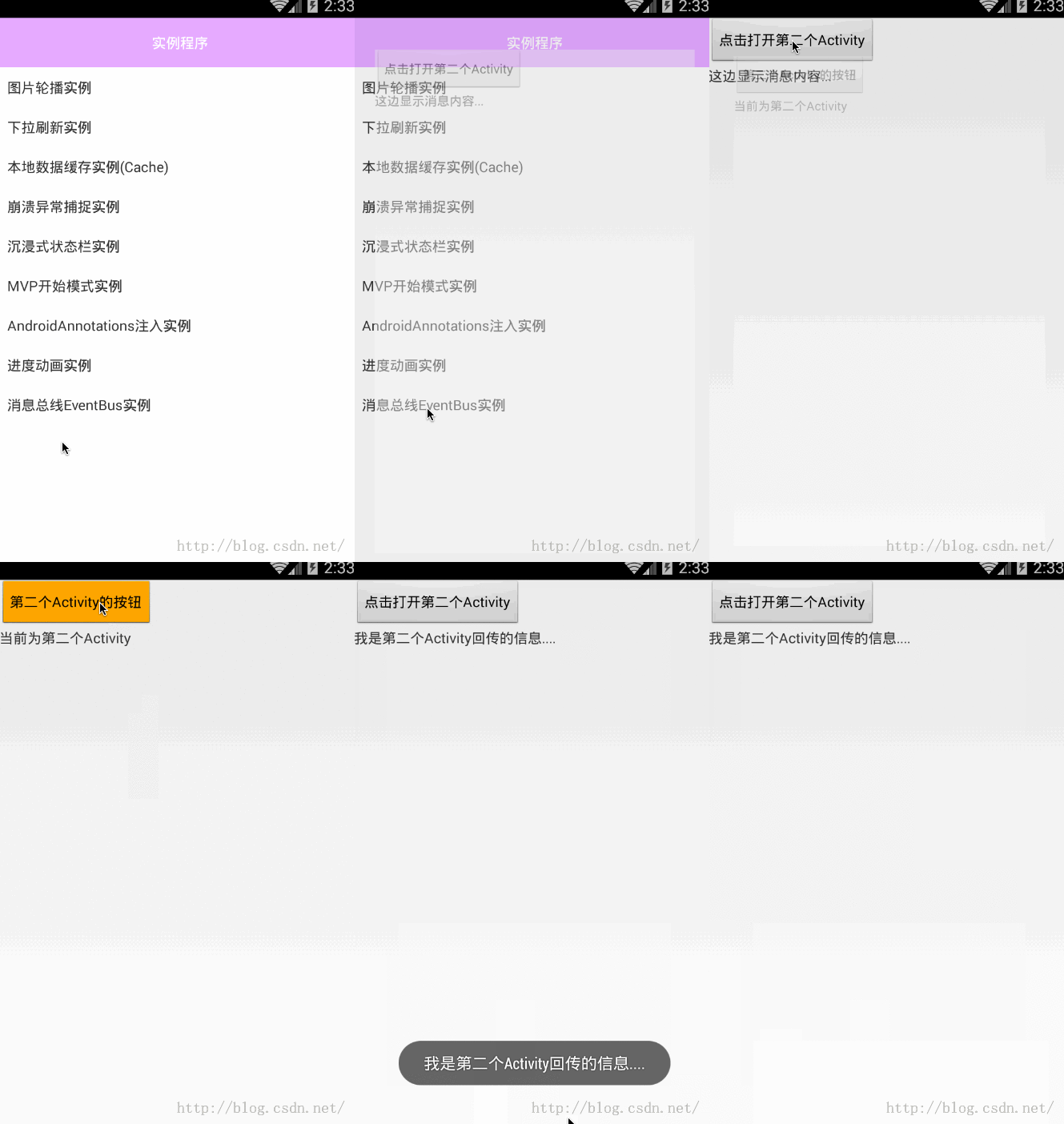
4.1.實現需求:在第一個Activity中有一個按鈕和一個TextView,然後點擊按鈕打開第二個Activity,在第二個Activity中有一個按鈕,點擊按鈕關閉當前第二個Activity,同時消息回調到第一個Activity中,在TextView中進行顯示。
4.2.我們這邊需要兩個Activity布局
4.3.創建一個事件管理類:TestEventFirst.java
packagecom.chinaztt.fda.event;
/**
 * 當前類注釋:EventBus測試 First事件類
 * 項目名:FastDev4Android
 * 包名:com.chinaztt.fda.event
 * 作者:江清清 on 15/11/3 14:25
 * 郵箱:[email protected]
 * QQ: 781931404
 * 公司:江蘇中天科技軟件技術有限公司
 */
public classTestEventFirst {
     private String msg;

    public String getMsg() {
        return msg;
    }

    public void setMsg(String msg) {
        this.msg = msg;
    }

    public TestEventFirst(String msg){
         this.msg=msg;
     }
}
4.4:注冊和取消注冊
使用EventBus.getDefault().register(this);進行注冊
使用EventBus.getDefault().unregister(this);進行取消注冊
4.5.消息發送
使用 EventBus.getDefault().post(new TestEventFirst(我是第二個Activity回傳的信息....));進行消息發送
4.6.消息接收
在注冊的Activity中進行重寫onEventMainThread()方法來進行處理接收消息(除了這個方法以外,還有另外三個方法,具體我們會在下一篇文章中進行介紹)
/**
     * 收到消息 進行相關處理
     * @param event
     */
    public voidonEventMainThread(TestEventFirst event) {

        textView_one.setText(event.getMsg());
        showToastMsgShort(event.getMsg());
    }
其中方法中的參數TestEventFirst就是發送過來的消息類,具體發送的消息全部已經封裝在裡面了。我們只需要使用event對象進行獲取處理即可。
4.7.完整第一個Activity和第二個Activity代碼如下:
packagecom.chinaztt.fda.test;
importandroid.os.Bundle;
importandroid.view.View;
importandroid.widget.Button;
importandroid.widget.TextView;
importandroid.widget.Toast;

importcom.chinaztt.fda.event.TestEventFirst;
importcom.chinaztt.fda.ui.R;
importcom.chinaztt.fda.ui.base.BaseActivity;
importcom.chinaztt.fda.utils.Log;

importorg.androidannotations.annotations.Click;
importorg.androidannotations.annotations.EActivity;
importorg.androidannotations.annotations.ViewById;
importorg.w3c.dom.Text;

importde.greenrobot.event.EventBus;

/**
 * 當前類注釋:EventBus組件間數據通信實例
 * 項目名:FastDev4Android
 * 包名:com.chinaztt.fda.test
 * 作者:江清清 on 15/11/3 13:14
 * 郵箱:[email protected]
 * QQ: 781931404
 * 公司:江蘇中天科技軟件技術有限公司
 */
@EActivity
public classEventBusTestActivity  extendsBaseActivity{
    Button button_one;
    TextView textView_one;

    @Override
    protected void onCreate(BundlesavedInstanceState) {
        super.onCreate(savedInstanceState);
       setContentView(R.layout.event_bus_test_layout);
        EventBus.getDefault().register(this);
       button_one=(Button)this.findViewById(R.id.button_one);
       textView_one=(TextView)this.findViewById(R.id.textView_one);
        button_one.setOnClickListener(newView.OnClickListener() {
            @Override
            public void onClick(View v) {
               openActivity(EventBusTestTwoActivity_.class);
            }
        });
    }
    /**
     * 收到消息 進行相關處理
     * @param event
     */
    public voidonEventMainThread(TestEventFirst event) {

        textView_one.setText(event.getMsg());
        showToastMsgShort(event.getMsg());
    }
        @Override
    protected void onDestroy() {
        super.onDestroy();
        EventBus.getDefault().unregister(this);
    }
}
packagecom.chinaztt.fda.test;

importandroid.os.Bundle;
importandroid.view.View;
importandroid.widget.Button;

importcom.chinaztt.fda.event.TestEventFirst;
importcom.chinaztt.fda.ui.R;
importcom.chinaztt.fda.ui.base.BaseActivity;

importorg.androidannotations.annotations.Click;
importorg.androidannotations.annotations.EActivity;
importorg.androidannotations.annotations.ViewById;

importde.greenrobot.event.EventBus;

/**
 * 當前類注釋:
 * 項目名:FastDev4Android
 * 包名:com.chinaztt.fda.test
 * 作者:江清清 on 15/11/3 14:25
 * 郵箱:[email protected]
 * QQ: 781931404
 * 公司:江蘇中天科技軟件技術有限公司
 */
@EActivity
public classEventBusTestTwoActivity extends BaseActivity {
    Button button_two;
    @Override
    protected void onCreate(BundlesavedInstanceState) {
        super.onCreate(savedInstanceState);
       setContentView(R.layout.event_bus_test_two_layout);
       button_two=(Button)this.findViewById(R.id.button_two);
        button_two.setOnClickListener(newView.OnClickListener() {
            @Override
            public void onClick(View v) {
               EventBus.getDefault().post(new TestEventFirst(我是第二個Activity回傳的信息....));
               EventBusTestTwoActivity.this.finish();
            }
        });
    }
}
到此我們的EventBus的基本使用已經講完了,看一下上面的效果演示,具體深入詳解以及其他的幾個方法的介紹和相關源代碼分析會在下一篇文章中進行講解。
 自定義PopupWindow,popupwindow
自定義PopupWindow,popupwindow 一、布局 <?xml version=1.0 encoding=ut
 Android開發環境的搭建之Java開發環境的安裝,androidjava
Android開發環境的搭建之Java開發環境的安裝,androidjava(1) 安裝JDK(Java Developer Kit)。下載JDK1.8並安裝
 Android快捷方式解密
Android快捷方式解密 Android快捷方式解密 Android快捷方式作為Android設備的殺手锏技能,一直都是非常重要的一個功能,也正是如此,各種流氓Ap
 Android版多線程下載器核心代碼分享,android下載器
Android版多線程下載器核心代碼分享,android下載器首先給大家分享多線程下載核心類: 按 Ctrl+C 復制代碼 按 Ctrl+C 復制代碼 下面是界面的