編輯:關於android開發
0、效果截圖:

以上兩個RadioGroup均使用FNRadioGroup實現。
1、控件代碼:
  1 public class FNRadioGroup extends ViewGroup {
  2
  3     /** 沒有ID */
  4     private final static int NO_ID = -1;
  5
  6     /** 當前選中的子控件ID */
  7     private int mCheckedId = NO_ID;
  8
  9     /** 子控件選擇改變監聽器 */
 10     private CompoundButton.OnCheckedChangeListener mChildOnCheckedChangeListener;
 11
 12     /** 為true時,不處理子控件選擇事件 */
 13     private boolean mProtectFromCheckedChange = false;
 14
 15     /** 選擇改變監聽器 */
 16     private OnCheckedChangeListener mOnCheckedChangeListener;
 17
 18     /** 子控件添加移除監聽器 */
 19     private PassThroughHierarchyChangeListener mPassThroughListener;
 20
 21     /** 子控件左邊距 */
 22     private int childMarginLeft = 0;
 23
 24     /** 子控件右邊距 */
 25     private int childMarginRight = 0;
 26
 27     /** 子控件上邊距 */
 28     private int childMarginTop = 0;
 29
 30     /** 子控件下邊距 */
 31     private int childMarginBottom = 0;
 32
 33     /** 子空間高度 */
 34     private int childHeight;
 35
 36     /**
 37      * 默認構造方法
 38      */
 39     public FNRadioGroup(Context context) {
 40         super(context);
 41         init();
 42     }
 43
 44     /**
 45      * XML實例構造方法
 46      */
 47     public FNRadioGroup(Context context, AttributeSet attrs) {
 48         super(context, attrs);
 49
 50         // 獲取自定義屬性checkedButton
 51         TypedArray attributes = context.obtainStyledAttributes(attrs,R.styleable.FNRadioGroup) ;
 52         // 讀取默認選中id
 53         int value = attributes.getResourceId(R.styleable.FNRadioGroup_checkedButton, NO_ID);
 54         if (value != NO_ID) {
 55             // 如果為設置checkButton屬性,保持默認值NO_ID
 56             mCheckedId = value;
 57         }
 58         // 讀取子控件左邊距
 59         childMarginLeft = attributes.getLayoutDimension(R.styleable.FNRadioGroup_childMarginLeft, childMarginLeft);
 60         if (childMarginLeft < 0) {
 61             childMarginLeft = 0;
 62         }
 63         // 讀取子控件右邊距
 64         childMarginRight = attributes.getLayoutDimension(R.styleable.FNRadioGroup_childMarginRight, childMarginRight);
 65         if (childMarginRight < 0) {
 66             childMarginRight = 0;
 67         }
 68         // 讀取子控件上邊距
 69         childMarginTop = attributes.getLayoutDimension(R.styleable.FNRadioGroup_childMarginTop, childMarginTop);
 70         if (childMarginTop < 0) {
 71             childMarginTop = 0;
 72         }
 73         // 讀取子控件下邊距
 74         childMarginBottom = attributes.getLayoutDimension(R.styleable.FNRadioGroup_childMarginBottom, childMarginBottom);
 75         if (childMarginBottom < 0) {
 76             childMarginBottom = 0;
 77         }
 78         attributes.recycle();
 79         // 調用二級構造
 80         init();
 81     }
 82
 83     /**
 84      * 設置子控件邊距
 85      * @param l 左邊距
 86      * @param t 上邊距
 87      * @param r 右邊距
 88      * @param b 下邊距
 89      */
 90     public void setChildMargin(int l, int t, int r, int b) {
 91         childMarginTop = t;
 92         childMarginLeft = l;
 93         childMarginRight = r;
 94         childMarginBottom = b;
 95     }
 96
 97     /**
 98      * 選中子控件為id的組件為選中項
 99      */
100     public void check(int id) {
101         if (id != -1 && (id == mCheckedId)) {
102             return;
103         }
104         if (mCheckedId != -1) {
105             setCheckedStateForView(mCheckedId, false);
106         }
107         if (id != -1) {
108             setCheckedStateForView(id, true);
109         }
110         setCheckedId(id);
111     }
112
113     /**
114      * 獲取當前選中子控件的id
115      * @return 當前選中子控件的id
116      */
117     public int getCheckedRadioButtonId() {
118         return mCheckedId;
119     }
120
121     /**
122      * 清除當前選中項
123      */
124     public void clearCheck() {
125         check(-1);
126     }
127
128     /**
129      * 設置選中改變監聽
130      * @param listener 選中改變監聽
131      */
132     public void setOnCheckedChangeListener(OnCheckedChangeListener listener) {
133         mOnCheckedChangeListener = listener;
134     }
135
136     /**
137      * 布局參數
138      */
139     public static class LayoutParams extends ViewGroup.LayoutParams {
140         /**
141          * XML構造
142          * @param c 頁面引用
143          * @param attrs XML屬性集
144          */
145         public LayoutParams(Context c, AttributeSet attrs) {
146             super(c, attrs);
147         }
148         /**
149          * 默認構造
150          * @param w 寬度
151          * @param h 高度
152          */
153         public LayoutParams(int w, int h) {
154             super(w, h);
155         }
156         /**
157          * 父傳遞構造
158          * @param p ViewGroup.LayoutParams對象
159          */
160         public LayoutParams(ViewGroup.LayoutParams p) {
161             super(p);
162         }
163         @Override
164         protected void setBaseAttributes(TypedArray a, int widthAttr, int heightAttr) {
165             if (a.hasValue(widthAttr)) {
166                 width = a.getLayoutDimension(widthAttr, "layout_width");
167             } else {
168                 width = WRAP_CONTENT;
169             }
170             if (a.hasValue(heightAttr)) {
171                 height = a.getLayoutDimension(heightAttr, "layout_height");
172             } else {
173                 height = WRAP_CONTENT;
174             }
175         }
176     }
177
178     /**
179      * 項目選中改變監聽器
180      */
181     public interface OnCheckedChangeListener {
182         /**
183          * 選中項目改變回調
184          * @param group 組引用
185          * @param checkedId 改變的ID
186          */
187         void onCheckedChanged(FNRadioGroup group, int checkedId);
188     }
189
190     /********************************************私有方法*******************************************/
191
192     /**
193      * 二級構造方法
194      */
195     private void init() {
196
197         // 初始化子控件選擇監聽
198         mChildOnCheckedChangeListener = new CheckedStateTracker();
199
200         // 初始化子控件添加移除監聽器
201         mPassThroughListener = new PassThroughHierarchyChangeListener();
202         // 設置子控件添加移除監聽器
203         super.setOnHierarchyChangeListener(mPassThroughListener);
204     }
205     @Override
206     protected void onMeasure(int widthMeasureSpec, int heightMeasureSpec) {
207         ViewGroup.LayoutParams params = getLayoutParams();
208         int pl = getPaddingLeft();
209         int pr = getPaddingRight();
210         int pt = getPaddingTop();
211         int pb = getPaddingBottom();
212         // 獲取視圖寬度
213         int width = MeasureSpec.getSize(widthMeasureSpec);
214         measureChildren(widthMeasureSpec, heightMeasureSpec);
215         // 計算Tag最大高度(以此作為所有tag的高度)
216         childHeight = 0;
217         for (int i = 0; i < getChildCount(); i++) {
218             int cmh = getChildAt(i).getMeasuredHeight();
219             if (cmh > childHeight) {
220                 childHeight = cmh;
221             }
222         }
223         // 計算本視圖
224         if (params.height != LayoutParams.WRAP_CONTENT) {
225             // 非內容匹配的情況下
226             super.onMeasure(widthMeasureSpec, heightMeasureSpec);
227         } else {
228             // 計算視圖高度
229             int currentHeight = pt;
230             int currentWidth = pl;
231             for (int i = 0; i < getChildCount(); i++) {
232                 View child = getChildAt(i);
233                 int childWidth = child.getMeasuredWidth();
234                 // 本視圖加入行中是否會超過視圖寬度
235                 if (currentWidth + childWidth + childMarginLeft + childMarginRight > width - pl - pr) {
236                     // 累加行高讀
237                     currentHeight += childMarginTop + childMarginBottom + childHeight;
238                     currentWidth = pl;
239                     currentWidth += childMarginLeft + childMarginRight + childWidth;
240                 } else {
241                     // 累加行寬度
242                     currentWidth += childMarginLeft + childMarginRight + childWidth;
243                 }
244             }
245             currentHeight += childMarginTop + childMarginBottom + childHeight + pb;
246             super.onMeasure(widthMeasureSpec, MeasureSpec.makeMeasureSpec(currentHeight, MeasureSpec.EXACTLY));
247         }
248     }
249     @Override
250     protected void onLayout(boolean changed, int l, int t, int r, int b) {
251         int pl = getPaddingLeft();
252         int pr = getPaddingRight();
253         int pt = getPaddingTop();
254         int pb = getPaddingBottom();
255         int width = r - l;
256         // 布局Tag視圖
257         int currentHeight = pt;
258         int currentWidth = pl;
259         for (int i=0; i < getChildCount(); i++) {
260             View child = getChildAt(i);
261             int childWidth = child.getMeasuredWidth();
262             // 本視圖加入行中是否會超過視圖寬度
263             if (currentWidth + childWidth + childMarginLeft + childMarginRight > width - pl - pr) {
264                 // 累加行高讀
265                 currentHeight += childMarginTop + childMarginBottom + childHeight;
266                 currentWidth = pl;
267                 // 布局視圖
268                 child.layout(currentWidth + childMarginLeft, currentHeight + childMarginTop,
269                         currentWidth + childMarginLeft + childWidth, currentHeight + childMarginTop + childHeight);
270                 currentWidth += childMarginLeft + childMarginRight + childWidth;
271             } else {
272                 // 布局視圖
273                 child.layout(currentWidth + childMarginLeft, currentHeight + childMarginTop,
274                         currentWidth + childMarginLeft + childWidth, currentHeight + childMarginTop + childHeight);
275                 // 累加行寬度
276                 currentWidth += childMarginLeft + childMarginRight + childWidth;
277             }
278         }
279     }
280     @Override
281     public void setOnHierarchyChangeListener(OnHierarchyChangeListener listener) {
282         // 設置子空間添加移除監聽
283         mPassThroughListener.mOnHierarchyChangeListener = listener;
284     }
285     @Override
286     protected void onFinishInflate() {
287         super.onFinishInflate();
288         if (mCheckedId != NO_ID) {
289             // 如果讀取到選中項,設置並存儲選中項
290             mProtectFromCheckedChange = true;
291             setCheckedStateForView(mCheckedId, true);
292             mProtectFromCheckedChange = false;
293             setCheckedId(mCheckedId);
294         }
295     }
296     @Override
297     public void addView(View child, int index, ViewGroup.LayoutParams params) {
298         if (child instanceof RadioButton) {
299             final RadioButton button = (RadioButton) child;
300             if (button.isChecked()) {
301                 mProtectFromCheckedChange = true;
302                 if (mCheckedId != -1) {
303                     setCheckedStateForView(mCheckedId, false);
304                 }
305                 mProtectFromCheckedChange = false;
306                 setCheckedId(button.getId());
307             }
308         }
309
310         super.addView(child, index, params);
311     }
312     private void setCheckedId(int id) {
313         mCheckedId = id;
314         if (mOnCheckedChangeListener != null) {
315             mOnCheckedChangeListener.onCheckedChanged(this, mCheckedId);
316         }
317     }
318     private void setCheckedStateForView(int viewId, boolean checked) {
319         View checkedView = findViewById(viewId);
320         if (checkedView != null && checkedView instanceof RadioButton) {
321             ((RadioButton) checkedView).setChecked(checked);
322         }
323     }
324     @Override
325     public LayoutParams generateLayoutParams(AttributeSet attrs) {
326         return new FNRadioGroup.LayoutParams(getContext(), attrs);
327     }
328     @Override
329     protected boolean checkLayoutParams(ViewGroup.LayoutParams p) {
330         return p instanceof RadioGroup.LayoutParams;
331     }
332     @Override
333     protected LayoutParams generateDefaultLayoutParams() {
334         return new LayoutParams(LayoutParams.WRAP_CONTENT, LayoutParams.WRAP_CONTENT);
335     }
336     @Override
337     public void onInitializeAccessibilityEvent(AccessibilityEvent event) {
338         super.onInitializeAccessibilityEvent(event);
339         event.setClassName(RadioGroup.class.getName());
340     }
341     @Override
342     public void onInitializeAccessibilityNodeInfo(AccessibilityNodeInfo info) {
343         super.onInitializeAccessibilityNodeInfo(info);
344         info.setClassName(RadioGroup.class.getName());
345     }
346     private class CheckedStateTracker implements CompoundButton.OnCheckedChangeListener {
347         public void onCheckedChanged(CompoundButton buttonView, boolean isChecked) {
348             // prevents from infinite recursion
349             if (mProtectFromCheckedChange) {
350                 return;
351             }
352             mProtectFromCheckedChange = true;
353             if (mCheckedId != -1) {
354                 setCheckedStateForView(mCheckedId, false);
355             }
356             mProtectFromCheckedChange = false;
357             int id = buttonView.getId();
358             setCheckedId(id);
359         }
360     }
361     private class PassThroughHierarchyChangeListener implements ViewGroup.OnHierarchyChangeListener {
362         private ViewGroup.OnHierarchyChangeListener mOnHierarchyChangeListener;
363         public void onChildViewAdded(View parent, View child) {
364             if (parent == FNRadioGroup.this && child instanceof RadioButton) {
365                 int id = child.getId();
366                 // generates an id if it's missing
367                 if (id == View.NO_ID) {
368                     id = generateViewId();
369                     child.setId(id);
370                 }
371                 ((RadioButton) child).setOnCheckedChangeListener(mChildOnCheckedChangeListener);
372             }
373
374             if (mOnHierarchyChangeListener != null) {
375                 mOnHierarchyChangeListener.onChildViewAdded(parent, child);
376             }
377         }
378         public void onChildViewRemoved(View parent, View child) {
379             if (parent == FNRadioGroup.this && child instanceof RadioButton) {
380                 ((RadioButton) child).setOnCheckedChangeListener(null);
381             }
382             if (mOnHierarchyChangeListener != null) {
383                 mOnHierarchyChangeListener.onChildViewRemoved(parent, child);
384             }
385         }
386     }
387 }
2、XML屬性:
1     <declare-styleable name="FNRadioGroup">
2         <attr name="checkedButton" format="integer" />
3         <attr name="childMarginLeft" format="dimension"/>
4         <attr name="childMarginRight" format="dimension"/>
5         <attr name="childMarginTop" format="dimension"/>
6         <attr name="childMarginBottom" format="dimension"/>
7     </declare-styleable>
3、使用方法說明:
使用方法與RadioGroup相同,使用RadioButton作為子控件,
如果要實現網格樣式,需要為子控件設置固定寬度
如果需要實現交錯模式,將子控件寬度設置為WRAP_CONTENT即可。
如果需要設置子控件外邊距,調用FNRadioGroup的setChildMargin方法設置即可。
PS:更多問題歡迎與我聯系,如果需要轉載請評論~~
後記:
網友補充了另一種實現方式如下:
 1 <RadioButton
 2             android:id="@+id/money_1500_Rb"
 3
 4             android:layout_marginLeft="-340dp"
 5             android:layout_marginTop="50dp"
 6             android:background="@drawable/bg_edittext"
 7             android:gravity="center"
 8             android:paddingBottom="@dimen/padding_10"
 9             android:paddingTop="@dimen/padding_10"
10             android:text="2" />
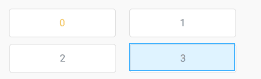
利用margin同樣可以實現簡單的RadioGroup內組件換行,感謝分享~~~
 android 5.X Toolbar+DrawerLayout實現抽屜菜單
android 5.X Toolbar+DrawerLayout實現抽屜菜單 前言 ?android5.X新增的一個控件Toolbar,這個控件比ActionBar更
 Android Studio SlidingMenu導入/配置 FloatMath找不到符號解決方法,studioslidingmenu
Android Studio SlidingMenu導入/配置 FloatMath找不到符號解決方法,studioslidingmenuSlidingMenu是一個第三方
 React-Native系列Android——Native與Javascript通信原理(二)
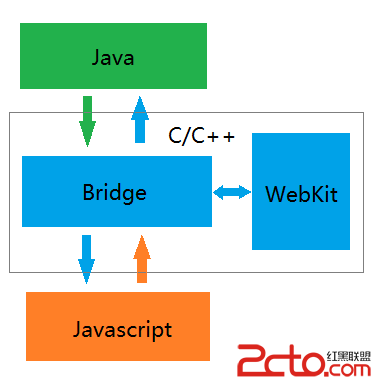
React-Native系列Android——Native與Javascript通信原理(二) 前一篇博客分析了Native端向Javascript端通信的全流程,這
 將語音搜索集成到Google Now中,googlenow
將語音搜索集成到Google Now中,googlenow原文標題:Use Voice Search to integrate with Google Now 原文鏈接: