編輯:關於android開發
繼續N天前的項目
開啟服務監聽手機來電,查詢數據庫,顯示歸屬地
詳細內容可以參考這篇博文:http://www.cnblogs.com/taoshihan/p/5331232.html
AddressService.java
package com.qingguow.mobilesafe.service;

import com.qingguow.mobilesafe.utils.NumberQueryAddressUtil;

import android.app.Service;
import android.content.Intent;
import android.os.IBinder;
import android.telephony.PhoneStateListener;
import android.telephony.TelephonyManager;
import android.widget.Toast;

/**
 * 來電顯示
 *
 * @author taoshihan
 *
 */
public class AddressService extends Service {
    private TelephonyManager tm;
    private MyPhoneStateListener phoneStateListener;

    @Override
    public IBinder onBind(Intent arg0) {
        // TODO Auto-generated method stub
        return null;
    }
    /**
     * 服務創建
     */
    @Override
    public void onCreate() {
        super.onCreate();
        tm = (TelephonyManager) getSystemService(TELEPHONY_SERVICE);
        phoneStateListener = new MyPhoneStateListener();
        tm.listen(phoneStateListener, PhoneStateListener.LISTEN_CALL_STATE);
    }

    private class MyPhoneStateListener extends PhoneStateListener {
        @Override
        public void onCallStateChanged(int state, String incomingNumber) {
            super.onCallStateChanged(state, incomingNumber);
            switch (state) {
            case TelephonyManager.CALL_STATE_RINGING:
                String info = NumberQueryAddressUtil
                        .queryAddress(incomingNumber);
                Toast.makeText(getApplicationContext(), info, 1).show();
                break;
            default:
                break;
            }
        }
    }
    /**
     * 服務銷毀
     */
    @Override
    public void onDestroy() {
        // TODO Auto-generated method stub
        super.onDestroy();
        //取消監聽
        tm.listen(phoneStateListener, PhoneStateListener.LISTEN_NONE);
        phoneStateListener=null;
    }
}
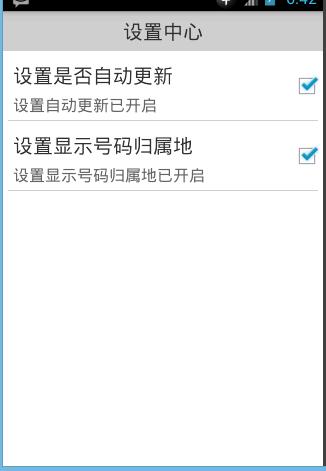
設置中心,配置是否開啟來電歸屬地顯示
直接使用我們之前定義好的組合控件
    <com.qingguow.mobilesafe.ui.SettingItemView
        tsh:title="設置顯示號碼歸屬地"
        tsh:desc_on="設置顯示號碼歸屬地已開啟"
        tsh:desc_off="設置顯示號碼歸屬地已關閉"
        android:layout_width="wrap_content"
        android:layout_height="wrap_content"
        android:id="@+id/siv_show_address">
    </com.qingguow.mobilesafe.ui.SettingItemView>
獲取到SettingItemView對象,我們自定義的控件,設置狀態
調用SettingItemView對象的setOnClickListener()方法,設置點擊事件,重寫onClick方法
調用SettingItemView對象的isChecked()方法,得到當前是否選中
判斷狀態,調用SettingItemView對象的setChecked()方法,設置狀態,參數:布爾值
調用startService()方法,開啟監聽手機狀態的服務,參數:Intent對象,
調用stopService()方法,關閉服務
判斷當前服務是否開啟,設置控件的默認選中狀態
新建一個工具類ServicesUtils.java
定義一個靜態方法isServiceRunning(),傳入參數:Context上下文,String服務名
調用Context對象的getSystemService()方法,獲取ActivityManager對象,參數:Context.ACTIVITY_SERVICE
調用ActivityManager對象的getRunningServices()方法,得到運行的服務List集合,參數:int最大值
for循環List集合,每條是個RunningServiceInfo對象
調用RunningServiceInfo.servie.getClassName(),獲取到String服務類名,判斷一下如果相等返回true
SettingActivity.java
package com.qingguow.mobilesafe;

import android.app.Activity;
import android.content.Intent;
import android.content.SharedPreferences;
import android.content.SharedPreferences.Editor;
import android.os.Bundle;
import android.view.View;
import android.view.View.OnClickListener;

import com.qingguow.mobilesafe.service.AddressService;
import com.qingguow.mobilesafe.ui.SettingItemView;
import com.qingguow.mobilesafe.utils.ServiceUtils;

public class SettingActivity extends Activity {
    private SettingItemView siv_item;
    private SharedPreferences sp;
    // 設置是否開啟號碼歸屬地
    private SettingItemView showAddressBtn;

    @Override
    protected void onCreate(Bundle savedInstanceState) {
        super.onCreate(savedInstanceState);
        setContentView(R.layout.activity_setting);

        // 設置號碼歸屬地
        showAddressBtn = (SettingItemView) findViewById(R.id.siv_show_address);
        if (ServiceUtils.isRunningService(this,
                "com.qingguow.mobilesafe.service.AddressService")) {
            showAddressBtn.setChecked(true);
        } else {
            showAddressBtn.setChecked(false);
        }
        showAddressBtn.setOnClickListener(new OnClickListener() {
            @Override
            public void onClick(View arg0) {
                if (showAddressBtn.isChecked()) {
                    showAddressBtn.setChecked(false);
                    stopService(new Intent(getApplicationContext(),
                            AddressService.class));
                } else {
                    showAddressBtn.setChecked(true);
                    startService(new Intent(getApplicationContext(),
                            AddressService.class));
                }
            }
        });

        siv_item = (SettingItemView) findViewById(R.id.siv_item);
        sp = getSharedPreferences("config", MODE_PRIVATE);
        // 根據保存的數據設置狀態
        boolean update = sp.getBoolean("update", false);
        if (update) {
            siv_item.setChecked(true);
        } else {
            siv_item.setChecked(false);
        }

        // 自動更新的點擊事件
        siv_item.setOnClickListener(new OnClickListener() {
            @Override
            public void onClick(View arg0) {
                Editor editor = sp.edit();
                if (siv_item.isChecked()) {
                    // 設置不選中
                    siv_item.setChecked(false);
                    editor.putBoolean("update", false);
                } else {
                    // 設置選中
                    siv_item.setChecked(true);
                    editor.putBoolean("update", true);
                }
                editor.commit();
            }
        });
    }
}
ServicesUtils.java
package com.qingguow.mobilesafe.utils;

import java.util.List;

import android.app.ActivityManager;
import android.app.ActivityManager.RunningServiceInfo;
import android.content.Context;
/**
 * 服務工具類
 * @author taoshihan
 *
 */
public class ServiceUtils {
    /**
     * 判斷某服務是否開啟
     * @param context
     * @param serviceName
     * @return
     */
    public static boolean isRunningService(Context context,String serviceName){
        ActivityManager am=(ActivityManager) context.getSystemService(Context.ACTIVITY_SERVICE);
        List<RunningServiceInfo> infos=am.getRunningServices(100);
        for(RunningServiceInfo info:infos){
            String name=info.service.getClassName();
            if(name.equals(serviceName)){
                return true;
            }
        }
        return false;
    }
}
 Android學習指南之十二:列表組件ListView
Android學習指南上一節中講的是ProgressBar、SeekBar和R
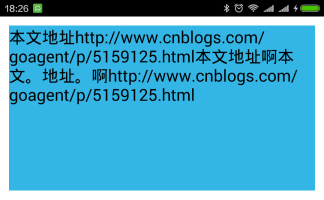 android textview 自動換行 整齊排版,androidtextview
android textview 自動換行 整齊排版,androidtextview一、問題在哪裡? textview顯示長文字時會進行自動折行,如果遇到一些特殊情況,自
 android實現文字漸變效果和歌詞進度的效果
android實現文字漸變效果和歌詞進度的效果 要用TextView使用漸變色,那我們就必須要了解LinearGradient(線性漸變)的用法。 LinearGra
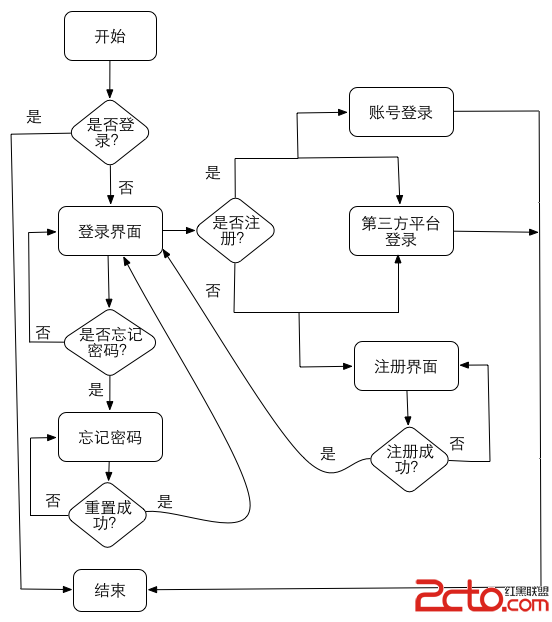 Android技巧2:登錄注冊模塊解決方案
Android技巧2:登錄注冊模塊解決方案 前言 幾乎每個app都會有登錄注冊的功能,可以看看筆者開發的『南方周末新聞閱讀器』,登錄、手機注冊、忘記密碼這些入口,這些功能
 Android 100多個Styles快速開發布局XML,一行搞定View屬性,一鍵統一配置UI...,androidui..
Android 100多個Styles快速開發布局XML,一行搞定Vie