編輯:關於android開發
樣式:
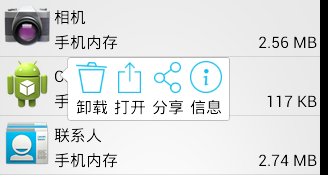
layout:
popup_appinfo.xml
 1 <?xml version="1.0" encoding="utf-8"?>
 2 <LinearLayout xmlns:android="http://schemas.android.com/apk/res/android"
 3     android:layout_width="wrap_content"
 4     android:layout_height="wrap_content"
 5     android:background="@drawable/pop_bg"
 6     android:orientation="horizontal" >
 7
 8     <TextView
 9         android:id="@+id/tv_uninstall"
10         android:layout_width="wrap_content"
11         android:layout_height="wrap_content"
12         android:layout_margin="3dp"
13         android:drawablePadding="3dp"
14         android:drawableTop="@drawable/ic_uninstall"
15         android:text="卸載"
16         android:textColor="@color/black"
17         android:textSize="16sp" />
18
19     <TextView
20         android:id="@+id/tv_open"
21         android:layout_width="wrap_content"
22         android:layout_height="wrap_content"
23         android:layout_margin="3dp"
24         android:drawablePadding="3dp"
25         android:drawableTop="@drawable/ic_open"
26         android:text="打開"
27         android:textColor="@color/black"
28         android:textSize="16sp" />
29
30     <TextView
31         android:id="@+id/tv_share"
32         android:layout_width="wrap_content"
33         android:layout_height="wrap_content"
34         android:layout_margin="3dp"
35         android:drawablePadding="3dp"
36         android:drawableTop="@drawable/ic_share"
37         android:text="分享"
38         android:textColor="@color/black"
39         android:textSize="16sp" />
40
41     <TextView
42         android:id="@+id/tv_info"
43         android:layout_width="wrap_content"
44         android:layout_height="wrap_content"
45         android:layout_margin="3dp"
46         android:drawablePadding="3dp"
47         android:drawableTop="@drawable/ic_info"
48         android:text="信息"
49         android:textColor="@color/black"
50         android:textSize="16sp" />
51
52 </LinearLayout>
anim:
popup_enter.xml
 1 <?xml version="1.0" encoding="utf-8"?>
 2 <set xmlns:android="http://schemas.android.com/apk/res/android"
 3     android:shareInterpolator="false" >
 4
 5     <translate
 6         android:duration="400"
 7         android:fromXDelta="100%p"
 8         android:interpolator="@android:interpolator/overshoot"
 9         android:toXDelta="0" />
10
11     <alpha
12         android:duration="400"
13         android:fromAlpha="0.2"
14         android:toAlpha="1.0" />
15
16 </set>
popup_exit.xml
 1 <?xml version="1.0" encoding="utf-8"?>
 2 <set xmlns:android="http://schemas.android.com/apk/res/android"
 3     android:shareInterpolator="false" >
 4
 5     <translate
 6         android:duration="400"
 7         android:fromXDelta="0"
 8         android:interpolator="@android:interpolator/anticipate"
 9         android:toXDelta="50%p" />
10
11     <alpha
12         android:duration="400"
13         android:fromAlpha="1.0"
14         android:toAlpha="0" />
15
16 </set>
code:
Activity.java
......
 1     //顯示popupwindow
 2     protected void showPopup(View itemView) {
 3         if (mPopupWindow == null) {//只需要初始化一次彈窗
 4             //初始化彈窗布局
 5             View view = View.inflate(this, R.layout.popup_appinfo, null);
 6
 7             //設置按鈕點擊事件
 8             TextView tvUninstall = (TextView) view
 9                     .findViewById(R.id.tv_uninstall);
10             TextView tvOpen = (TextView) view.findViewById(R.id.tv_open);
11             TextView tvShare = (TextView) view.findViewById(R.id.tv_share);
12             TextView tvInfo = (TextView) view.findViewById(R.id.tv_info);
13             tvUninstall.setOnClickListener(this);
14             tvOpen.setOnClickListener(this);
15             tvShare.setOnClickListener(this);
16             tvInfo.setOnClickListener(this);
17
18             //初始化彈窗對象
19             ////參1:布局; 參2,3:寬高; 參4:獲取焦點
20             mPopupWindow = new PopupWindow(view,
21                     WindowManager.LayoutParams.WRAP_CONTENT,
22                     WindowManager.LayoutParams.WRAP_CONTENT, true);
23
24             //設置背景;只有設置了背景,點擊窗口外側和返回鍵,彈窗才會消失
25             mPopupWindow.setBackgroundDrawable(new ColorDrawable());
26
27             //設置動畫樣式
28             mPopupWindow.setAnimationStyle(R.style.PopupAnim);
29         }
30
31         //顯示在item正下方, 然後向上偏移一個item的高度
32         mPopupWindow.showAsDropDown(itemView, 60, -itemView.getHeight());
33     }
......
1 //彈窗消失
2 mPopupWindow.dismiss();
......
 HttpCache in android
HttpCache in android 概述 http Cache指的是web浏覽器所具有的復用本地已緩存的文檔”副本”的能力。我
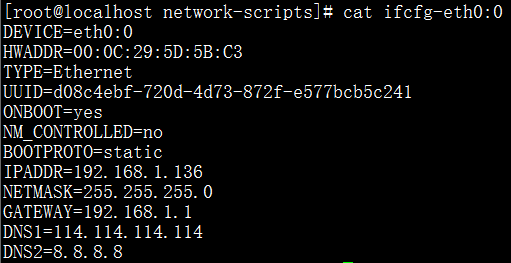 centos環境下的apache 2.4虛擬主機的三種實現方法
centos環境下的apache 2.4虛擬主機的三種實現方法吶,苦於沒法在生產環境使用apache,吶吶吶,虛擬機! 方法一:基於IP IP1:80 IP
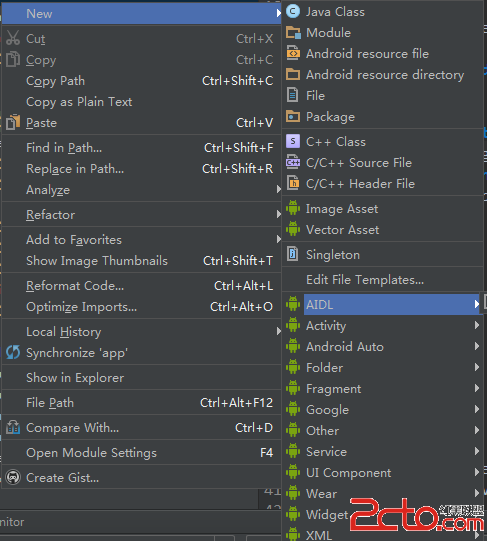 Android IPC 之 AIDL(一)
Android IPC 之 AIDL(一) IPC是Inter-Process Communication的縮寫,即跨進程通信。Android中跨進程通信有多種方式,如文
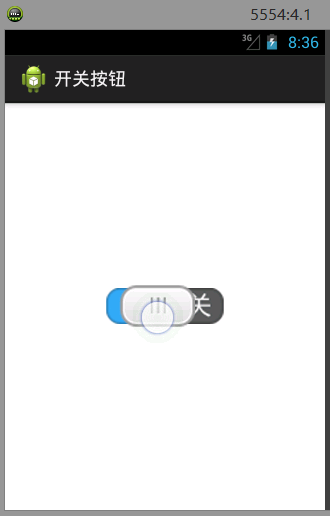 自定義控件——開關按鈕ToggleButton,控件togglebutton
自定義控件——開關按鈕ToggleButton,控件togglebutton 實現一個類似於ToggleButton的開關按鈕 效果圖: 資源圖片: